
Description
.png)
 Enterprise Community Odoo.sh
Stripe Odoo Integration
𝗩𝗿𝗮𝗷𝗮 𝗧𝗲𝗰𝗵𝗻𝗼𝗹𝗼𝗴𝗶𝗲𝘀’ 𝗦𝘁𝗿𝗶𝗽𝗲 𝗢𝗱𝗼𝗼 𝗜𝗻𝘁𝗲𝗴𝗿𝗮𝘁𝗶𝗼𝗻 module introduces a significant advancement by enabling the utilization of the 𝗦𝘁𝗿𝗶𝗽𝗲 𝗧𝗲𝗿𝗺𝗶𝗻𝗮𝗹—including support for devices such as the 𝗪𝗶𝘀𝗲𝗣𝗼𝘀 𝗘 and 𝗦𝘁𝗿𝗶𝗽𝗲 𝗦𝟳𝟬𝟬 Reader—directly within the Odoo backend for processing 𝗖𝘂𝘀𝘁𝗼𝗺𝗲𝗿 𝗜𝗻𝘃𝗼𝗶𝗰𝗲𝘀 and 𝗦𝗮𝗹𝗲 𝗤𝘂𝗼𝘁𝗮𝘁𝗶𝗼𝗻𝘀. This innovative solution moves beyond the traditional limitations of POS-exclusive terminal usage, allowing businesses to execute physical, real-time card transactions exactly where financial documents are managed. The integration streamlines payment workflows with features like 𝗢𝗻𝗲-𝗖𝗹𝗶𝗰𝗸 𝗜𝗻𝘀𝘁𝗮𝗹𝗹𝗮𝘁𝗶𝗼𝗻, 𝗕𝗮𝗰𝗸𝗲𝗻𝗱 𝗣𝗮𝘆𝗺𝗲𝗻𝘁 𝗣𝗿𝗼𝗰𝗲𝘀𝘀𝗶𝗻𝗴, and 𝗔𝘂𝘁𝗼𝗺𝗮𝘁𝗲𝗱 𝗗𝗮𝘁𝗮 𝗦𝘆𝗻𝗰𝗶𝗻𝗴 with Odoo Accounting, ensuring operational efficiency and maintaining financial data integrity.
 Watch on YouTube
Stripe Key Features
.png)
One-Click Installation: Enjoy hassle-free setup with a single-click installation process.
.png)
Expand beyond POS systems—process payments directly in the Odoo backend using Stripe Terminal.
.png)
Simplify your operations by collecting payments seamlessly via the Odoo backend, without relying solely on traditional POS systems.
.png)
Process invoice payments and accept instant transactions on physical terminals, all in real time through Odoo.
.png)
Benefit from automated syncing of payment data between Stripe and Odoo’s accounting, ensuring accuracy and efficiency.

Experience smooth payment workflows with seamless Stripe integration, keeping your operations streamlined.
We specialize in delivering advanced Odoo solutions across multiple domains. Our expertise includes:

EDI & SWIFT/ACH Payment Integrations
End-to-end EDI automation, including X12, EDIFACT, XML standards, & financial integrations such as SWIFT, ACH, & Fedwire.


eCommerce Integrations
Seamless integration with leading eCommerce platforms to sync products, orders, inventory, and customer data in real time.

Shipping Integrations
Robust shipping connectors for global couriers, offering automated label generation, tracking, and rate computation.

Most Useful Apps for your ERP
A wide range of highly-rated Odoo modules designed to enhance automation, improve productivity, & simplify business operations.
 Configuration
 FAQs
FAQs
We’ve utilized Odoo’s payment provider—just enable Stripe Payment Provider!
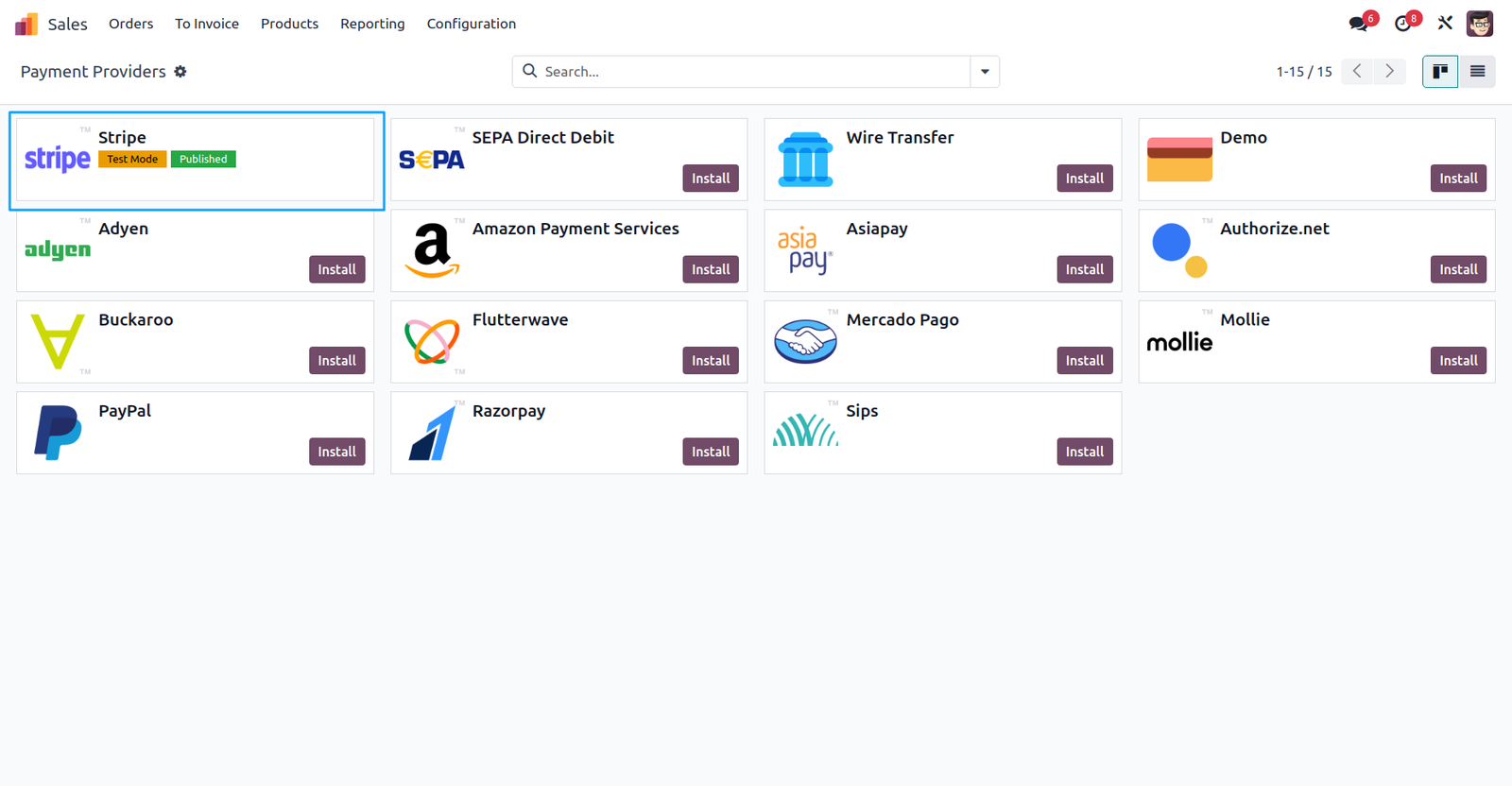
Configuring the Stripe Payment Provider.
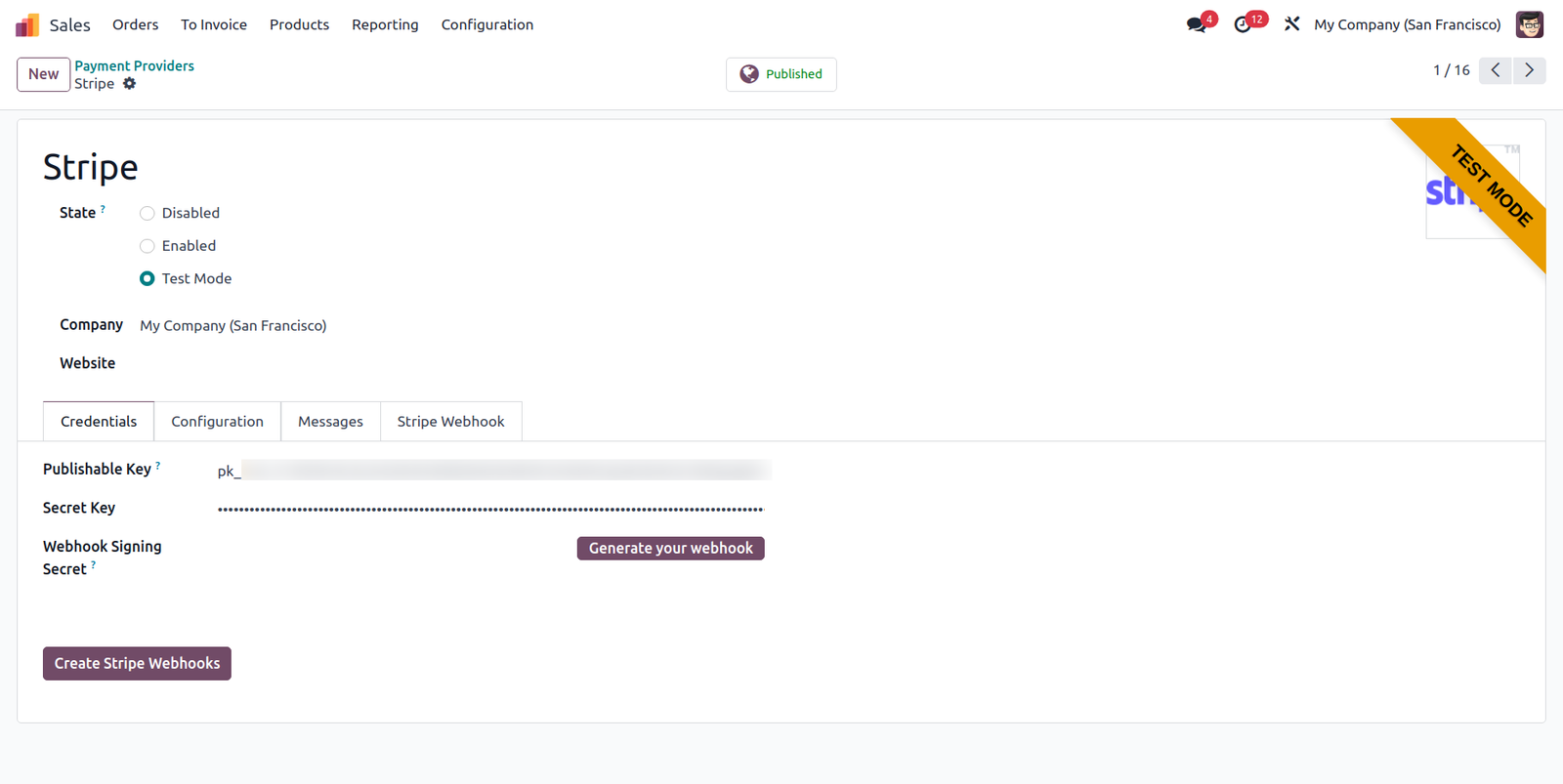
When you click the ‘Create Stripe Webhooks’ button in the Stripe payment provider, a webhook is created in your Stripe account with the necessary payment intent events. This webhook will be displayed under the ‘Stripe Webhook’ tab.
To configure terminal readers you have to go Accounting/Invoicing > Configuration > Stripe Terminal Readers.
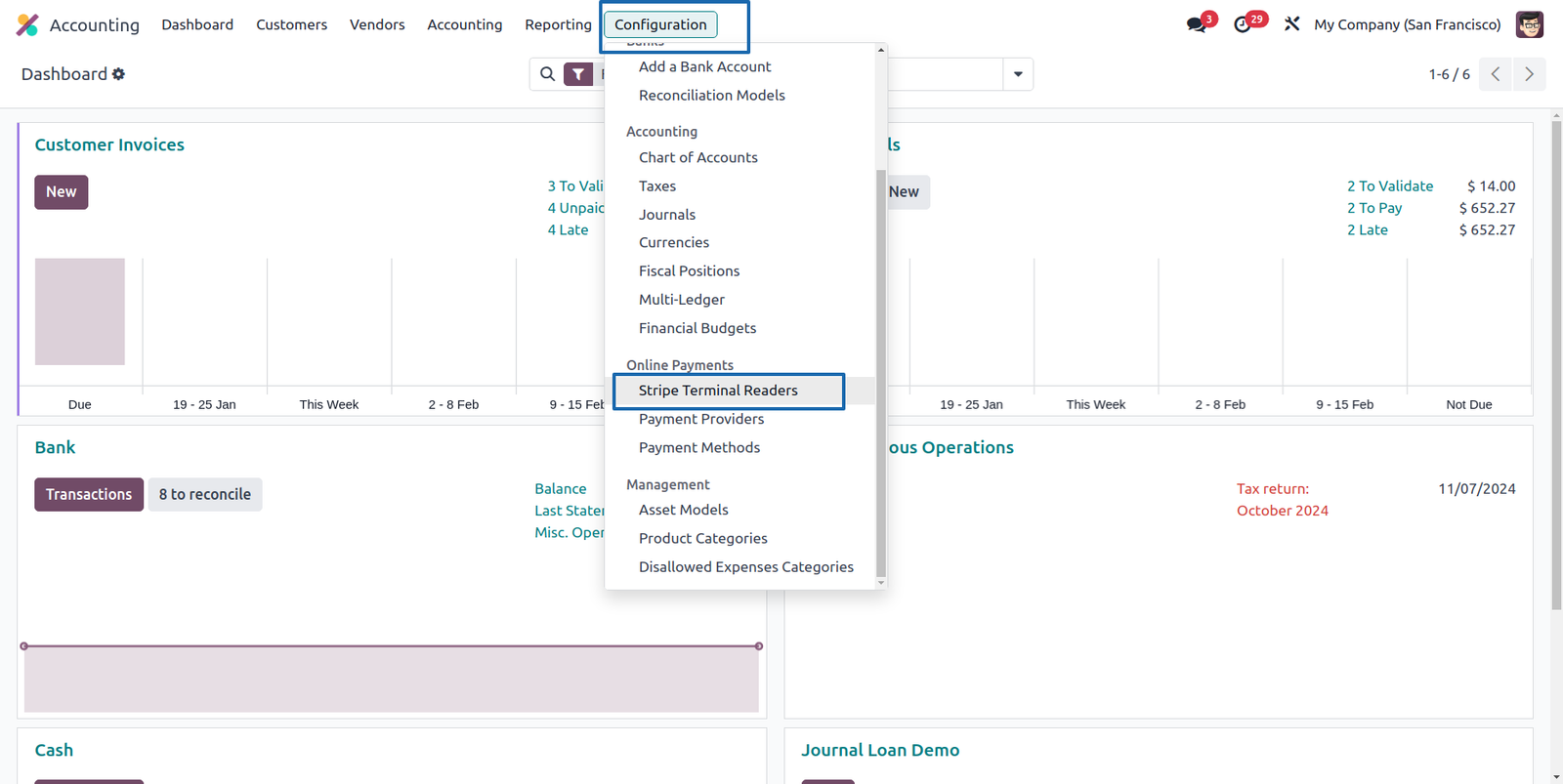
You can add multiple readers if you have multiple terminal machines
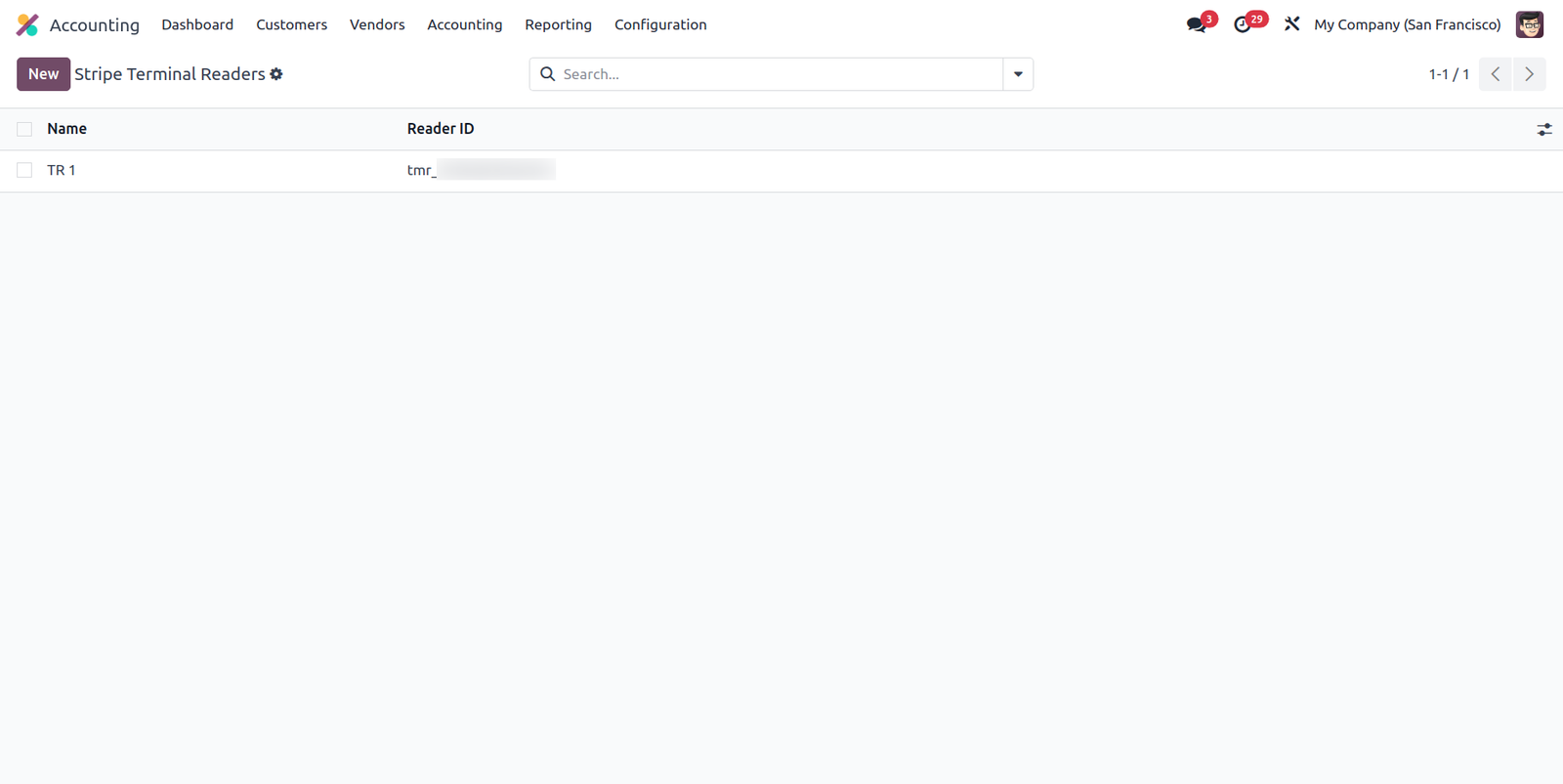
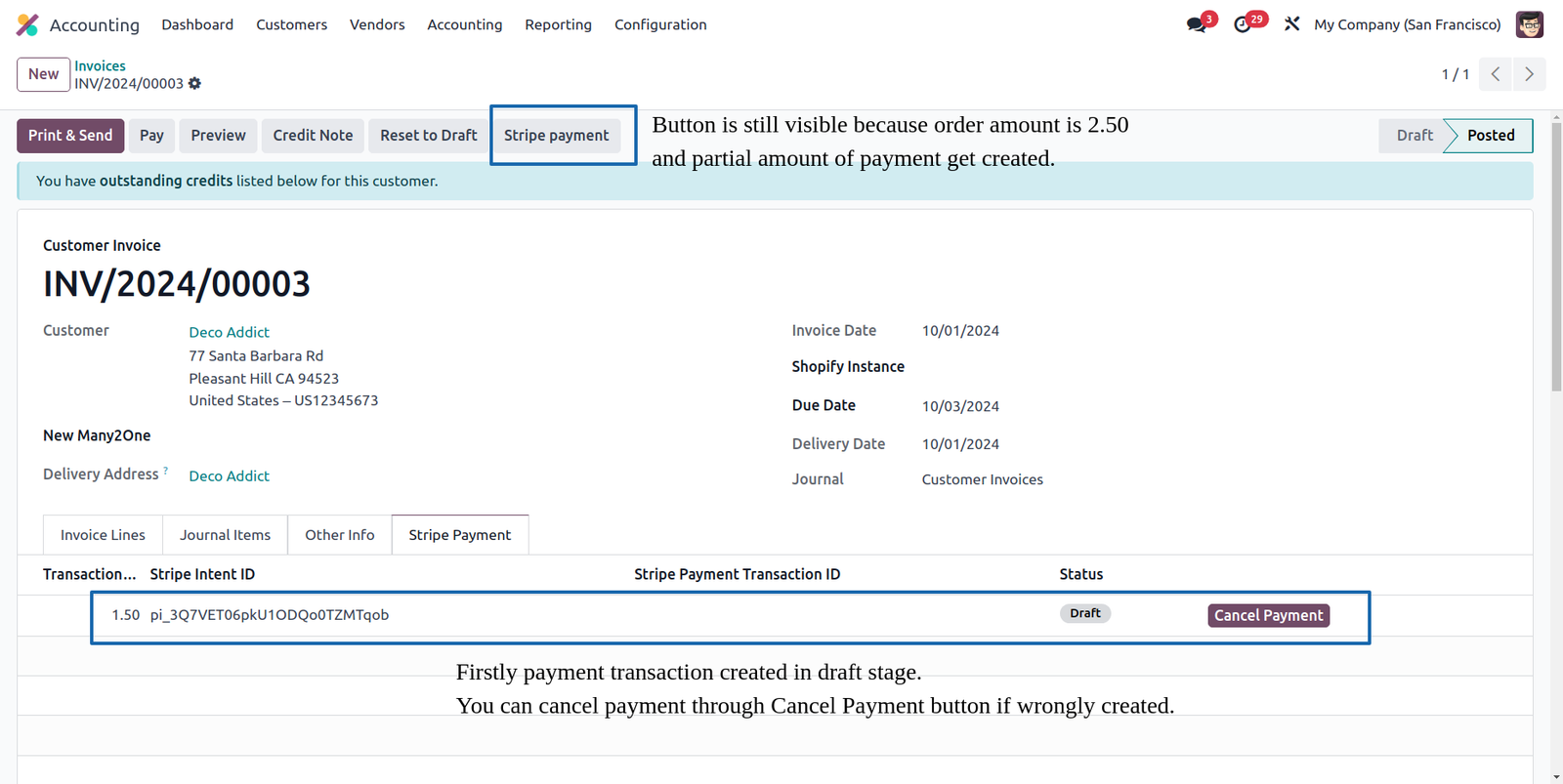
When Invoice get posted stripe payment button get visible.
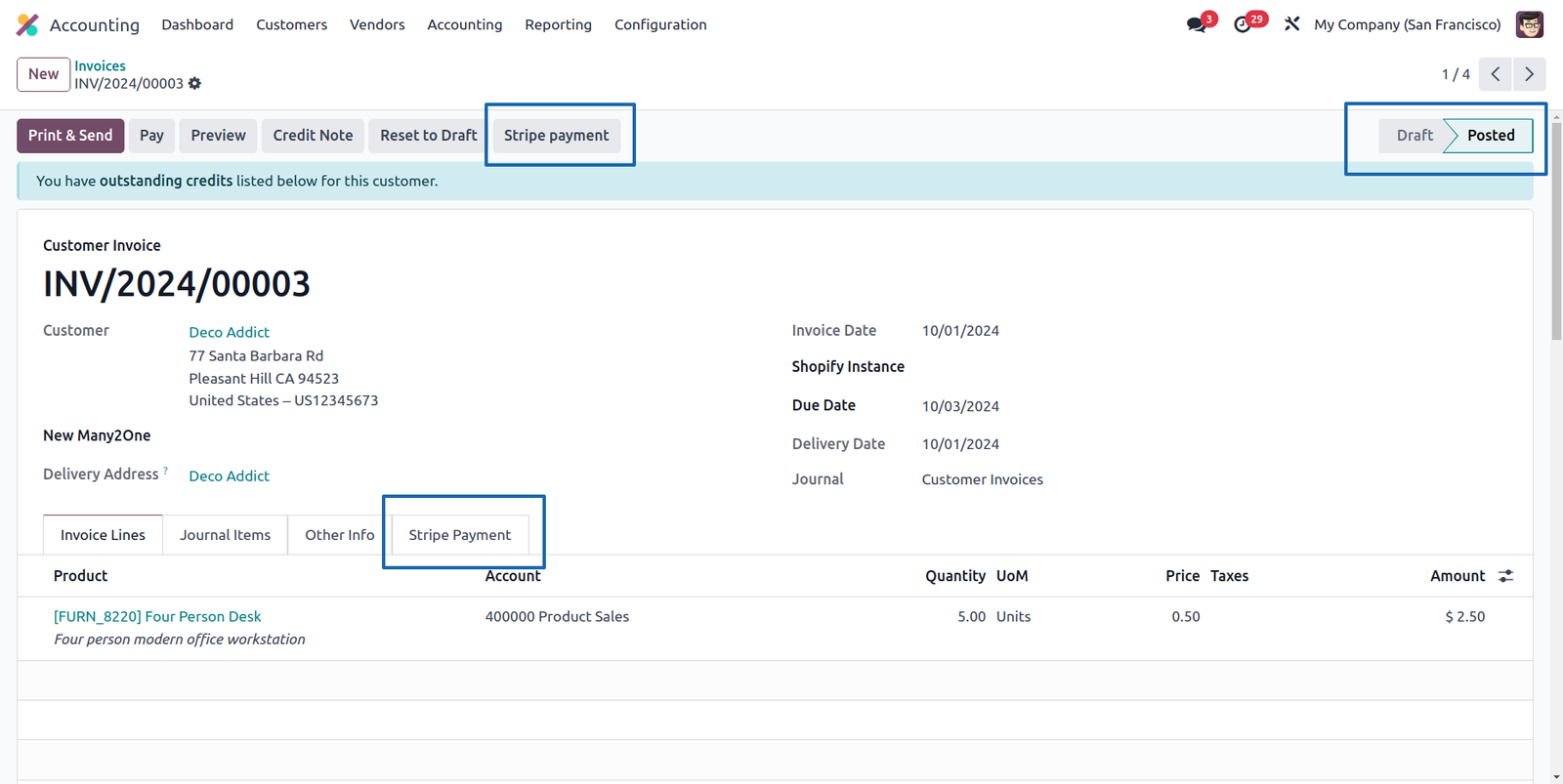
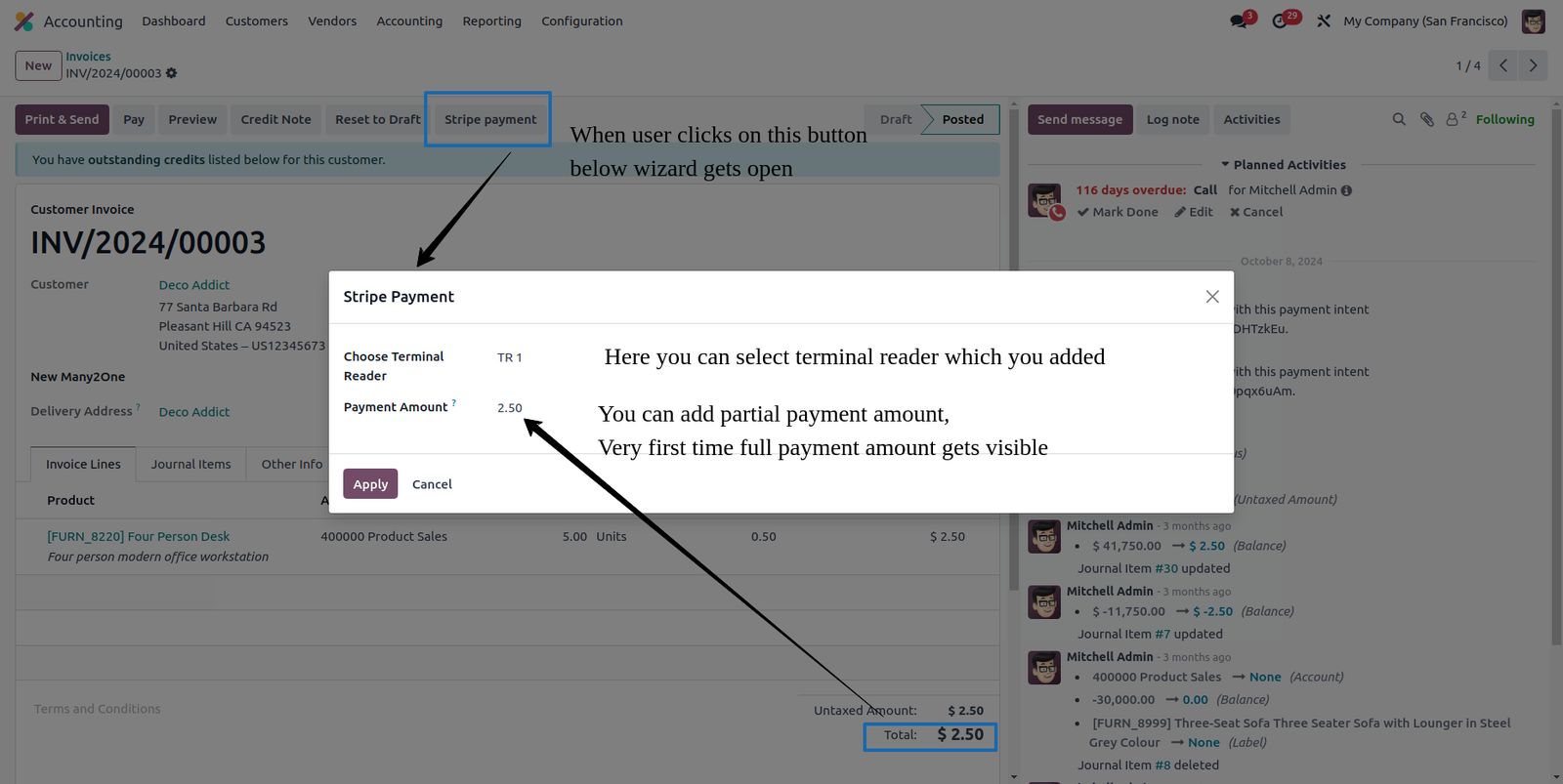
When you click on stripe payment button this type of wizard open, you can do partial or full payment.
When you submit payment from Odoo this type of transaction get created in Odoo as a draft stage, if by mistake transaction created you can cancel it through Cancel Payment button
This type of payment request you will get in you terminal.

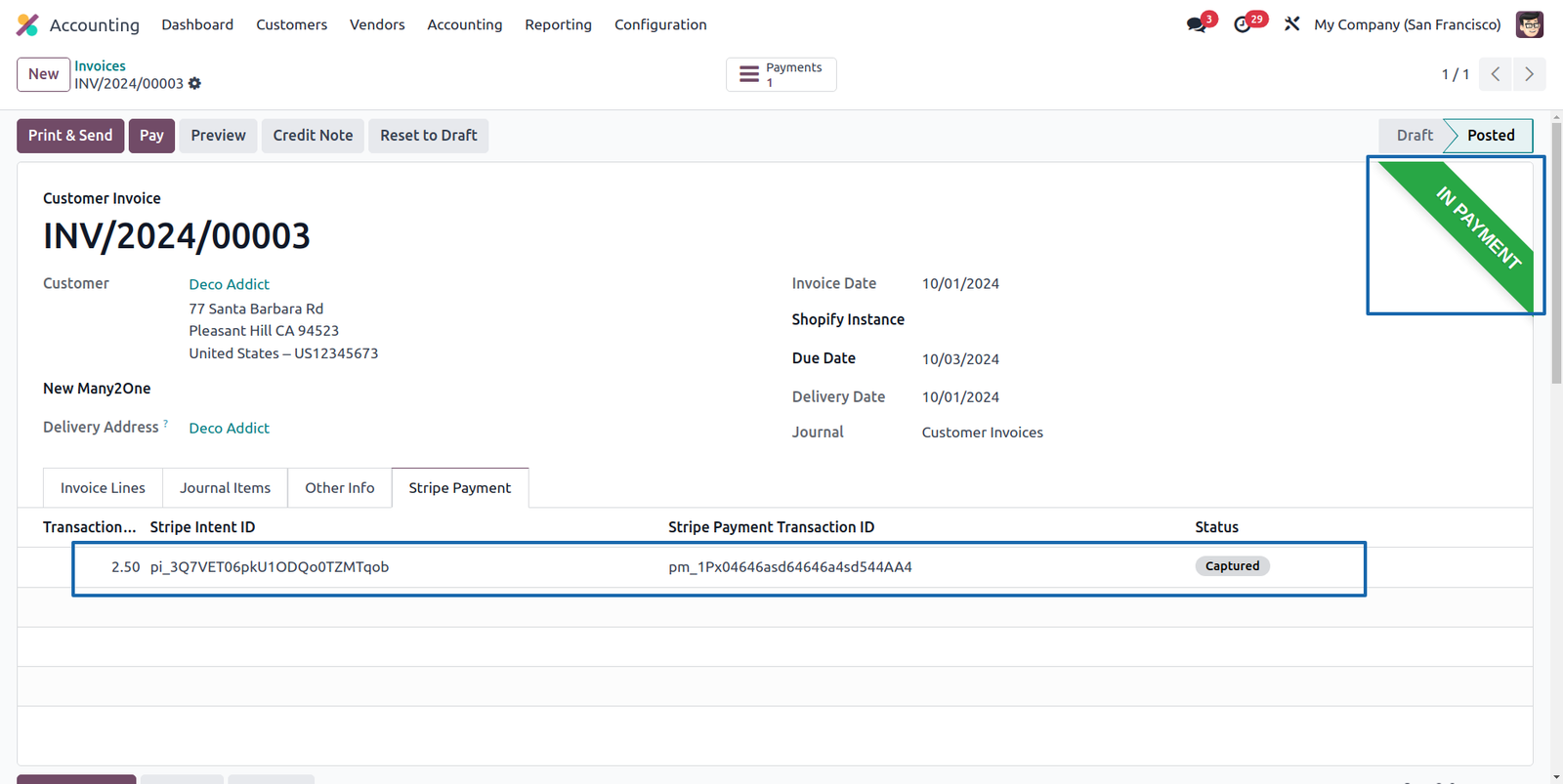
When fully payment received all transactions get created in Odoo and payment state transaction status get updated to captured.
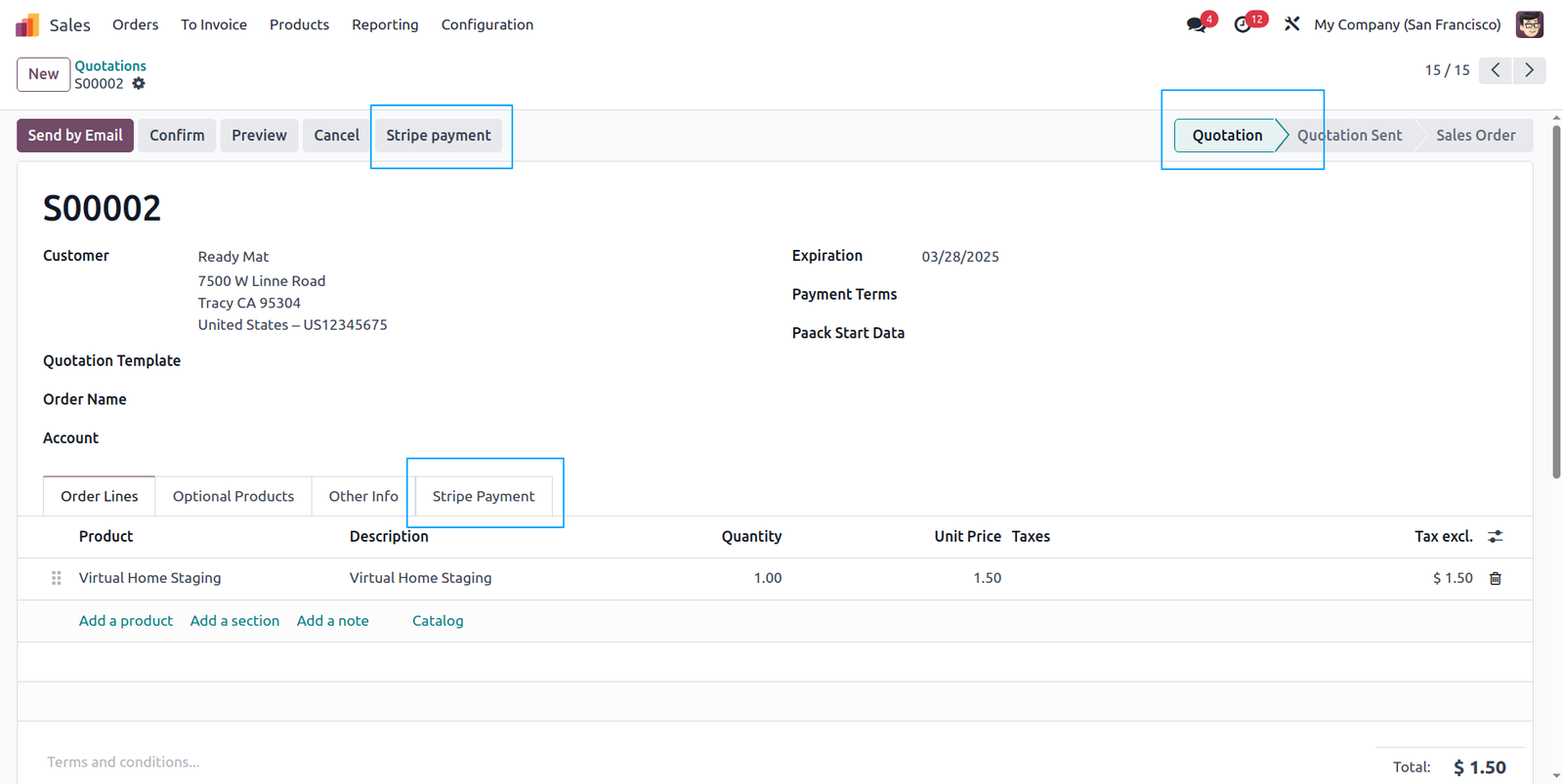
From quotation you have a option to create stripe payment.
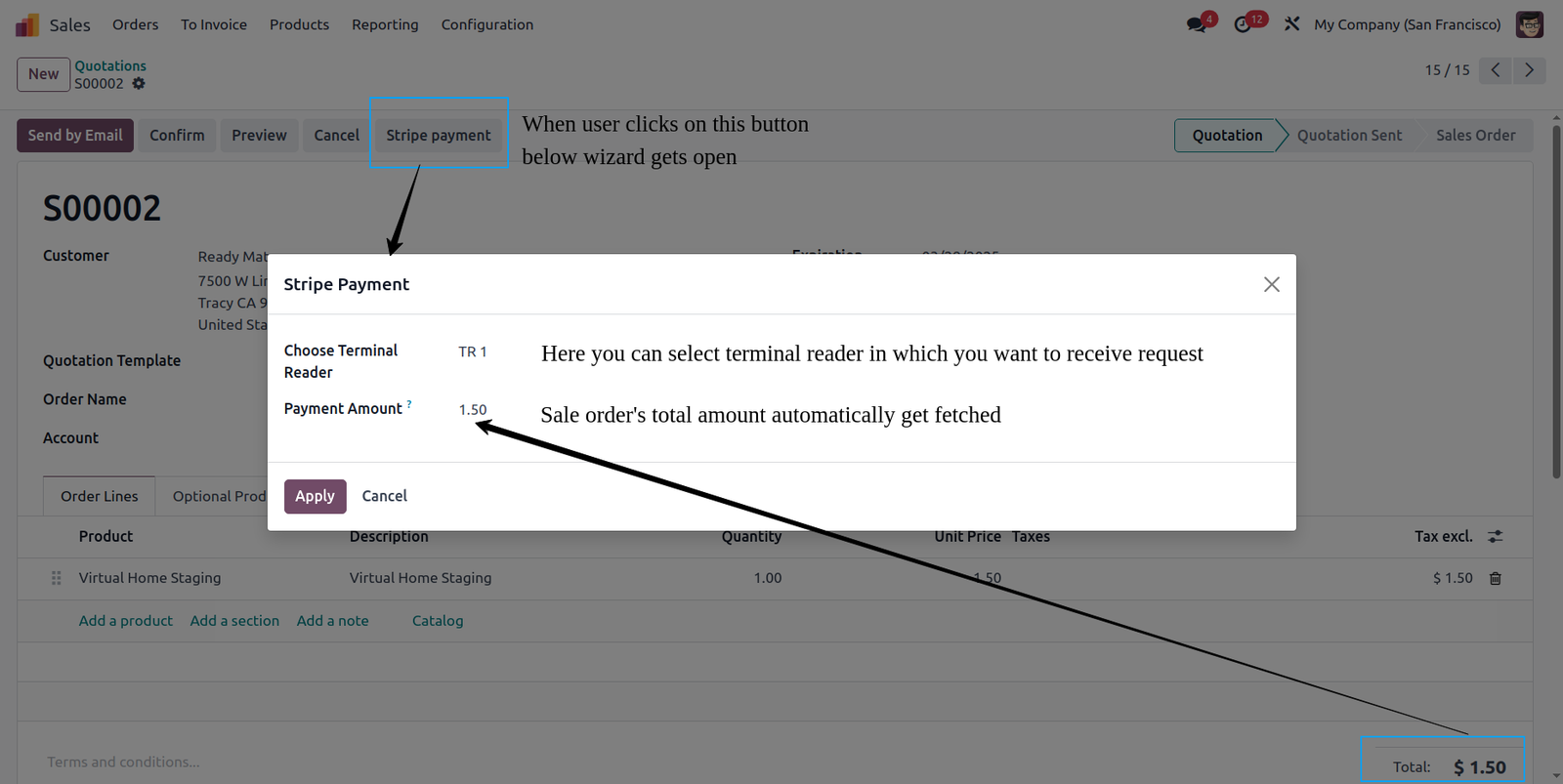
When you click on stripe payment button this type of wizard open, you can select terminal in which you want to receive request.
When you submit payment from Odoo transaction get created in Odoo as a draft stage, if by mistake transaction created you can cancel it through Cancel Payment button inside Stripe Payment tab inside Quotation form view.
This type of payment request you will get in you terminal.
When a payment is received in Stripe, it sends a response to Odoo. Upon receiving this response, Odoo confirms the corresponding quotation, generates an invoice for the sale order, and creates a payment transaction. The transaction status is then updated to Captured.
 Is this application compatible with both Odoo Enterprise and Community editions?
- Yes, the application is fully compatible with Odoo Enterprise (On-premise and Odoo.SH) and Community editions. However, it cannot be installed on Odoo Online, as third-party apps are not supported.
Is it possible to manage multiple terminal readers?
- Yes
Is it possible to do partial payment from Invoice?
- Yes
Is it possible to cancel payment after sent request to terminal?
- Yes, you can use Cancel Payment button in stripe transaction line & cancel payment.
When I execute payment through terminal what happen?
- It will update Odoo & in Odoo payment records get created against that Invoice.
Will I receive free support and upgrades with the purchase of the application?
- We provide free support for the first 90 days following the purchase date.
Need some customization in this app, whom to contact?
- Please drop email at support@vrajatechnologies.com or raise a ticket through Odoo store itself.
Submit a Support Ticket
If you encounter any issues while using our app that are caused by the app itself, we offer complimentary support for 90 days from the date of purchase.
To create a support ticket, please register via the Vraja Technologies Support Email and provide the necessary details so we can assist you in resolving the issue.

Email Us
support@vrajatechnologies.com

 1.png)
Contact Us
vrajatechnologies.com/contactus

Support
vrajatechnologies.com/support-policy
Vraja Technologies Services

Odoo Implementation

Odoo App Integration Services

Odoo Customization

Odoo Consultation

Odoo Support & Maintenance
Odoo Developer Outsourcing
Suggested Application
















Reviews
There are no reviews yet.