
Description
.png)
 Enterprise Community Odoo.sh
ShipStation Integration for Odoo – Automate Shipping, Labels & Tracking
The ShipStation Odoo Integration provides a seamless two-way connection between Odoo ERP and ShipStation Easily connect Odoo with ShipStation to automate shipping workflows, generate carrier labels, fetch real-time rates, and synchronize orders and tracking details.
The ShipStation Odoo Connector simplifies order fulfillment, improves shipping accuracy, and gives full visibility into domestic and international shipments—all within Odoo ERP.
Difference between ShipStation Integration – V1 & ShipStation Integration – V2
ShipStation Integration – V1
1. Export Deliveries from Odoo to ShipStation
Key Features – Odoo – ShipStation Integration
- Export Deliveries from Odoo to ShipStation
- Estimated Shipping Rates at Sale Order Level
- Generate Shipping Labels in Odoo via ShipStation
- Generate Shipping Labels Directly in ShipStation
- International Shipping Support
Seamlessly sync Odoo Delivery Orders with ShipStation for fast and accurate shipment processing.
Retrieve real-time estimated shipping rates directly on the Odoo Sale Order before order confirmation.
Export orders to ShipStation and generate shipping labels directly within Odoo—no platform switching required.
Option to export orders to ShipStation and create labels directly from the ShipStation dashboard.
Handle international shipments with automated customs forms, commercial invoices, and paperless trade documents.
2. Import Orders from ShipStation to Odoo
Order Import & Synchronization – ShipStation → Odoo
- Import Orders from ShipStation to Odoo
- Import Carriers, Services, Stores, and Packages
- Store-Wise Order Import Support
- Manual & Scheduled (Cron) Order Imports
- Import Shipped Orders & Shipment Details
- Import Tracking Information into Odoo
Automatically synchronize orders created or processed in ShipStation into Odoo for centralized order management.
Sync ShipStation carriers, shipping services,Stores, predefined packages, and custom package configurations into Odoo.
Import orders into Odoo based on ShipStation stores, ensuring accurate mapping with Odoo sales channels and warehouses.
Supports both on-demand manual imports and automated scheduled imports using Odoo cron jobs.
Fetch shipped orders from ShipStation along with shipment data such as carrier, service, shipping cost, and shipment status.
Automatically update Odoo Delivery Orders with tracking numbers, tracking URLs, and carrier details from ShipStation.
ShipStation Integration – V2
1. Export Deliveries from Odoo to ShipStation
- Export Deliveries from Odoo to ShipStation
- Estimated Shipping Rates at Sale Order Level
- Shipment Rate Calculation at Delivery Order Level
- Generate Shipping Labels in Odoo via ShipStation
- Generate Shipping Labels Directly in ShipStation
- Multi-Package Shipment Support
- Package-Wise Insurance Support
- International Shipping Support
Seamlessly sync Odoo Delivery Orders with ShipStation for fast and accurate shipment processing.
Retrieve real-time estimated shipping rates directly on the Odoo Sale Order before order confirmation.
Fetch exact carrier shipping rates at the Delivery Order stage prior to label generation.
Export orders to ShipStation and generate shipping labels directly within Odoo—no platform switching required.
Option to export orders to ShipStation and create labels directly from the ShipStation dashboard.
Fully supports multi-package shipments with package-wise weight, dimensions, and tracking numbers.
Configure and apply insurance values per package for enhanced shipment protection.
Handle international shipments with automated customs forms, commercial invoices, and paperless trade documents.
2. Import Orders from ShipStation to Odoo
Order Import & Synchronization – ShipStation → Odoo
- Import Orders from ShipStation to Odoo
- Import Carriers, Services, Stores, and Packages
- Store-Wise Order Import Support
- Manual & Scheduled (Cron) Order Imports
- Import Shipped Orders & Shipment Details
- Import Tracking Information into Odoo
Automatically synchronize orders created or processed in ShipStation into Odoo for centralized order management.
Sync ShipStation carriers, shipping services, Stores, predefined packages, and custom package configurations into Odoo.
Import orders into Odoo based on ShipStation stores, ensuring accurate mapping with Odoo sales channels and warehouses.
Supports both on-demand manual imports and automated scheduled imports using Odoo cron jobs.
Fetch shipped orders from ShipStation along with shipment data such as carrier, service, shipping cost, and shipment status.
Automatically update Odoo Delivery Orders with tracking numbers, tracking URLs, and carrier details from ShipStation.
Important Notes & Clarifications
ShipStation V1 – Single Package Limitation
The ShipStation V1 API supports only one package per order. Multi-package shipments are not supported in the V1 integration.
 Watch on YouTube
.png) Shipstation V1 API
Shipstation V1 API
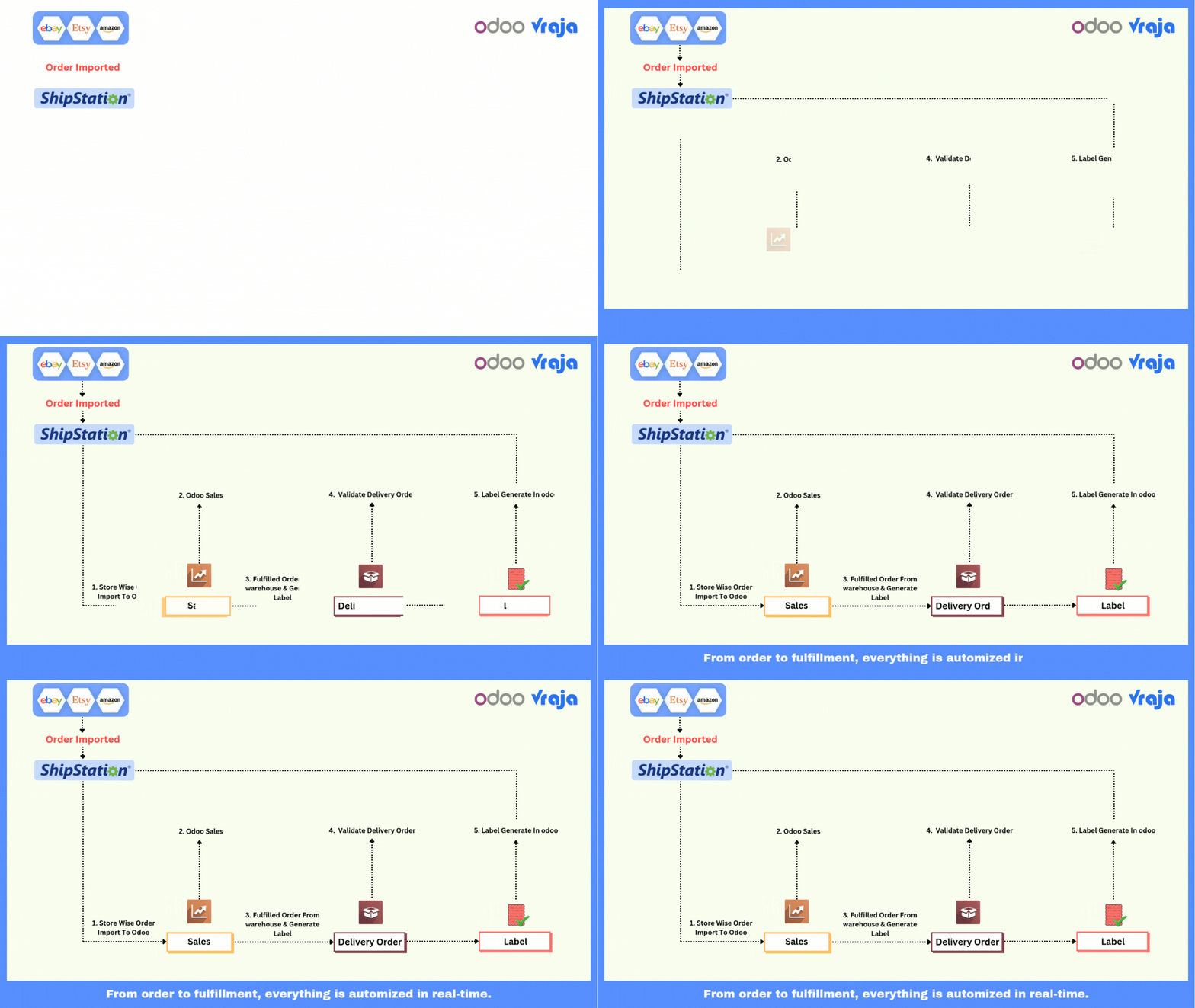


We specialize in delivering advanced Odoo solutions across multiple domains. Our expertise includes:

EDI & SWIFT/ACH Payment Integrations
End-to-end EDI automation, including X12, EDIFACT, XML standards, & financial integrations such as SWIFT, ACH, & Fedwire.


eCommerce Integrations
Seamless integration with leading eCommerce platforms to sync products, orders, inventory, and customer data in real time.

Shipping Integrations
Robust shipping connectors for global couriers, offering automated label generation, tracking, and rate computation.

Most Useful Apps for your ERP
A wide range of highly-rated Odoo modules designed to enhance automation, improve productivity, & simplify business operations.
 Features
 Configuration
 Import Order
 Generate Label in odoo
 Import Tracking Odoo
 FAQs
FAQs
 Import Carriers like (UPS, FedEx), Services, Packages From Shipstation into Odoo.
Get estimated delivery rate from shipstation to odoo.
International shipment support
Multiple rate fetching at delivery order level
Store Wise Import Orders From Shipstation To Odoo
Export shipment and generate labels.
Multiple packages supported.
Bill Third party features supported.
Cancel Shipment from odoo to Shipstation.
Live Tracking.
Signature Confirmation supported.
Insurance supported.
Import Carriers like (UPS, FedEx), Services, Packages From Shipstation into Odoo.
Get estimated delivery rate from shipstation to odoo.
International shipment support
Multiple rate fetching at delivery order level
Store Wise Import Orders From Shipstation To Odoo
Export shipment and generate labels.
Multiple packages supported.
Bill Third party features supported.
Cancel Shipment from odoo to Shipstation.
Live Tracking.
Signature Confirmation supported.
Insurance supported.
- Configuration – Workflow
- Configure ShipStation V2 API credentials in Odoo to establish the connection with ShipStation.
- Click Import Carriers, Services and Packages to fetch carriers, services, and package details from ShipStation.
- Imported carriers and services are automatically created in Odoo.
- Configure and set up the ShipStation delivery method for shipping operations.
Configure ShipStation v2 API credentials to connect Odoo with ShipStation.
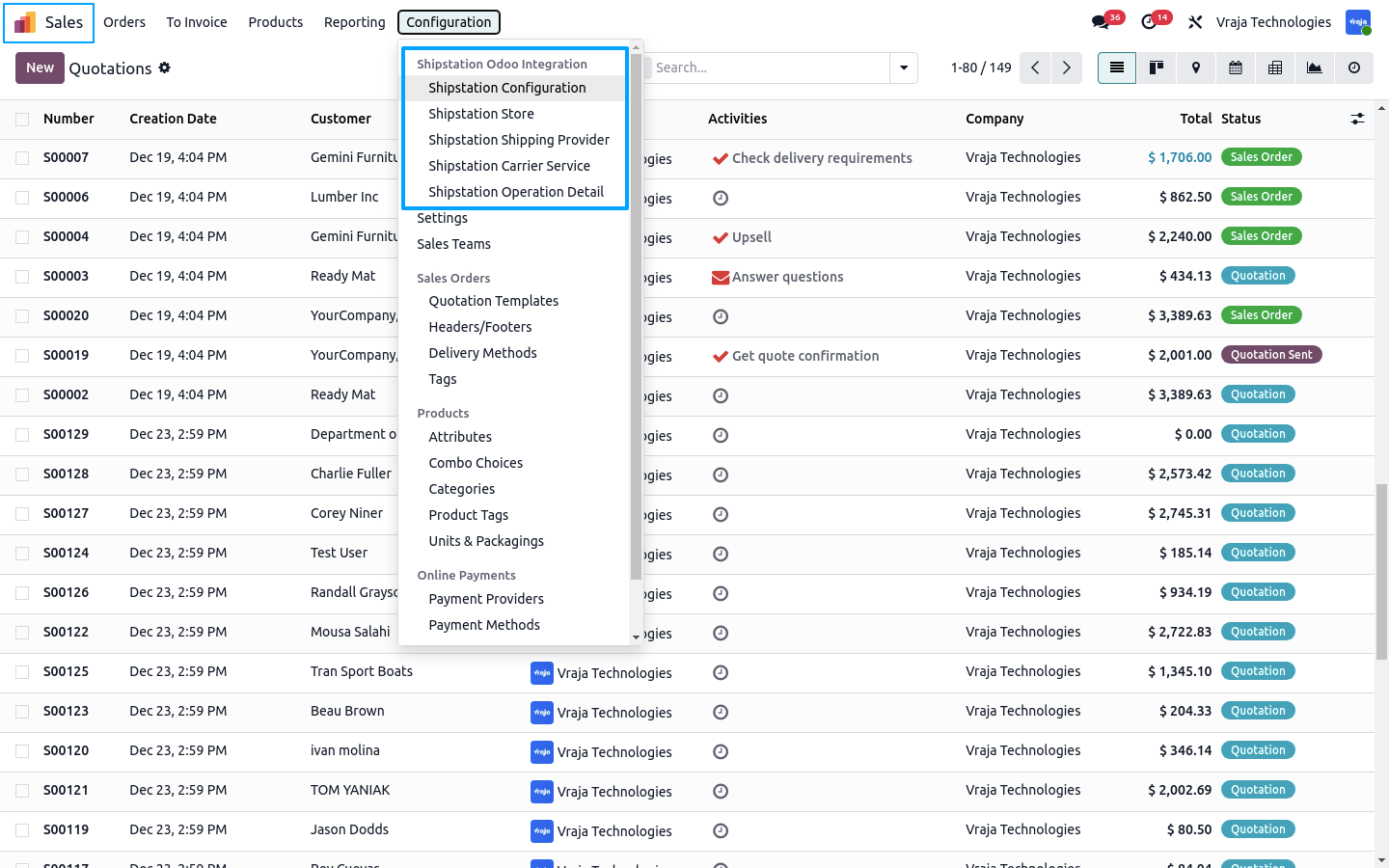
Click Import Carriers, Services and Packages to fetch shipping data from ShipStation into Odoo and Click import stores to fetch stores using the ShipStation V1 API.
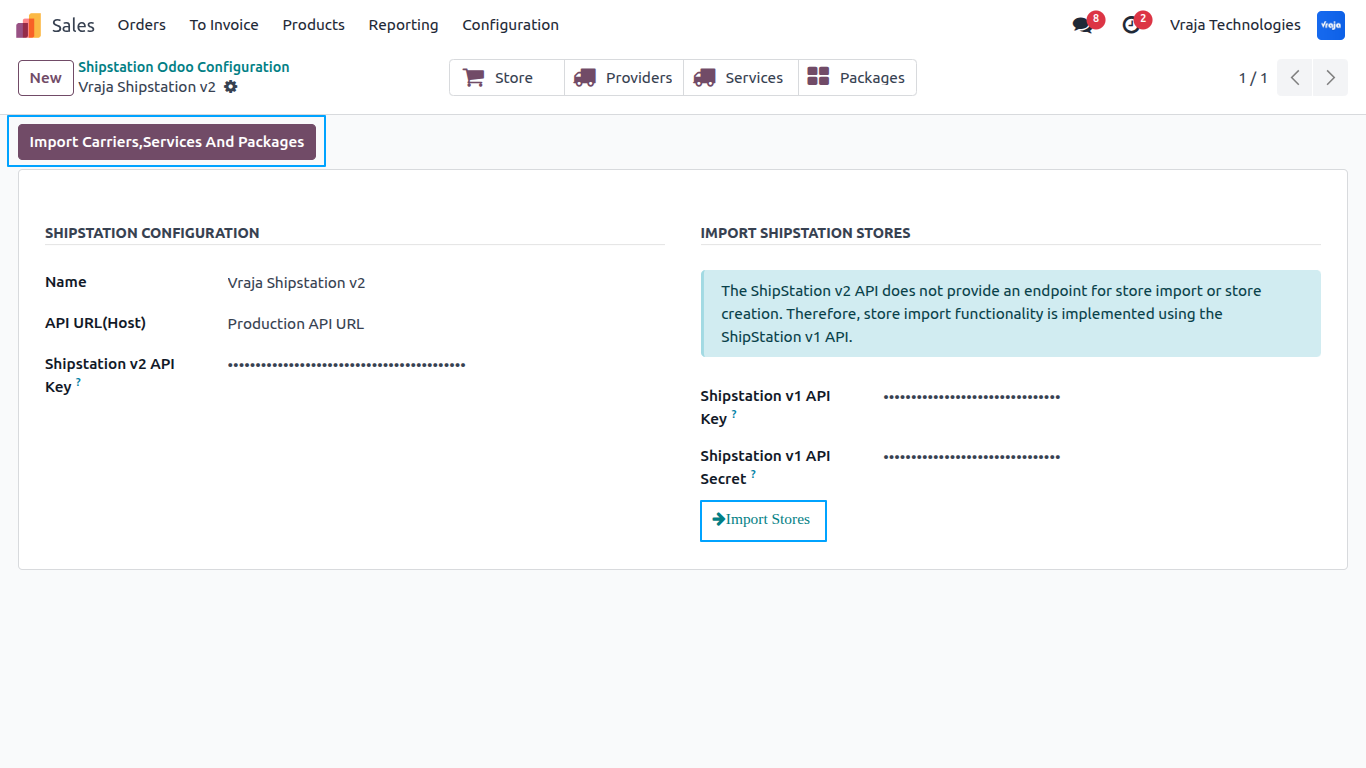
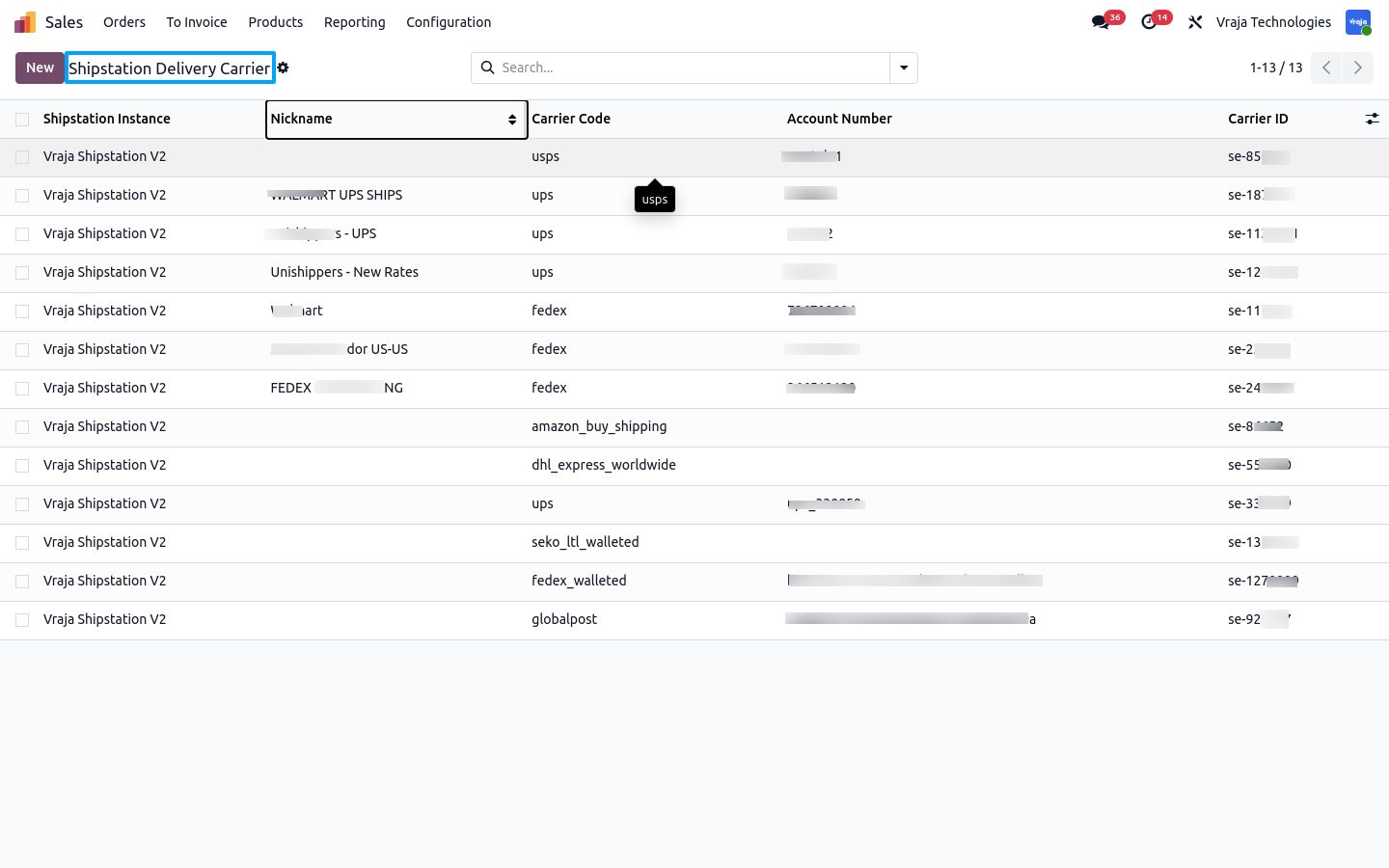
All ShipStation carriers are automatically created as delivery carriers in Odoo.
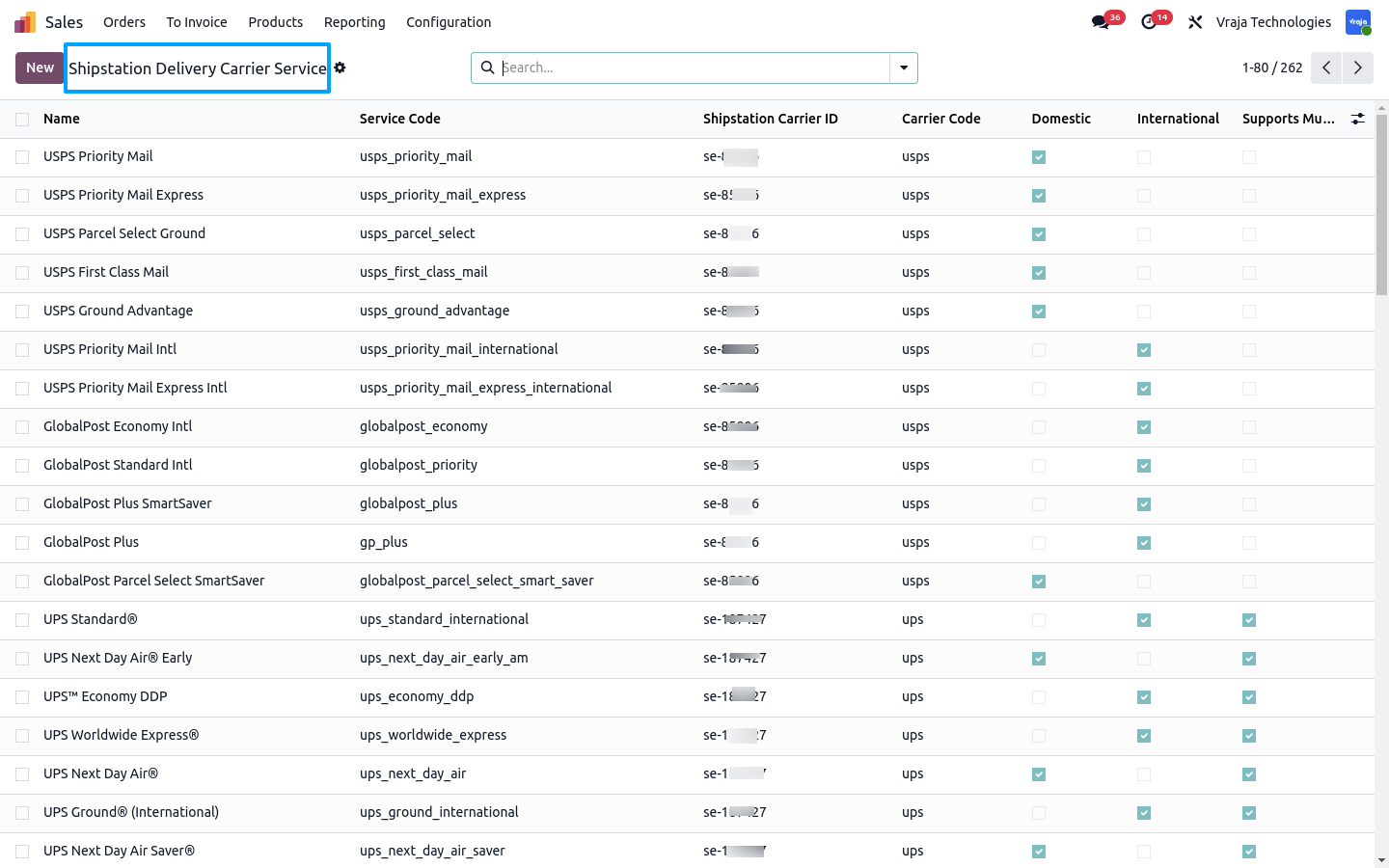
Carrier services from ShipStation are imported and available for shipment processing.
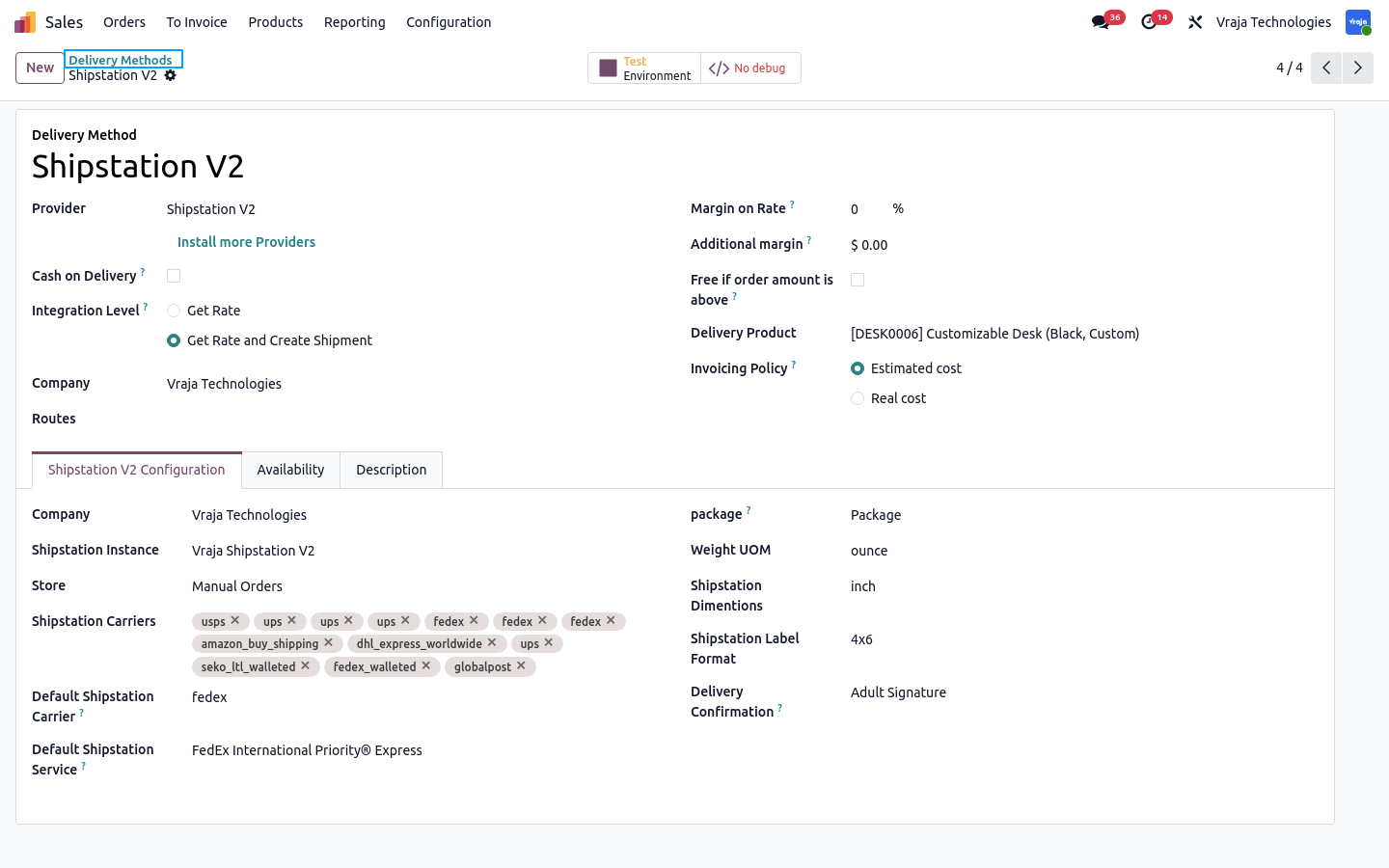
Setting up the ShipStation delivery method.
- Import Order – Workflow
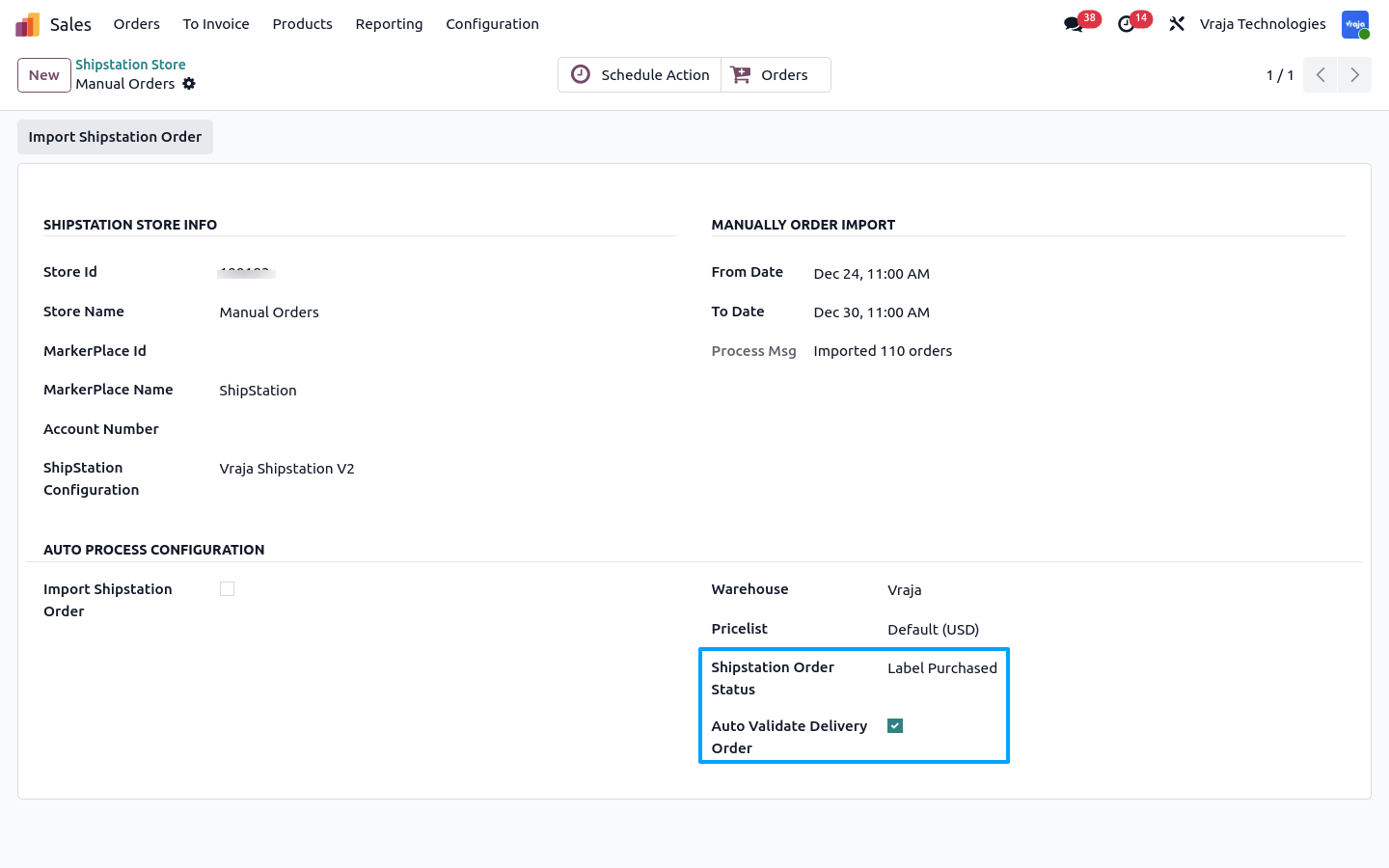
- Import orders from ShipStation to Odoo either manually by selecting From Date and To Date, or automatically using a scheduled action (cron) to import recent orders.
- When Label Purchase is enabled, shipped orders are imported, and if Auto Validate Delivery Order is selected, delivery orders are automatically validated.
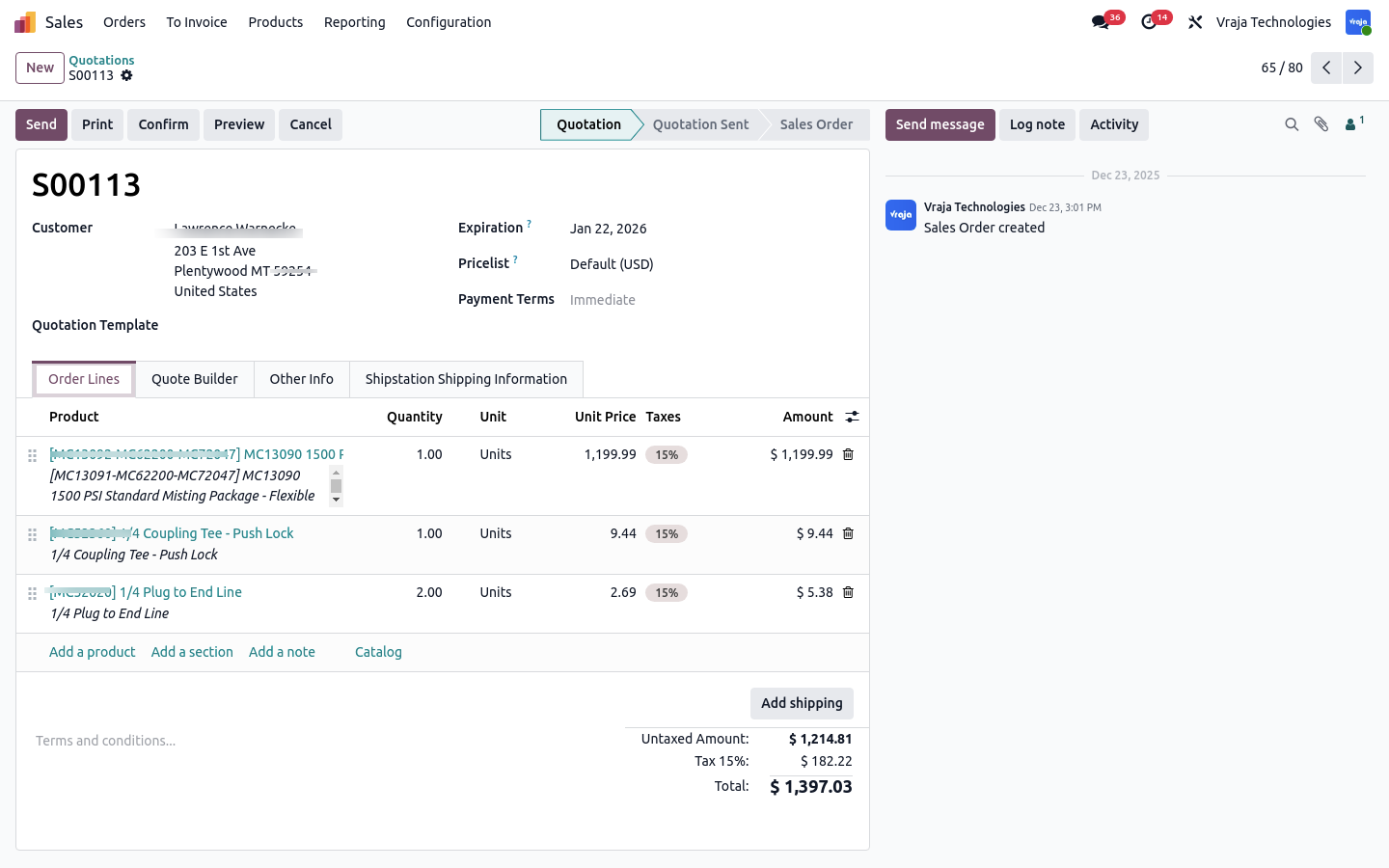
- Imported sale orders are created in Odoo with complete ShipStation order details.
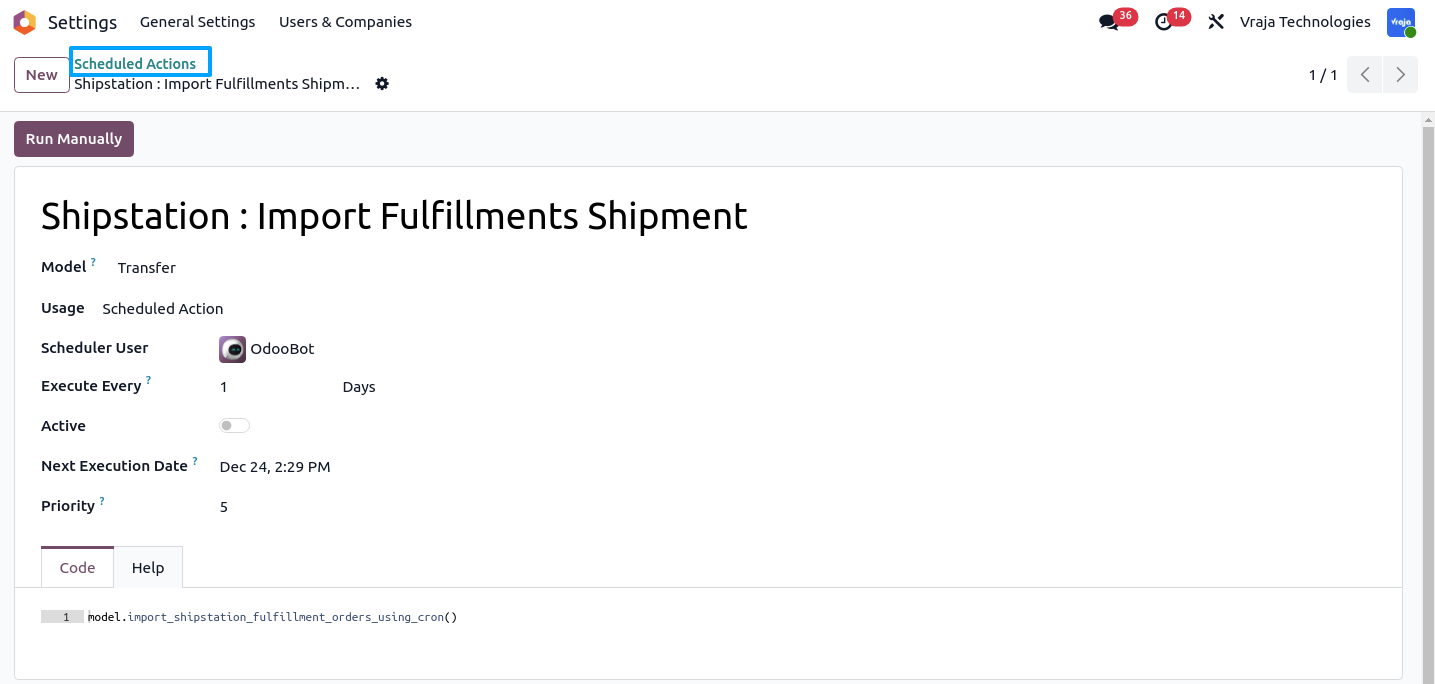
- The Fulfillment Shipment scheduled action retrieves shipment and tracking information once labels are generated in ShipStation.
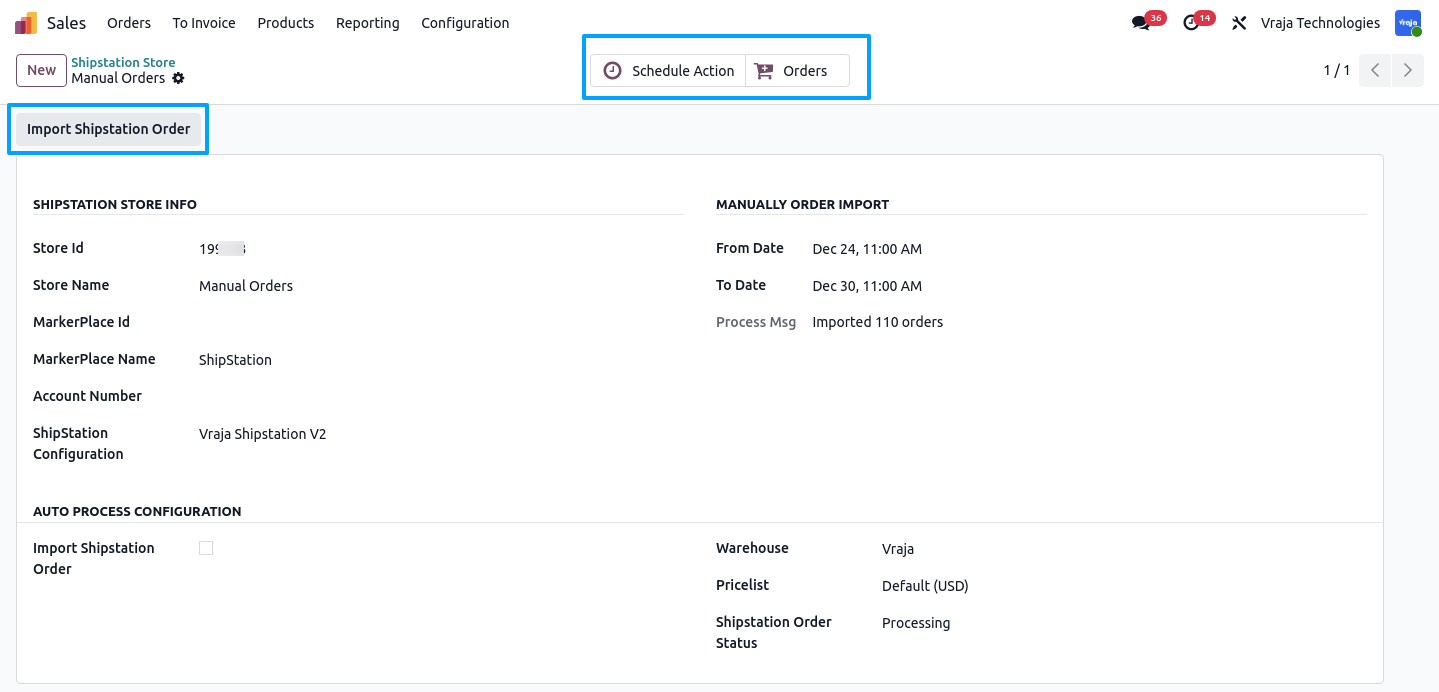
Orders can be imported in two ways: manually & automatically.
Manual import allows users to import orders from ShipStation to Odoo by selecting a From Date and To Date.
Automatic import uses a scheduled action (cron); once activated, enabling the Import ShipStation Orders option imports orders from the last 3 hours.
When Label Purchase is selected, all shipped orders are imported from ShipStation.
If Auto Validate Delivery Order is enabled, delivery orders are automatically validated in Odoo.
This screen shows a sale order imported from ShipStation into Odoo.
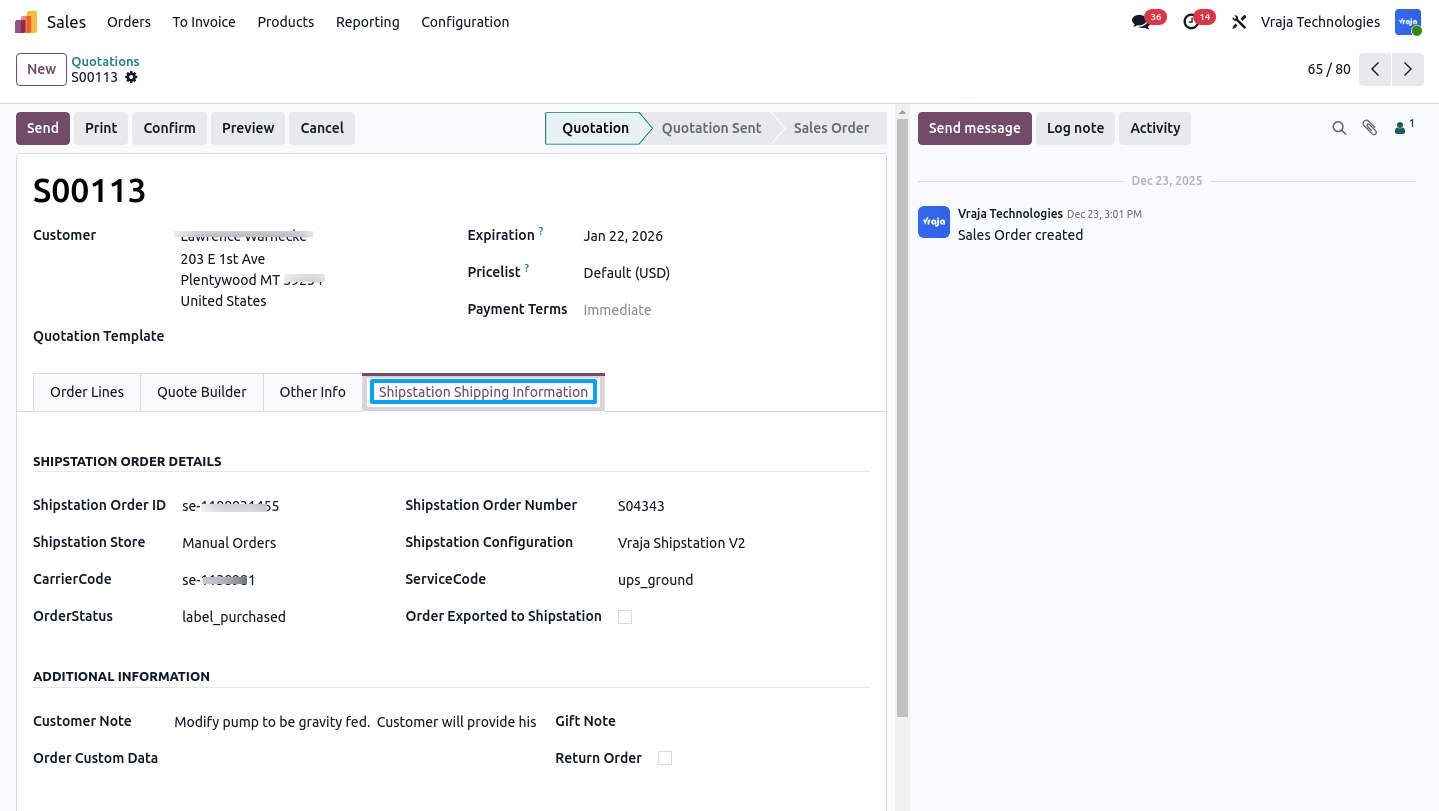
This screen displays ShipStation-related information set on the sale order.
This scheduled action retrieves shipment details when orders are exported from Odoo and labels are generated in ShipStation, updating tracking information.
- Generate Label in odoo – Workflow
- Create a Sale Order in Odoo and select the ShipStation delivery method.
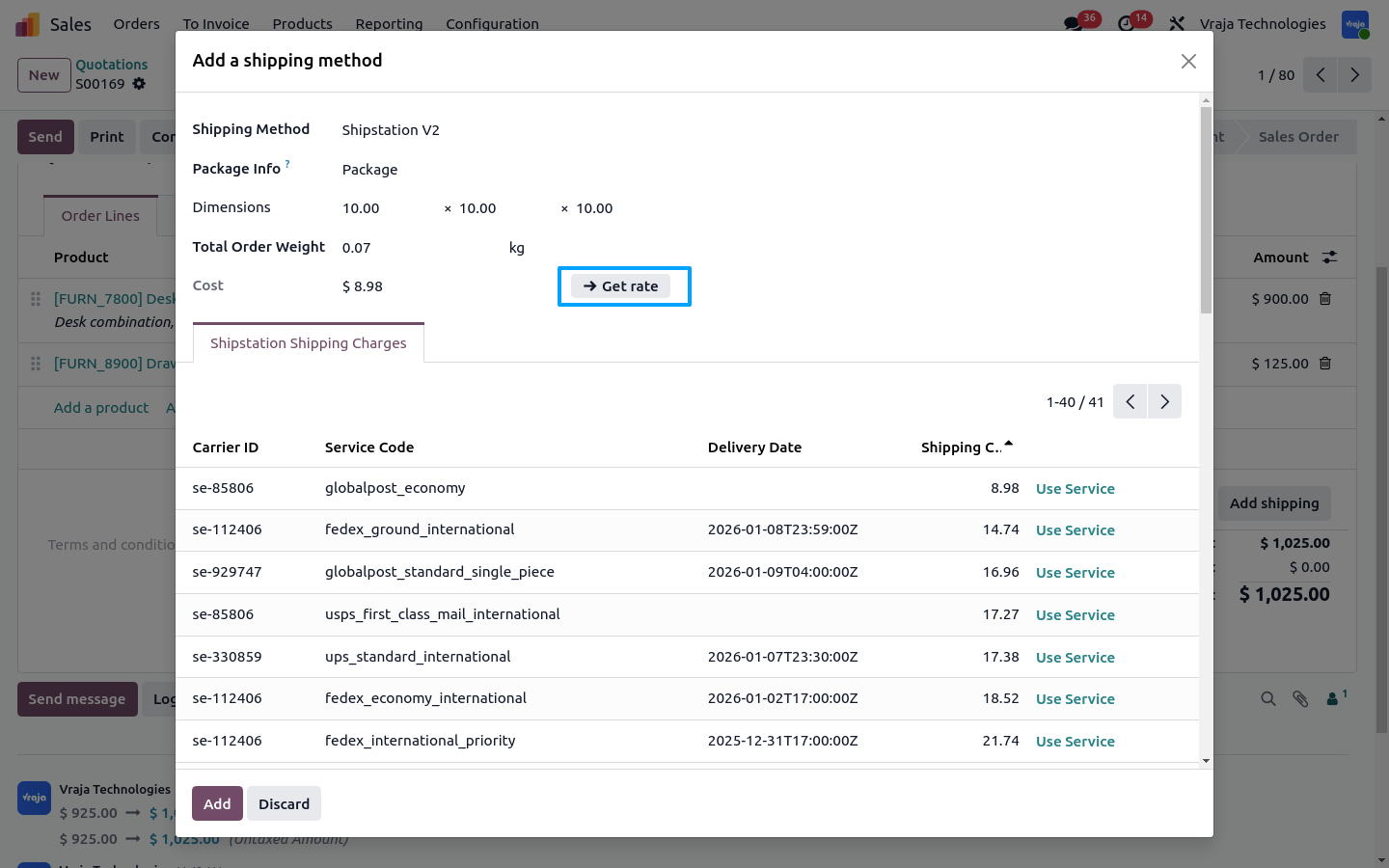
- Click Get Rate to retrieve service-wise shipping rates and select the required service.
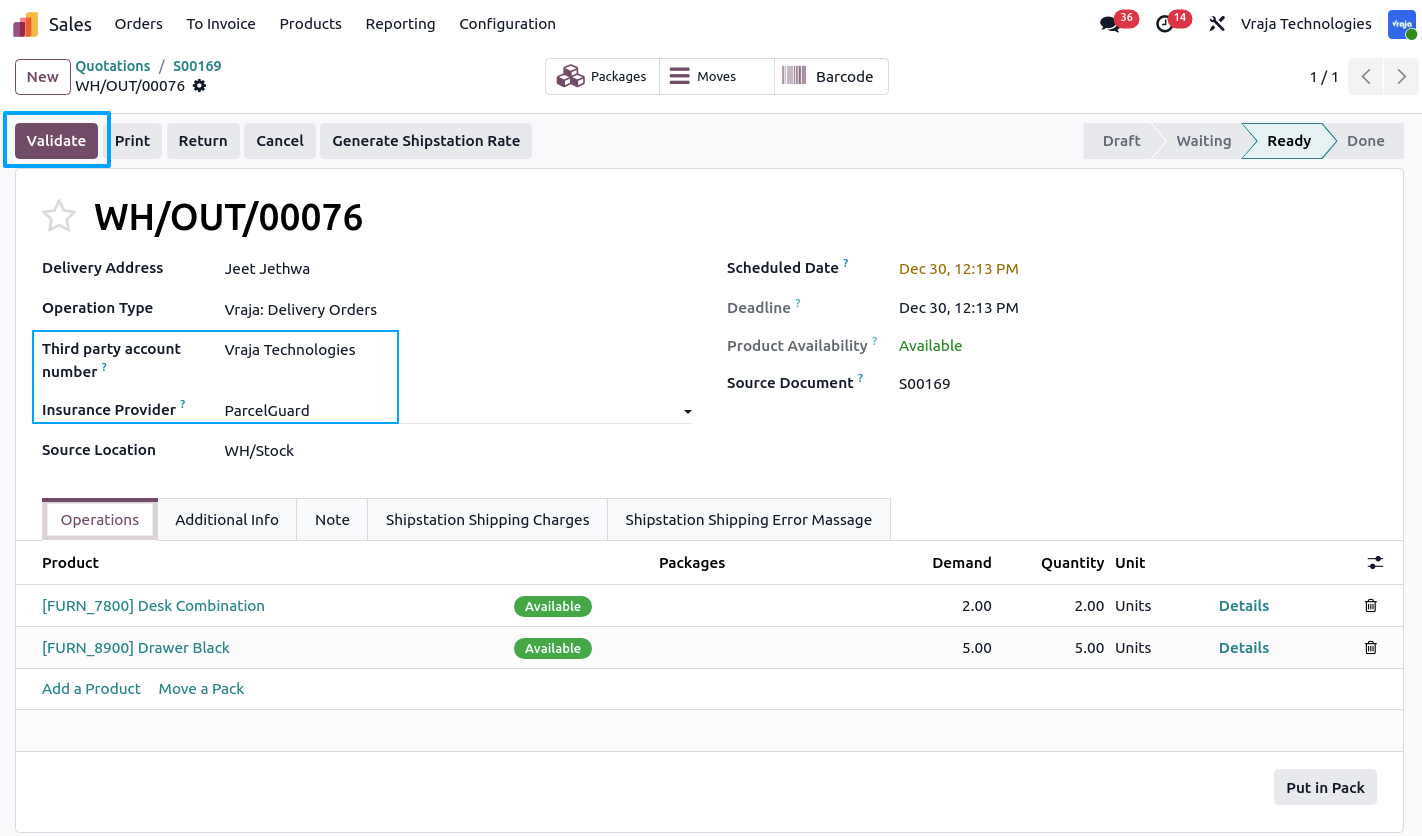
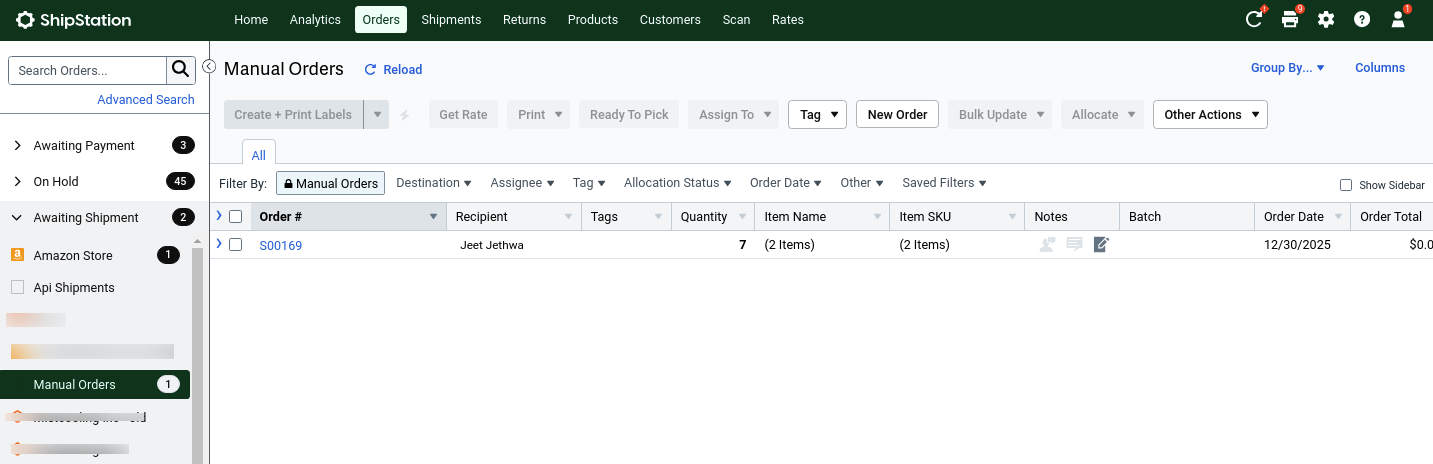
- Confirm the Sale Order and validate the Delivery Order to export the shipment from Odoo to ShipStation.
- Third-party billing and insurance are supported; insurance is automatically calculated per package and can be manually adjusted if needed.
- After validation, the ShipStation Shipment ID is retrieved.
- Click Generate ShipStation Label to retrieve the shipping label and shipment details in Odoo.
Create sale order and use Shipstation delivery method.
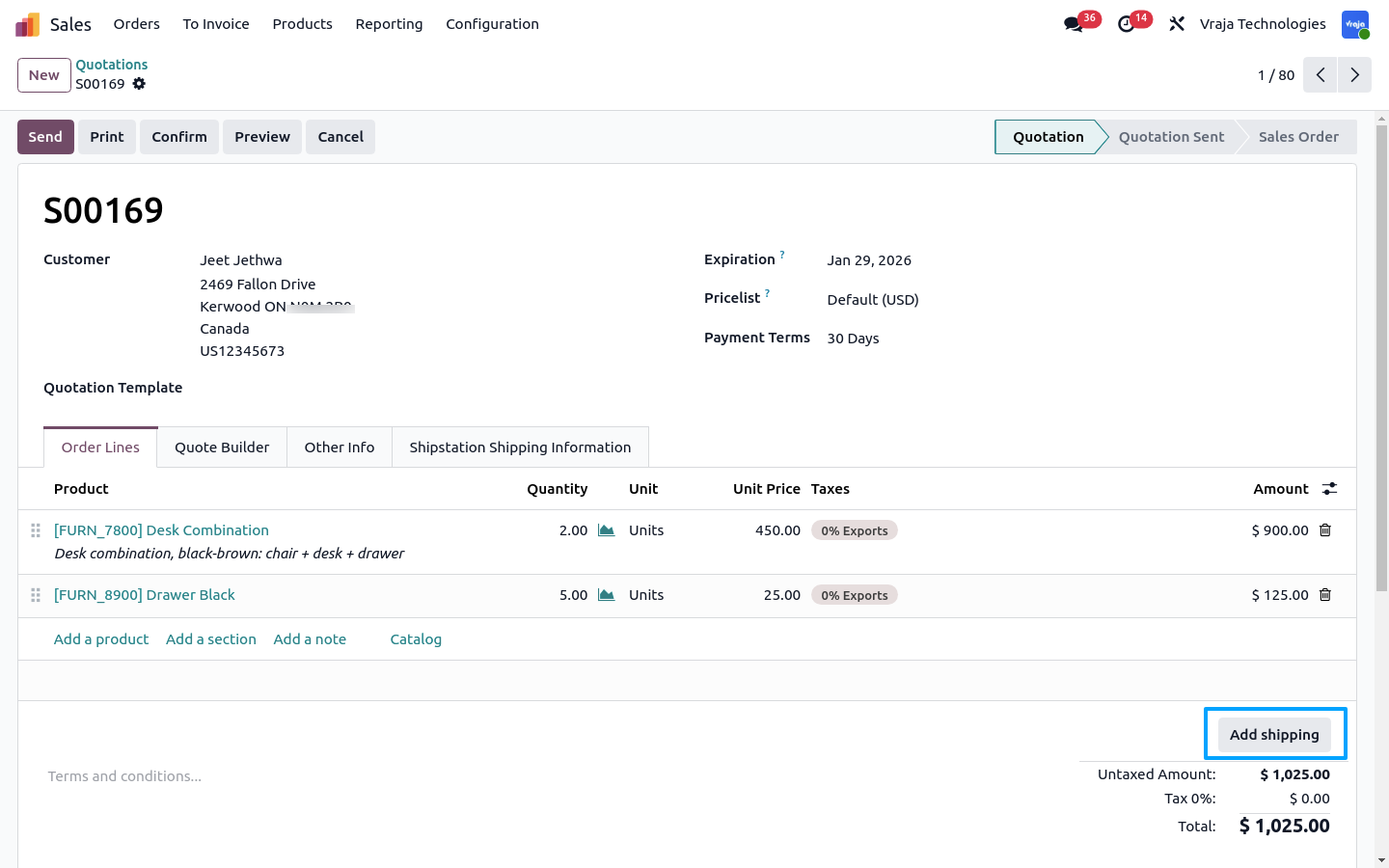
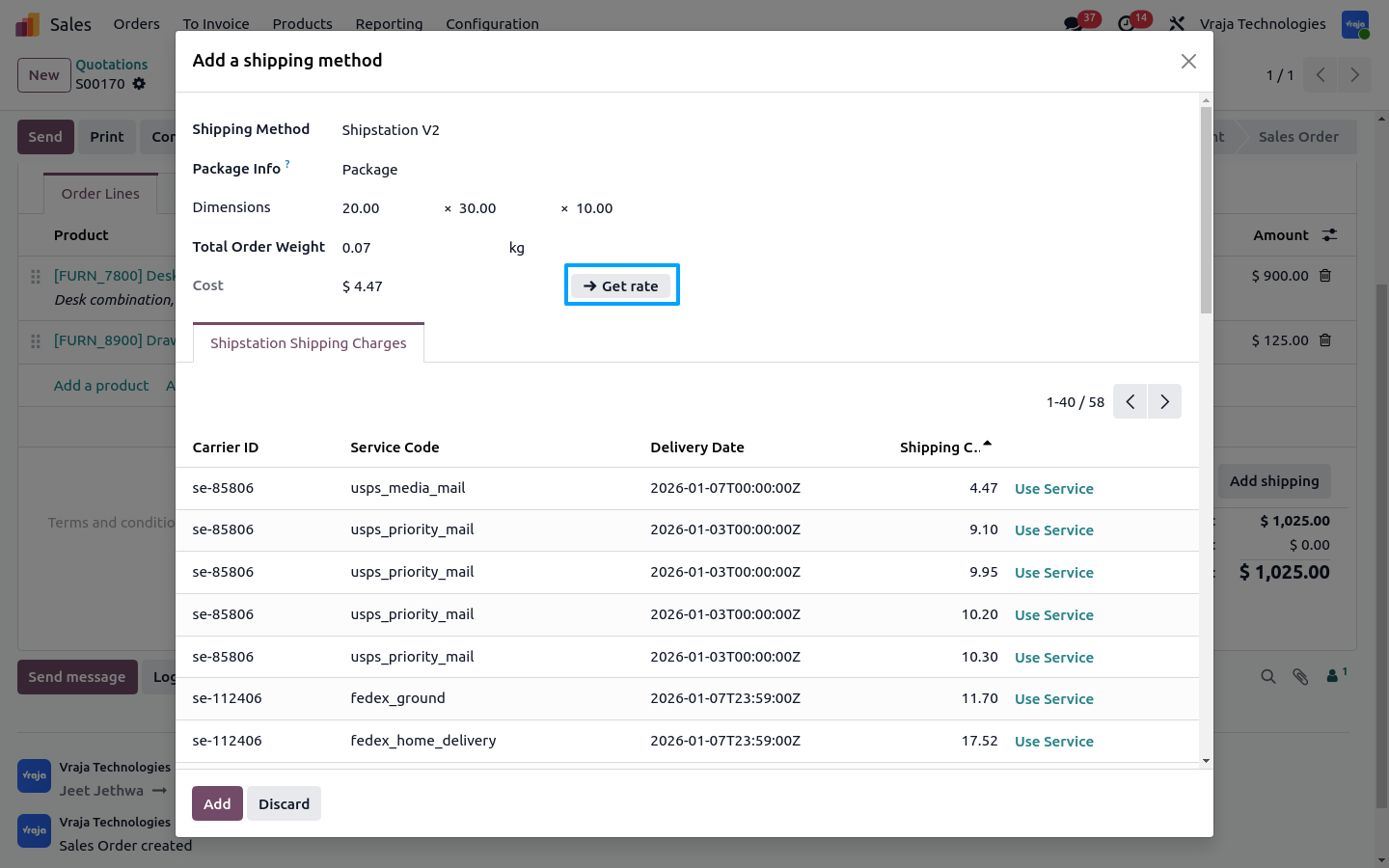
Click Get Rate to retrieve service-wise shipping rates based on the selected ShipStation carrier in the delivery method.
On validating the delivery order, the shipment is exported from Odoo to ShipStation.
Third-party billing and insurance are supported. When insurance is selected, the amount is automatically calculated per package and can also be manually adjusted.
Order successfully exported from Odoo to ShipStation.
After exporting the order from Odoo to ShipStation, the ShipStation Shipment ID is retrieved.
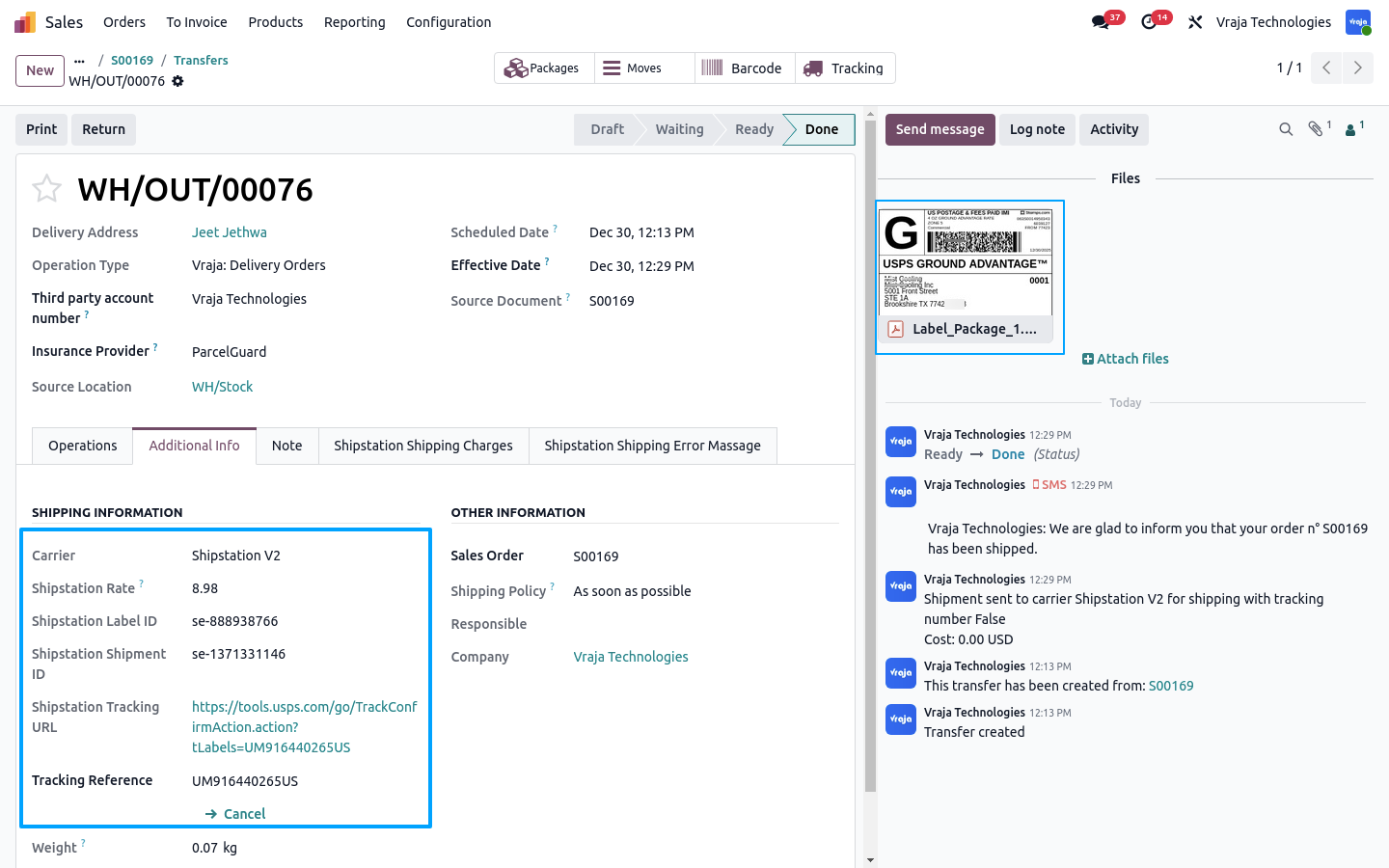
When Generate ShipStation Label is clicked, the shipping label and shipment information are retrieved.
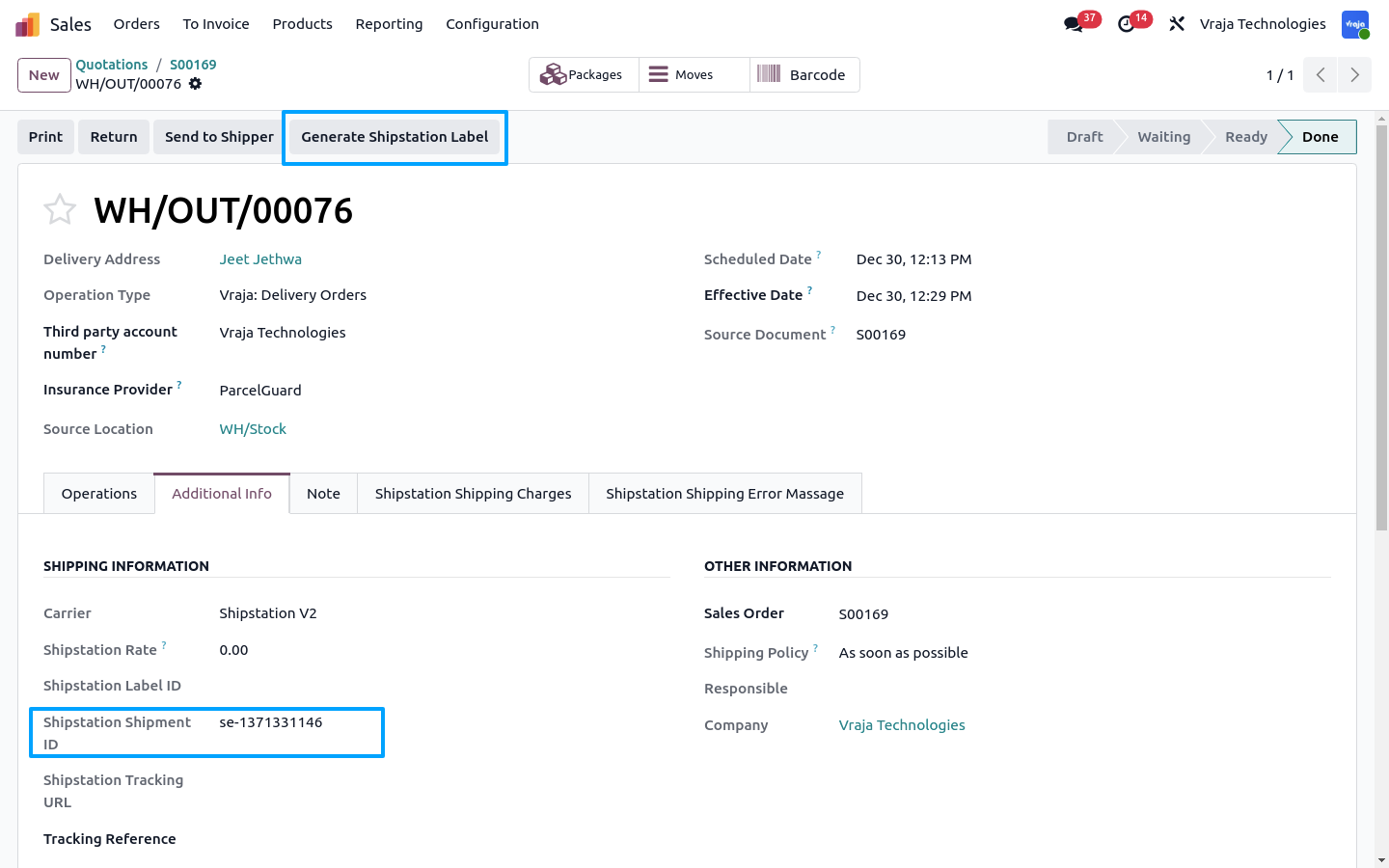
Shipping label and shipment information retrieved successfully from ShipStation.
- Import Tracking Odoo – Workflow
- Create a Sale Order in Odoo and select the ShipStation delivery method.
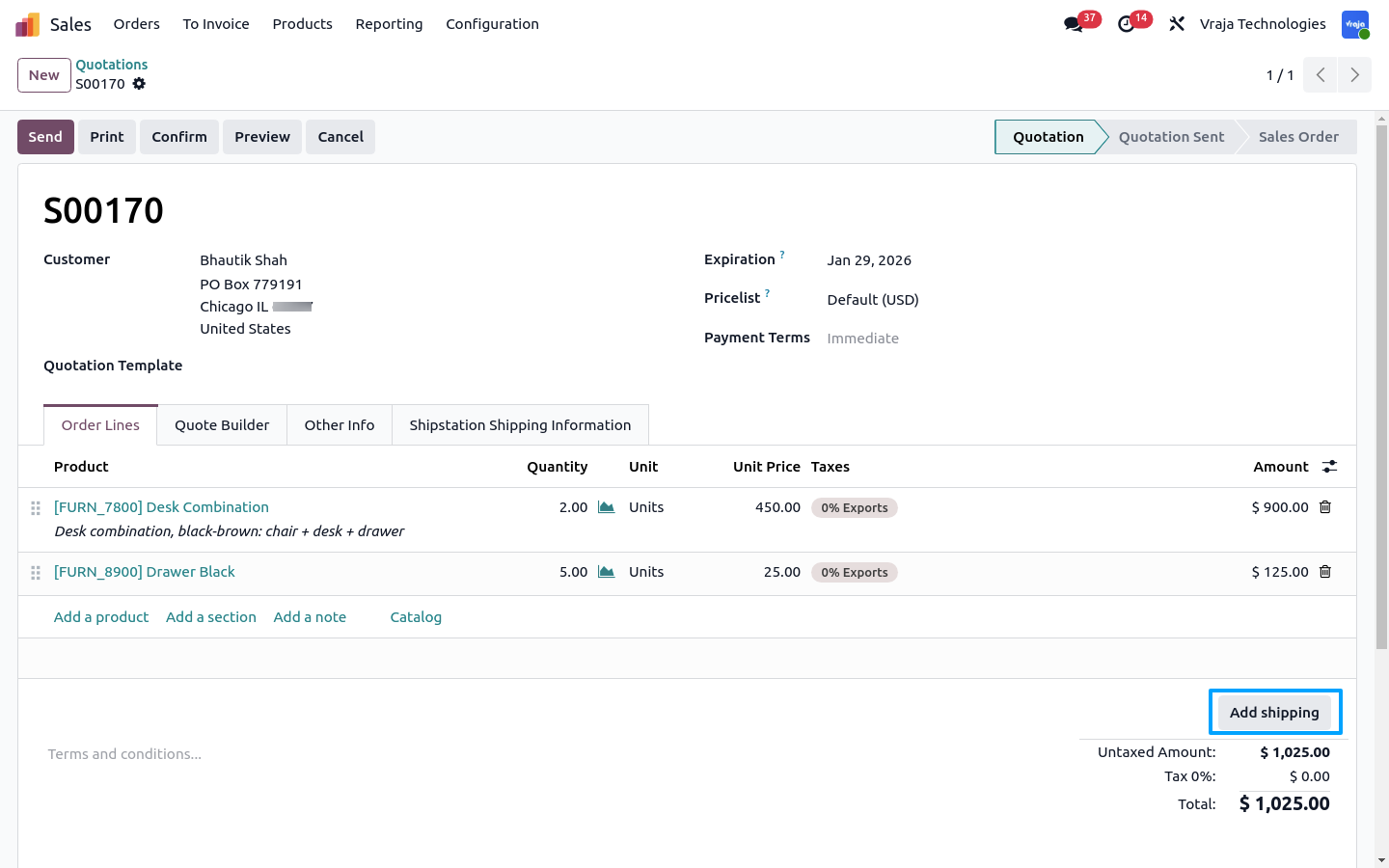
- Click Get Rate to retrieve available service-wise shipping rates.
- Confirm the Sale Order to create the Delivery Order.
- For multi-package shipments, use Put in Pack to create packages and adjust package-wise insurance if required.
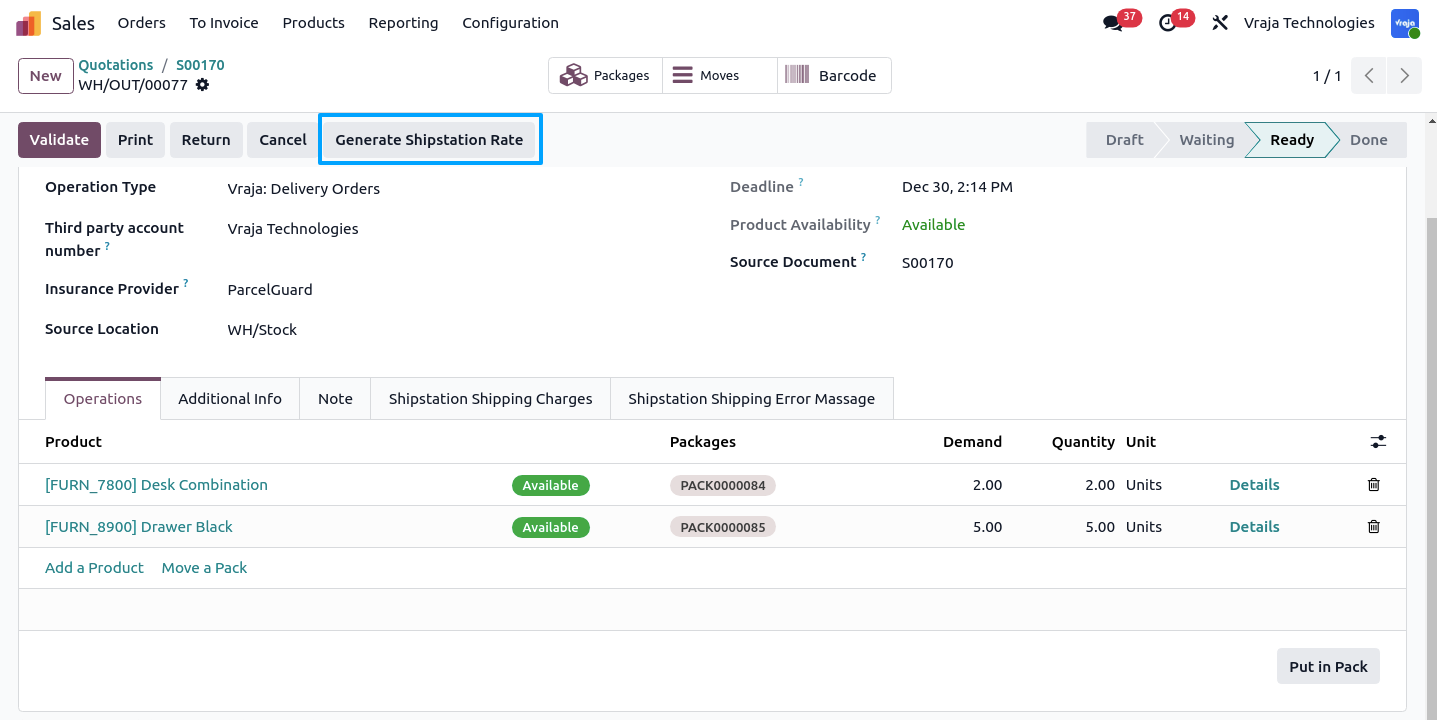
- Click Generate ShipStation Rate, select the service, and Validate to export the order from Odoo to ShipStation.
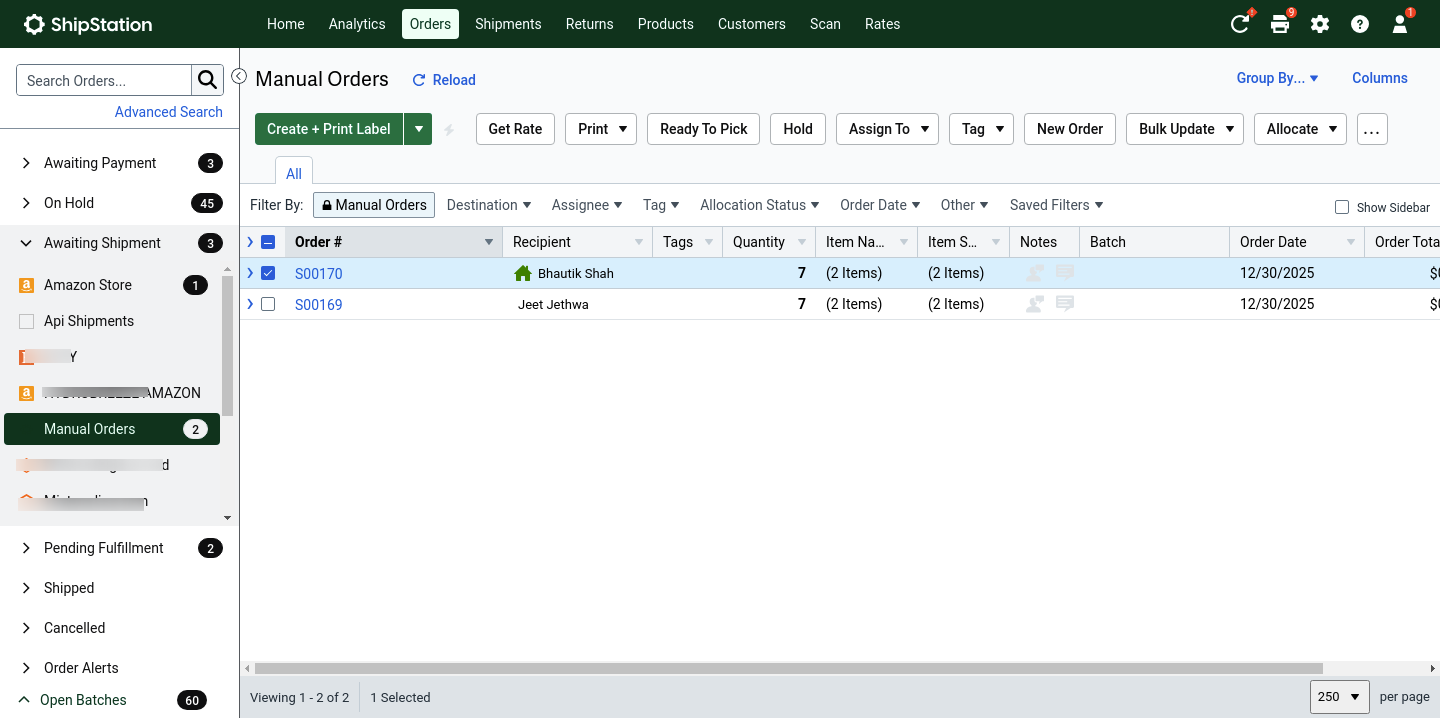
- After validation, the ShipStation Shipment ID is retrieved and the order is successfully visible in ShipStation.
Create sale order and use Shipstation delivery method.
Click Get Rate to retrieve service-wise shipping rates based on the selected ShipStation carrier in the delivery method.
Delivery order is created after confirming the sale order.
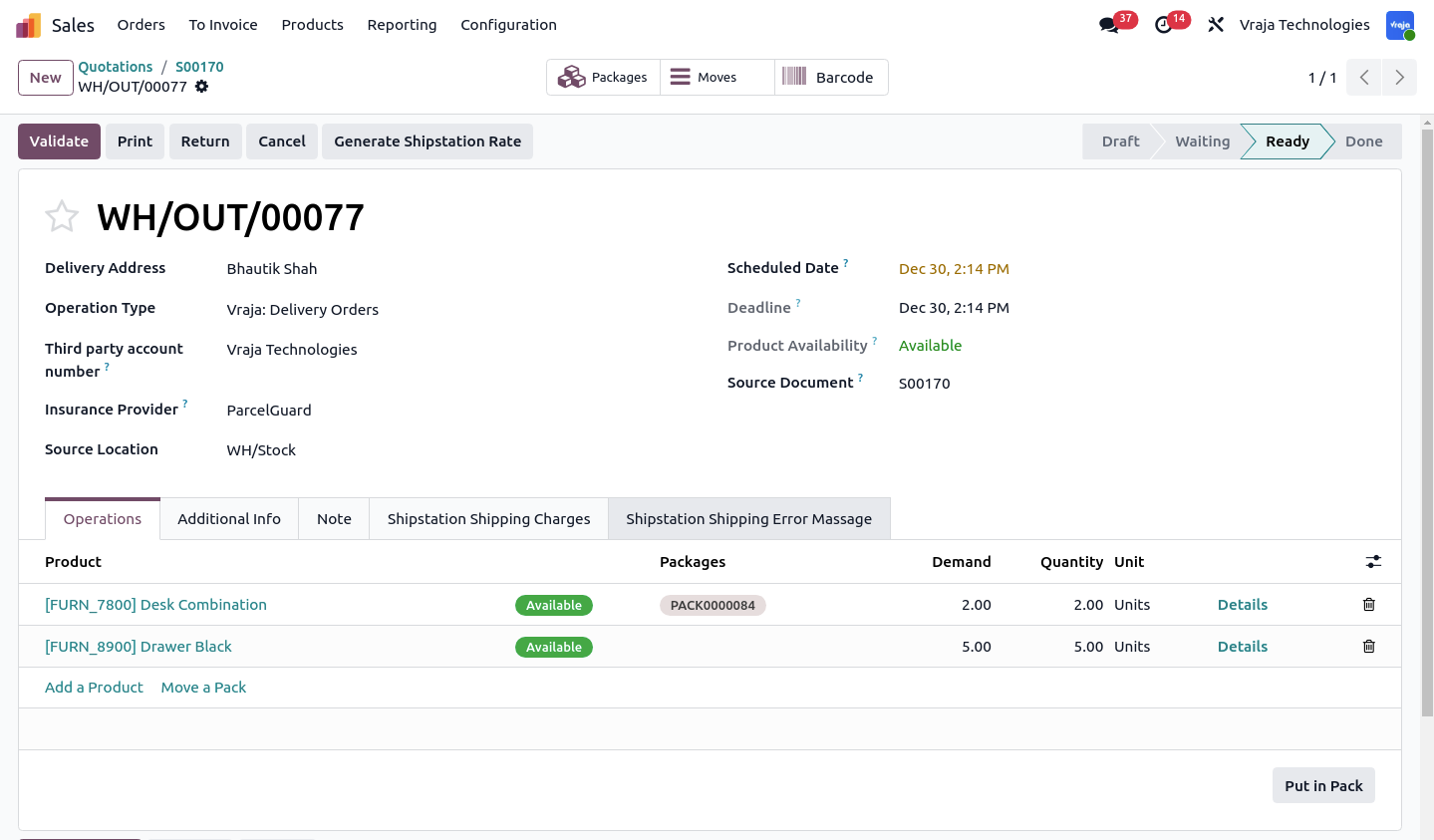
For multi-package shipments, click Put in Pack and select the package.

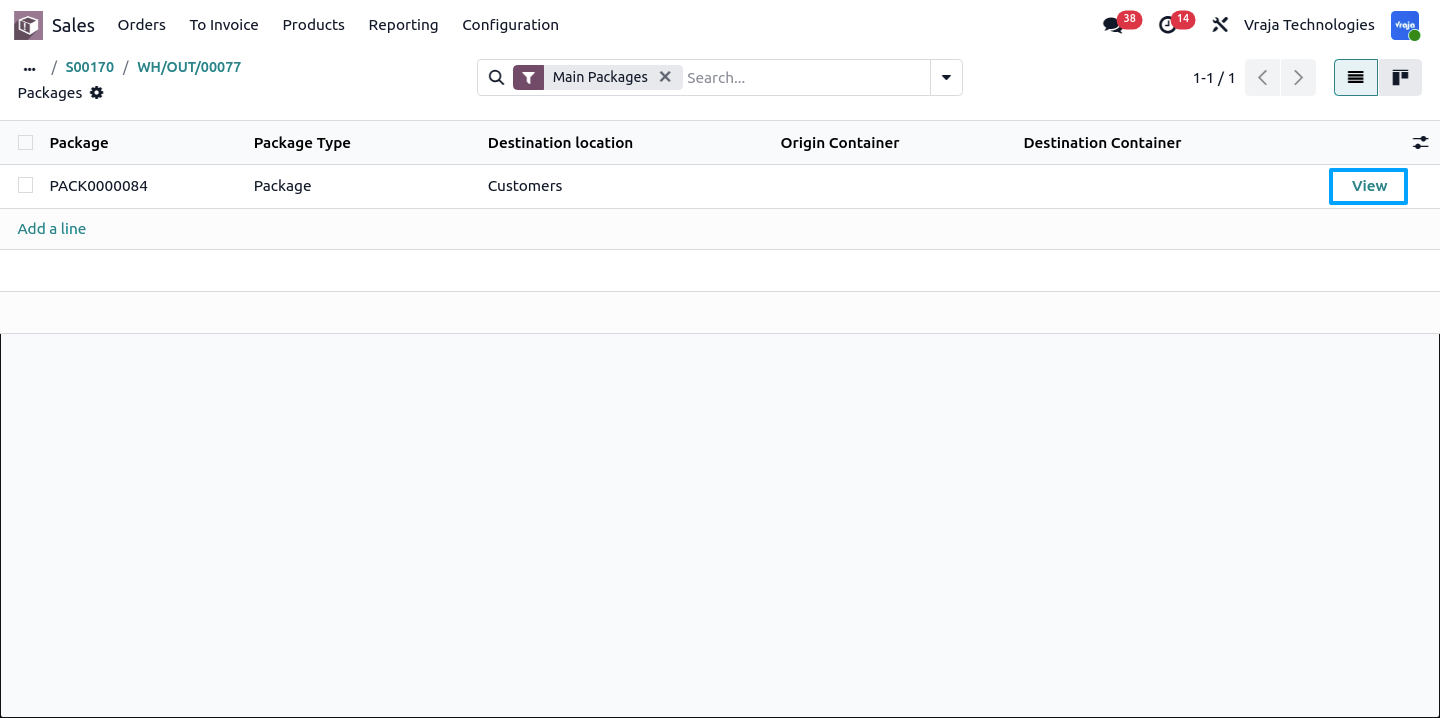
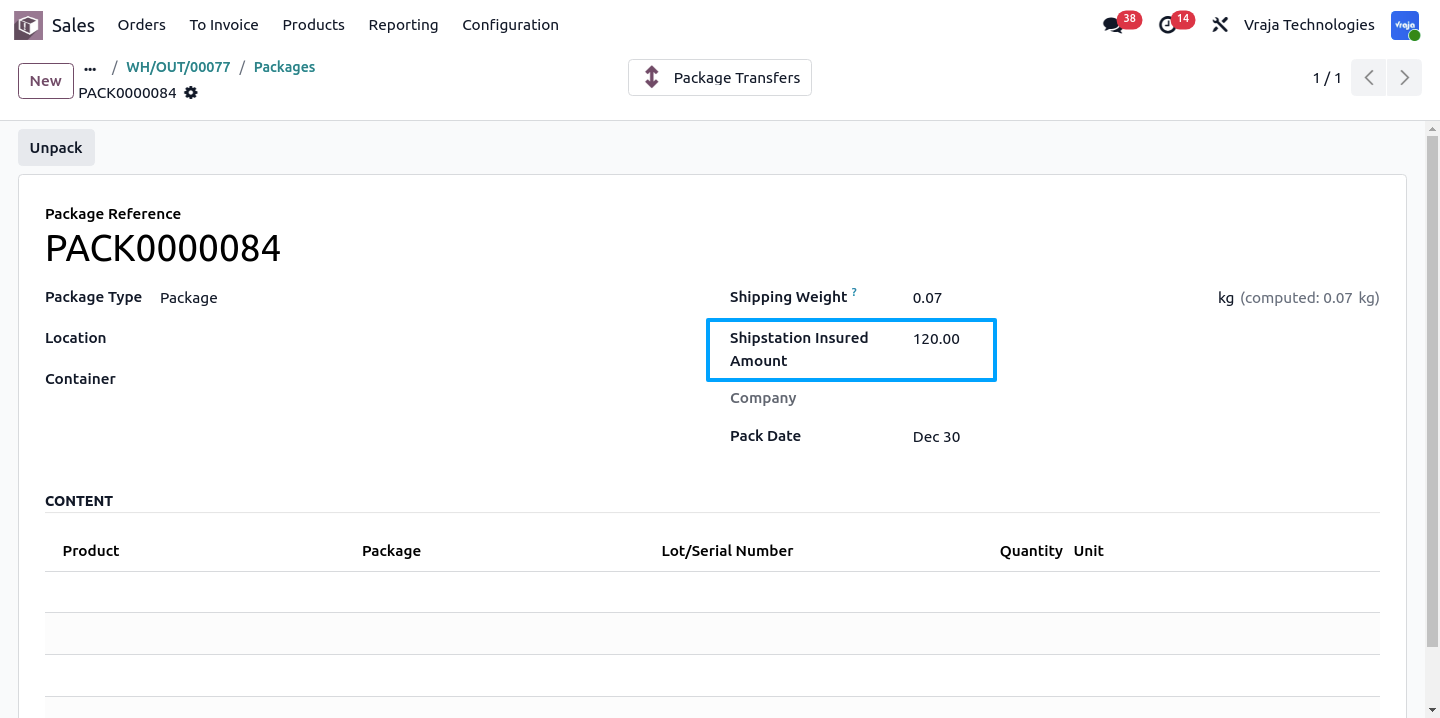
After creating a package and selecting insurance, click View inside the package to manually adjust the ShipStation insurance amount.
Click Generate ShipStation Rate to retrieve multiple service rates. The selected service is then used for exporting the shipment to ShipStation.
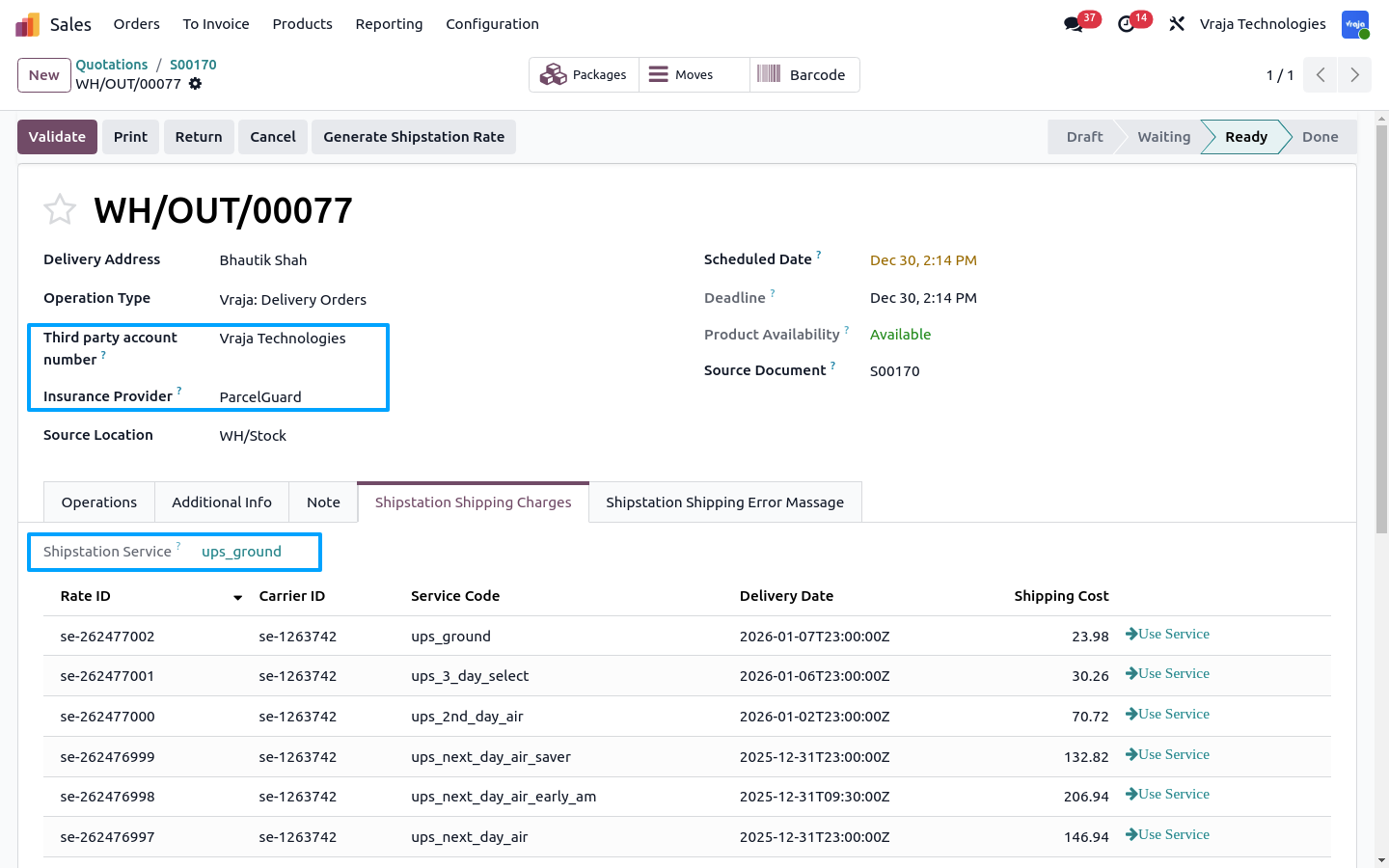
Click Validate to export the order from Odoo to ShipStation.
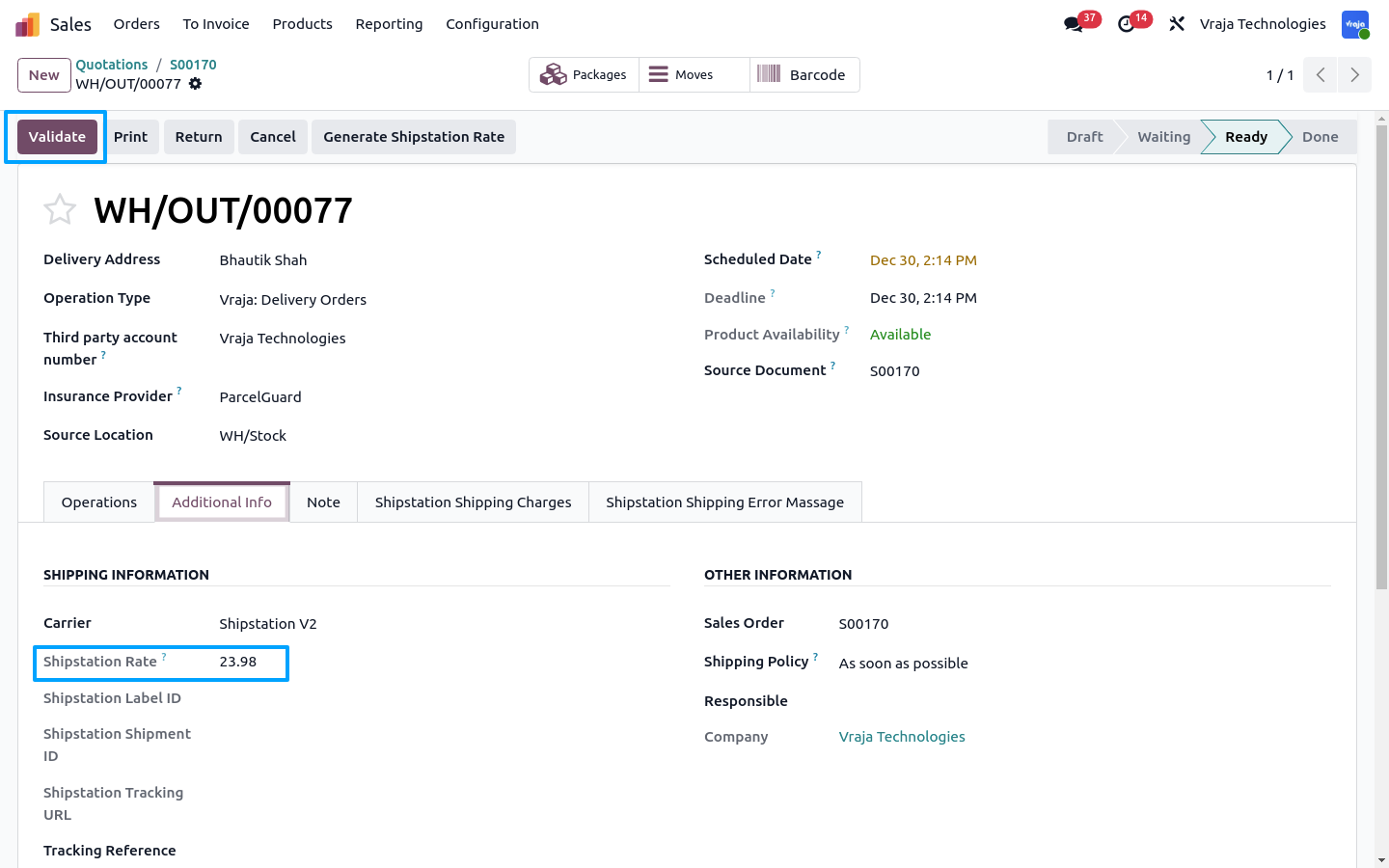
After validation, the ShipStation Shipment ID is successfully retrieved.
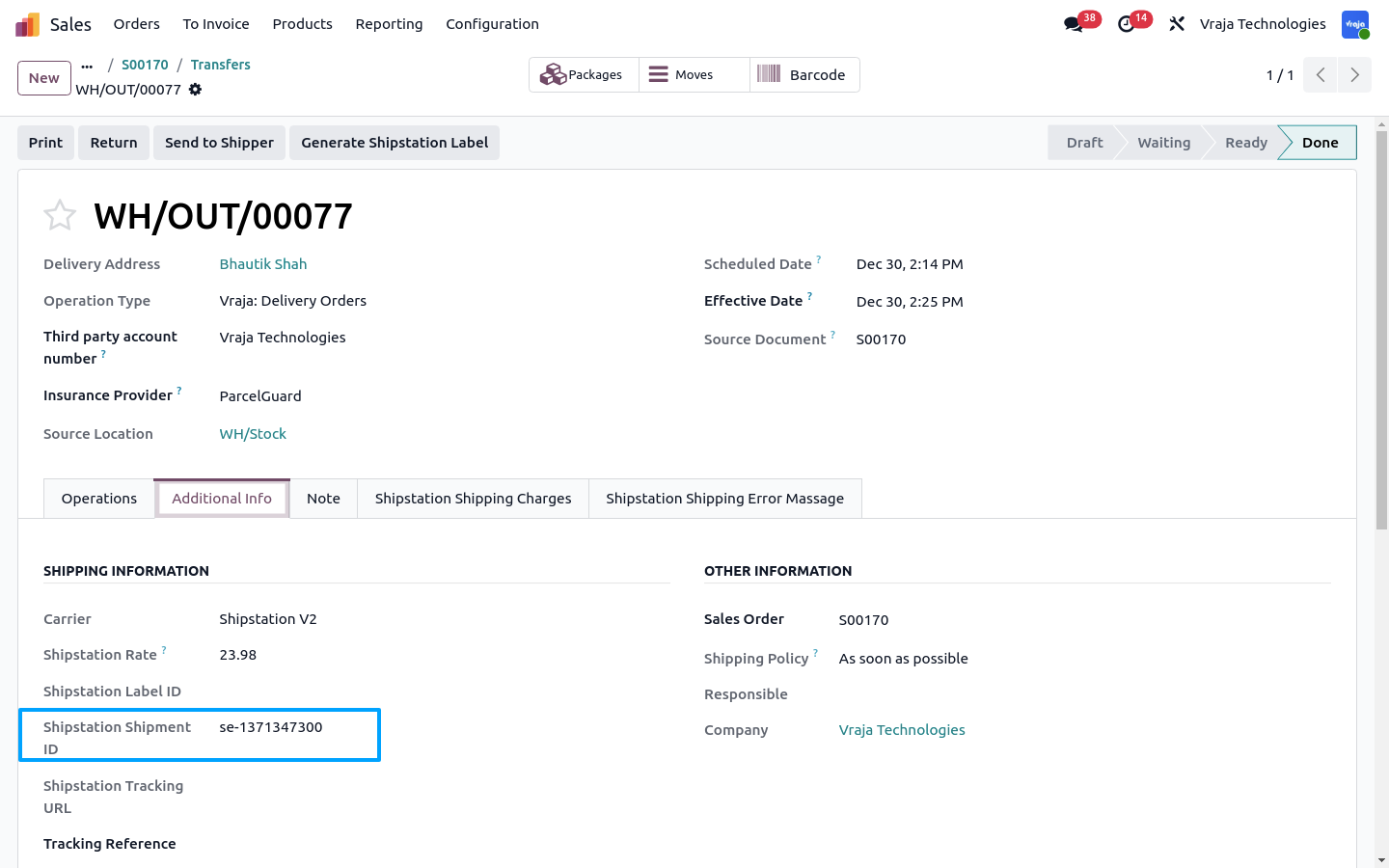
Order successfully exported from Odoo to ShipStation.
 I need an extra customization in this application, how can I get it?
- Yes, you can contact us on support@vrajatechnologies.com or can schedule a DEMO with our team to customize additional features.
How does the integration work?
- The integration works through APIs, allowing seamless communication between Odoo and this connector without the need to navigate to the user dashboard. This ensures a smooth experience when managing shipping tasks directly from Odoo.
Is the application compatible with Odoo Enterprise and Community?
- Yes, this application module is supported by both. It is also compatible with test and production environments.
Can I modify the delivery address once it is generated?
- No, the delivery address cannot be modified once the label is generated.
Do I get free upgrades and support if I purchase this application?
- If there is a bug or any issues, our team will be there to help you out. If you need to add any new features, you will need to upgrade the application.
Is technical knowledge required to set up the integration?
- While some technical understanding may be helpful, the integration is designed to be user-friendly. Detailed documentation and support may be provided to aid in the setup process.
Is this free customization and implementation?
- Our team has produced a support video that guides you through the implementation process step by step. If you encounter any issues, please feel free to contact us for assistance.
Does the module support Dropship Workflow?
- No, it requires customization according to your specific needs which we will take into consideration.
Is it possible to generate labels for incoming orders?
- No, this would require customization based on your specific requirements.
Are upgrades free when the API provider makes changes?
- Yes, they are for free.
Submit a Support Ticket
If you encounter any issues while using our app that are caused by the app itself, we offer complimentary support for 90 days from the date of purchase.
To create a support ticket, please register via the Vraja Technologies Support Email and provide the necessary details so we can assist you in resolving the issue.

Email Us
support@vrajatechnologies.com

 1.png)
Contact Us
vrajatechnologies.com/contactus

Support
vrajatechnologies.com/support-policy
Vraja Technologies Services

Odoo Implementation

Odoo App Integration Services

Odoo Customization

Odoo Consultation

Odoo Support & Maintenance

Odoo Developer Outsourcing
Suggested Application


At Vraja Technologies, we are committed to providing reliable support and a smooth experience for all our Odoo apps.
Lifetime Free Support
We provide lifetime free support for our app. Our support covers issues that are directly related to the purchased app and its standard features.
- Configuration support
- Bug fixing related to our app
- Technical issues related to our app functionality
- Guidance for app usage and setup
Third-Party App Conflict
Our support does not cover conflicts caused by third-party apps, custom modules, or external code changes made by another provider. If your Odoo system has other customizations or third-party modules installed and they conflict with our app, we can review the issue and provide a solution as a paid customization or support service, if required.
Supported Hosting Platforms
Before purchasing, please make sure your Odoo hosting environment supports custom module installation.
- Odoo.sh
- On-Premise Odoo Server
Free Installation & Configuration
We provide free installation and basic configuration support after purchase. Our team will help you install the app and complete the required basic setup so you can start using it smoothly.
Version Compatibility
Before purchasing the app, please verify the Odoo version carefully. Each app is developed and tested for specific Odoo versions. If you purchase the app for the wrong version, additional migration or compatibility work may require extra charges.
Support Availability
- Time Zone: IST
- Support Hours: 9:30 AM to 7:00 PM IST
- Email Response Time: Within the next 24 working hours
- We always try our best to respond as quickly as possible and provide a proper solution based on the issue.
Need Help Before Purchasing?
Still have any questions or need help before purchasing? Please contact our team. We are here to help you make the right choice.
At Vraja Technologies, customer satisfaction is very important to us. We always try our best to provide a stable and reliable app experience.
Refund Eligibility
We provide a refund in the following cases:
- Issue from our side: If any issue is raised due to our app and we are unable to fix it within the committed timeline, we will provide a refund without asking any unnecessary questions.
- Missing promised feature: If any feature is clearly mentioned in our app description but is not available in the actual app, you are eligible for a refund.
Non-Refundable Cases
Refunds may not be applicable in the following cases:
- Wrong Odoo version purchase
- Conflict with third-party apps or custom modules
- Unsupported hosting environment
- Custom changes requested after purchase
- Issue caused by manual code changes or server misconfiguration
Review Before Purchase
We strongly recommend reviewing the app description, features, screenshots, and supported Odoo version before making a purchase.
Secure Payment
We do not store any card details on our system. All payments are processed through a secure payment gateway, ensuring your payment information remains safe and protected.
Need Clarification Before Purchase?
If you have any doubts about features, compatibility, installation, or support before purchasing, please contact us. Our team will be happy to guide you.
Need Clarification Before Purchase?
Please contact us before purchasing if you need help with features, compatibility, installation, or support.


Reviews
There are no reviews yet.