
Description
.png)
 Enterprise Community Odoo.sh
Dynamic Import Records From Email
Automates record creation in Odoo from email attachments (Excel/CSV) with dynamic model mapping. This module automates the processing of incoming emails with Excel or CSV attachments. It searches for unread emails from specific partner email addresses, parses and extracts attachments from emails (it supports .xlsx and .csv files), and dynamically creates records in the configured Odoo model.
We specialize in delivering advanced Odoo solutions across multiple domains. Our expertise includes:

EDI & SWIFT/ACH Payment Integrations
End-to-end EDI automation, including X12, EDIFACT, XML standards, & financial integrations such as SWIFT, ACH, & Fedwire.


eCommerce Integrations
Seamless integration with leading eCommerce platforms to sync products, orders, inventory, and customer data in real time.

Shipping Integrations
Robust shipping connectors for global couriers, offering automated label generation, tracking, and rate computation.

Most Useful Apps for your ERP
A wide range of highly-rated Odoo modules designed to enhance automation, improve productivity, & simplify business operations.
 Features
 Process
 FAQs
FAQs
 This module automates the processing of incoming emails with Excel or CSV attachments.
Searches for unread emails from specific partner email addresses.
Parses and extracts attachments from emails (supports .xlsx and .csv files).
Dynamically creates records in the configured Odoo model.
This module automates the processing of incoming emails with Excel or CSV attachments.
Searches for unread emails from specific partner email addresses.
Parses and extracts attachments from emails (supports .xlsx and .csv files).
Dynamically creates records in the configured Odoo model.
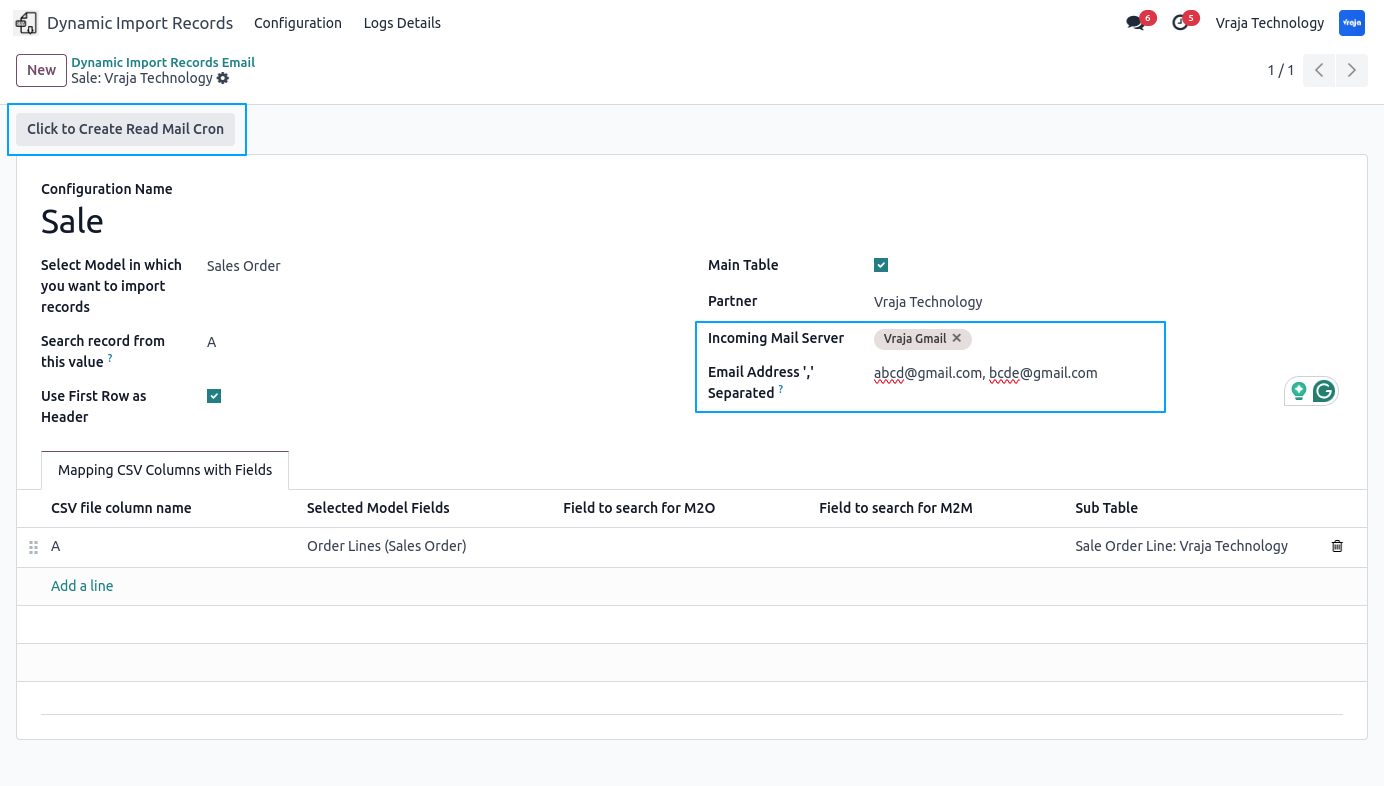
Upon installing the application, you can see the ‘Dynamic Import Record Email’ menu.

Configuration Of Mapping Table.
You need to map fields of Odoo with CSV columns.
Fields explanations:
Select Model in which you want to import records => You need to select Odoo model in which you want to create records.
Search record from this value => Set Column Alphabet (From A-Z), from this value check existing record available or not. To avoid duplication of records in Odoo this must be needed.
Main Table => You need to enable this option if your configuration is main, for example if you want to add a sale order record then for the sale order model you need to create configuration record with main table enable & you need to create sale order line configuration separately without main table enable.
CSV file column name => You need to enter the Alphabet (From A-Z), for which CSV column you need to map the Odoo field.
Selected Model Fields => Select field of selected model in which you want to add value.
Field to search for M2O => This field is not required, if you choose Many2one field for mapping then you have an option to set the inner field of that Many2one model. It helps you to search records based on that field or else search with the name field of the Many2one model.
Use first row as a header => If you use Heading/Header in CSV file.
Incoming Mail Server => You have to select the incoming mail server here. This is the server where you will receive the mails.
Email Address ‘,’ Separated => You have to enter the email address you want to read from mail server.
Sub Table => For One2Many field you have to select a sub table in which there is a separate configuration available for One2Many field/model. (In sub table there is the same concept to follow, the only difference is in that table you don’t need to enable Main table & also not required to enter Search record from this value, so it will create duplicate One2Many records from CSV & if you select then it will update existing record.)
Upon creating the Schedule Action you can see the smart button.

This is the created Schedule Action.

This is sub table for order lines that you have to configure.

This is your incoming mail server that you have to configure in odoo.

The Sale record is created from the attached file of mail. You can also view the file from which this record is created.

You can view the logs inside the Dynamic Import Record menu.

 I need an extra customisation in this application, how can I get it?
- Yes, you can contact us on support@vrajatechnologies.com or can schedule a DEMO with our team to customize additional features.
Is the application compatible with Odoo Enterprise and Community?
- Yes, this application module is supported by both. It is also compatible with test and production environments.
Do I get free upgrades and support if I purchase this application?
- We provide free support for the first 90 days following the purchase date.
Is technical knowledge required to set up the integration?
- While some technical understanding may be helpful, the integration is designed to be user-friendly. Detailed documentation and support may be provided to aid in the setup process.
Is this free customisation and implementation?
- Our team has produced a support video that guides you through the implementation process step by step. If you encounter any issues, please feel free to contact us for assistance.
Submit a Support Ticket
If you encounter any issues while using our app that are caused by the app itself, we offer complimentary support for 90 days from the date of purchase.
To create a support ticket, please register via the Vraja Technologies Support Email and provide the necessary details so we can assist you in resolving the issue.

Email Us
support@vrajatechnologies.com

 1.png)
Contact Us
vrajatechnologies.com/contactus

Support
vrajatechnologies.com/support-policy
Vraja Technologies Services

Odoo Implementation

Odoo App Integration Services

Odoo Customization

Odoo Consultation

Odoo Support & Maintenance

Odoo Developer Outsourcing
Suggested Application




Reviews
There are no reviews yet.