
Description
.png)
PDF ↔ ZPL Converter
This module provides an automated solution to convert attachments between PDF and ZPL formats directly within Odoo. It monitors incoming messages and their attachments, and when a file matches configured rules (based on filename or message content), the conversion process is triggered automatically.
ZPL files are converted into PDF format, and PDF files are converted into ZPL format without any manual intervention. The converted file is automatically attached to the same message, allowing users to access both formats easily.
This module integrates seamlessly with the Odoo chatter system and is especially useful for businesses that require both label printing (ZPL) and document sharing (PDF). It is optimized for single-page file conversion.
 Watch on YouTube
We specialize in delivering advanced Odoo solutions across multiple domains. Our expertise includes:

EDI & SWIFT/ACH Payment Integrations
End-to-end EDI automation, including X12, EDIFACT, XML standards, & financial integrations such as SWIFT, ACH, & Fedwire.

eCommerce Integrations
Seamless integration with leading eCommerce platforms to sync products, orders, inventory, and customer data in real time.

Shipping Integrations
Robust shipping connectors for global couriers, offering automated label generation, tracking, and rate computation.

Most Useful Apps for your ERP
A wide range of highly-rated Odoo modules designed to enhance automation, improve productivity, & simplify business operations.
 Features
 Process
 FAQs
FAQs
 Automatic Attachment Conversion:
Converts files automatically based on predefined rules without manual action.
PDF to ZPL Conversion:
Supports conversion of PDF files into ZPL format for label printing.
Chatter-Based Processing:
Works directly from Odoo messages and attachments.
Auto File Attachment:
Attaches the converted file back to the same message automatically.
Seamless Odoo Integration:
Fully integrated with Odoo’s chatter and messaging system.
Optimized for Single-Page Files:
Ensures best performance and accuracy for single-page conversions.
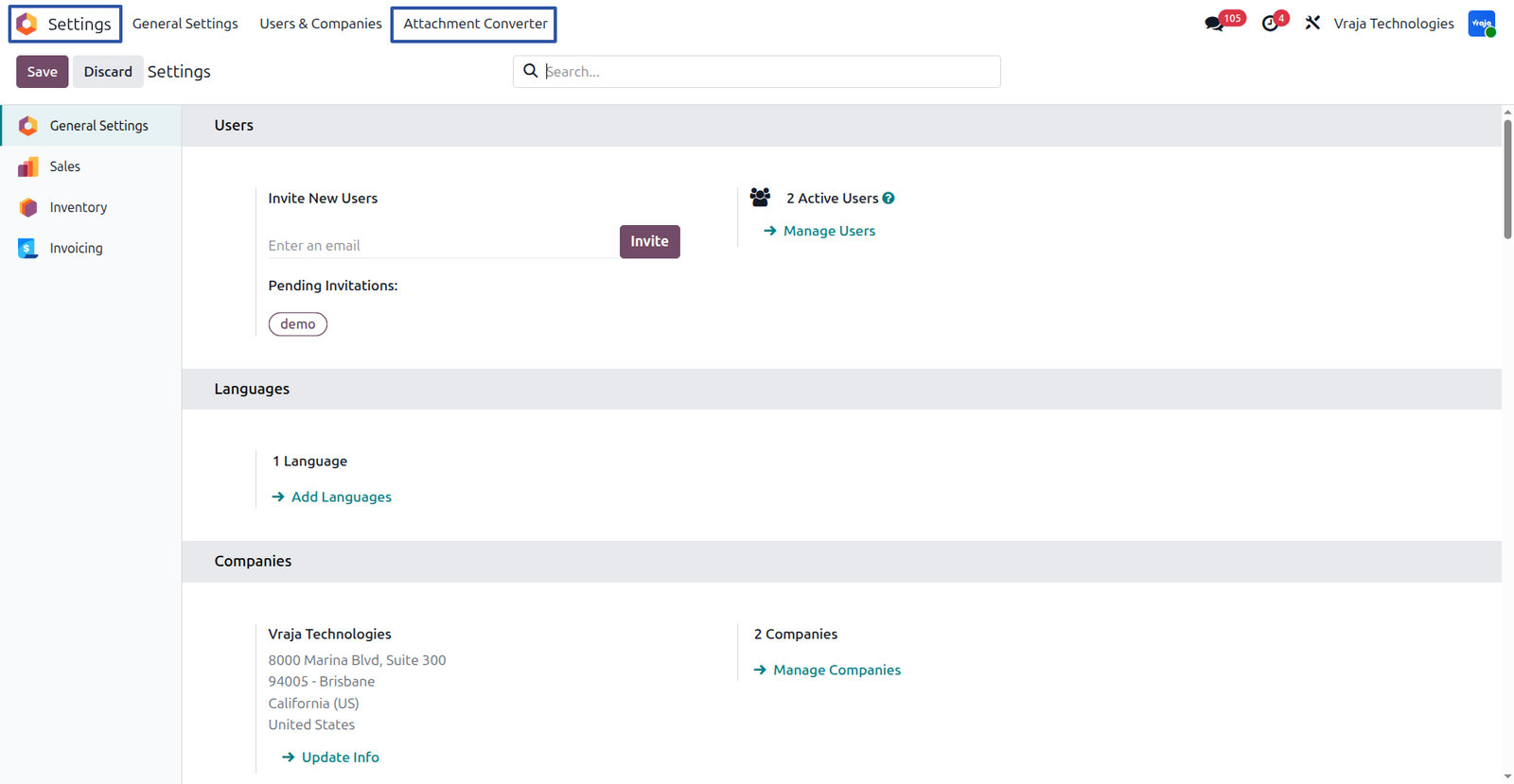
After installing the module, go to Settings → Attachment Converter.
where, you will find the configuration screen there you can manage and create conversion rules.
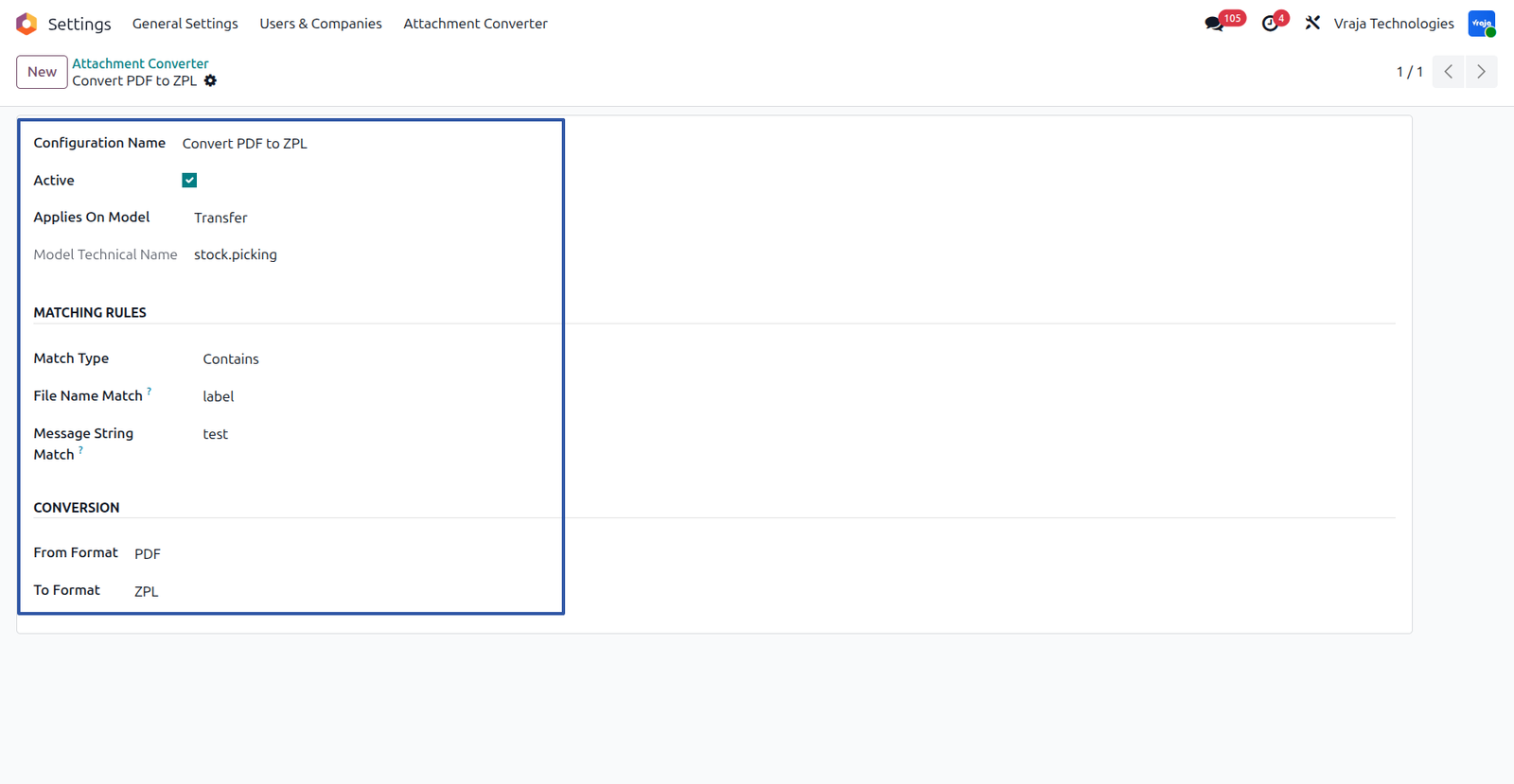
When you click on New, you will see a form like below:
- Configuration Name : Enter a name for your configuration (e.g., Convert PDF to ZPL).
- Active :Enable this option to activate the configuration. (Default it is enable).
- Applies On Model : Select the model where this conversion should work (e.g., Transfer, Sale Order, etc.).
- Model Technical Name: This is auto-filled based on the selected model.
Matching Rules
Match Type: Choose how the file name should match:
- Contains
- Starts With
- Ends With
File Name Match : Enter the keyword to match in the attachment file name (e.g., “label”).
Message String Match : Enter text to match in the message body (optional).
Note : If either file name or message content matches, conversion will trigger.
Conversion Settings
From Format : Select the source format (PDF or ZPL).
To Format : Select the target format (ZPL or PDF).
Click on Save to activate the configuration.
PDF to ZPL convertion process :
– Once the configuration for PDF to ZPL is set up, the conversion works automatically during business operations.
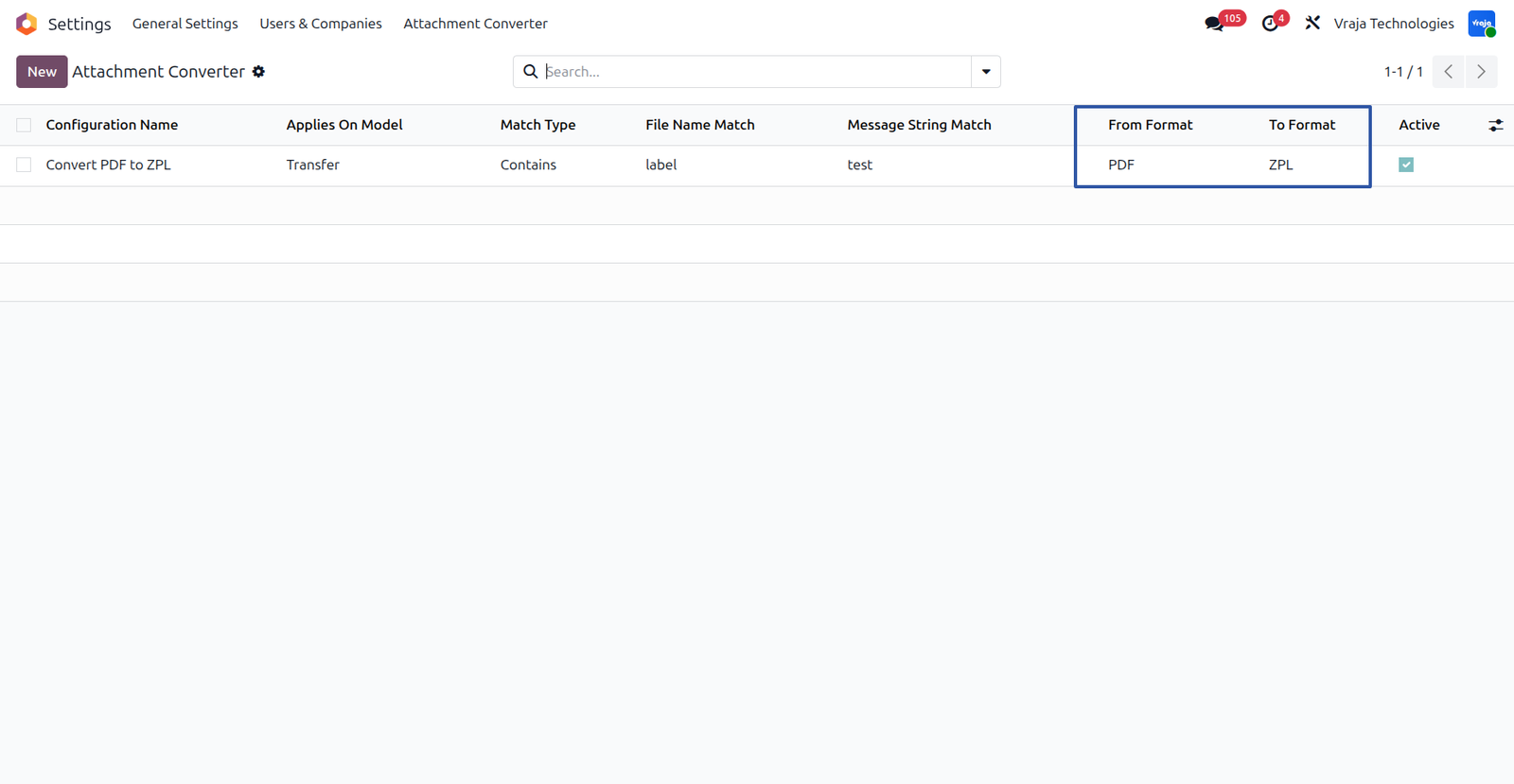
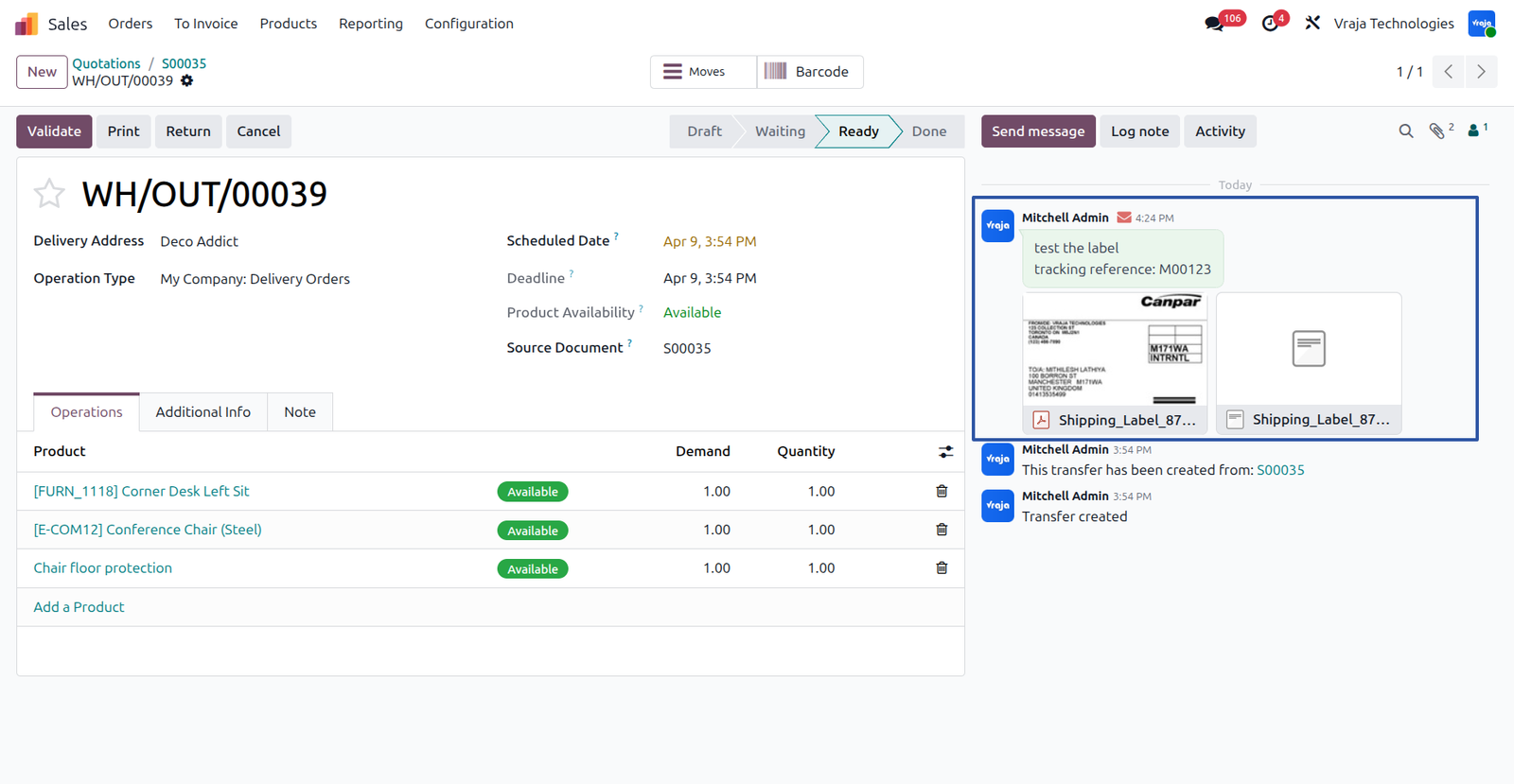
For example,During the shipping process, when a shipment is created, a shipping label is received in PDF format and attached to the record. If ZPL format is required for printing, the system detects the attachment based on configured rules and automatically triggers the conversion.
The PDF file is converted into ZPL format, and the converted ZPL file is attached back to the same record in the chatter, making it easy to access and use for label printing.
ZPL to PDF convertion process:
-Once the configuration for ZPL to PDF is set up, the conversion works automatically during business operations.
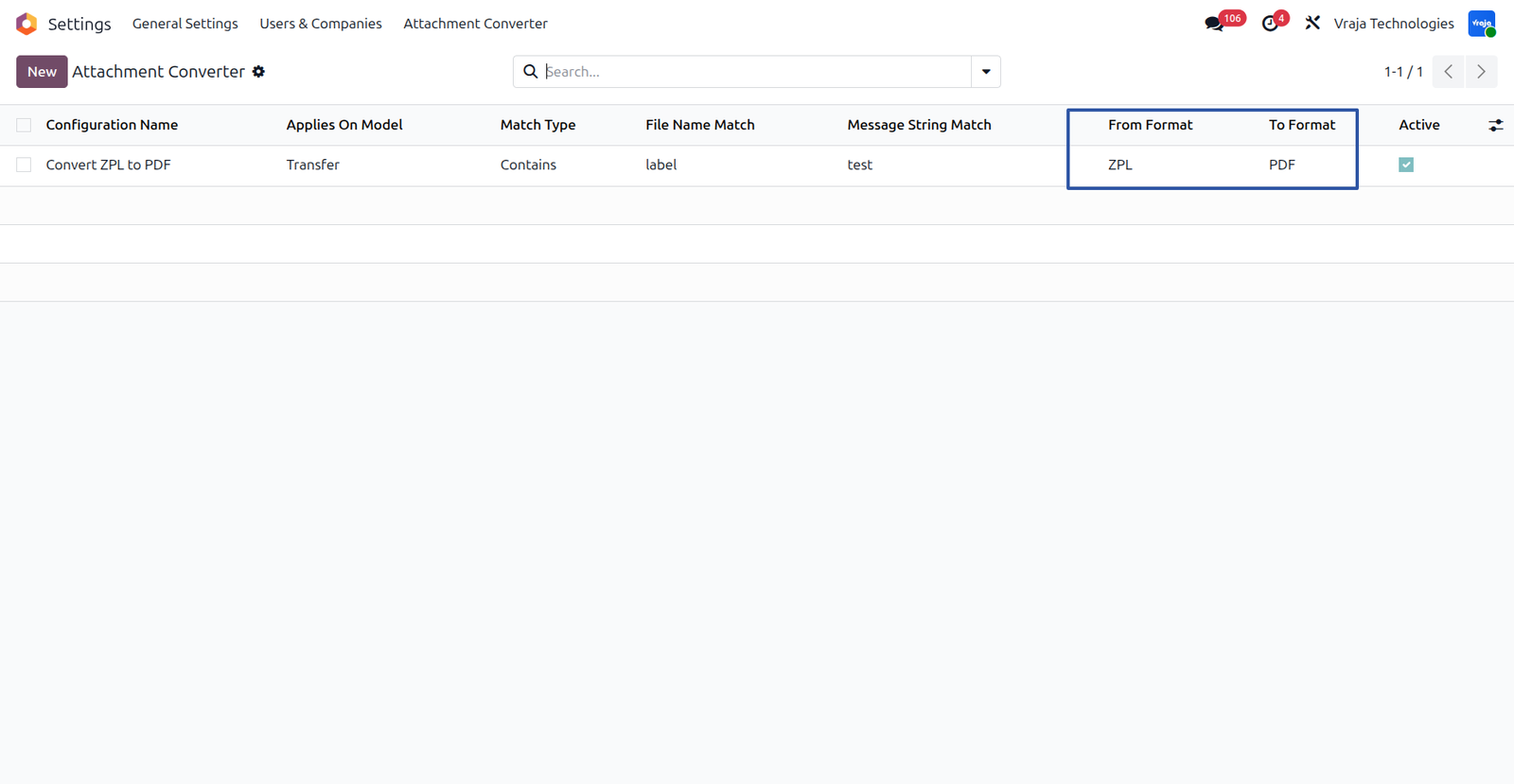
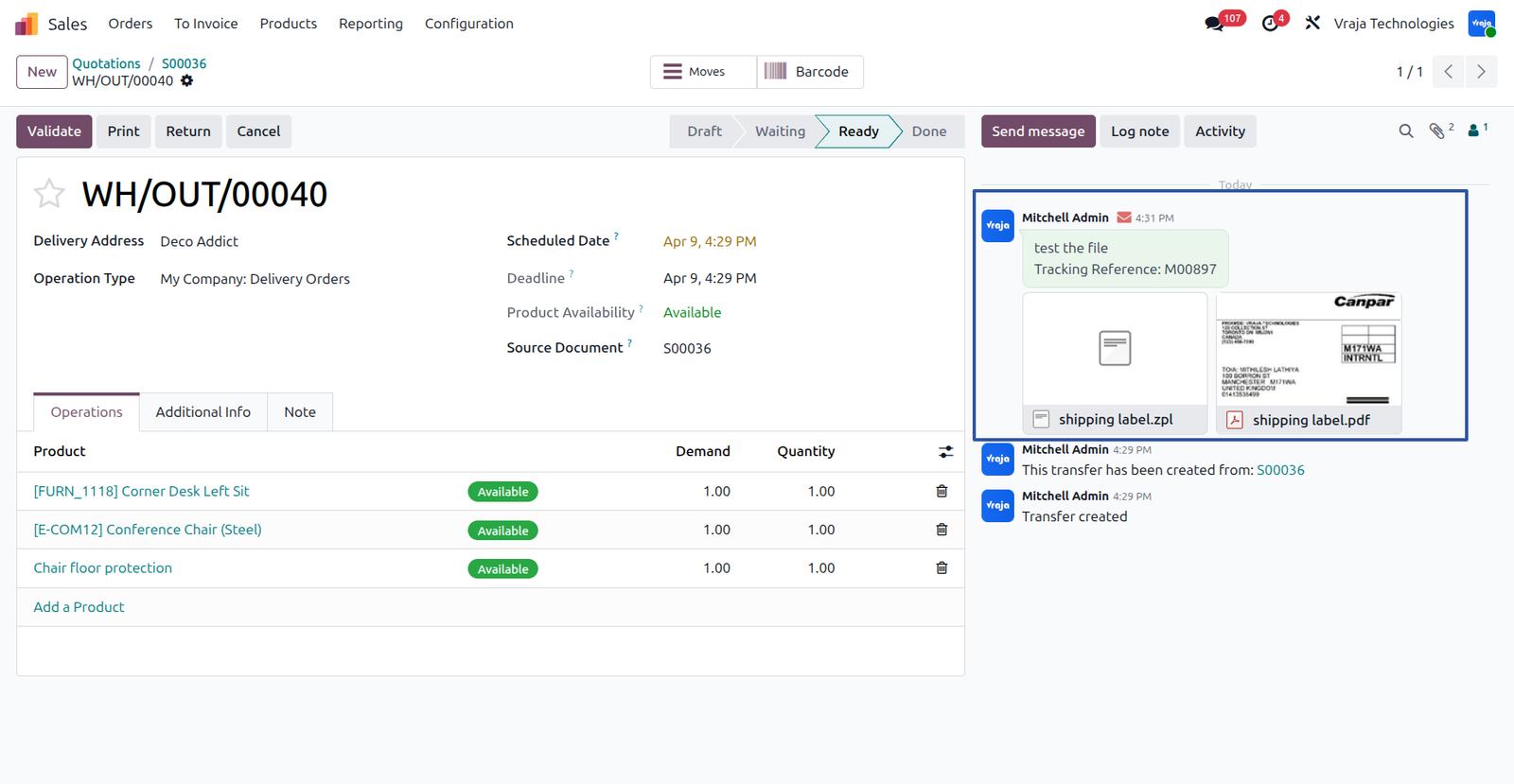
For example,During the shipping or integration process, if a label is received in ZPL format and attached to a record, the system detects it based on the configured rules and automatically triggers the conversion when PDF format is needed for viewing or sharing.
The ZPL file is converted into PDF format, and the converted PDF file is attached back to the same record in the chatter, allowing users to easily view, download, and share the document.
 Does the conversion happen automatically?
- Yes, once the configuration is set, the conversion happens automatically when an attachment matches the defined conditions.
Where can I find the converted file?
- The converted file is attached to the same record in the chatter, along with the original file.
Can I configure both PDF to ZPL and ZPL to PDF?
- Yes, you can create separate configurations for(PDF → ZPL / ZPL → PDF).
Does it support multi-page files?
- The module works best with single-page files. Multi-page conversions may not always produce optimal results.
Can I apply this to specific models only?
- Yes, you can configure the conversion for specific models like Sales Orders, Delivery Orders, etc.
What happens if conversion fails?
- If the conversion fails, no new attachment is created or inside chatter.
I would like to request a custom feature for this application. What’s the process to get it implemented?
- We’re happy to help tailor the application to meet your business needs! You can reach us via sales@vrajatechnologies.com
Who is the point of contact for technical support, configuration support or bug-related queries?
- You can reach us via support@vrajatechnologies.com
Submit a Support Ticket
If you encounter any issues while using our app that are caused by the app itself, we offer complimentary support for 90 days from the date of purchase.
To create a support ticket, please register via the Vraja Technologies Support Email and provide the necessary details so we can assist you in resolving the issue.

Email Us
support@vrajatechnologies.com

 1.png)
Contact Us
vrajatechnologies.com/contactus

Support
vrajatechnologies.com/support-policy
Vraja Technologies Services

Odoo Implementation

Odoo App Integration Services

Odoo Customization

Odoo Consultation
Odoo Support & Maintenance

Odoo Developer Outsourcing
Suggested Application














Reviews
There are no reviews yet.