
Description
.png)
 Enterprise Community Odoo.sh
Website Product Restock Date & Incoming Qty | Product Restock Visibility & Arrival Dates
This module enhances the Odoo eCommerce product page by displaying incoming stock quantity and expected arrival dates when a product is out of stock. Instead of leaving customers without information, it shows a clear and structured incoming stock table based on confirmed Purchase Orders.
The feature is fully variant-aware, dynamically updating stock details when users switch between variants without reloading the page. Arrival dates are intelligently calculated using incoming shipment schedules or purchase order planned dates, ensuring accurate and reliable information.
The section automatically appears only when needed and hides when stock becomes available, maintaining a clean user experience. Multiple incoming shipments are displayed in order of earliest arrival, along with a summary count.
This module helps businesses improve customer trust, reduce cart abandonment, and increase conversions by providing transparency on restocking timelines.
We specialize in delivering advanced Odoo solutions across multiple domains. Our expertise includes:

EDI & SWIFT/ACH Payment Integrations
End-to-end EDI automation, including X12, EDIFACT, XML standards, & financial integrations such as SWIFT, ACH, & Fedwire.


eCommerce Integrations
Seamless integration with leading eCommerce platforms to sync products, orders, inventory, and customer data in real time.

Shipping Integrations
Robust shipping connectors for global couriers, offering automated label generation, tracking, and rate computation.

Most Useful Apps for your ERP
A wide range of highly-rated Odoo modules designed to enhance automation, improve productivity, & simplify business operations.
 Features
 Process
 FAQs
FAQs
 Auto Show/Hide with Real-Time Stock:
Automatically displays incoming stock when a product is out of stock and hides it once stock is available.
Variant-Wise Dynamic Updates:
Shows variant-specific incoming stock details and updates instantly on variant change without page reload.
Accurate Arrival Dates from Confirmed Orders:
Displays reliable restock dates based only on confirmed Purchase Orders and incoming shipments.
Multiple Shipments with Smart Sorting:
Lists all incoming shipments sorted by earliest arrival date for better clarity.
Visible to All Website Visitors:
Ensures incoming stock information is accessible to every user on the website.
Open the product page on your website. The product currently has stock available, so the Incoming Stock section is not visible at all. Customers simply see the product as available to purchase.
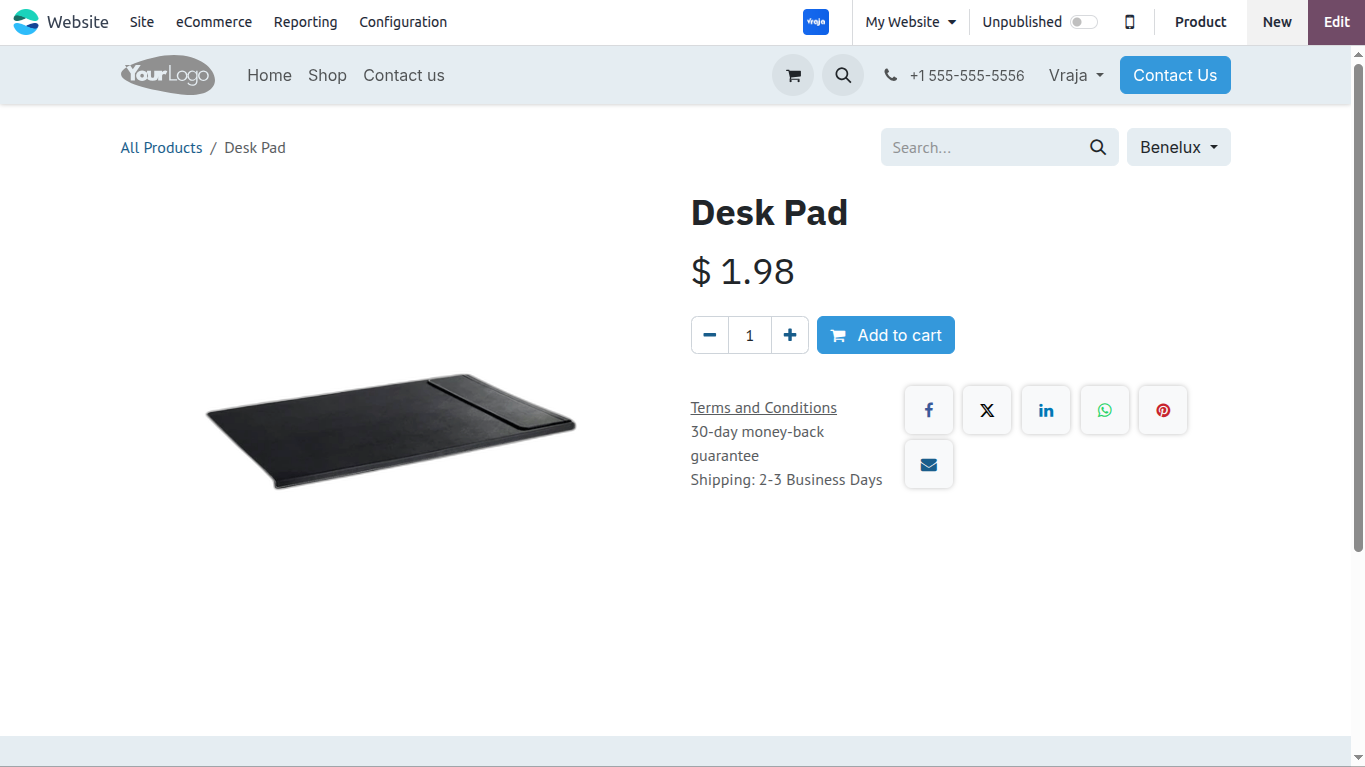
Now the product goes out of stock. At this point, no confirmed Purchase Orders exist for this product yet, so the Incoming Stock section still does not appear because the module only shows real, confirmed data.

Go to the Purchase module in the backend and create a new Purchase Order for the out-of-stock product. Add the product, set the quantity, and set the expected delivery date.
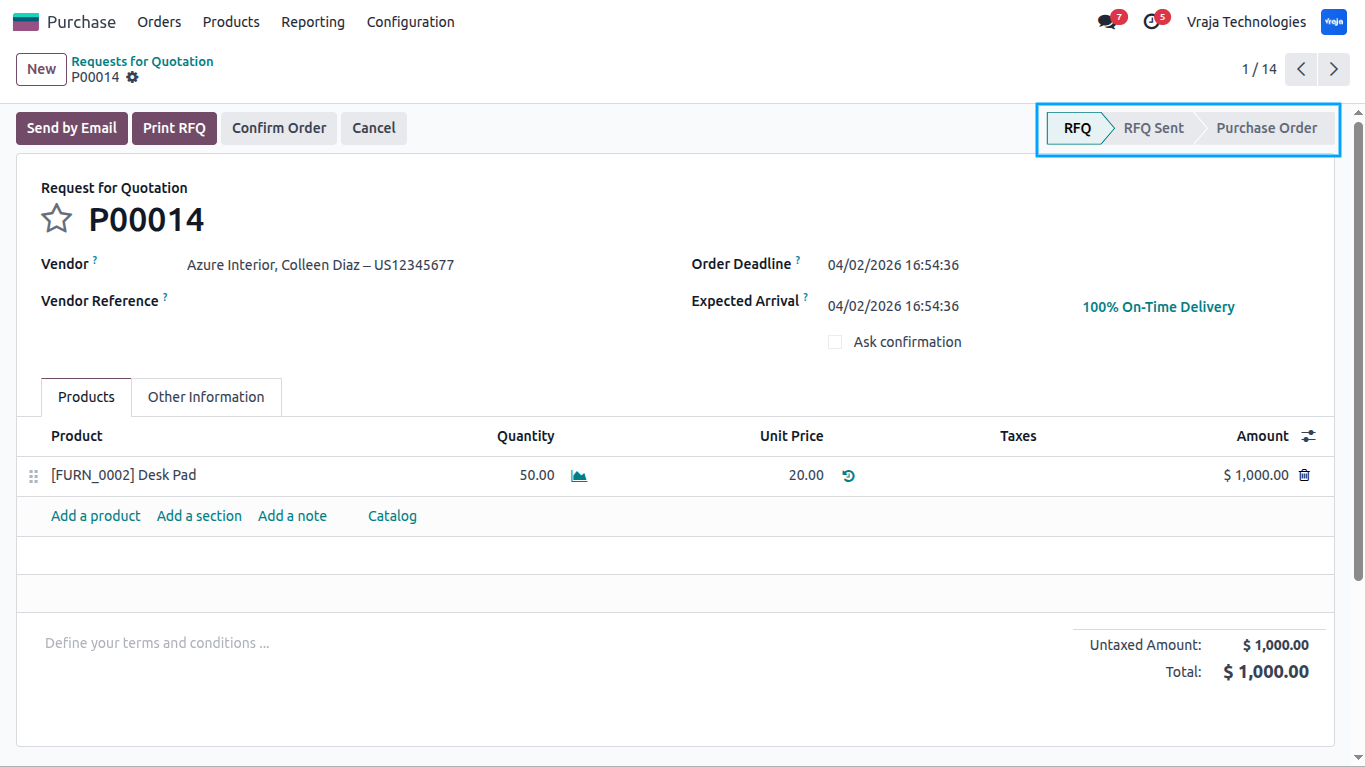
Confirm the Purchase Order by clicking the Confirm Order button. The order is now in a confirmed state and the module will start reading from it.

Go back to the product page on the website. The Incoming Stock section now automatically appears, showing the incoming quantity and the expected arrival date from the Purchase Order you just confirmed.

If you have multiple confirmed Purchase Orders for the same product, all shipments are listed in the table sorted by the earliest arrival date first. The footer shows the total number of shipments on the way.

Now switch to a different variant on the different product page (for example, change size or color). The table instantly refreshes and shows only the incoming stock details for that specific variant — no page reload required.

If a particular variant already has stock available, switching to that variant will hide the incoming stock section completely. Only variants with zero stock will show the table.

Once the shipment is received in the backend and stock is updated, go back to the website product page. The Incoming Stock section automatically disappears — the product is back in stock and ready to purchase.

.png)
 Will customers see this section even if the product is in stock?
- No. The incoming stock section is only shown when the product is out of stock. As soon as stock is available, it automatically disappears.
What if a product has multiple variants — will all of them show the same information?
- No. Each variant shows its own incoming stock details. So if a customer switches from Size S to Size M, the table will update to show only the restocking information for Size M.
Where does the arrival date come from? Is it accurate?
- The arrival date is taken directly from your confirmed supplier Purchase Orders in Odoo. It reflects the most up-to-date expected delivery date available in the system.
What if the product is coming in multiple shipments?
- All shipments will be listed in the table, sorted from the earliest to the latest arrival date, so customers can see the complete restocking picture.
Will customers see fake or draft orders in the table?
- No. Only confirmed Purchase Orders with unreceived quantities are shown. Draft, cancelled, or already received orders are completely ignored.
Will this slow down my website?
- Not at all. When a product is in stock, the module does nothing in the background. It only activates when a product is out of stock, so there is zero impact on your website speed under normal conditions.
Do I need to do anything manually to show or hide this section?
- No. Everything is fully automatic. The module handles all show/hide logic on its own based on your live stock and Purchase Order data.
I would like to request a custom feature for this application. What’s the process to get it implemented?
- We’re happy to help tailor the application to meet your business needs! You can reach us via sales@vrajatechnologies.com
Who is the point of contact for technical support, configuration support or bug-related queries?
- You can reach us via support@vrajatechnologies.com
Submit a Support Ticket
If you encounter any issues while using our app that are caused by the app itself, we offer complimentary support for 90 days from the date of purchase.
To create a support ticket, please register via the Vraja Technologies Support Email and provide the necessary details so we can assist you in resolving the issue.

Email Us
support@vrajatechnologies.com

 1.png)
Contact Us
vrajatechnologies.com/contactus

Support
vrajatechnologies.com/support-policy
Vraja Technologies Services

Odoo Implementation

Odoo App Integration Services

Odoo Customization

Odoo Consultation

Odoo Support & Maintenance

Odoo Developer Outsourcing
Suggested Application






Reviews
There are no reviews yet.