ANSI X12 Supplier 3PL Odoo Integration |
Community Enterprise Odoo.sh |
Our 3PL EDI module helps automate warehouse operations by exchanging standardized EDI documents between Odoo and your logistics partner. Instead of manual communication or CSV files, this module sends and receives real-time EDI transactions to streamline inventory, fulfilment, and shipping workflows.
This integration supports ANSI X12 EDI standards and can be connected to any 3PL provider that supports EDI, such as eStore Logistics, ShipHero, Amware, Bleckmann, Mainfreight, and more.This integration supports ANSI X12 EDI standards and can be connected to any 3PL provider that supports EDI, such as eStore Logistics, ShipHero, Amware, Bleckmann, Mainfreight, and more.
This module enables smooth ANSI X12 EDI communication between Odoo and third-party logistics (3PL) warehouses.
943 Shipment Advice Export – Automatically generate and send Warehouse Stock Transfer Shipment Advice (943) from Odoo to the 3PL warehouse. 944 Receipt Advice Import – Receive and process the 3PL's Warehouse Stock Transfer Receipt Advice (944) back into Odoo. 940 Shipping Order Export – Send Warehouse Shipping Orders (940) from Odoo to the 3PL warehouse for outbound shipments. 945 Shipping Confirmation Import – Import the 3PL's Warehouse Shipping Advice (945) into Odoo for real-time shipment updates. Automated FTP/SFTP Integration – Supports secure file transfers to and from the 3PL’s FTP/SFTP servers.
|
|
Automatically Export Warehouse Shipping Order (EDI 940) and Stock Transfer Shipment Advice (EDI 943) from Odoo. |
|
|
Automatically Import Warehouse Shipping Advice (EDI 945) and Stock Transfer Receipt Advice (EDI 944) into Odoo. |
|
|
Supports FTP communication protocols for secure data transfer. |
01 Upon Installing the application, you can see the FTP/SFTP Syncing menu.

02 You have to configure the FTP on the left side and on the right side you have to configure the file paths for import and export with Warehouse, 3PL client, Sender Id and, choose backorder configuration for orders. You also have to create schedule actions for import purpose.
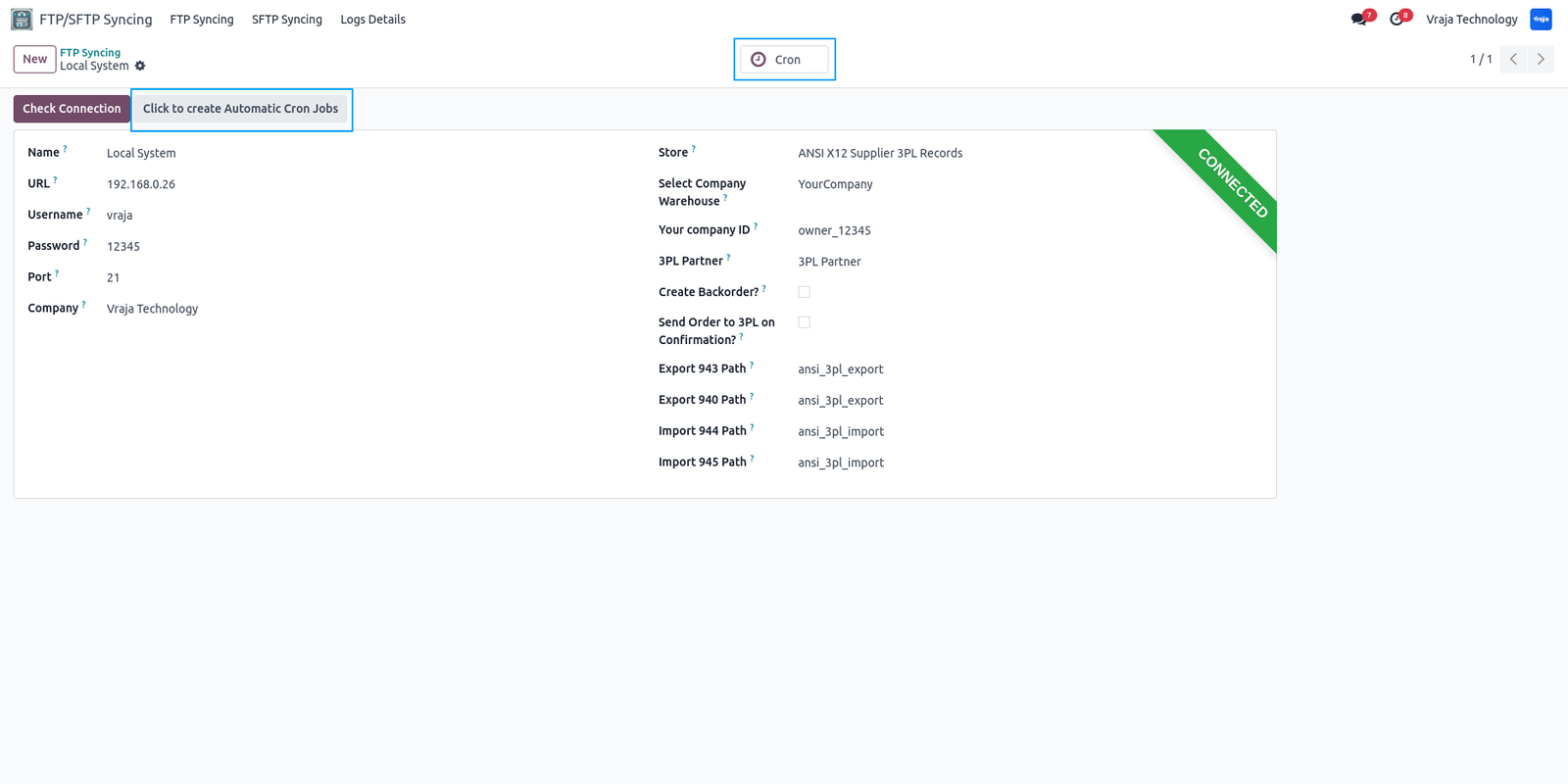
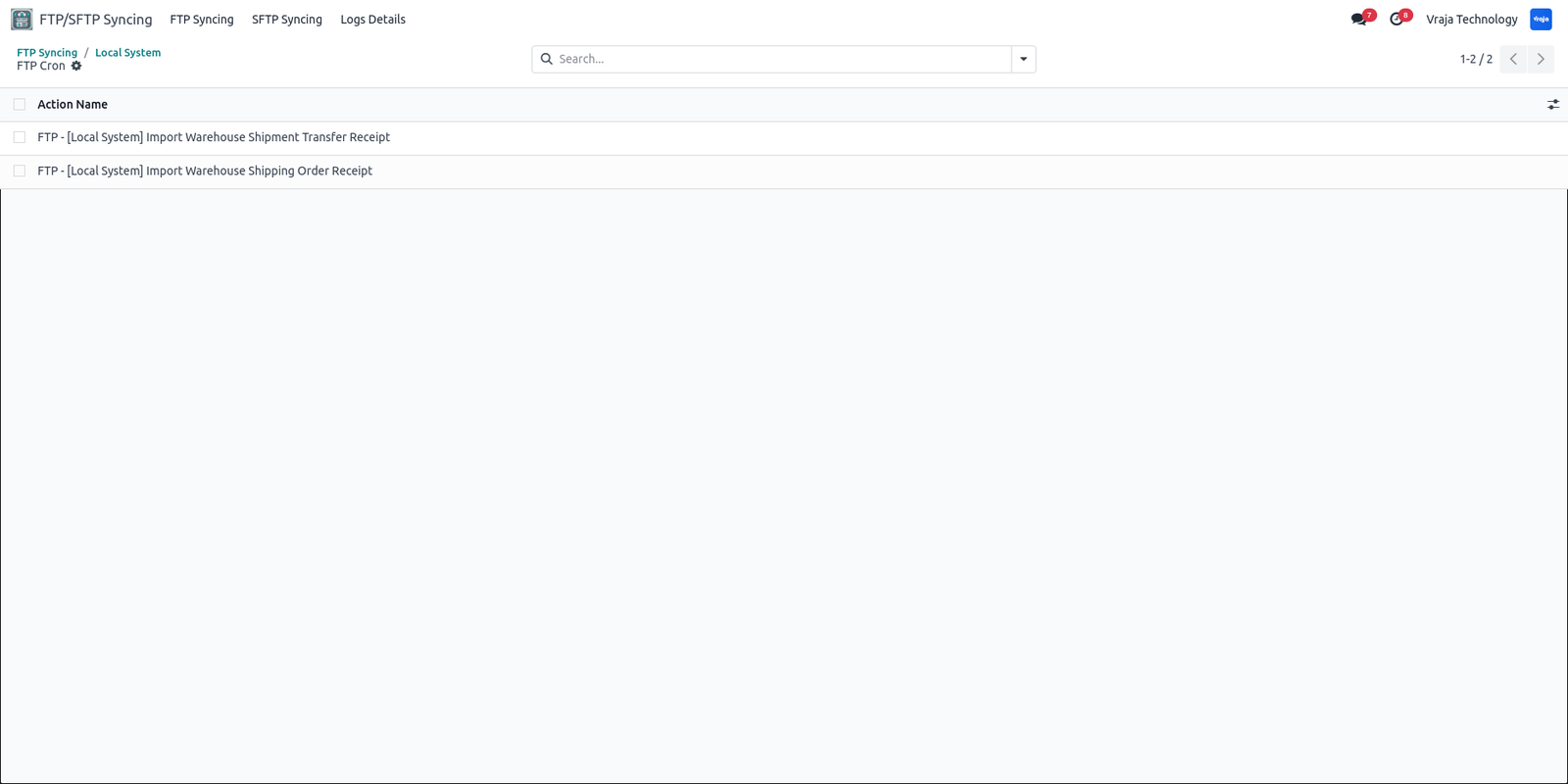
03 These are your schedule actions for importing file and process them accordingly.
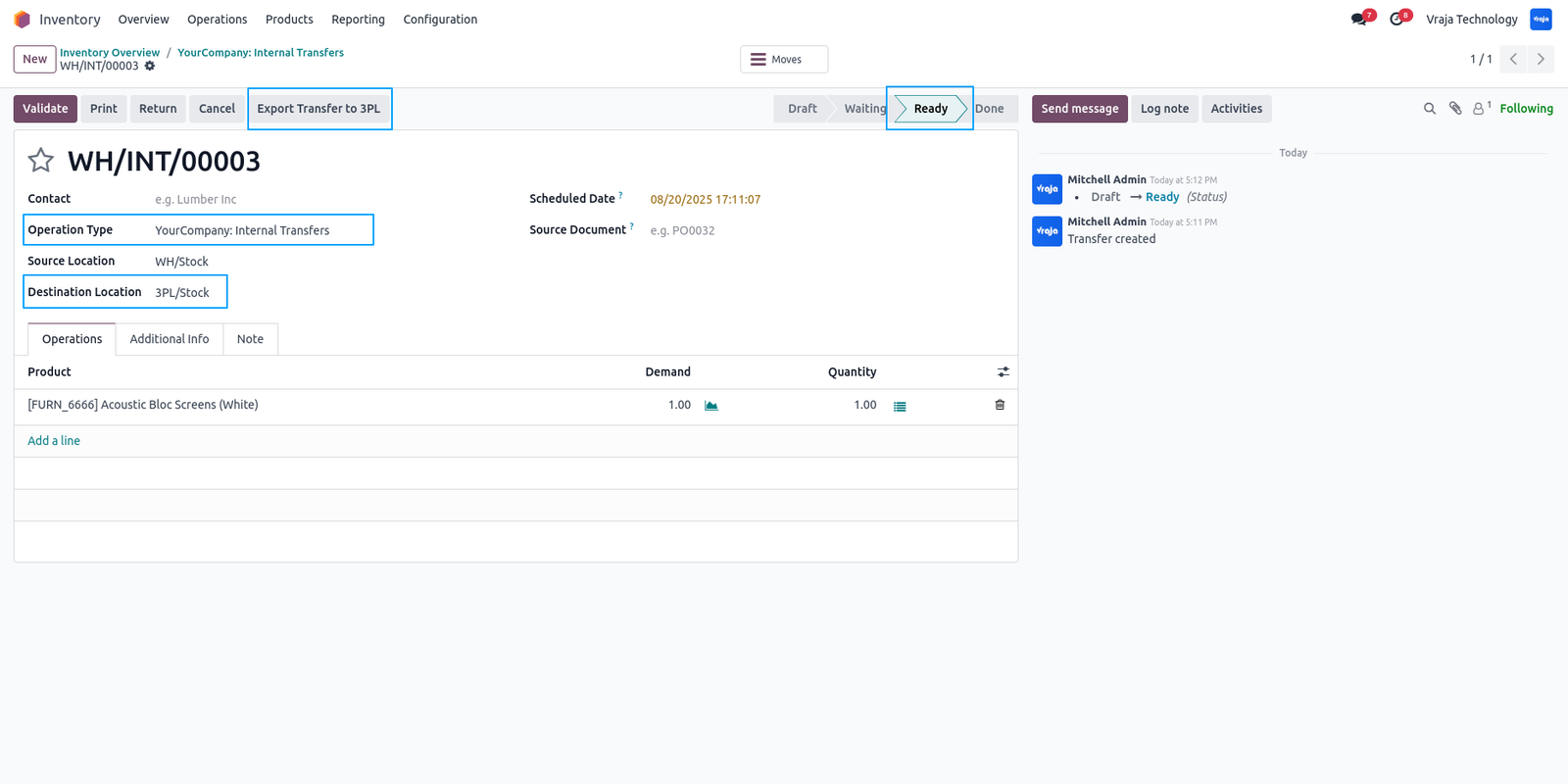
04 You can export the EDI 943 (Stock Transfer Shipment Advice) through button on internal transfer.
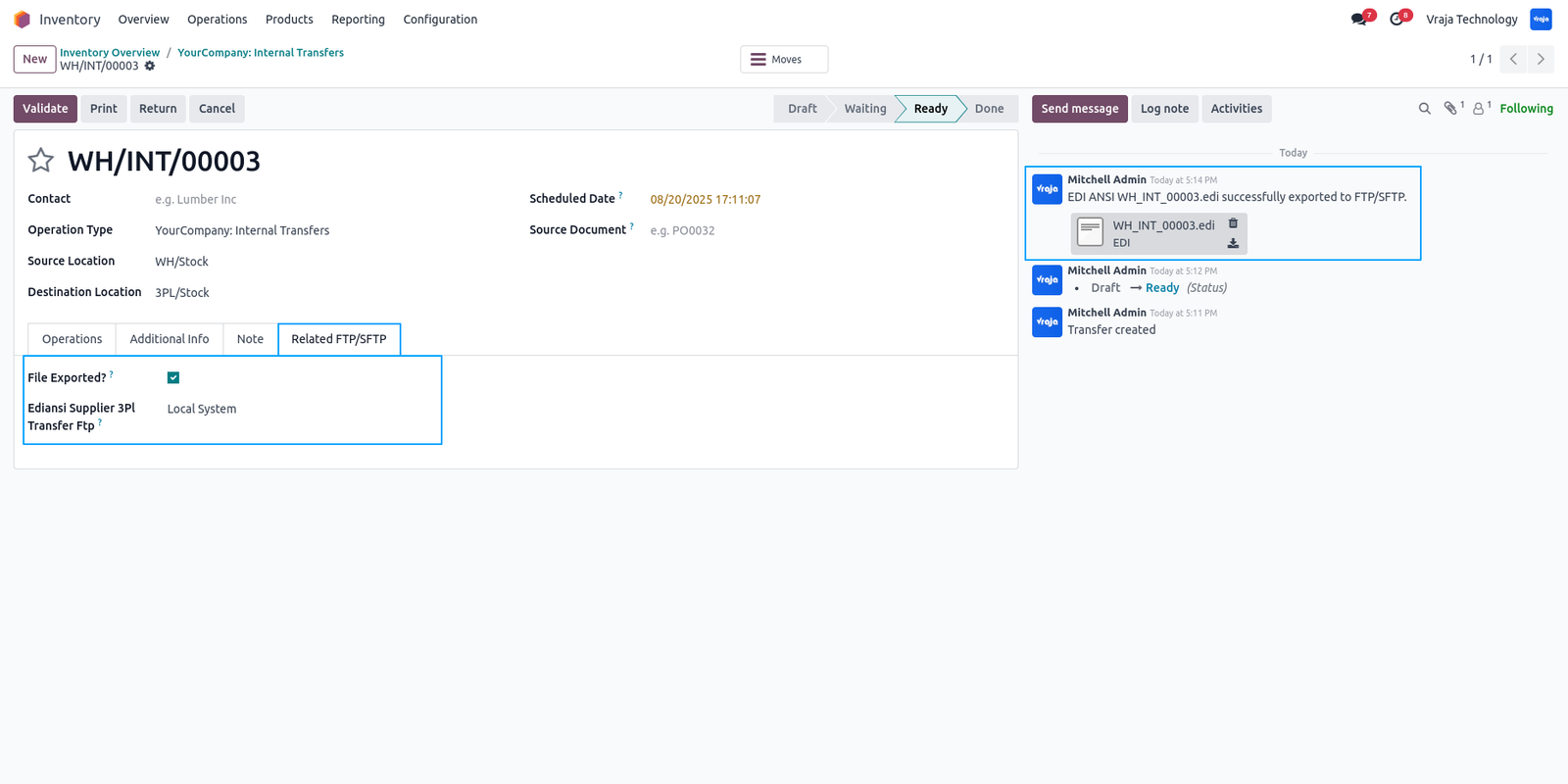
05 Upon successfully exporting the file, you can view the file in the chatter area and FTP used in exporting the file.
06 Sample file for 943 (Stock Transfer Shipment Advice).

07 This Schedule Action will import the 944 (Stock Transfer Receipt Advice) file and process it.
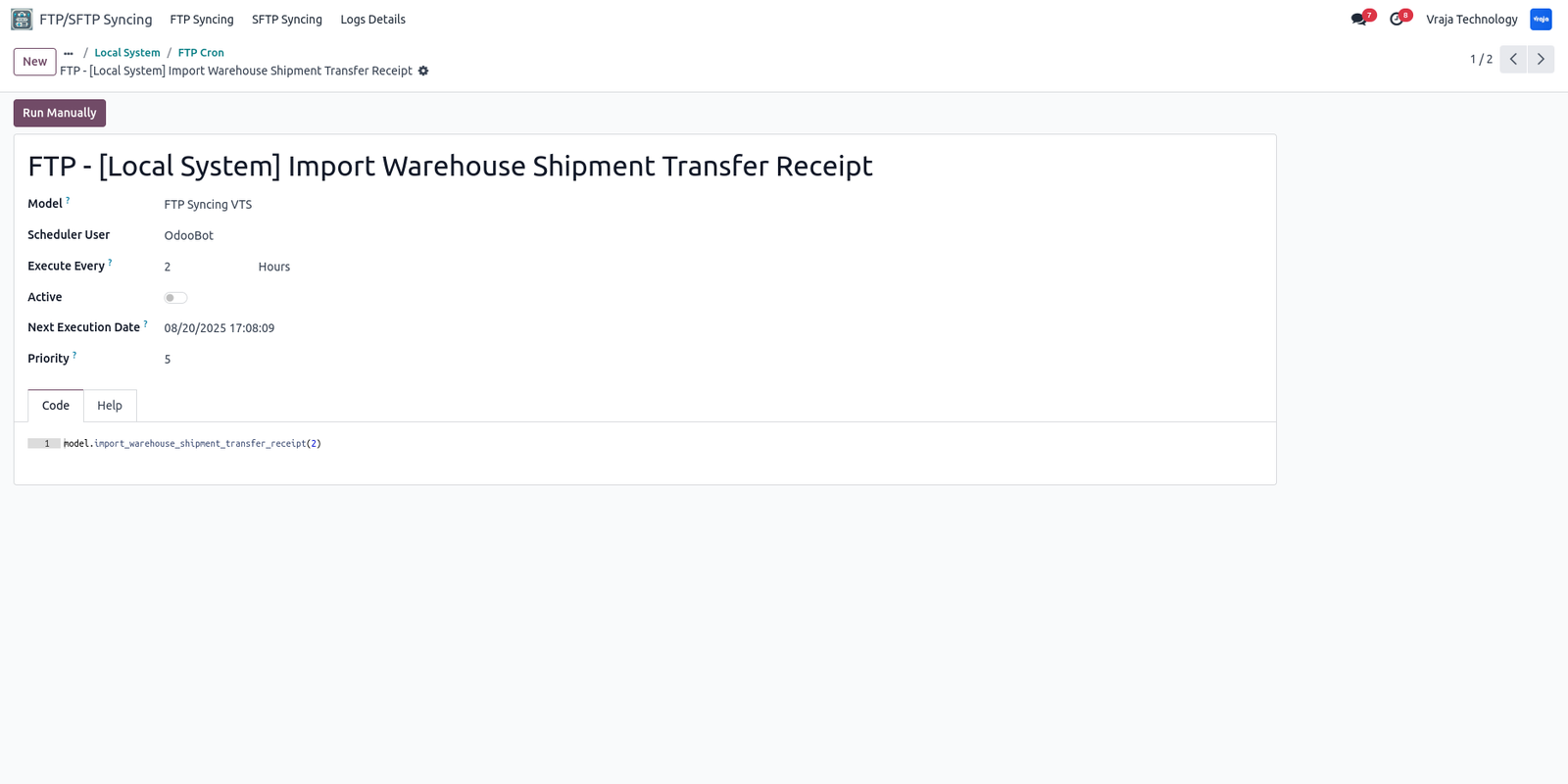
08 After successful operation of schedule action, you can see the transfer in Done state and message post giving the information about the file used to confirm the transfer.

09 You can Export the EDI 940 (Warehouse Shipping Order) through export button or you can export the sale order by confirming the order as well. For auto export of the order, you have to select the configuration for that.
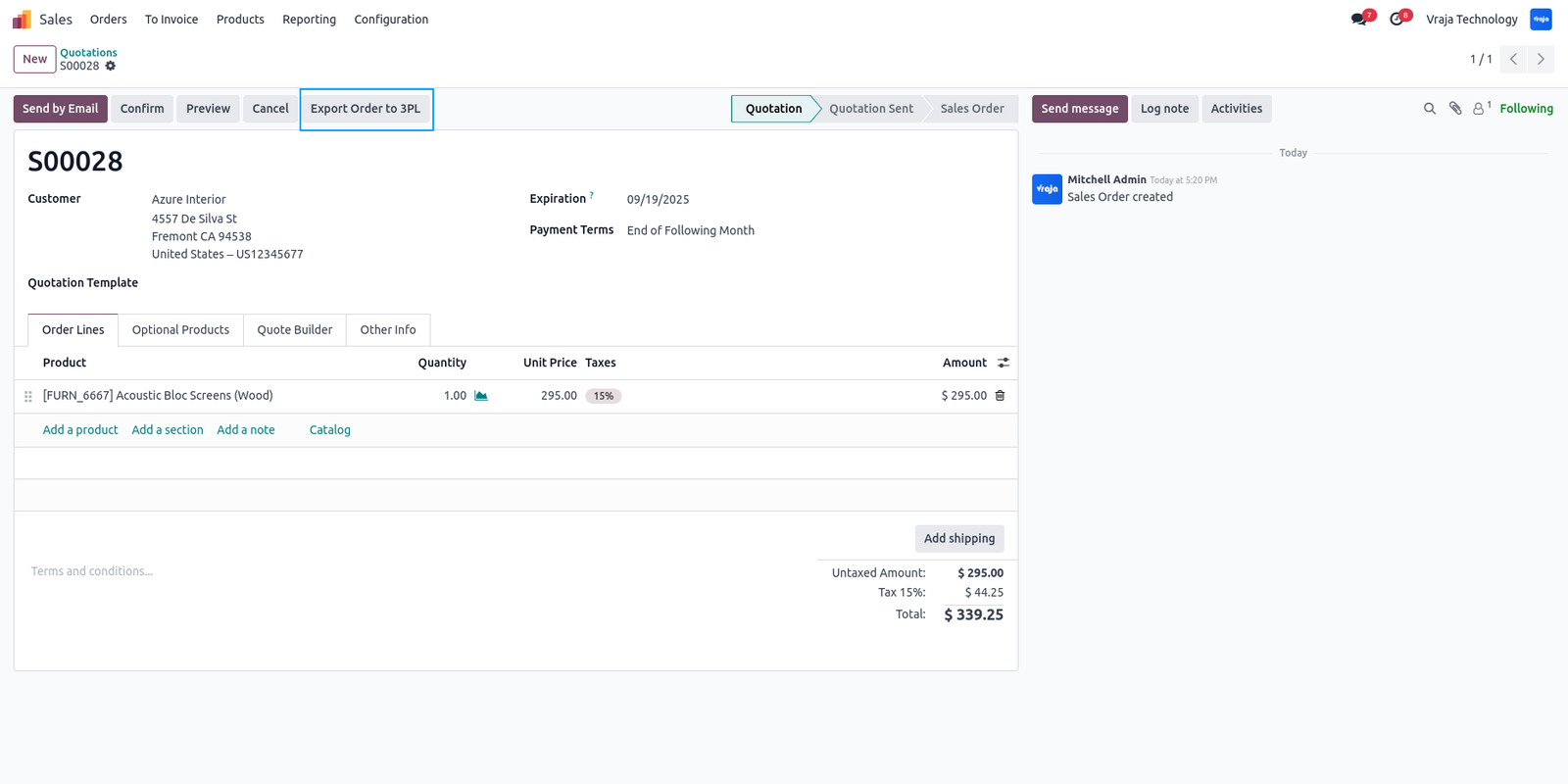
10 Upon successfully exporting the file, you can view the file in the chatter area and FTP used in exporting the file.

11 This Schedule Action will import the 945 (Warehouse Shipping Advice) file and process it.

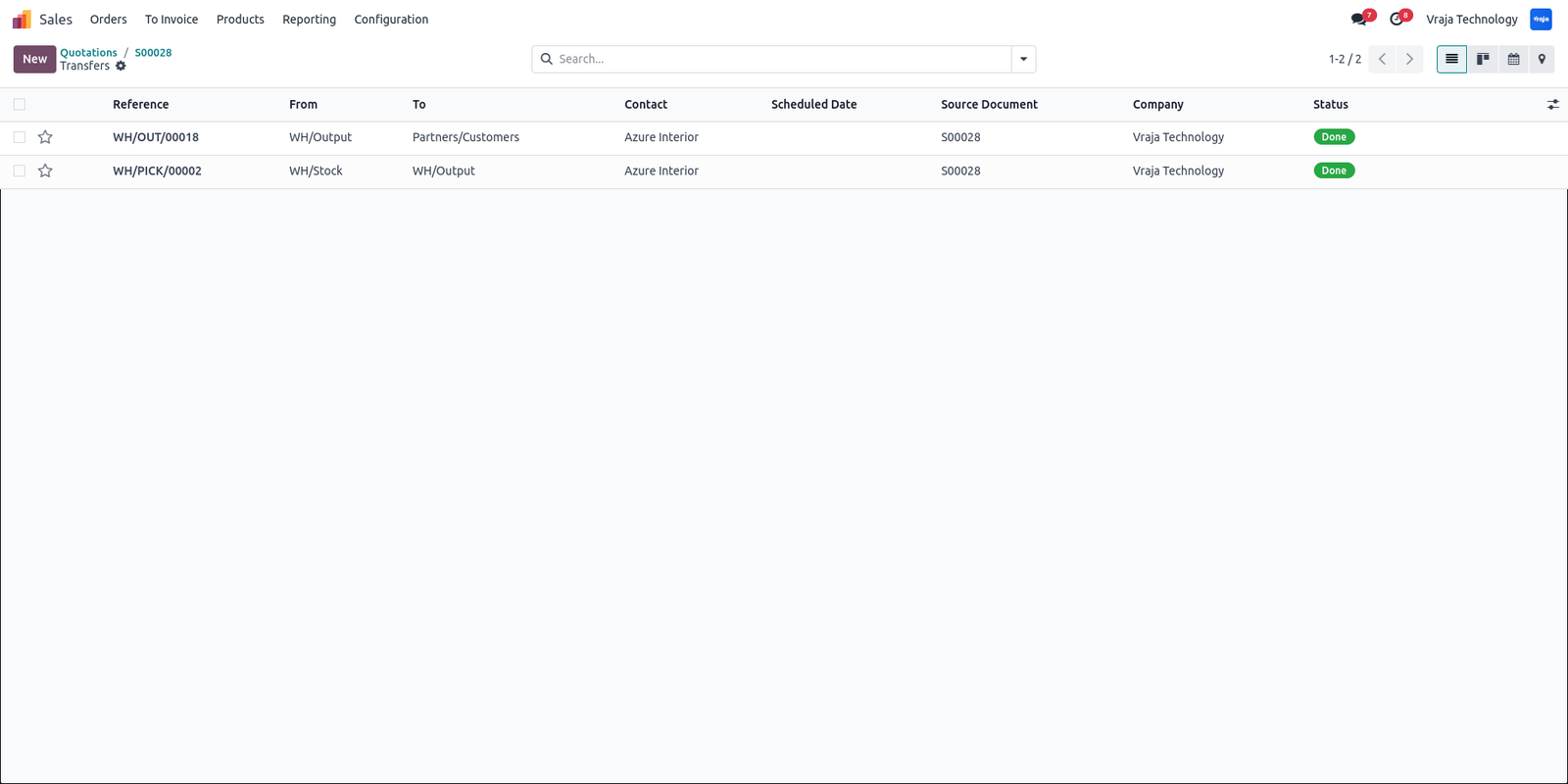
12 Module can process all the steps (1 step, 2 steps, or 3 steps) configured for Delivery automatically. Our example has 2 steps configured.

13 As you can see, both transfer are validated successfully after schedule action run.
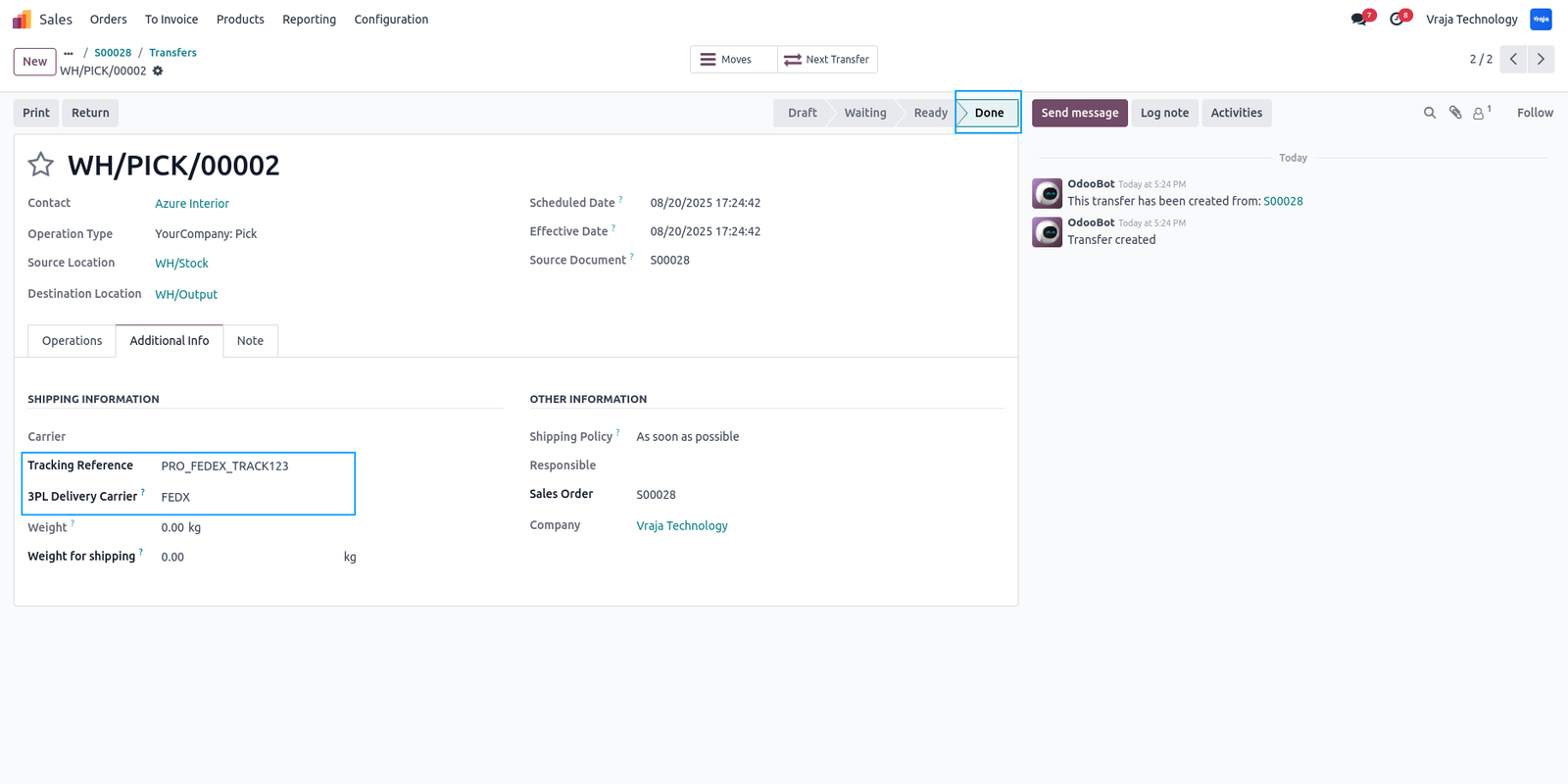
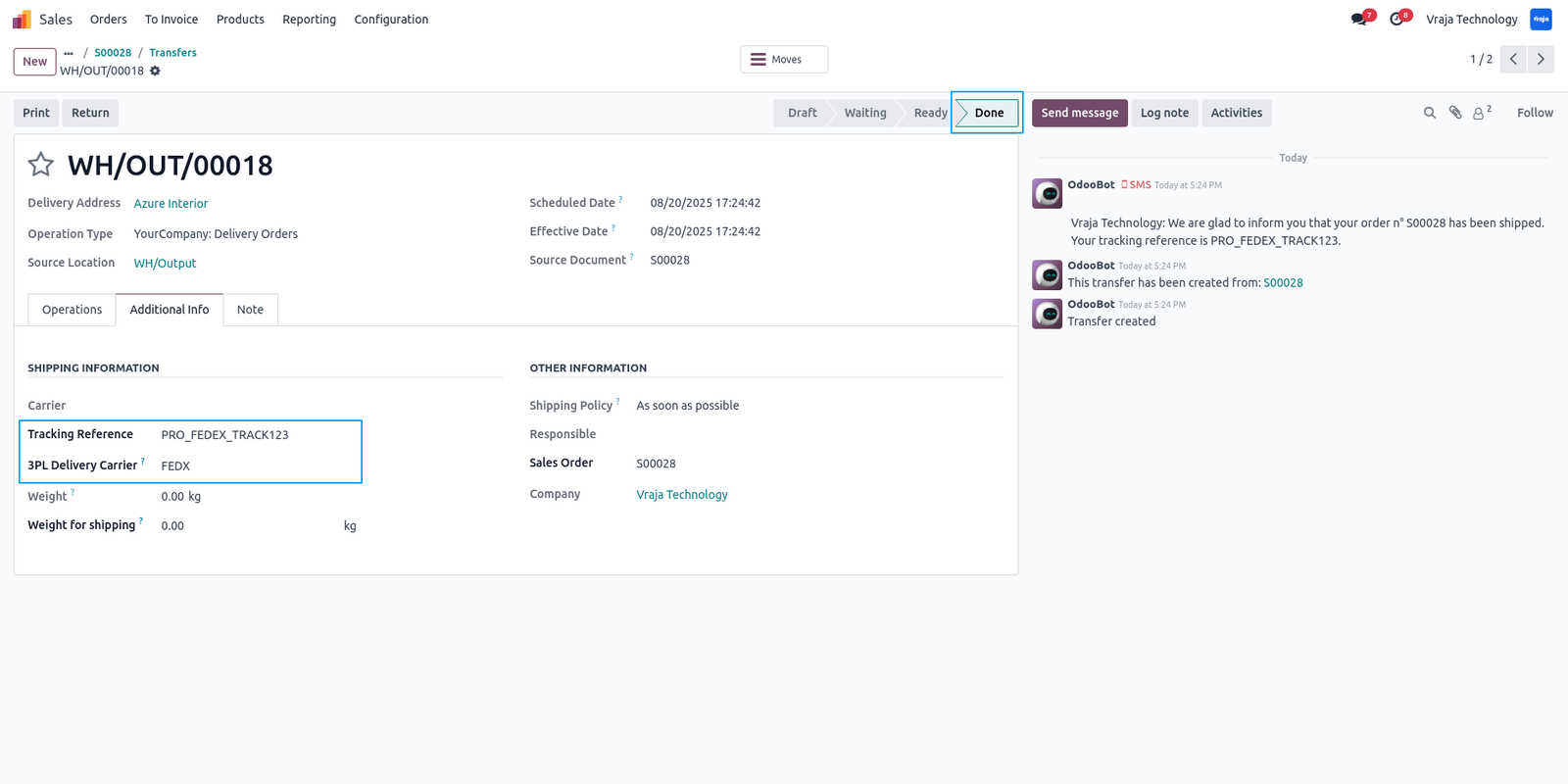
14 Module also sets the Tracking reference and the 3PL delivery carrier on all transfers.
15 You can view the log history from the FTP/SFTP Syncing menu under Log Details.

16 You can see the detailed log operation as well.

|
|
I need an extra customization in this application, how can I get it?You can contact us on support@vrajatechnologies.com or can schedule a DEMO with our team to customize additional features. |
|
|
Is the application compatible with Odoo Enterprise and Community?Yes, this application is supported by both. It is also compatible with test and production environments. |
|
|
Do I get free upgrades and support if I purchase this application?We provide free support for the first 90 days following the purchase date. |
|
|
Is technical knowledge required to set up the integration?While some technical understanding may be helpful, the integration is designed to be user-friendly. Detailed documentation and support may be provided to aid in the setup process. |
|
|
Which protocol you have used to transfer file?We have used FTP protocol to transfer files. |
|
|
Can we see the exported file? If yes, where?Yes, you can view or download the exported file from the message post as shown in the screenshots. |
|
|
Do we get any confirmation or message after schedule action performs its tasks?Yes, we have managed logs for all the process whether it is export or import. |
|
|
Included App Support90 Days Complimentary Support for Supported Versions If you encounter issues caused by the app itself, our team provides complimentary support for 90 days from the date of purchase for supported Odoo versions. |
90 Days Complimentary Support for Supported Versions
If you encounter issues caused by the app itself, our team provides complimentary support for 90 days from the date of purchase for supported Odoo versions.
Customer SupportNeed help with installation, configuration, technical issues, or general questions about the module? Submit a support ticket through our dedicated support portal. |
||
|
Support Portal
vrajatechnologies.com/helpdesk
|
Support PolicyReview our support policy for complete information about support coverage, issue eligibility, exclusions, version compatibility, and other support conditions. |
||
|
Support Policy
vrajatechnologies.com/support-policy
|
Scan for Support |

||
|
Support Portal
vrajatechnologies.com/helpdesk
|
A powerful Odoo import/export solution supporting CSV, TSV, XLSX, TXT, FTP/SFTP, and manual file upload for seamless data transfer. It offers dynamic mapping, default values, validations, filters, relational data handling, error tracking, and complete logging for reliable operations.
This module manages the complete transportation EDI workflow in Odoo, including 204 Load Tender, 990 Carrier Response, 214 Shipment Status, 210 Freight Invoice, and 820 Payment Order. It supports secure FTP-based communication with carriers and trading partners, enabling smooth shipment processing, tracking, billing, and payment data exchange.
Automates ANSI X12 EDI integration in Odoo by supporting export of EDI 850 Purchase Orders, 860 PO Changes, and 846 Product Inventory, along with import of 810 Bills, 856 ASN, 855 PO Acknowledgments, 997 Functional Acknowledgments, and 832 Vendor Pricelists. It ensures accurate data synchronization with trading partners using FTP protocols and ANSI 4010 format for secure, reliable, and streamlined EDI file exchange.
This module automates trading partner communication by importing EDI 850/860 Purchase Orders into Odoo as Sales Orders and exporting EDI 855 PO Acknowledgments, 856 ASN, 810 Invoices, and 832 Sales Pricelists. It supports ANSI 4010 format and secure FTP-based data exchange, helping suppliers reduce manual work, improve order accuracy, and streamline EDI operations directly from Odoo.
This module automates the complete purchasing workflow, including ORDERS, ORDRSP, ORDCHG, DESADV, RECADV, INVOIC, REMADV, PRICAT, and INVRPT documents. It supports secure FTP/SFTP data exchange and EDIFACT D96A/D97A formats, helping businesses streamline supplier communication, order processing, delivery confirmation, billing, and payment updates in Odoo.
This module automates B2B document exchange by importing ORDERS and ORDCHG into Odoo Sales Orders and exporting ORDRSP, DESADV, INVOIC, PRICAT, and INVRPT to trading partners. It also supports RECADV and REMADV processing with secure FTP/SFTP communication, helping suppliers reduce manual entry, improve accuracy, and streamline order, delivery, invoicing, payment, pricing, and inventory operations.
This all-in-one Odoo EDI solution connects Odoo with trading partners using FTP, SFTP, and AS2 protocols, with a dynamic XML mapping engine to import, export, create, or update any Odoo record without coding. It supports secure AS2 file transfer, MDN acknowledgments, scheduled automation, remote folder synchronization, and reliable bidirectional data exchange across any Odoo model.
This all-in-one Odoo EDI solution connects Odoo with trading partners using FTP and SFTP protocols, with a dynamic XML mapping engine to import, export, create, or update any Odoo record without coding. It supports remote directory synchronization, scheduled automation, and reliable bidirectional data exchange across any Odoo model for accurate and streamlined business workflows.
Explore Before Purchase |
Start with a free trial
Test the connector with your real workflows using our 15-day free trial. If you need help, our product experts will guide you throughout the trial.
|
|
Test the connector with your real workflows.Our product experts will guide you during the trial to help you evaluate, configure, and use the connector with confidence.
15-Day
Trial
Expert
Guidance
Real
Workflow Testing
|