ABA EDI Odoo Integration (Domestic Payments) |
Community Enterprise Odoo.sh |
The ABA EDI Odoo Integration for Domestic Payments is a reliable and efficient solution designed to automate payment processes for businesses and financial institutions, specifically within Australia. It is particularly effective for managing large volumes of transactions with accuracy and minimal manual effort. This integration supports the ABA (Australian Banking Association) file format, which is the standard format used for electronic fund transfers across Australian banks. Additionally, it ensures secure data transmission through FTP communication protocols, facilitating seamless and compliant domestic payment processing within the Australian financial environment.
|
|
Automates domestic payment processes for businesses and financial institutions. |
|
|
Ideal for handling multiple transactions efficiently. |
|
|
Primarily used for domestic payment processing. |
|
|
Supports the ABA file format for electronic fund transfers. |
|
|
Supports FTP communication protocols for secure data transfer. |
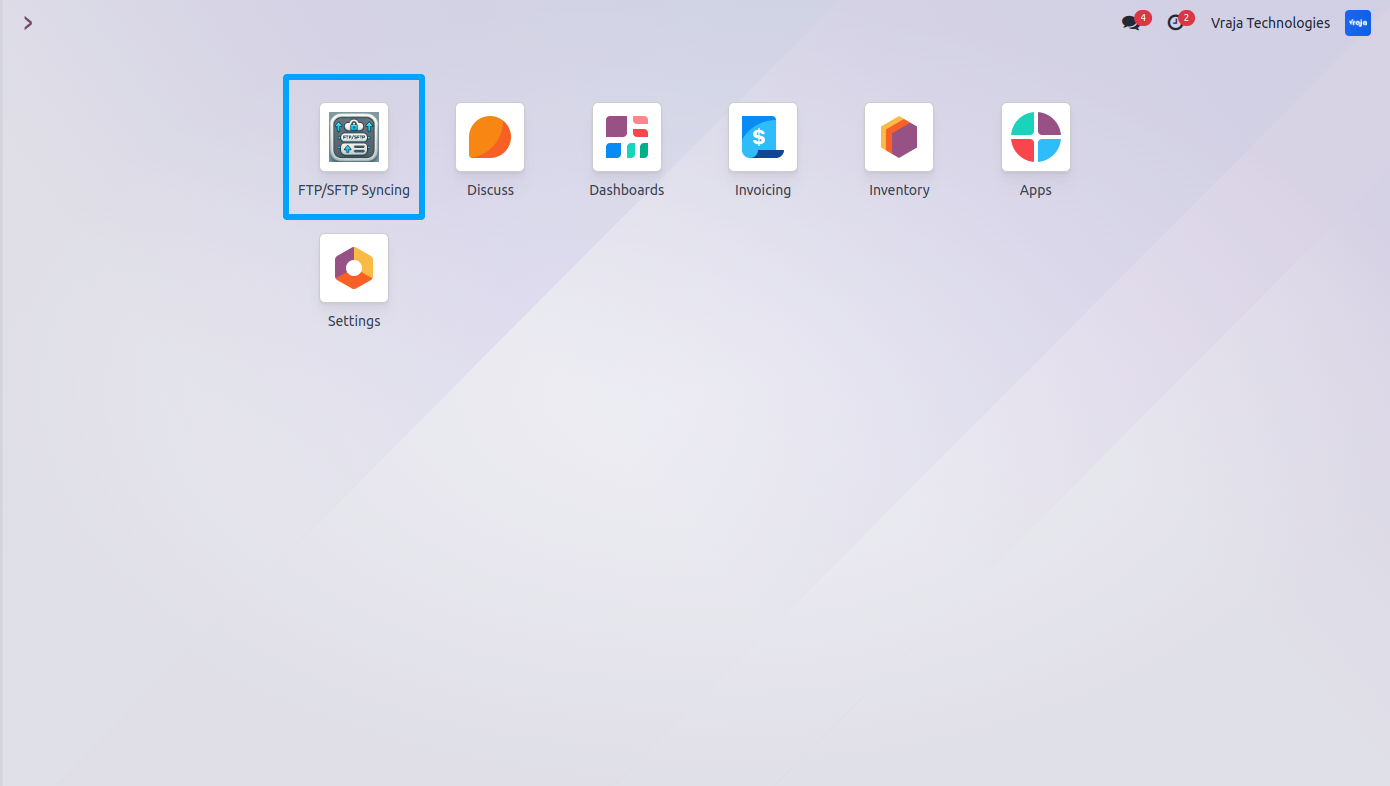
01 After installing the application, the FTP/SFTP syncing menu becomes accessible.
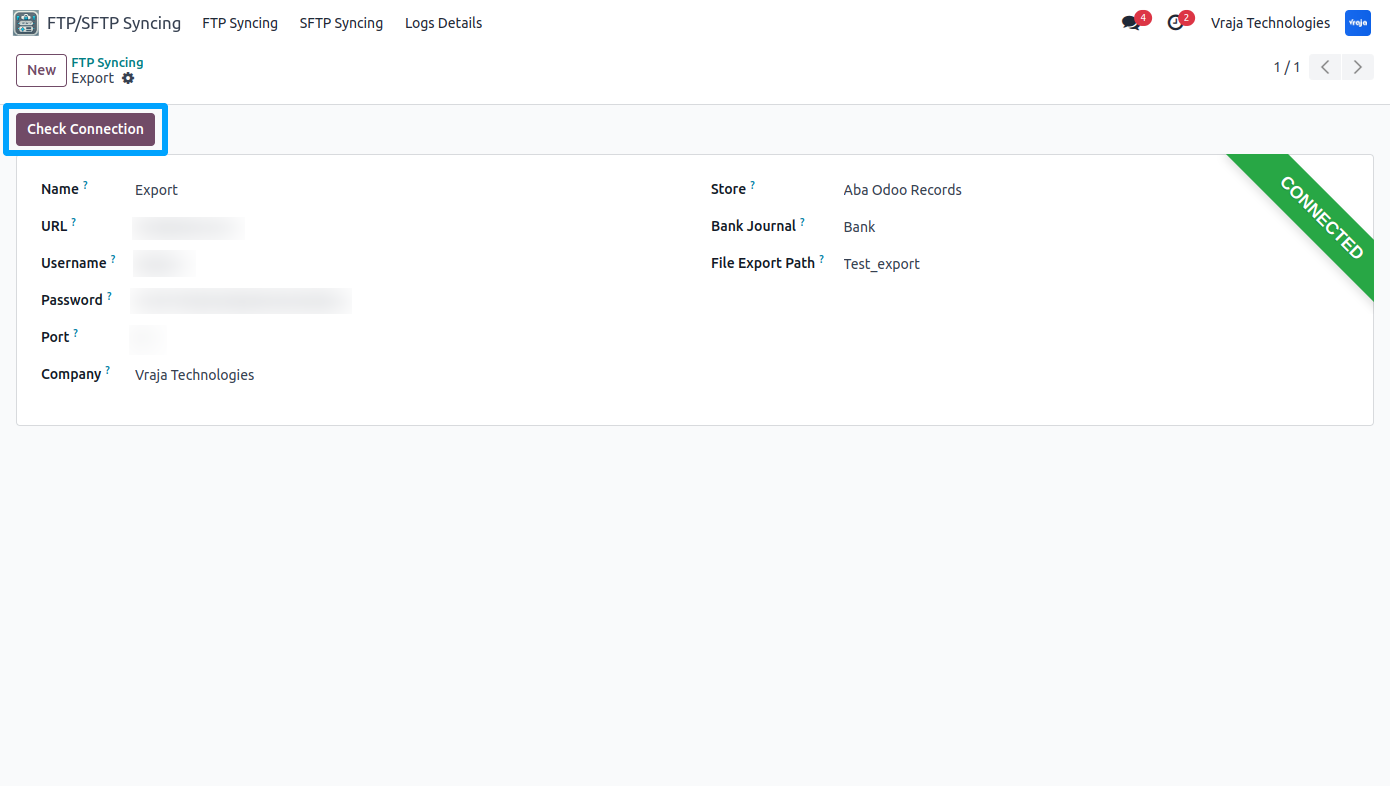
02 On this screen, enter the FTP credential details for server connection. Use the 'Check Connection' button to verify connectivity. Next, select the 'ABA Odoo Records' store, specify the journal whose payment you want to export, and define the server directory names for exporting.
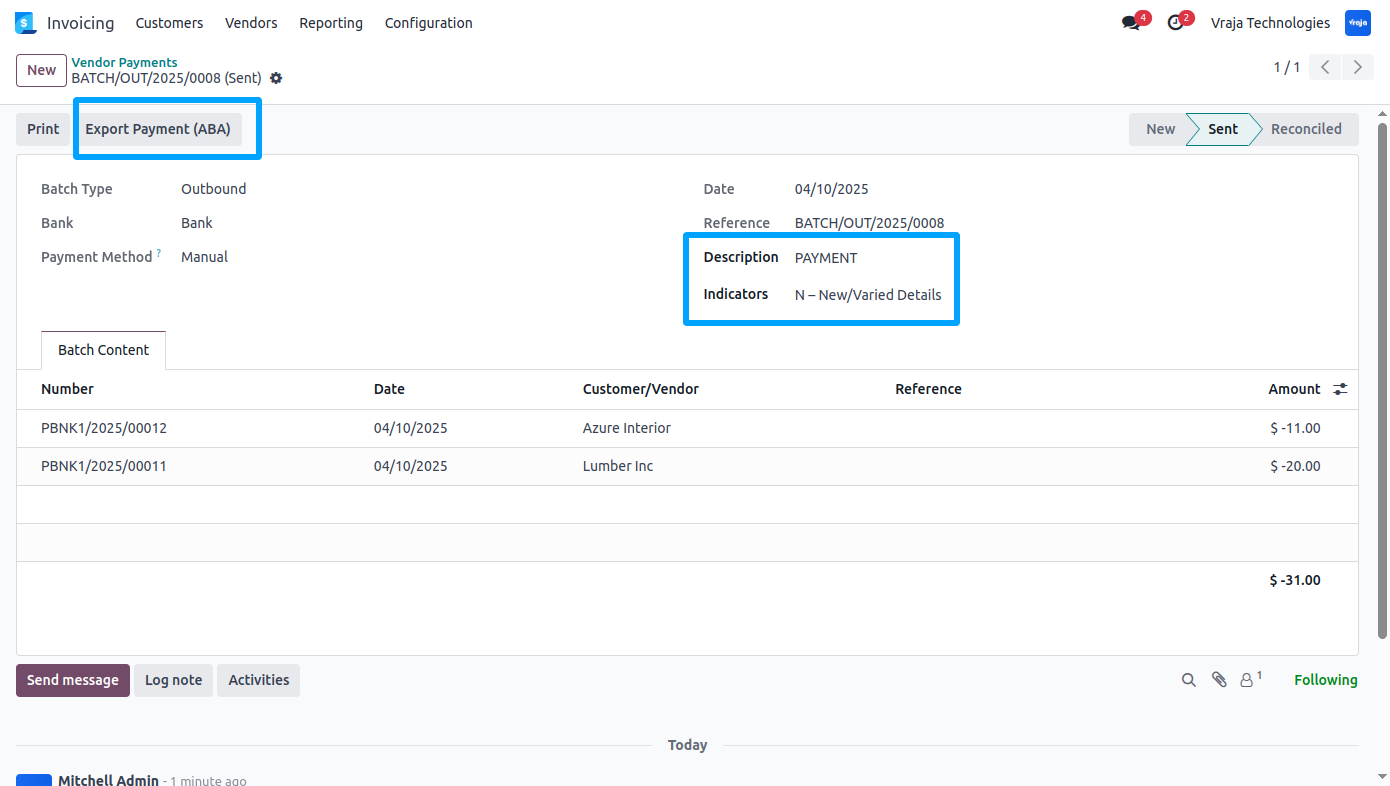
03 Batch/Bulk Payment Process
You can select the 'Indicators' and write the 'Description' for batch payment transfer. You can export Batch payment to FTP via 'Export Payment(ABA)' button.
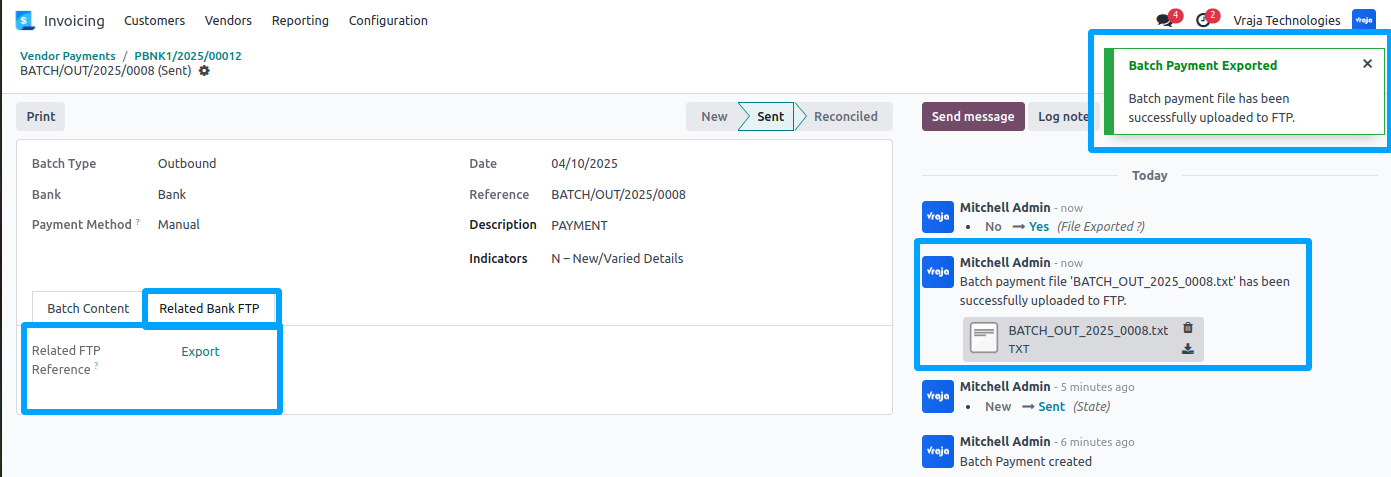
04 After Successfully Exporting the file to the FTP, You can see the Success Notification on the screen and related FTP where file is exported and you can view the exported file that is attached to the record in chatter area.
05 This is the format for ABA batch payment.
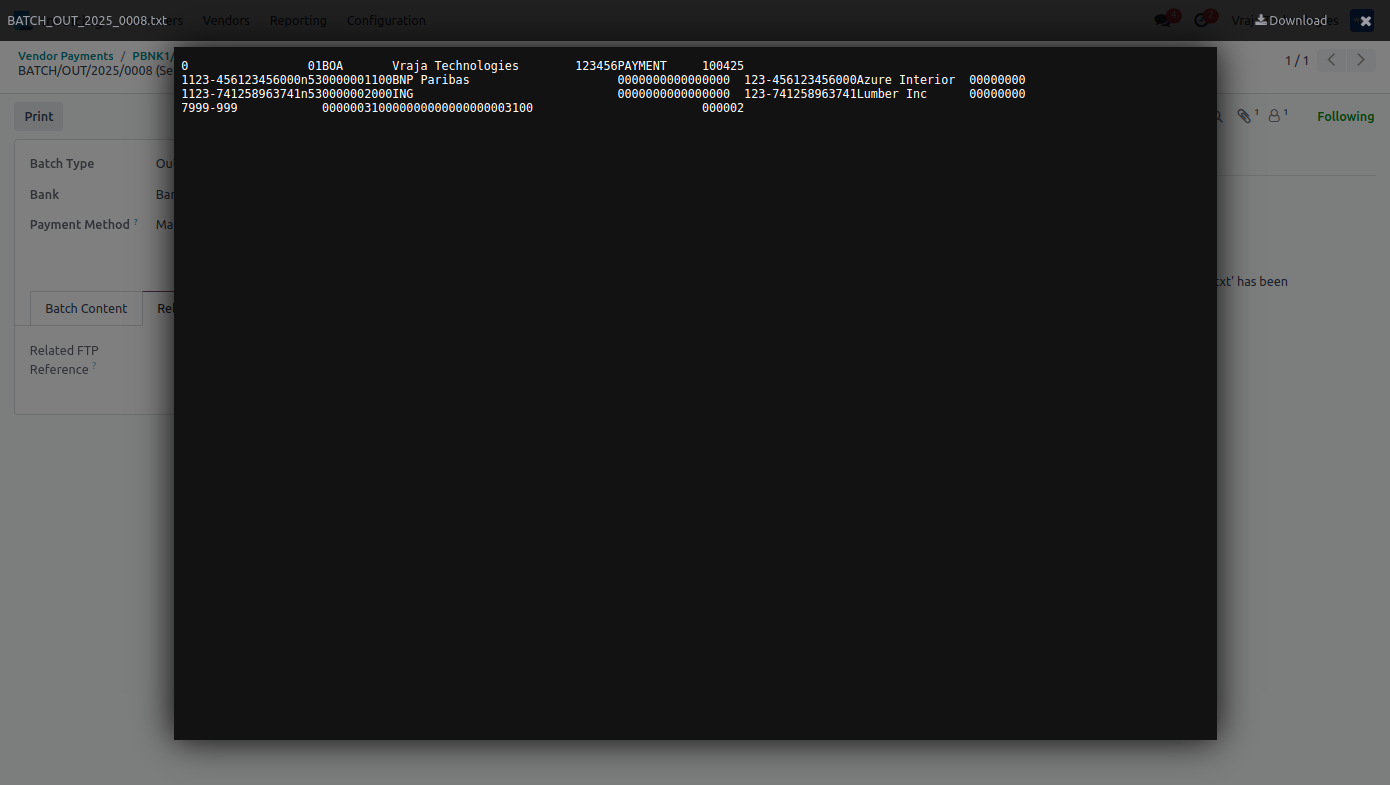
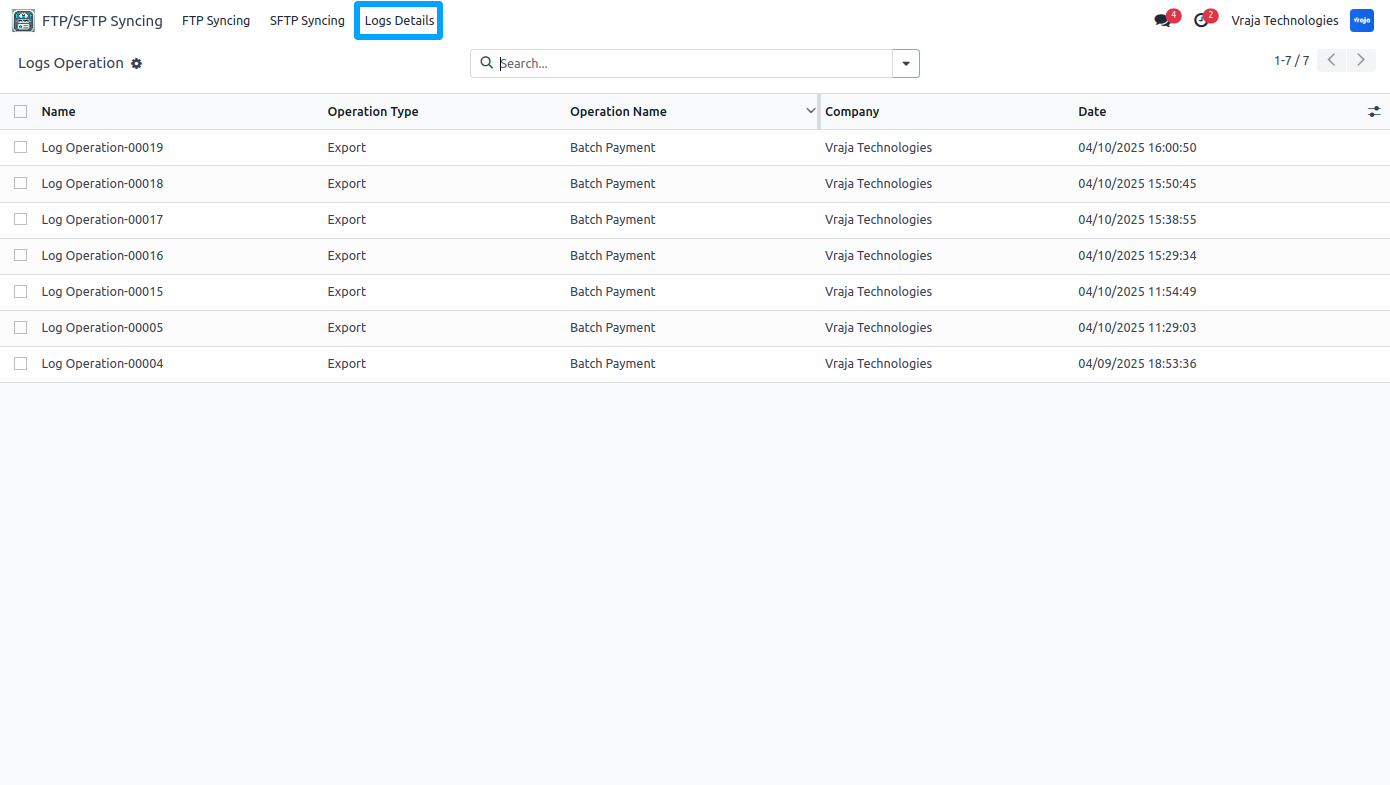
06 You can also see the logs for the application inside FTP/SFTP syncing menu.
|
|
I need an extra customization in this application, how can I get it?Yes, you can contact us on mailto:support@vrajatechnologies.com or can schedule a DEMO with our team to customize additional features. |
|
|
Is the application compatible with Odoo Enterprise and Community?Yes, this application module is supported by both. It is also compatible with test and production environments. |
|
|
Do I get free upgrades and support if I purchase this application?We provide free support for the first 90 days following the purchase date. |
|
|
Is technical knowledge required to set up the integration?While some technical understanding may be helpful, the integration is designed to be user-friendly. Detailed documentation and support may be provided to aid in the setup process. |
|
|
Is this free customization and implementation?Our team has produced a support video that guides you through the implementation process step by step. If you encounter any issues, please feel free to contact us for assistance. |
|
|
Which protocol you have used to transfer file?We have used FTP protocol to transfer files. |
|
|
Included App Support90 Days Complimentary Support for Supported Versions If you encounter issues caused by the app itself, our team provides complimentary support for 90 days from the date of purchase for supported Odoo versions. |
90 Days Complimentary Support for Supported Versions
If you encounter issues caused by the app itself, our team provides complimentary support for 90 days from the date of purchase for supported Odoo versions.
Customer SupportNeed help with installation, configuration, technical issues, or general questions about the module? Submit a support ticket through our dedicated support portal. |
||
|
Support Portal
vrajatechnologies.com/helpdesk
|
Support PolicyReview our support policy for complete information about support coverage, issue eligibility, exclusions, version compatibility, and other support conditions. |
||
|
Support Policy
vrajatechnologies.com/support-policy
|
Scan for Support |

||
|
Support Portal
vrajatechnologies.com/helpdesk
|
BigCommerce Odoo Integration helps businesses connect their BigCommerce online store with Odoo and manage eCommerce operations from one centralized system. This connector allows you to import and export key store data between BigCommerce and Odoo, reducing manual work and improving operational accuracy.
Shopify Odoo Integration helps you connect your Shopify store with Odoo to manage products, orders, customers, and inventory from one centralized system.Automate data synchronization between Shopify and Odoo, reduce manual work, avoid errors, and streamline your complete eCommerce operations.
Bridge the gap between Odoo and your trading partners with an all-in-one EDI solution supporting FTP and SFTP protocols. This module features a dynamic XML mapping engine that gives you the power to import, export, create, or update any Odoo record without a single line of code. This tool streamlines your data exchange by allowing you to sync remote directory structures and automate entire workflows via Odoo’s scheduled actions. This tool ensures accurate, automated, and bidirectional data flow for any Odoo model.
EDIFACT EDI integration with Odoo on the customer side automates — from sending Purchase Orders (ORDERS) and receiving Order Responses (ORDRSP), managing Order Changes (ORDCHG), importing Dispatch Advice (DESADV), confirming delivery via Receiving Advice (RECADV), auto-creating Vendor Bills (INVOIC), to sending Remittance Advice (REMADV) for payment confirmation. It also supports Pricelists (PRICAT) and Inventory Reports (INVRPT) from suppliers.
Stripe Odoo Integration helps businesses process real-time card payments from Odoo invoices and sale quotations using Stripe Terminal devices like WisePOS E and Stripe S700. It streamlines backend payment collection with automated syncing to Odoo Accounting, reducing manual work and improving financial accuracy.
RMA Customer & Supplier Return Management helps businesses manage product returns, refunds, replacements, approvals, stock movements, and credit notes for both customers and vendors directly in Odoo. Fully integrated with Sales, Purchase, Inventory, Accounting, and Website Portal, it automates the complete return workflow, reduces manual work, and improves return process traceability.
The ShipStation Odoo Integration provides a seamless two-way connection between Odoo ERP and ShipStation Easily connect Odoo with ShipStation to automate shipping workflows, generate carrier labels, fetch real-time rates, and synchronize orders and tracking details.
Sales Dashboard is an advanced Odoo module developed by Vraja Technologies that provides a real-time overview of sales in a single screen.It gives users a complete, real-time view of business performance for a selected date range, combining key performance indicators with visual analytics in a single screen. It displays critical metrics such as total sales, orders, quotations, invoices, unpaid amounts, deliveries, gross profit and margin, and shipping costs, each with a month-over-month percentage change so trends are easy to spot at a glance.
Klaviyo Odoo Integration Most ecommerce marketing software forces you to choose between being as effective as possible or moving fast. Klaviyo is different. Designed for growth-minded ecommerce merchants, Klaviyo gives you powerful functionality without sacrificing the time it takes for your marketing to make an impact on your bottom line.
QuickBooks Odoo Integration helps businesses synchronize customers, vendors, products, taxes, accounts, invoices, bills, payments, and payment terms between QuickBooks and Odoo. Automate financial data exchange, reduce manual entry, avoid inconsistencies, and maintain accurate accounting records across both platforms.
Explore Before Purchase |
Start with a free trial
Test the connector with your real workflows using our 15-day free trial. If you need help, our product experts will guide you throughout the trial.
|
|
Test the connector with your real workflows.Our product experts will guide you during the trial to help you evaluate, configure, and use the connector with confidence.
15-Day
Trial
Expert
Guidance
Real
Workflow Testing
|