Explore the key features, workflow, and value of this Odoo module.
|
|
Automatic Daily MergeA scheduled action runs every day and merges open delivery orders without any manual work. |
|
|
Merges by Customer and Delivery TypeOnly deliveries for the same customer and the same delivery type are merged. Deliveries for different customers are never mixed. |
|
|
Outgoing Deliveries OnlyThe merge only applies to outgoing delivery orders, so receipts and internal transfers are left alone. |
|
|
Skips Completed and Cancelled DeliveriesDeliveries that are already Done or Cancelled are ignored, so shipped orders are never touched. |
|
|
One Delivery with All ProductsThe products and quantities from all the merged deliveries are combined in a single new delivery order. |
|
|
Original Deliveries Cancelled AutomaticallyAfter the merge, the original deliveries are cancelled, so the same goods are not delivered twice. They stay in the system for reference. |
|
|
Combined Source DocumentThe merged delivery’s Source Document lists the references of the original deliveries, so you can trace where each product came from. |
|
|
Ready for Picking Straight AwayThe new delivery is confirmed and stock is reserved automatically, so it appears as Ready when the stock is available. |
|
|
Reference Smart ButtonA Reference button on the merged delivery shows the number of linked sale orders and opens them in one click. |
|
|
Merge History in the ChatterThe chatter records an “Auto Generated DO From” message listing the deliveries that were merged. |
01 Go to Inventory → Operations → Deliveries. Several delivery orders for the same customer (Wood Corner) are open. WH/OUT/00011, WH/OUT/00013 and WH/OUT/00015 are Ready, and WH/OUT/00017 is Waiting. All of them use the same delivery type.

02 Open one of the deliveries, for example WH/OUT/00011. It is in Ready status and contains one product on the Operations tab: [FURN_0001] Desk Organizer, with a demand of 350.

03 Schedule Cron :- Auto Merge Picking. The action is active and runs every 1 day on the Transfer model. No configuration is needed. It runs automatically, or you can open it and click Run Manually, it can merge the delivery order with the same customer.

04 After the action runs, open Inventory → Operations → Deliveries again. The original deliveries (WH/OUT/00011, 00013, 00015 and 00017) are now Cancelled. A new delivery, WH/OUT/00066, is Ready and contains their combined Source Document.

05 Open one of the original deliveries, for example WH/OUT/00011. Its status is now Cancelled. Its products and details are kept for reference, and the merged delivery replaces it.

06 Open the new delivery WH/OUT/00066. It combines the products of all the merged deliveries on the Operations tab, with their demand quantities. The chatter shows an OdooBot message, “Auto Generated DO From”, listing the deliveries that were merged. The Reference button at the top opens the sale orders linked to the merged delivery.
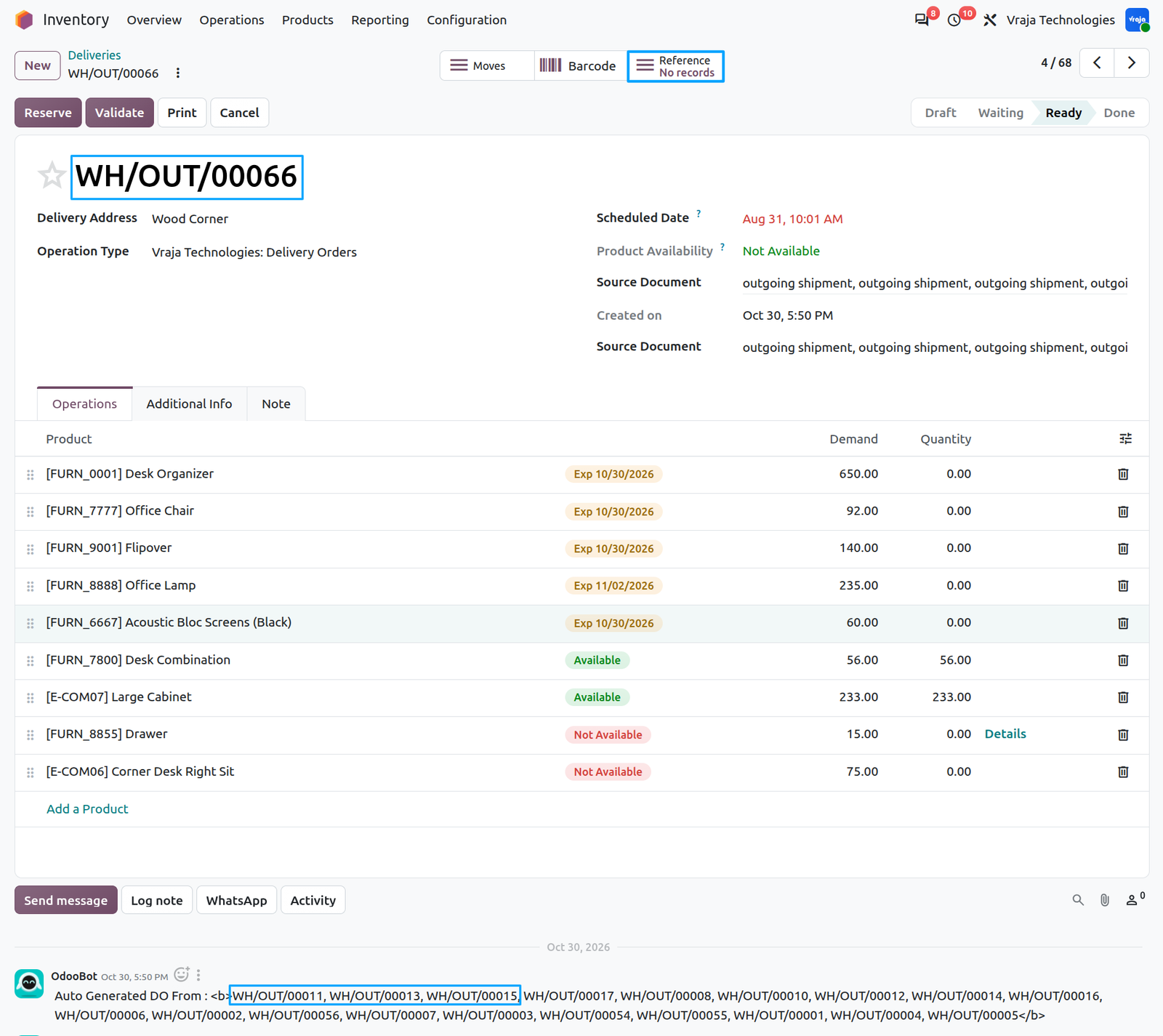
|
|
What does this module do?It automatically merges open delivery orders for the same customer and the same delivery type into one delivery order, once a day. |
|
|
Which deliveries are merged?Outgoing delivery orders that are not Done or Cancelled, have the same customer, and use the same delivery type. For example, Ready or Waiting deliveries for the same customer are merged. |
|
|
Do I need to configure anything?No. The module has no settings. It works as soon as it is installed. |
|
|
How often does the merge run?Once a day, through the scheduled action Auto Merge Picking. You can change the interval in Settings → Technical → Automation → Scheduled Actions. |
|
|
Can I merge deliveries right away without waiting for the daily run?Yes. Open the Auto Merge Picking scheduled action and click Run Manually. You need developer mode to see the Technical menu. |
|
|
What happens to the original deliveries?They are cancelled, and a new delivery order is created with the products of all of them. The cancelled deliveries stay in the system for reference. |
|
|
Will the products and quantities be combined into one delivery?Yes. All the products and quantities from the merged deliveries appear as lines on the new delivery’s Operations tab. |
|
|
Can I see which deliveries were merged?Yes. The chatter of the merged delivery shows an “Auto Generated DO From” message listing the original deliveries, and the Source Document lists their references. |
|
|
How do I see which sale orders are included?Click the Reference smart button on the merged delivery. It shows the number of linked sale orders and opens them. |
|
|
Are deliveries for different customers merged together?No. Only deliveries for the same customer and the same delivery type are merged. |
|
|
I would like to request a custom feature for this application. What’s the process to get it implemented?We’re happy to help tailor the application to meet your business needs! You can reach us via sales@vrajatechnologies.com |
|
|
Who is the point of contact for technical support, configuration support or bug-related queries?You can reach us via support@vrajatechnologies.com |
|
|
Included App Support90 Days Complimentary Support for Supported Versions If you encounter issues caused by the app itself, our team provides complimentary support for 90 days from the date of purchase for supported Odoo versions. |
Included App Support
90 Days Complimentary Support for Supported Versions
If you encounter issues caused by the app itself, our team provides complimentary support for 90 days from the date of purchase for supported Odoo versions.

Customer SupportNeed help with installation, configuration, technical issues, or general questions about the module? Submit a support ticket through our dedicated support portal. |
||
|
Support Portal
vrajatechnologies.com/helpdesk
|
Support PolicyReview our support policy for complete information about support coverage, issue eligibility, exclusions, version compatibility, and other support conditions. |
||
|
Support Policy
vrajatechnologies.com/support-policy
|
Scan for Support
|
||
|
Support Portal
vrajatechnologies.com/helpdesk
|