Explore the key features, workflow, and value of this Odoo module.
|
|
Delivery Date SelectionAllow customers to choose their preferred delivery date during checkout while restricting selection based on configured availability and date limits. |
|
|
Weekly Delivery SchedulingDefine delivery days and timings for each week to ensure customers can only select valid and available delivery dates. |
|
|
Delivery Time Slot ManagementEnable time slot selection with configurable preparation time, intervals, and order limits to efficiently manage delivery capacity. |
|
|
Same-Day Delivery OptionProvide same-day delivery with configurable fees, product mapping, and time gap validation to control eligibility and charges. |
|
|
Delivery Date RestrictionsRestrict delivery date selection by setting limits and ensuring customers cannot choose unavailable or invalid dates. |
|
|
Exceptional Delivery ManagementManage special cases by disabling deliveries on specific dates or defining custom delivery availability when needed. |
|
|
Checkout IntegrationSeamlessly integrate delivery date, time slot, and same-day fee options into the checkout process with dynamic updates. |
|
|
Backend Order VisibilityView and manage delivery date, time slot, and same-day charges directly from the sales order for better planning. |
01 Delivery Date
Navigate to Website → Configuration → Delivery Methods, choose a shipping method, and configure the Delivery Date, Time Slot, and Same-Day Delivery options as required.
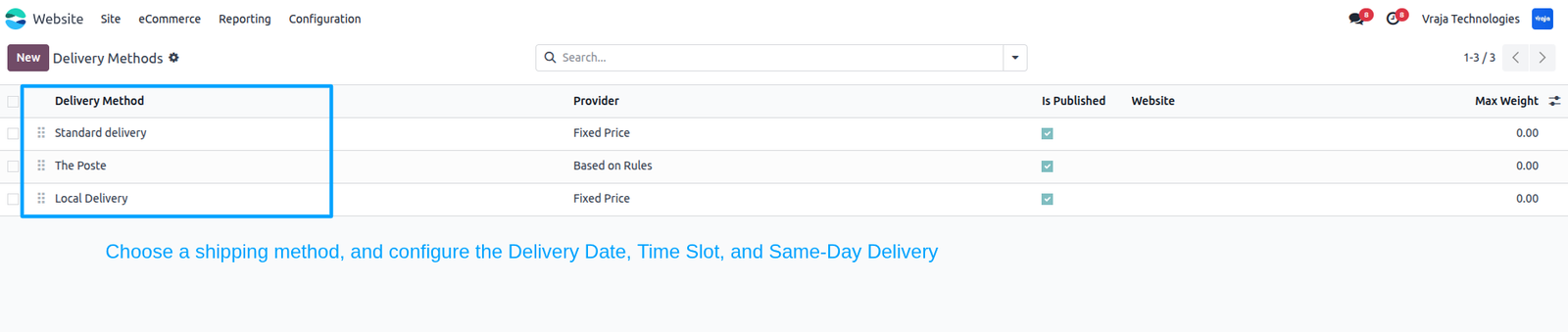
In the shipping method, navigate to the Delivery Time Slot tab, where you can configure delivery options including Delivery Date, Delivery Time Slot, and Same-Day Delivery.

Enable the Delivery Date option to allow customers to select a delivery date during checkout. Configure the Delivery Date Limit (in months) to restrict how far in advance dates are available in the calendar.
Define the weekly delivery days to control which days are available for delivery. Additionally, use the Exceptional Delivery Dates option to disable specific dates or set custom availability and timings for those dates.
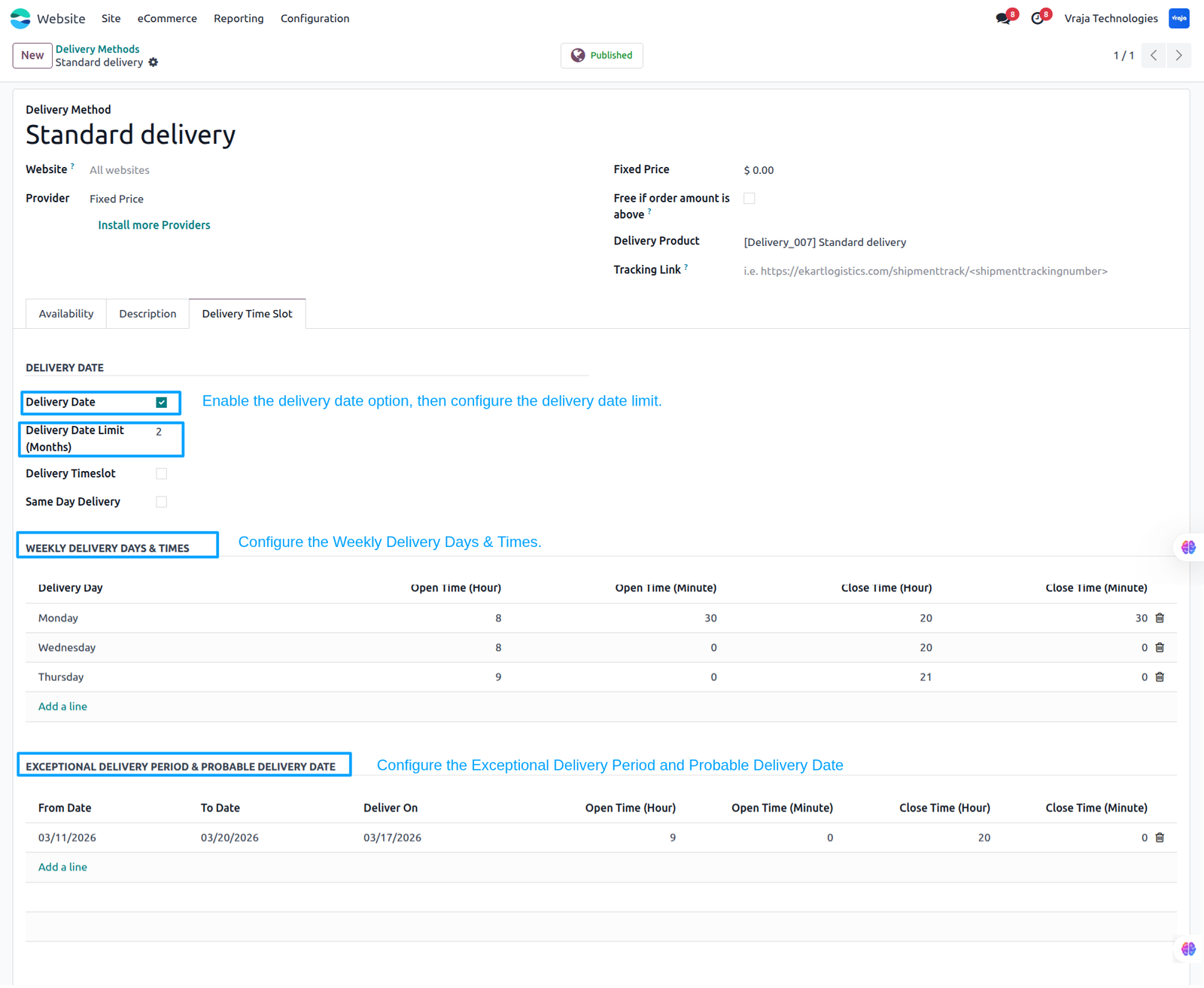
In Weekly Delivery Days & Times, select the required delivery days (e.g., Monday, Wednesday, Thursday) and configure the opening and closing time for each day to define available delivery hours.

Go to the website, select a product, click Add to Cart, and proceed to Checkout to view the available delivery methods.
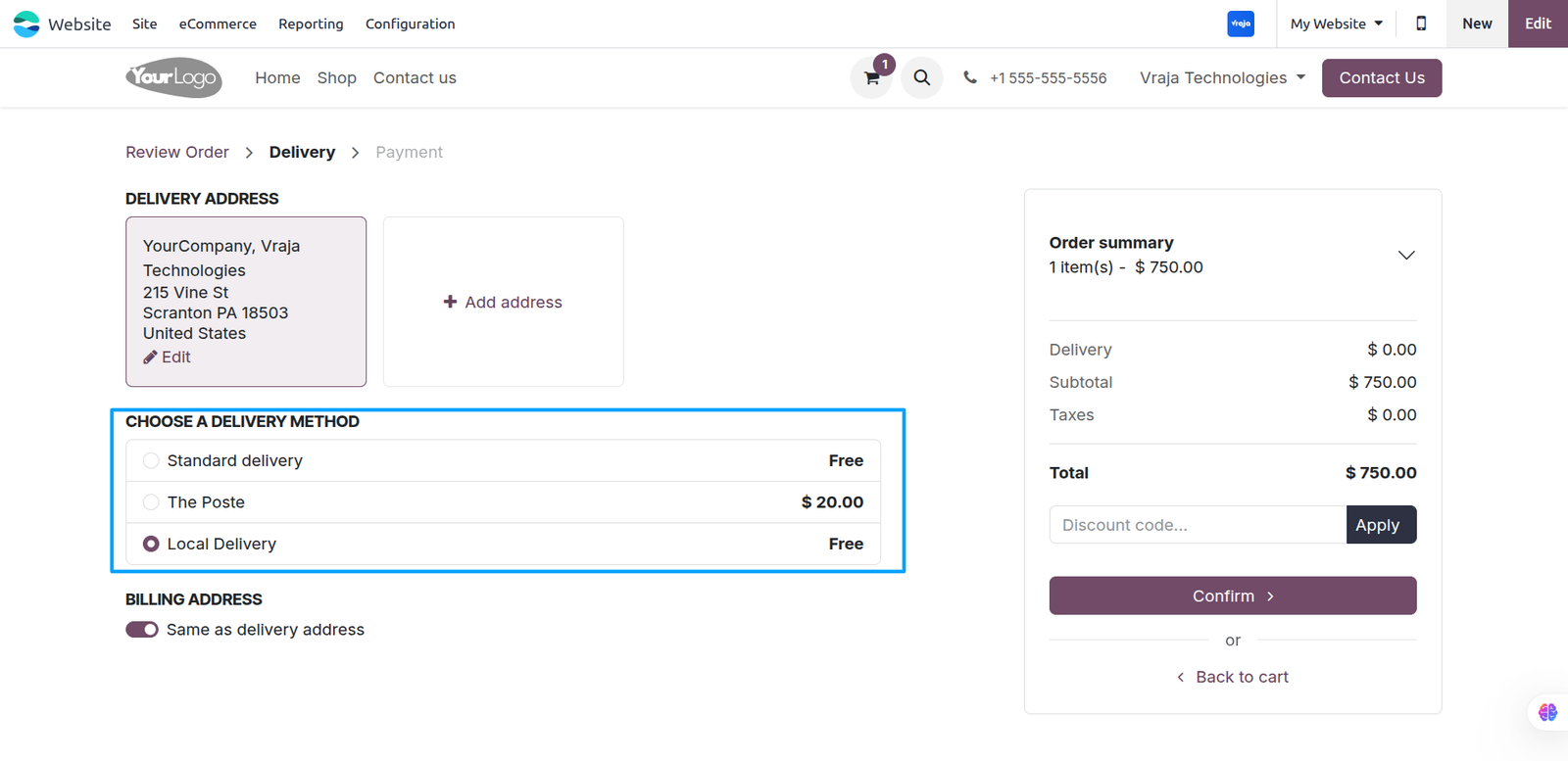
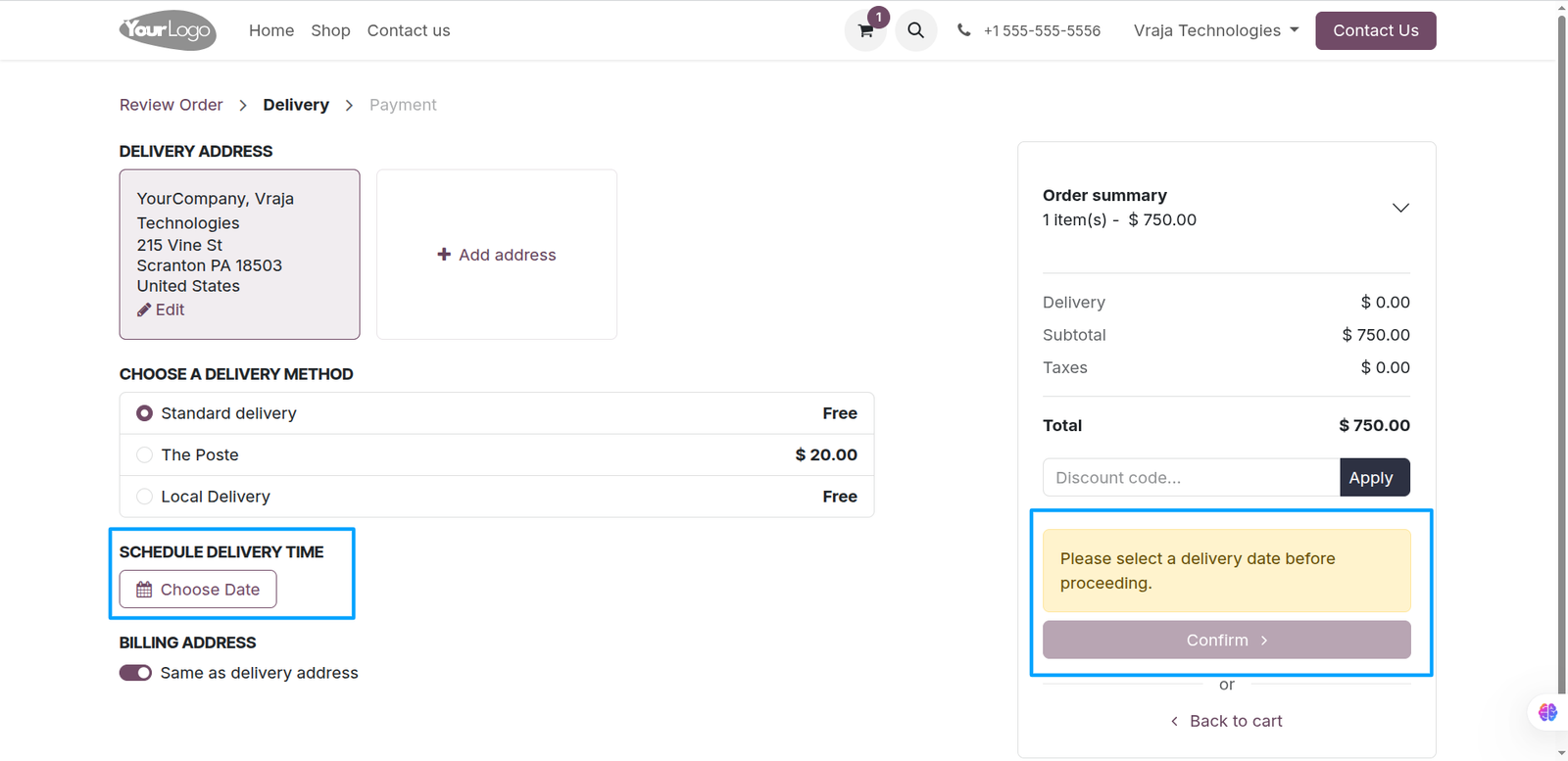
When you select a delivery method with Delivery Date enabled, the option to choose a delivery date will be displayed. Selecting a delivery date is mandatory to proceed with the order.
When selecting a delivery date, only the configured days (e.g., Monday, Wednesday, Thursday) from Weekly Delivery Days & Times will be available. All other dates will be disabled, and the calendar will display only dates within the configured delivery limit (e.g., up to 2 months).

Once a delivery date is selected, the Confirm button is automatically enabled, allowing the customer to proceed with the order.

Configure the Exceptional Delivery Period to block deliveries for a specific date range. Within this period, you can set a Probable Delivery Date so that all deliveries are redirected to a selected available date.

When an Exceptional Delivery Period is configured, customers can select the defined Probable Delivery Date. All other dates within the exceptional period will be unavailable for selection.

02 Delivery Time Slot
Enable the Delivery Time Slot option in the delivery method and configure the Order Preparation Time and Time Interval. Time slots will be automatically generated based on the defined interval within the configured opening and closing hours.

When Delivery Time Slot is enabled, available time slots are displayed on the website after selecting a delivery date, allowing customers to choose their preferred delivery time.
If a 60-minute interval is configured and the delivery time for a day (e.g., Wednesday) is set from 08:00 to 20:00, the system will generate time slots at 60-minute intervals within this time range.
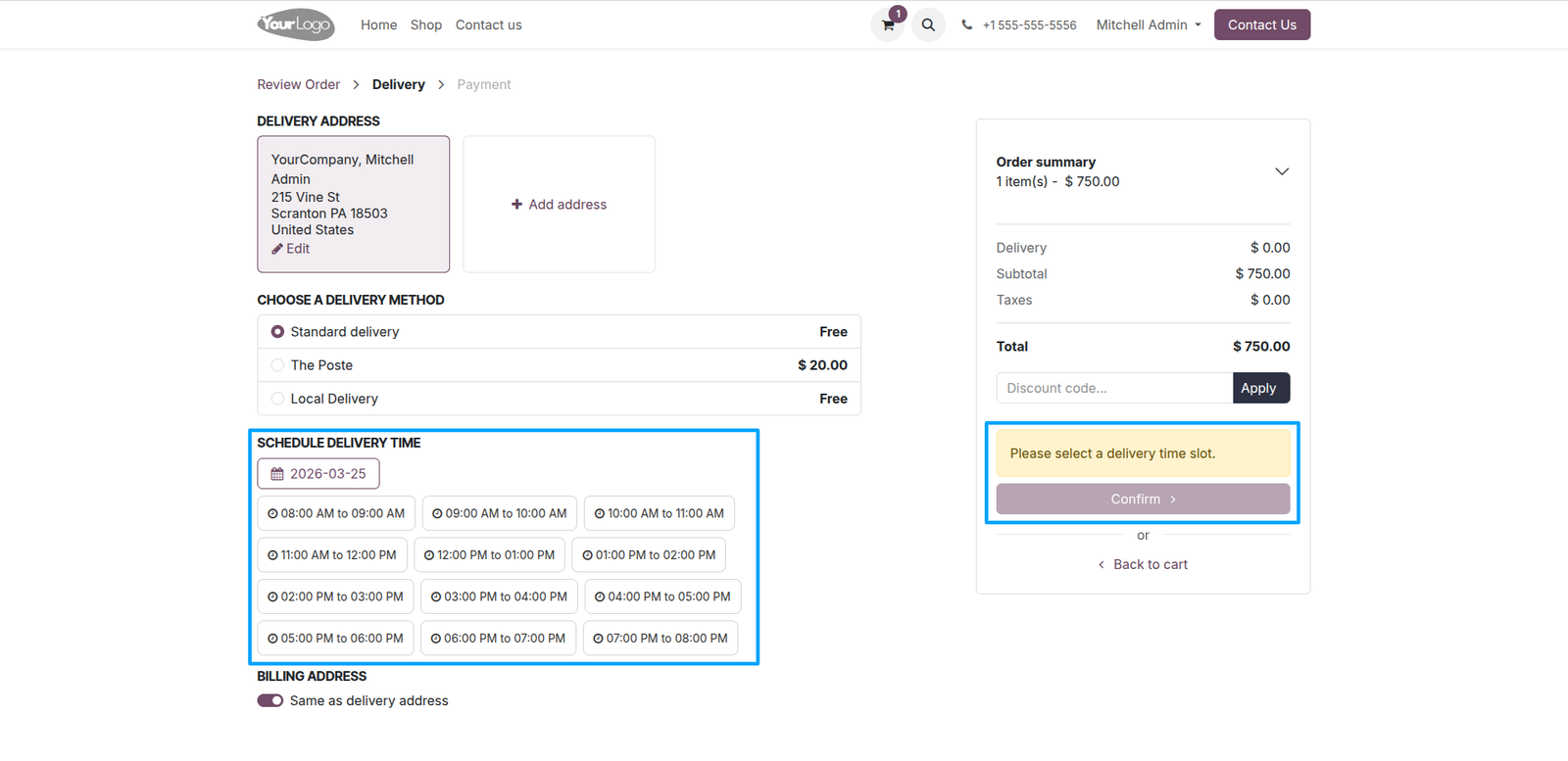
Once a delivery date and time slot are selected, the Confirm button is automatically enabled, allowing the customer to proceed with the order.
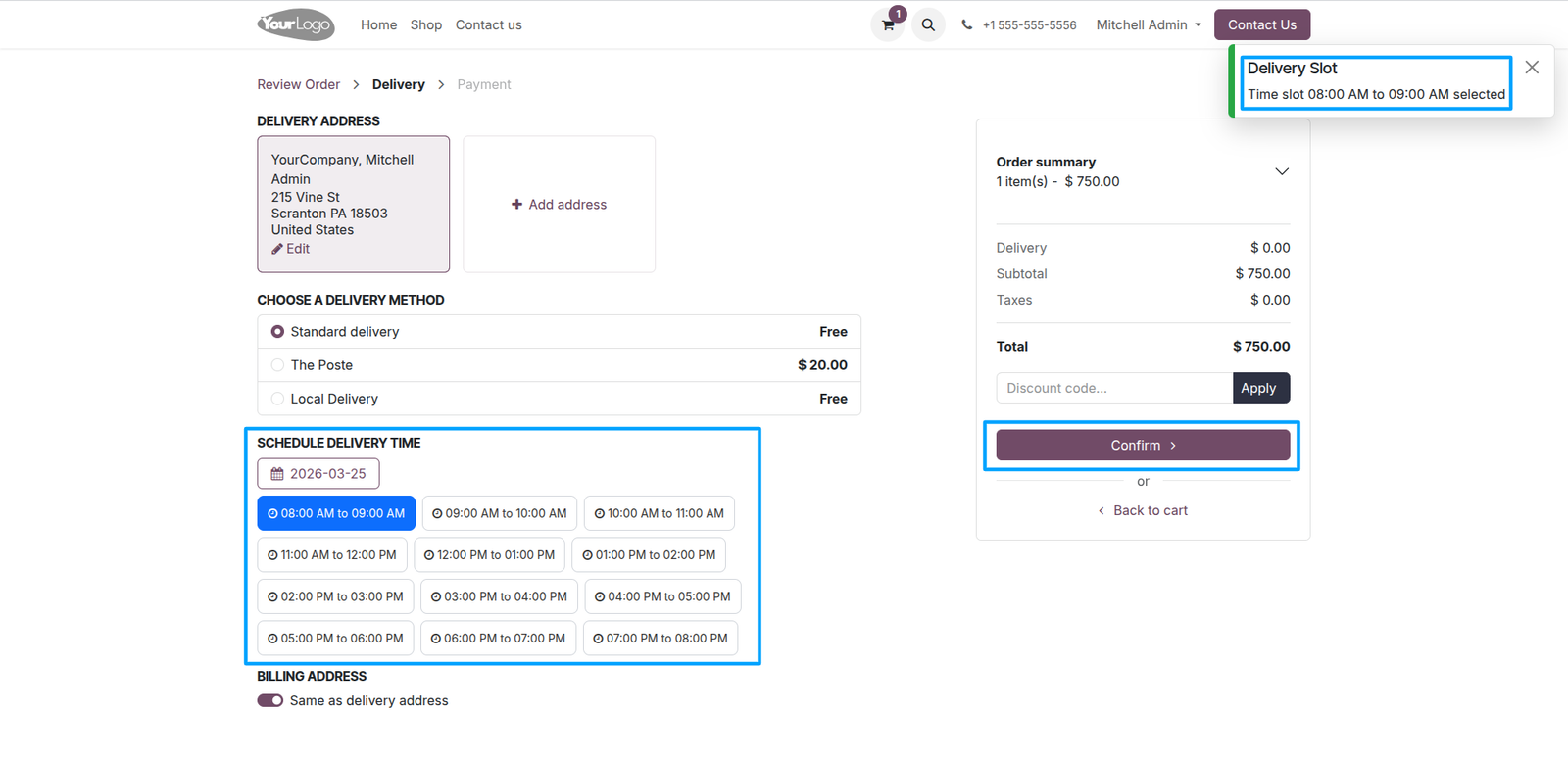
Once the order is confirmed, the selected delivery date and time slot are saved in the order. Navigate to eCommerce → Orders and open the order to view the delivery details.

Maximum Orders per Time Slot is set to 1, the selected time slot will be automatically disabled for other customers once it is booked for that date, requiring them to choose another available time slot.
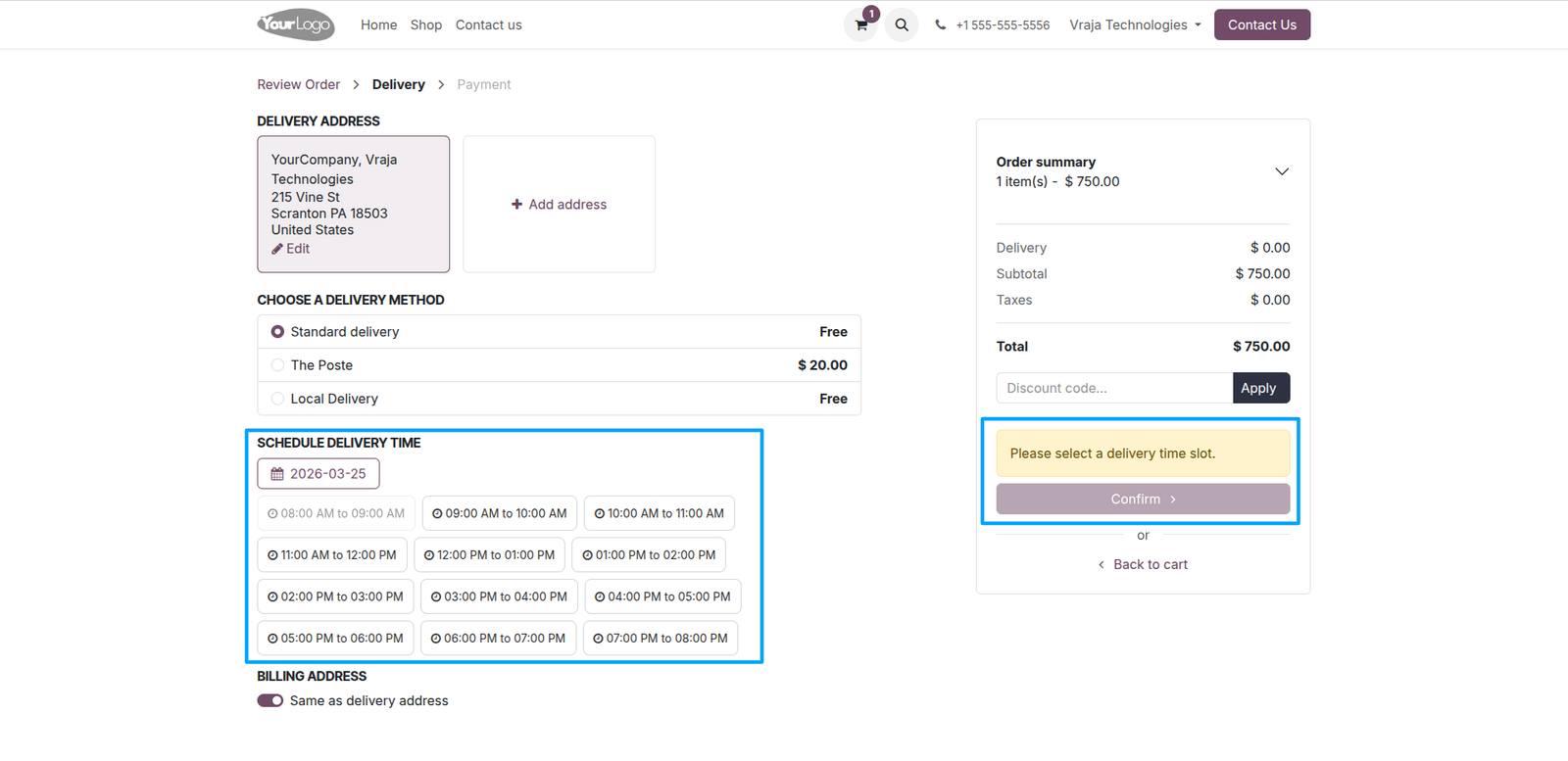
Same-Day Delivery Configuration :
- Enable the Same-Day Delivery option in the delivery method to allow customers to select delivery for the current day. Configure the Same-Day Delivery Fee, assign a fee product, and set a timing gap (in hours) that determines when the first available time slot appears.
Same-Day Delivery Fee
- Configure a fee that is automatically applied to the order when a customer selects same-day delivery. This ensures additional costs for expedited service are handled transparently.
Same-Day Delivery Product
- Map a product to represent the same-day delivery charge. When same-day delivery is chosen, this product is automatically added to the order to account for the fee.
Same-Day Timing Gap (Hours)
- Set the timing gap to control when same-day delivery slots become available. For example, if the delivery window on Wednesday is 08:00 to 20:00 and the timing gap is set to 1 hour, the first available slot will open at 09:00.

When a customer selects same-day delivery at checkout, the configured same-day delivery fee is automatically added to the total order amount. The available delivery slots open after the defined timing gap for example, if the gap is 1 hour and the delivery window is 08:00 to 20:00, slots will be available from 09:00 to 18:00

When an order is confirmed with the selected delivery date and time slot, the same-day delivery fee is automatically applied to the customer’s order and displayed as a separate line item in the sales order.

|
|
What is the Delivery Date Picker?The Delivery Date Picker allows customers to choose their preferred delivery date during checkout. Only dates within your configured delivery limits, weekly schedule, and available slots are selectable. |
|
|
Can I restrict delivery dates based on business availability?Yes. You can configure delivery date limits, weekly schedules, and blocked dates to ensure customers can only select valid delivery options. |
|
|
How do weekly delivery days work?You can define which days of the week are available for delivery (e.g., Monday, Wednesday, Thursday) and set the opening and closing times for each day. Customers can only select these valid days. |
|
|
What are Exceptional Delivery Dates?Exceptional Delivery Dates let you block specific dates or define custom delivery availability. You can also set a Probable Delivery Date to redirect orders during blocked periods. |
|
|
How do Delivery Time Slots work?Time slots break each delivery day into selectable intervals. You can configure: 1. Order preparation time 2. Slot duration 3. Maximum orders per slot 4. Customers select from available slots after choosing a delivery date. |
|
|
Can I limit the number of orders per time slot?Yes. You can set a maximum number of orders per time slot to prevent overbooking and manage delivery capacity efficiently. Once the limit is reached, the slot becomes unavailable. |
|
|
What is Same-Day Delivery?Same-Day Delivery lets customers choose delivery for the current day. It includes: 1. A configurable delivery fee 2. Product mapping in the order 3. A timing gap to control slot availability |
|
|
How does same-day delivery work in this module?Same-day delivery can be enabled with conditions such as order cut-off time, preparation time, and additional charges. The system automatically validates eligibility during checkout. |
|
|
How is the Same-Day Delivery Fee applied?When a customer selects same-day delivery, the configured fee is automatically added to the total order amount. |
|
|
What is the Same-Day Delivery Product?The Same-Day Delivery Product represents the same-day fee in the order. When same-day delivery is chosen, it’s automatically added as a separate line item in the sales order. |
|
|
How does the Same-Day Timing Gap work?The timing gap determines when the first same-day delivery slot becomes available. Example: If the delivery window is 08:00 to 20:00 and the timing gap is 1 hour, the first available slot opens at 09:00. |
|
|
Where can I view delivery details?All delivery information, including delivery date, selected time slot, and same-day charges, is saved in the sales order. Navigate to eCommerce → Orders to view these details. |
|
|
I would like to request a custom feature for this application. What’s the process to get it implemented?We’re happy to help tailor the application to meet your business needs! You can reach us via sales@vrajatechnologies.com |
|
|
Who is the point of contact for technical support, configuration support or bug-related queries?You can reach us via support@vrajatechnologies.com |
|
|
Included App Support90 Days Complimentary Support for Supported Versions If you encounter issues caused by the app itself, our team provides complimentary support for 90 days from the date of purchase for supported Odoo versions. |
Included App Support
90 Days Complimentary Support for Supported Versions
If you encounter issues caused by the app itself, our team provides complimentary support for 90 days from the date of purchase for supported Odoo versions.

Customer SupportNeed help with installation, configuration, technical issues, or general questions about the module? Submit a support ticket through our dedicated support portal. |
||
|
Support Portal
vrajatechnologies.com/helpdesk
|
Support PolicyReview our support policy for complete information about support coverage, issue eligibility, exclusions, version compatibility, and other support conditions. |
||
|
Support Policy
vrajatechnologies.com/support-policy
|
Scan for Support
|
||
|
Support Portal
vrajatechnologies.com/helpdesk
|