Calculate Shipping Deadline Date |
Community Enterprise Odoo.sh |
Shipping Deadline Calculation for Odoo helps businesses automatically calculate shipping deadlines for every new order based on configured company shipping policies. Whether orders are created from WooCommerce, Odoo Website, marketplace integrations, manual sales orders, or any other sales channel, the module automatically determines the correct shipment deadline and helps warehouse teams plan dispatch operations more efficiently. The module considers important rules such as order received date and time, daily cutoff time, working days, weekends, holidays, and company-specific shipping rules. Based on these configurations, the system automatically assigns the appropriate shipping deadline to each order. For example, if an order is received before the configured cutoff time, it can be scheduled for same-day or next-day shipping based on your policy. If an order is received after the cutoff time, the system automatically moves it to the next available business day. This helps avoid manual deadline calculation and ensures a consistent shipping workflow. Shipping Deadline Calculation for Odoo helps warehouse and logistics teams identify urgent shipments, prioritize delivery orders, reduce manual mistakes, and improve order fulfillment accuracy. It is especially useful for businesses handling high order volumes from multiple sales channels and requiring clear shipment planning based on operational rules. By automating shipment deadline calculation, this module improves warehouse efficiency, supports better dispatch planning, and helps businesses deliver orders on time with a more reliable and organized shipping process.
|
|
Automatic Shipping Deadline Calculation |
|
|
Configurable Cutoff Times |
|
|
Management of Working and Non-Working Days |
|
|
Holiday Management |
|
|
Real-Time Updates in Stock Picking |
|
|
Improved Order Fulfillment Speed |
01 Create and Configure the Shipping Rules To Calculate Shipping Deadline Date.

02 Create Public Holidays.

03 Configure the Shipping Rules Inside the Shipping Method.

04 Create SaleOrder and Add Shipping Method.
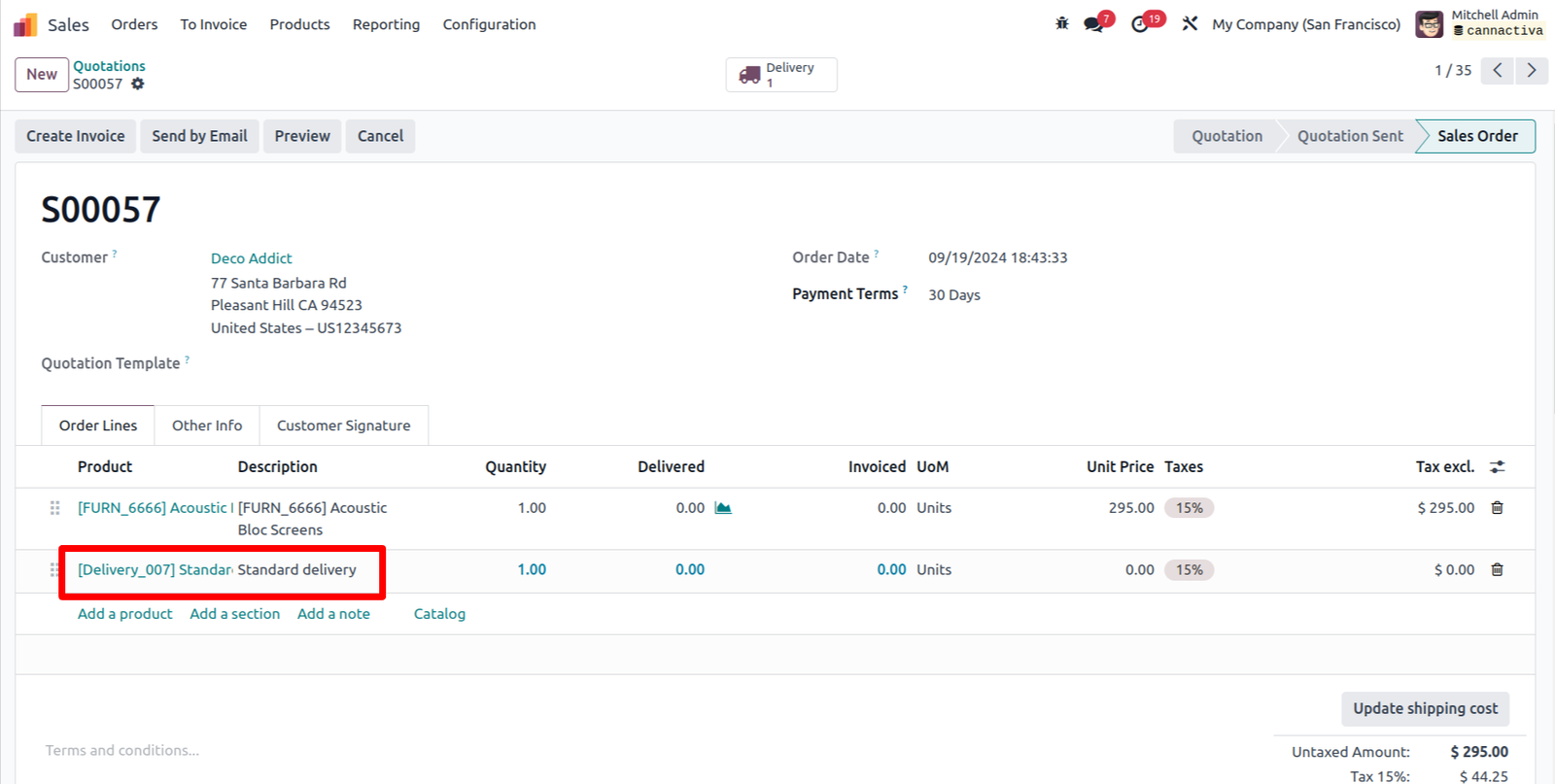
05 Once Confirm the Sale Order It will Calcualte the Shipping Deadline Date Based On Shipping Rules.

06 DeadLine Date Set in Delivery Order.

|
|
What is the purpose of this module?This module automatically calculates shipping deadlines for orders based on company shipping rules, cutoff times, working days, weekends, and holidays. |
|
|
How does the shipping deadline calculation work?The system checks the order date and time, compares it with the configured cutoff time, and then assigns the correct shipping deadline based on working days and holidays. |
|
|
Included App Support90 Days Complimentary Support for Supported Versions If you encounter issues caused by the app itself, our team provides complimentary support for 90 days from the date of purchase for supported Odoo versions. |
90 Days Complimentary Support for Supported Versions
If you encounter issues caused by the app itself, our team provides complimentary support for 90 days from the date of purchase for supported Odoo versions.
Customer SupportNeed help with installation, configuration, technical issues, or general questions about the module? Submit a support ticket through our dedicated support portal. |
||
|
Support Portal
vrajatechnologies.com/helpdesk
|
Support PolicyReview our support policy for complete information about support coverage, issue eligibility, exclusions, version compatibility, and other support conditions. |
||
|
Support Policy
vrajatechnologies.com/support-policy
|
Scan for Support |

||
|
Support Portal
vrajatechnologies.com/helpdesk
|
Shipping Dashboard for Odoo is designed to give businesses a complete overview of their delivery and shipment operations in one place. The dashboard provides real-time shipment insights using charts, graphs, filters, and detailed delivery order information.
Process multiple delivery orders at once, validate transfers, and generate shipping labels automatically using the selected or default carrier.
Generate shipping manifest records and reports dynamically in Odoo based on selected shipping services. This app helps you create, manage, and download carrier-wise manifest reports for smoother shipment processing.
It helps automate labels, reports, and attachment printing without manual downloads, making printer management and printing workflows faster and easier.
Automatically select the best-fit package based on product dimensions, weight, package size, and configured packing rules in Odoo.
Custom Shipping Rate allows you to define and apply your own shipping charges in Odoo using fixed prices or rule-based cost calculation.
Compare shipping rates from all active carriers in Odoo with a single click and view available options in one easy table.
Set your own shipping charges for third-party carriers using fixed prices or custom rules. Perfect when live carrier rates are unavailable or when you want to control shipping costs in Odoo.
Explore Before Purchase |
Start with a free trial
Test the connector with your real workflows using our 15-day free trial. If you need help, our product experts will guide you throughout the trial.
|
|
Test the connector with your real workflows.Our product experts will guide you during the trial to help you evaluate, configure, and use the connector with confidence.
15-Day
Trial
Expert
Guidance
Real
Workflow Testing
|