SWIFT CBA EDI Odoo Integration (International Payments)

Community Enterprise Odoo.sh

SWIFT CBA EDI integration with Odoo streamlines international vendor payments by enabling the export of bulk payment transaction files (MT101) and single payment transaction files. Designed for secure and efficient cross-border transactions, this integration supports SWIFT CBA message formats and ensures seamless communication with financial institutions. Utilizing FTP protocols for secure data transfer, it enhances payment processing accuracy, reduces manual effort, and improves transaction efficiency for global businesses.

Submit Request Watch on YouTube Trending Apps
Vraja Technologies

End-to-end Odoo solutions for growing companies.

EDI & SWIFT/ACH Payment Integrations

End-to-end EDI automation, including X12, EDIFACT, XML standards, and financial integrations such as SWIFT, ACH, and Fedwire.

ANSI X12 EDIFACT XML SFTP / AS2 More Apps
ANSI X12 EDIFACT XML SFTP / AS2

Ecommerce Integrations

Seamless integration with leading eCommerce platforms to sync products, orders, inventory, and customer data in real time.

Orders Sync Inventory Products Customers More Apps
Orders Sync Inventory Products Customers

Shipping Integrations

Robust shipping connectors for global couriers, offering automated label generation, tracking, and rate computation.

Live Rates Labels Tracking Cancel Shipment More Apps
Live Rates Labels Tracking Cancel Shipment

Most Useful Apps for your ERP

A wide range of highly-rated Odoo modules designed to enhance automation, improve productivity, and simplify business operations.

Sales Inventory Accounting Automation More Apps
Sales Inventory Accounting Automation
App Details

Explore the key features, workflow, and value of this Odoo module.

Export bulk or batch payment transaction files (MT101) for vendor payments.

Export single payment transaction files for vendor payments.

Primarily used for international payment processing.

Supports SWIFT CBA message formats MT101.

Supports FTP communication protocols for secure data transfer.

01 Configuration

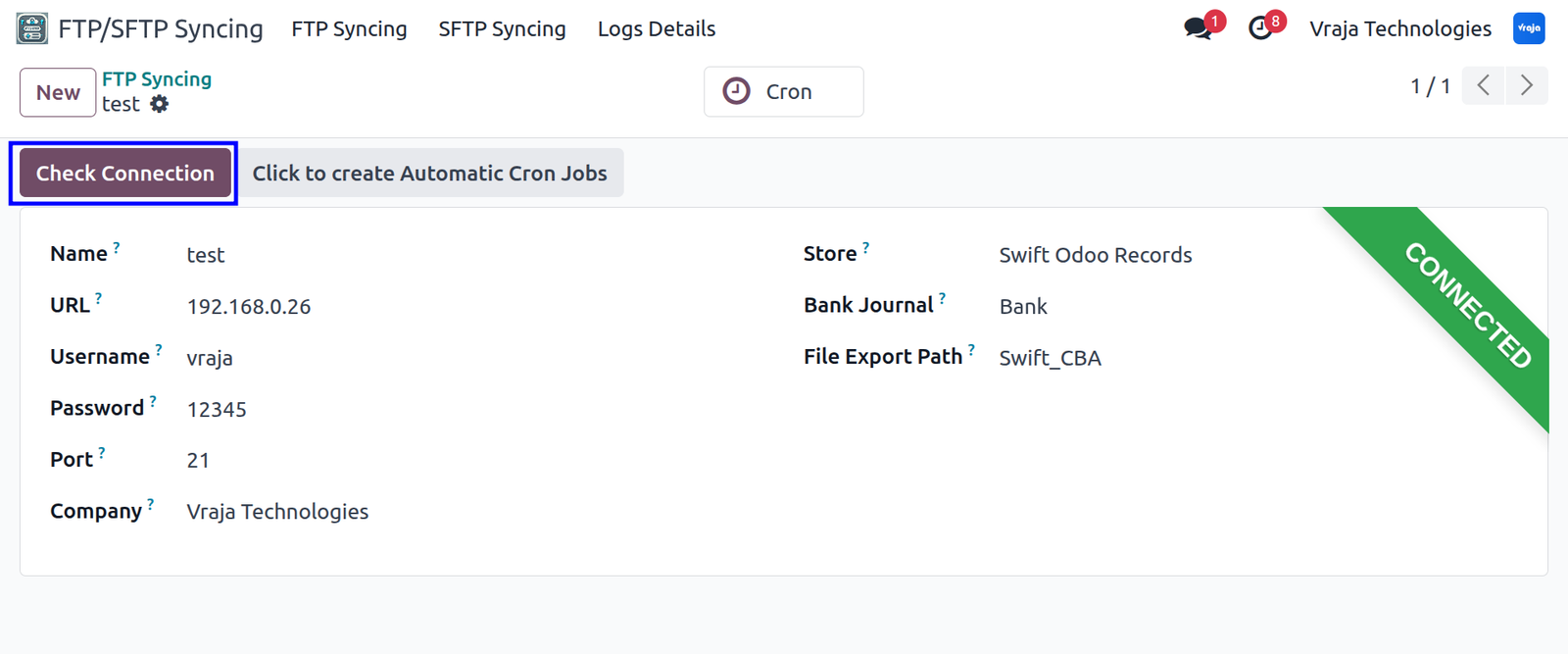
After installing the application, the FTP/SFTP syncing menu becomes accessible.

On this screen, enter the FTP credential details for server connection. Use the 'Check Connection' button to verify connectivity. Next, select the 'Swift CBA Odoo Records' store, specify the journal whose payment you want to export, and define the server directory names for exporting.
02 SINGLE PAYMENT PROCESS

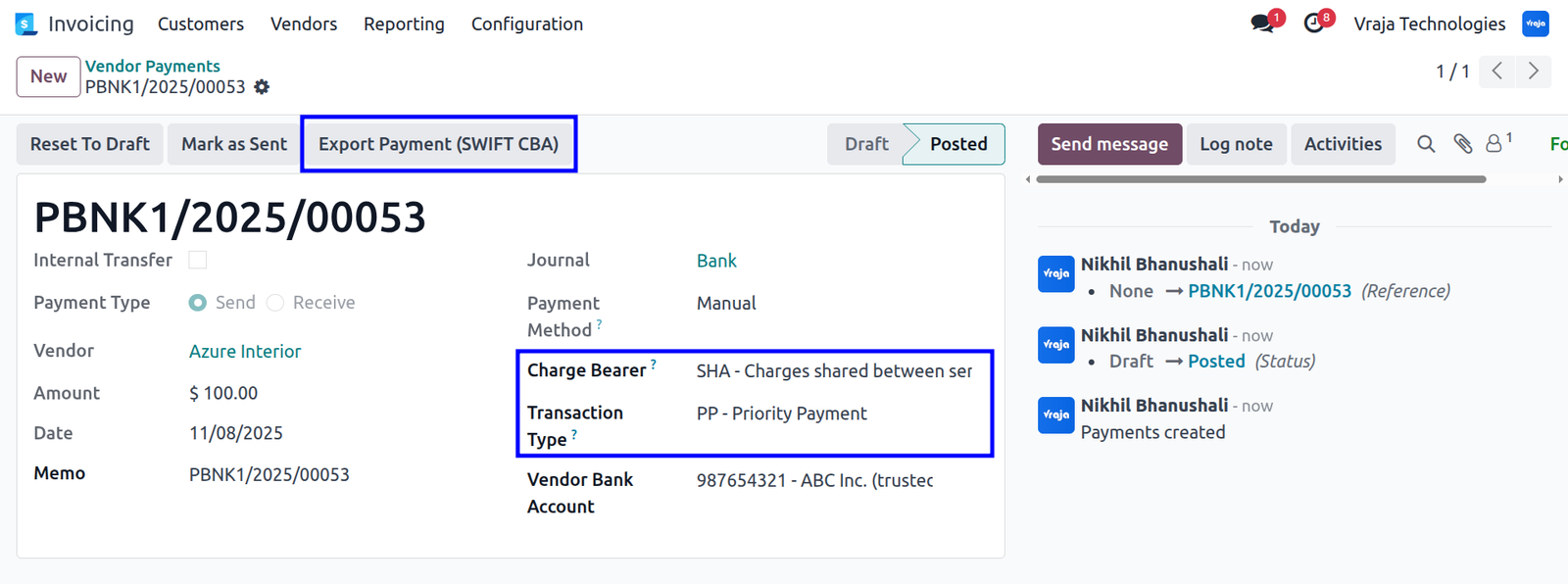
You can select the method for 'Charge Bearer' for single payment transfer. You can export single payment to FTP via 'Export Single Payment to FTP' button.

After Successfully Exporting the file to the FTP, You can see the Success Notification on the screen and related FTP where file is exported as well as that file attached to that record and you can see in chatter area.
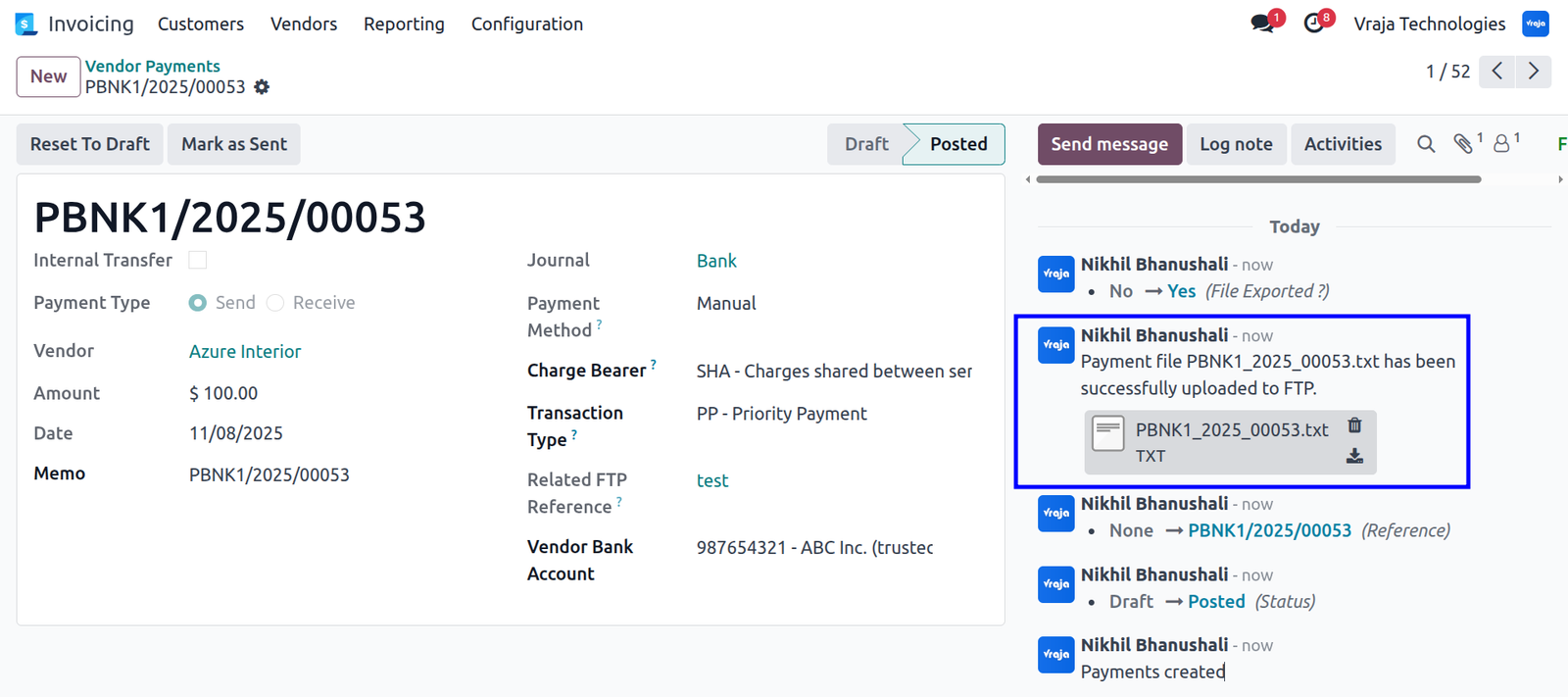
The exported file can be viewed as an attachment.

03 BATCH/BULK PAYMENT Process

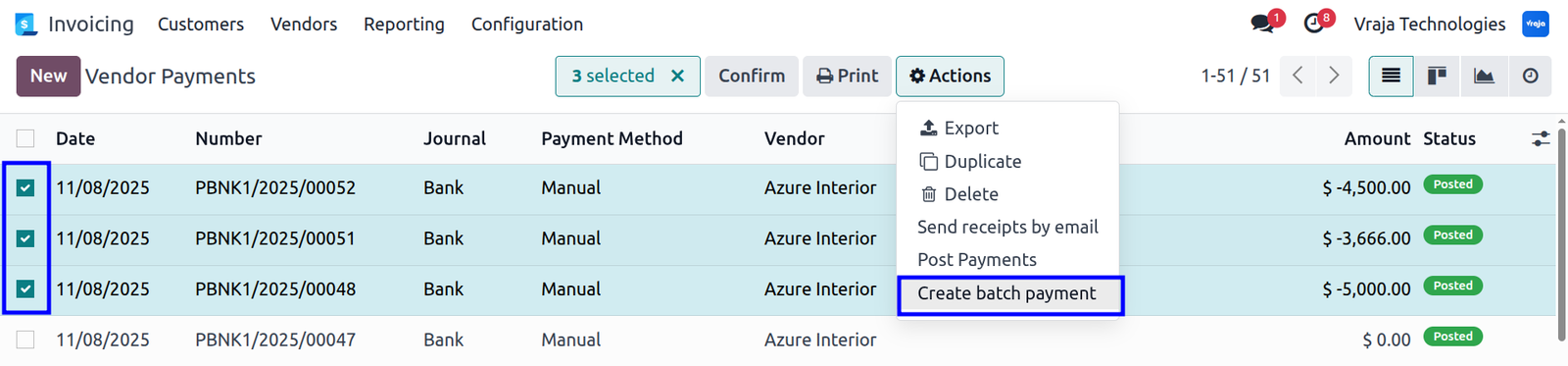
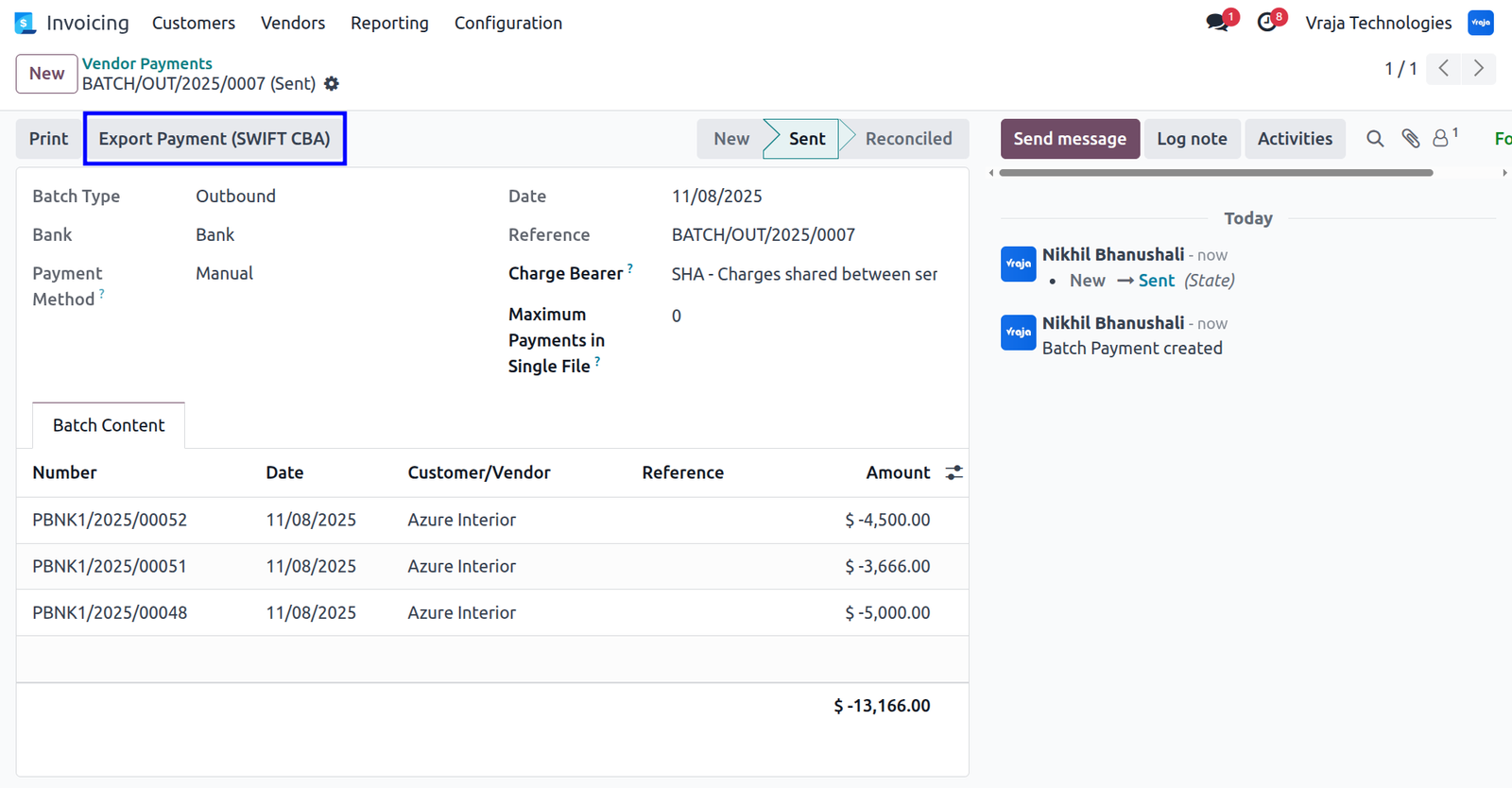
You can select the method for 'Charge Bearer' for batch payment transfer. You can also choose the maximum number of payments that include in a single file, so based on it we will split file if required. You can export Batch payment to FTP via 'Export Batch Payment To FTP' button.
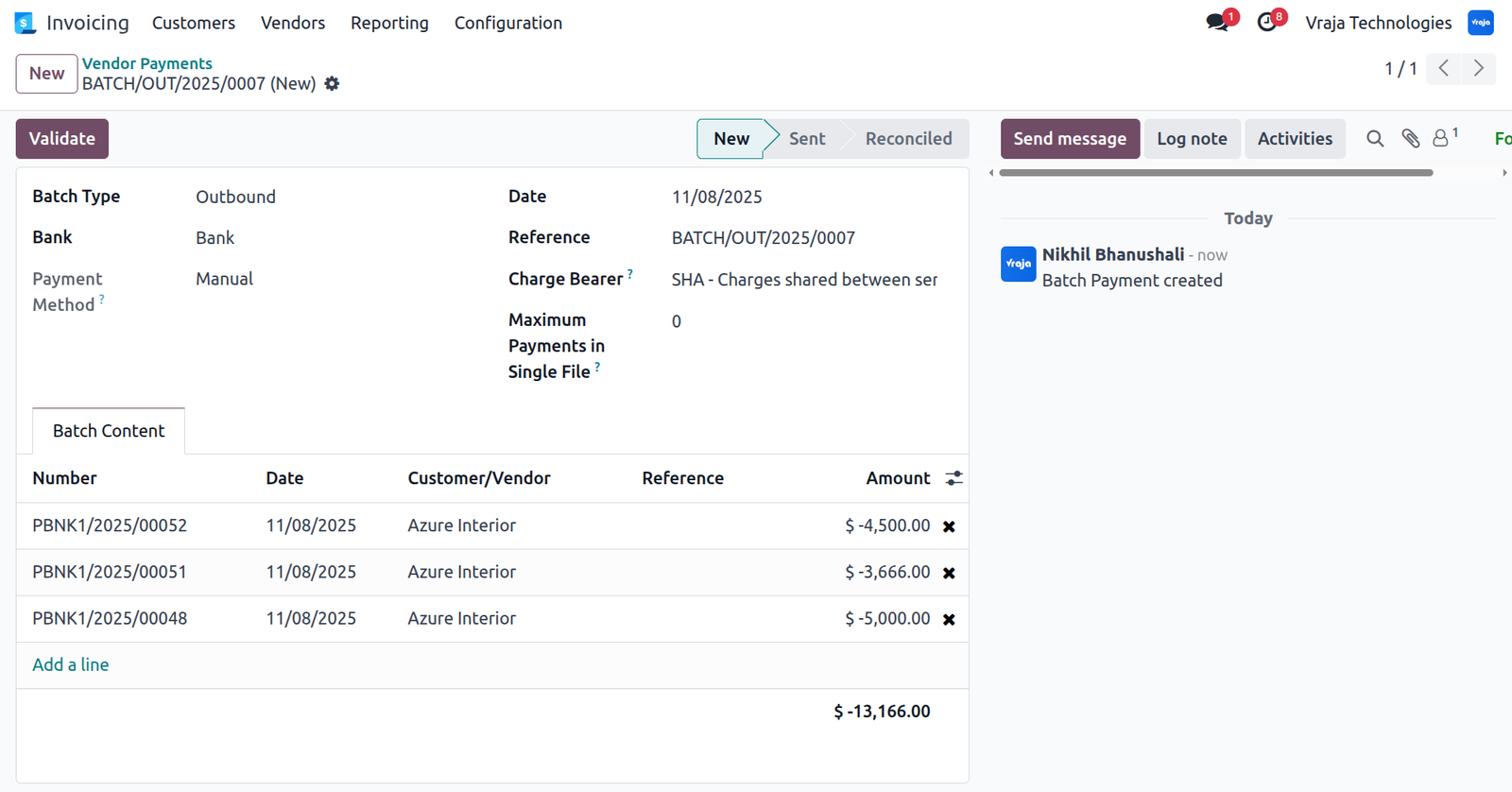
After Successfully Exporting the file to the FTP, You can see the Success Notification on the screen and related FTP where file is exported.
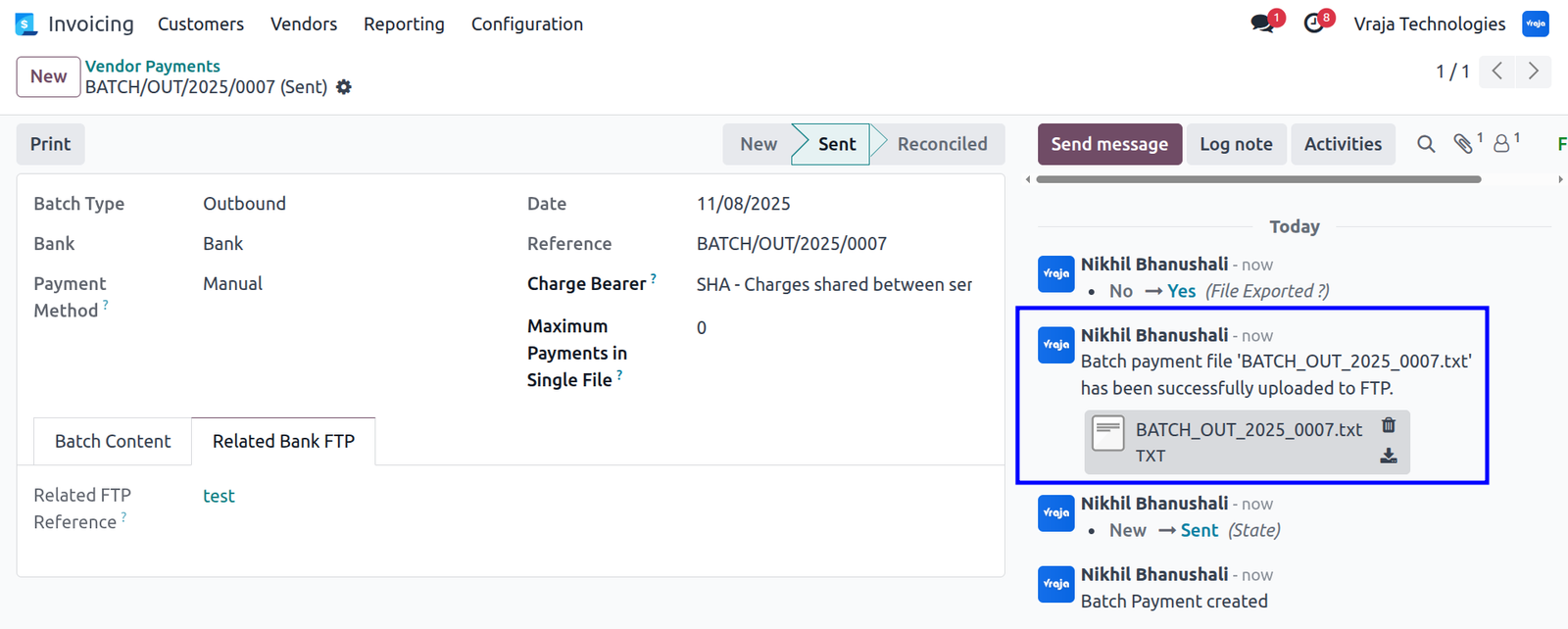
You can also see the exportred files that attached to that record and you can see in chatter area, that says how many files are exported.

The exported file can be viewed as an attachment.
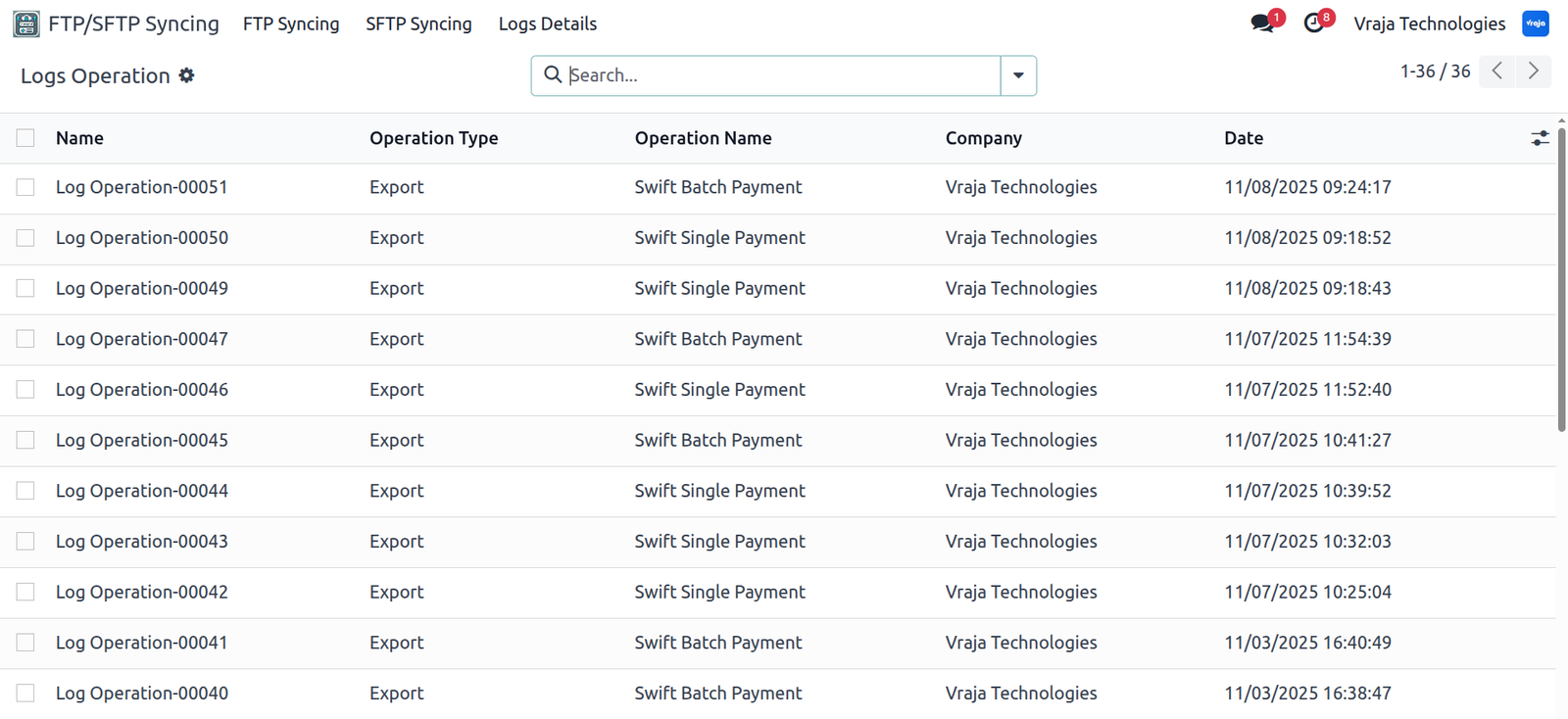
Log details can be found under the 'Log Details' menu in FTP/SFTP syncing, capturing both successful and failed operations for reference.
I need an extra customization in this application, how can I get it?

Yes, you can contact us on support@vrajatechnologies.com or can schedule a DEMO with our team to customize additional features.

I need an extra customization in this application, how can I get it?

Yes, you can contact us on mailto:support@vrajatechnologies.com or can schedule a DEMO with our team to customize additional features.

Is the application compatible with Odoo Enterprise and Community?

Yes, this application module is supported by both. It is also compatible with test and production environments.

Do I get free upgrades and support if I purchase this application?

We provide free support for the first 90 days following the purchase date.

Is technical knowledge required to set up the integration?

While some technical understanding may be helpful, the integration is designed to be user-friendly. Detailed documentation and support may be provided to aid in the setup process.

Is this free customization and implementation?

Our team has produced a support video that guides you through the implementation process step by step. If you encounter any issues, please feel free to contact us for assistance.

Which protocol you have used to transfer file?

We have used FTP protocol to transfer files.

Included App Support

90 Days Complimentary Support for Supported Versions

If you encounter issues caused by the app itself, our team provides complimentary support for 90 days from the date of purchase for supported Odoo versions.

Included App Support

90 Days Complimentary Support for Supported Versions

If you encounter issues caused by the app itself, our team provides complimentary support for 90 days from the date of purchase for supported Odoo versions.

Customer Support

Customer Support

Need help with installation, configuration, technical issues, or general questions about the module? Submit a support ticket through our dedicated support portal.

Customer Support

Customer Support

Need help with installation, configuration, technical issues, or general questions about the module? Submit a support ticket through our dedicated support portal.

Support Policy

Review our support policy for complete information about support coverage, issue eligibility, exclusions, version compatibility, and other support conditions.

Support Policy

Review our support policy for complete information about support coverage, issue eligibility, exclusions, version compatibility, and other support conditions.

Scan for Support

Vraja Technologies Support Portal QR Code

Scan for Support

Vraja Technologies Support Portal QR Code
Discover Trending Apps

Create Advance Payment

The Create Advance Payment for Sale Order app simplifies advance payment management directly from the Sales Order in Odoo. Users can record, track, and manage customer advance payments with a dedicated button. These advance payments are automatically applied to customer invoices for a smooth billing process.

Website Multiple Customer Invoice Full/Partial Payment(Portal User)

The Website Customer Invoice Partial/Full Payment app allows customers to pay outstanding invoices partially or in full directly from the Odoo website. Users can pay multiple invoices in a single transaction using their preferred payment method. With real-time payment updates and automated reminders, it delivers a seamless and efficient payment experience.

Helcim Payment Provider

"The Helcim Payment Gateway module integrates Helcim with Odoo for secure and seamless online payment processing. Businesses can accept payments, process transactions in real time, and manage refunds directly within Odoo. By centralizing sales and payment workflows, the module improves efficiency and delivers a smooth customer payment experience.

Restrict Payment Method

The Restrict Payment Method module lets businesses control which payment methods are available during checkout using configurable rules. Payment providers can be restricted based on customers, order amount, products, order date, location, and other custom conditions. This ensures a streamlined checkout experience, enforces payment policies, and improves payment accuracy in Odoo.

Stripe Partial Payment | Stripe Split Payment

The Stripe Partial Payment module extends Odoo's Stripe integration to support capturing payments in multiple installments from a single authorization. Each partial payment is automatically linked to the corresponding sales order and invoice within Odoo. This provides a flexible and seamless payment workflow while maintaining accurate transaction tracking.

Stripe Odoo Integration

The Stripe Terminal Odoo Integration enables businesses to process in-person card payments directly from Odoo Sales Quotations and Customer Invoices using Stripe Terminal devices. It supports devices like WisePOS E and Stripe S700 Reader, eliminating the need to process payments only through POS. With one-click setup and automatic accounting synchronization, it delivers a seamless, secure, and efficient payment workflow.

Stripe Refund Payment

The Stripe Refund feature allows businesses to process full or partial Stripe refunds directly from Odoo invoices. Refunds are handled within Odoo, ensuring accurate transaction records and a seamless refund workflow. It supports refunds only for payments made through the Stripe Payment Gateway on the Odoo website.

SWIFT EDI Odoo Integration (International Payments)

"The SWIFT CBA EDI Integration enables Odoo to export MT101 bulk and single payment files for secure international vendor payments. It supports SWIFT CBA message formats and uses FTP for seamless communication with financial institutions. This integration improves payment accuracy, reduces manual effort, and streamlines cross-border payment processing.

Explore Before Purchase

Start with a free trial

Test the connector with your real workflows using our 15-day free trial. If you need help, our product experts will guide you throughout the trial.

Test the connector with your real workflows.

Our product experts will guide you during the trial to help you evaluate, configure, and use the connector with confidence.

15-Day Trial Expert Guidance Real Workflow Testing
