Explore the key features, workflow, and value of this Odoo module.
|
|
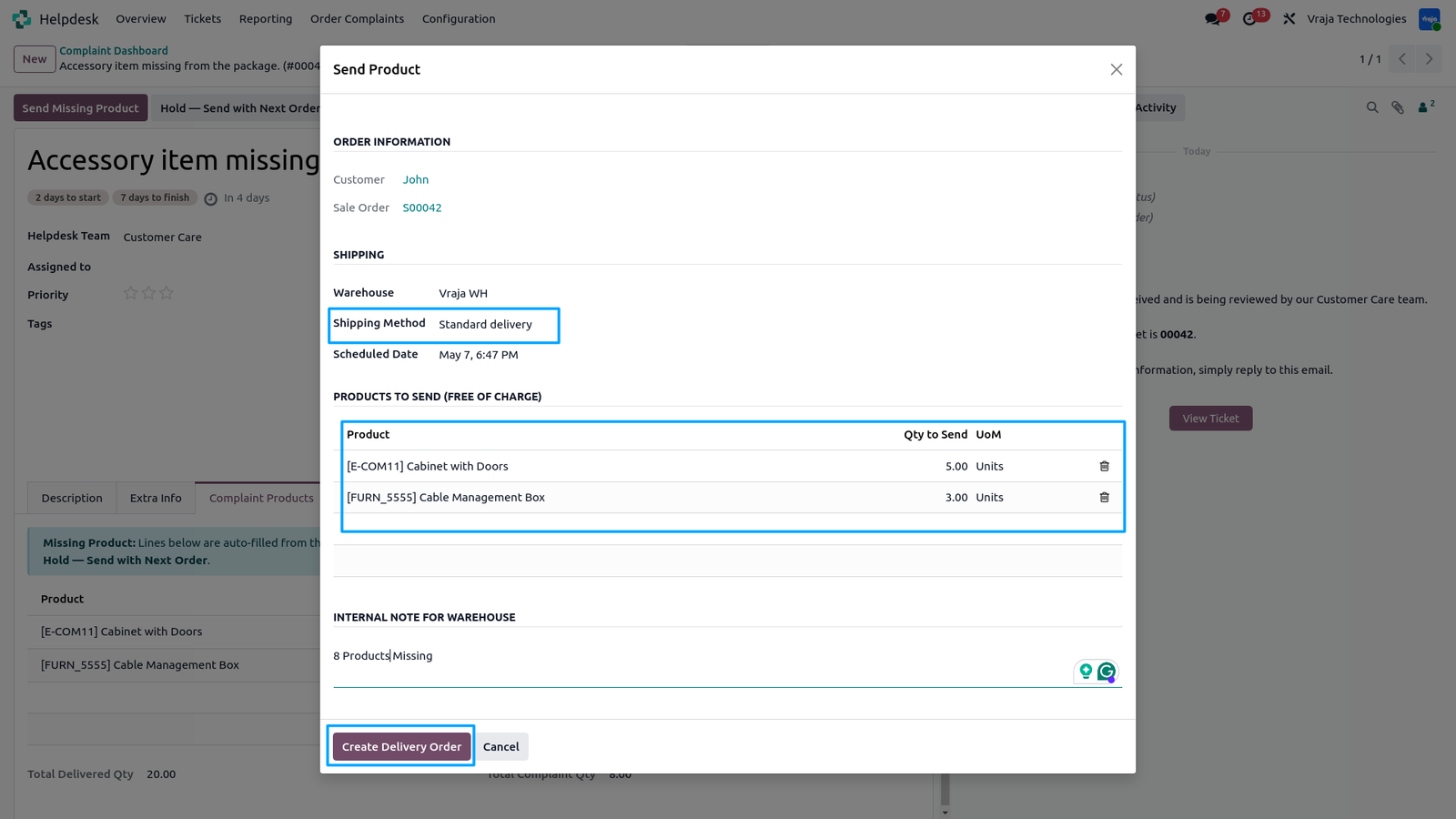
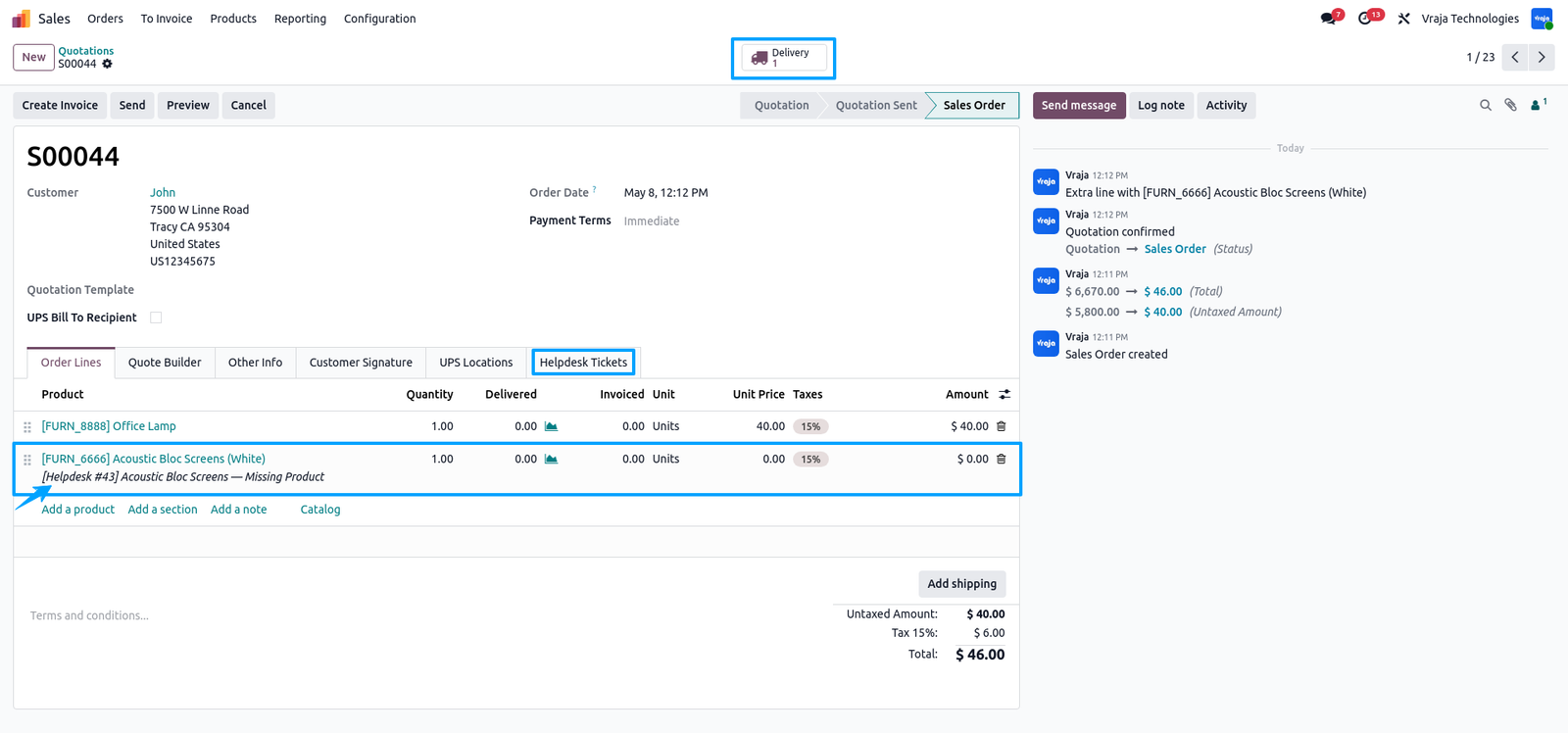
Send with Next Order:Add pending complaint products as free lines in the customer’s next Sale Order. |
|
|
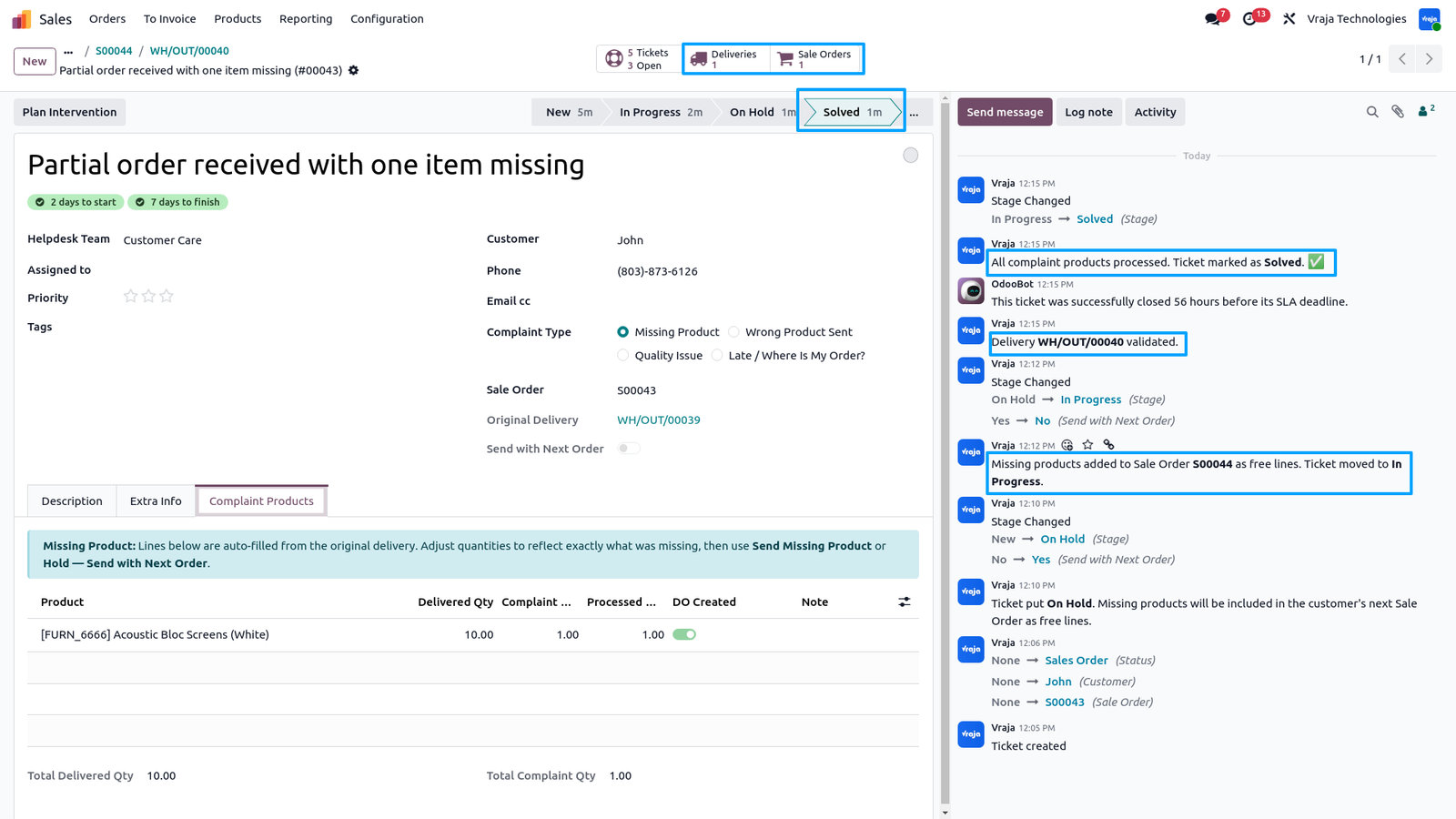
Auto Stage Transitions:Tickets move from New → In Progress → Solved automatically based on delivery and return validation. No manual stage changes. |
|
|
Carrier and Tracking Info:Carrier name, tracking reference and tracking URL are auto-filled from the original delivery. Supports any carrier in Odoo. |
|
|
Send Status Email:One-click email to customer with order status, tracking link and estimated delivery date — auto-generated. |
|
|
Complaint Dashboard:Dedicated dashboard with Kanban, List, Pivot and Activity views. Built-in filters and group by for quick analysis. |
|
|
Full Chatter History:Every action — delivery created, validated, return received, stage changed — is logged in the ticket chatter automatically. |
|
|
No Configuration Required:Works with your existing Helpdesk teams, warehouses, carriers and Sale Orders out of the box. |
|
|
One Place. Every Order Complaint.:Stop switching between Sales, Inventory and Helpdesk. Raise, resolve and track every order issue from a single ticket. |
|
|
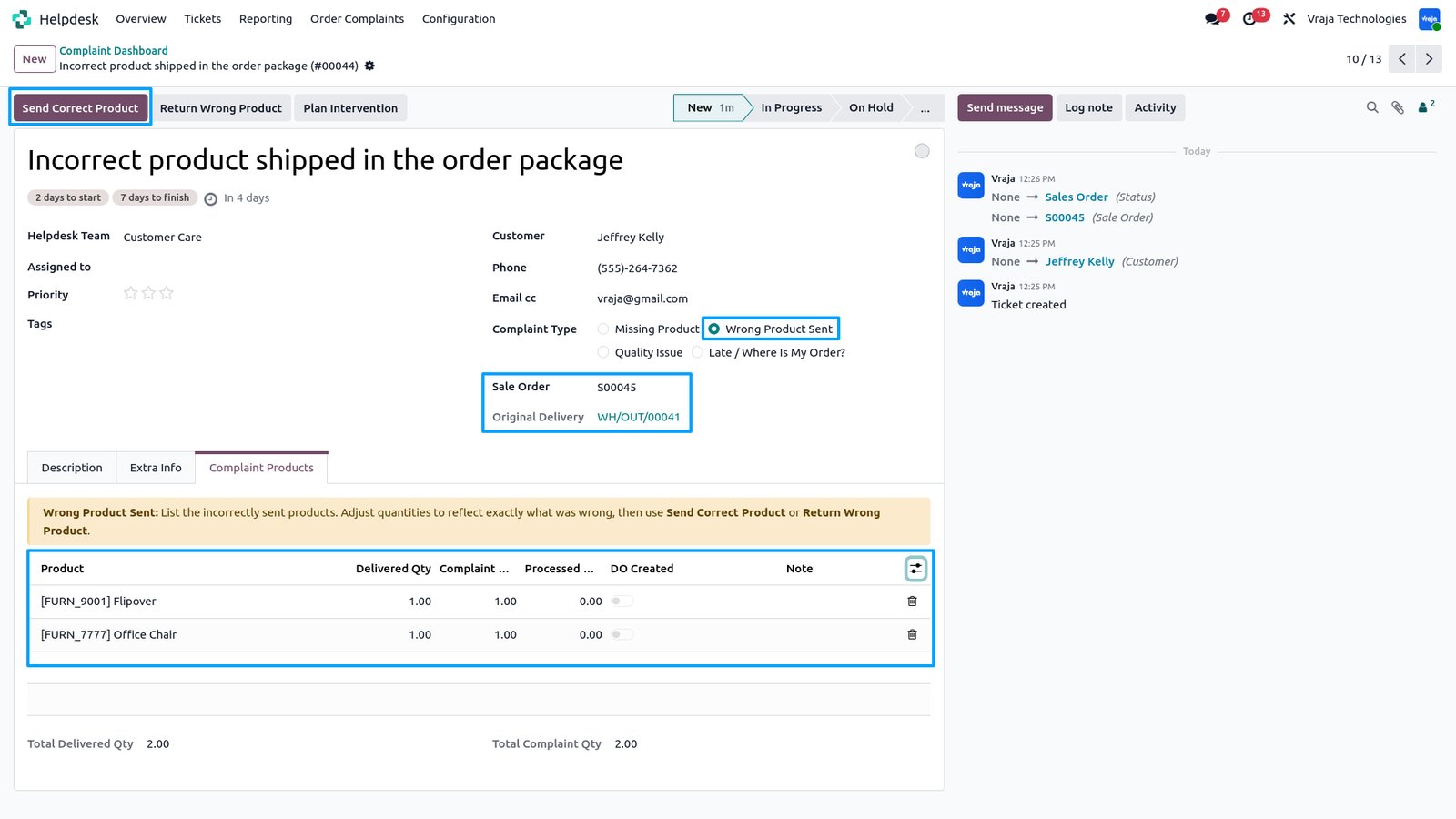
Products Load Themselves:Link the Sale Order — complaint products fill in automatically from the original delivery. Agent only sets the affected quantity. |
01 Open Helpdesk from the main menu and click Order Complaints. The Complaint Dashboard opens in Kanban view — all complaint tickets displayed as cards, grouped by Complaint Type.Each column shows the complaint type with a ticket count. Each card shows the ticket subject, customer name and priority.

02 Use the search bar to filter and organise tickets instantly.

03 Use the search bar to filter and organise tickets instantly.

04 Use the search bar to filter and organise tickets instantly.

05 Use the search bar to filter and organise tickets instantly.
06 Use the search bar to filter and organise tickets instantly.

07 Use the search bar to filter and organise tickets instantly.

08 Use the search bar to filter and organise tickets instantly.

09 Use the search bar to filter and organise tickets instantly.

10 Use the search bar to filter and organise tickets instantly.

11 Use the search bar to filter and organise tickets instantly.
12 Use the search bar to filter and organise tickets instantly.

13 Use the search bar to filter and organise tickets instantly.
14 Use the search bar to filter and organise tickets instantly.
15 Use the search bar to filter and organise tickets instantly.
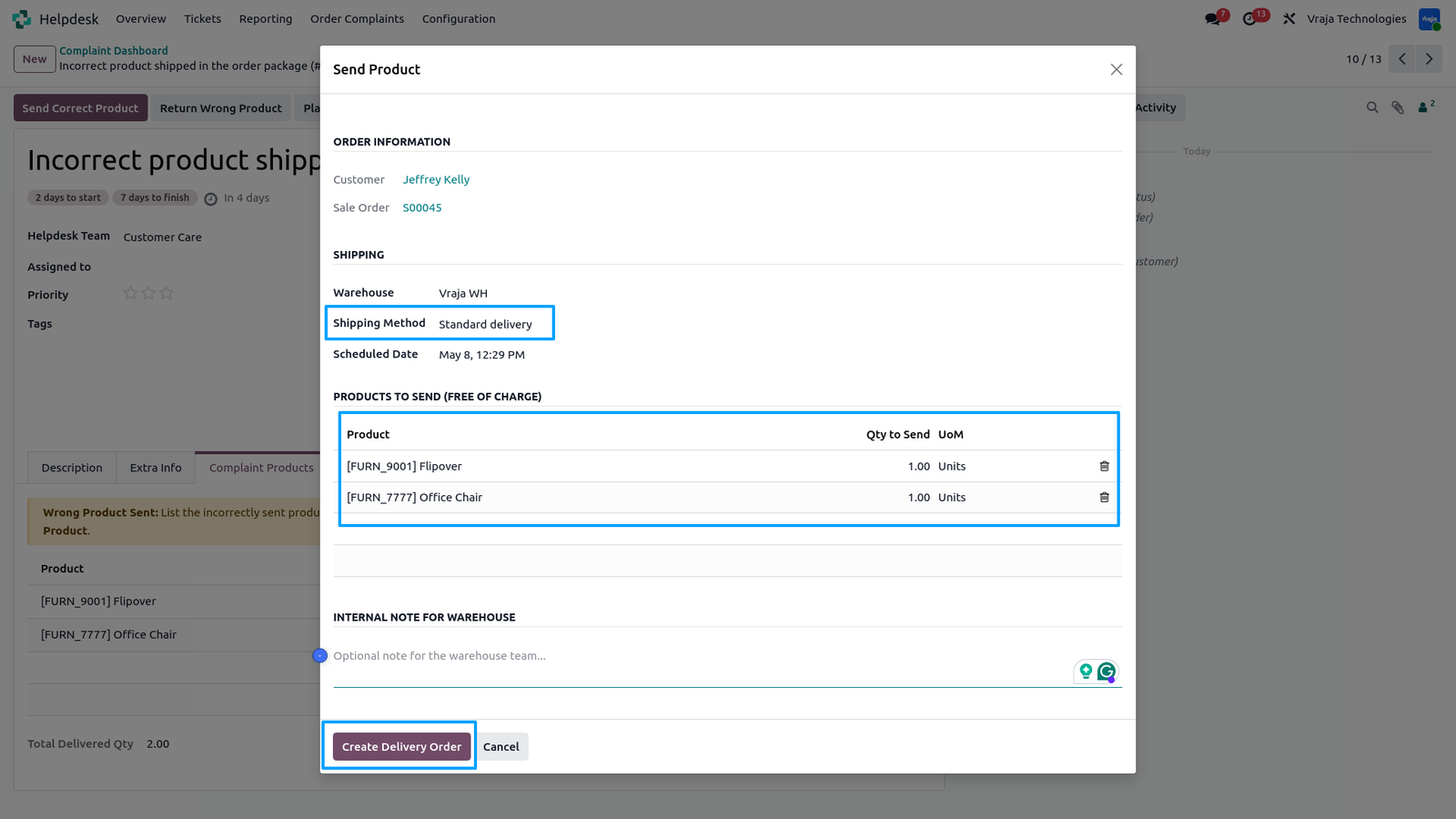
16 Use the search bar to filter and organise tickets instantly.

17 Use the search bar to filter and organise tickets instantly.
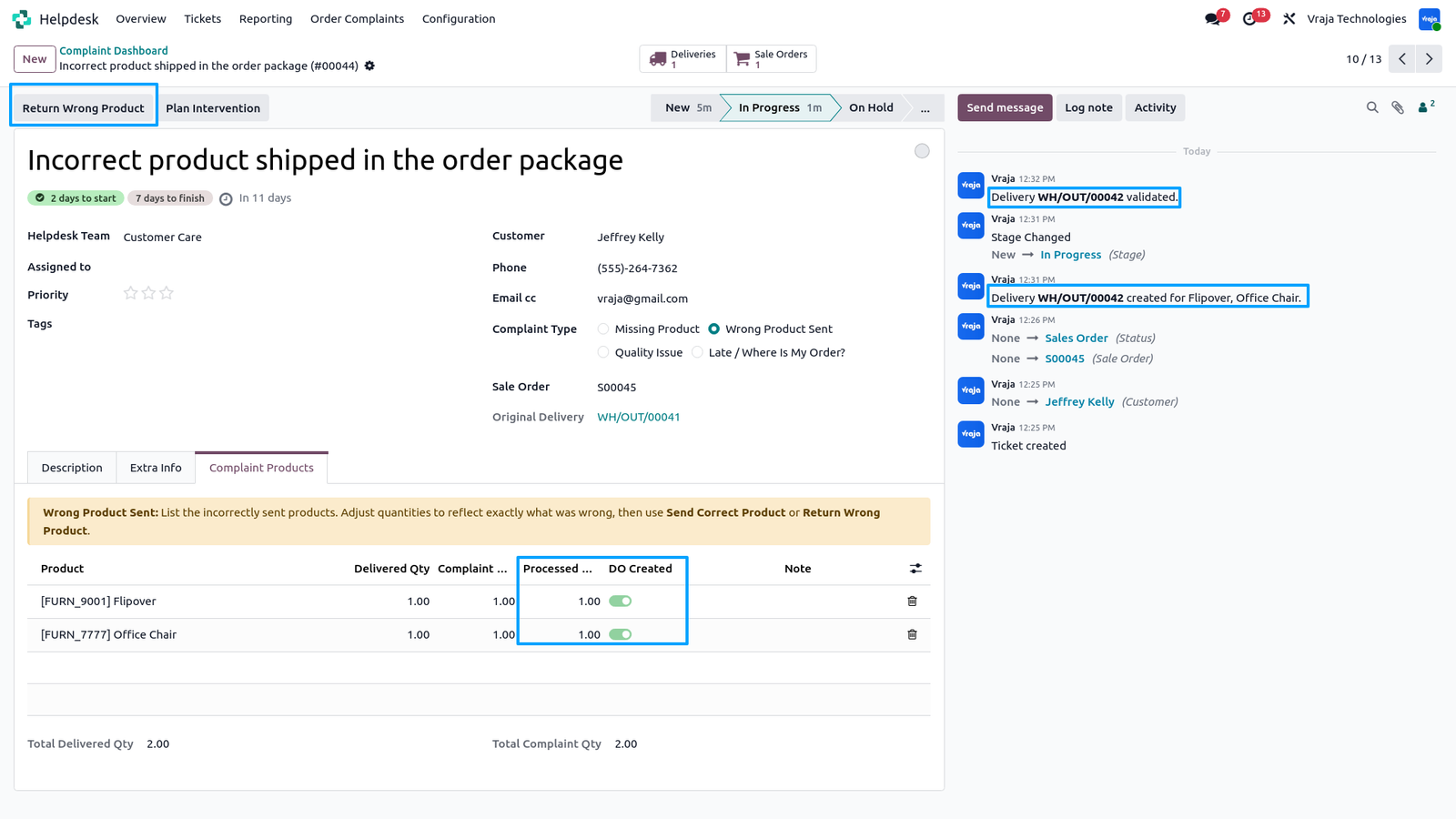
18 Use the search bar to filter and organise tickets instantly.

19 Use the search bar to filter and organise tickets instantly.

20 Use the search bar to filter and organise tickets instantly.

21 Use the search bar to filter and organise tickets instantly.

22 Use the search bar to filter and organise tickets instantly.

23 Use the search bar to filter and organise tickets instantly.

24 Use the search bar to filter and organise tickets instantly.

25 Use the search bar to filter and organise tickets instantly.
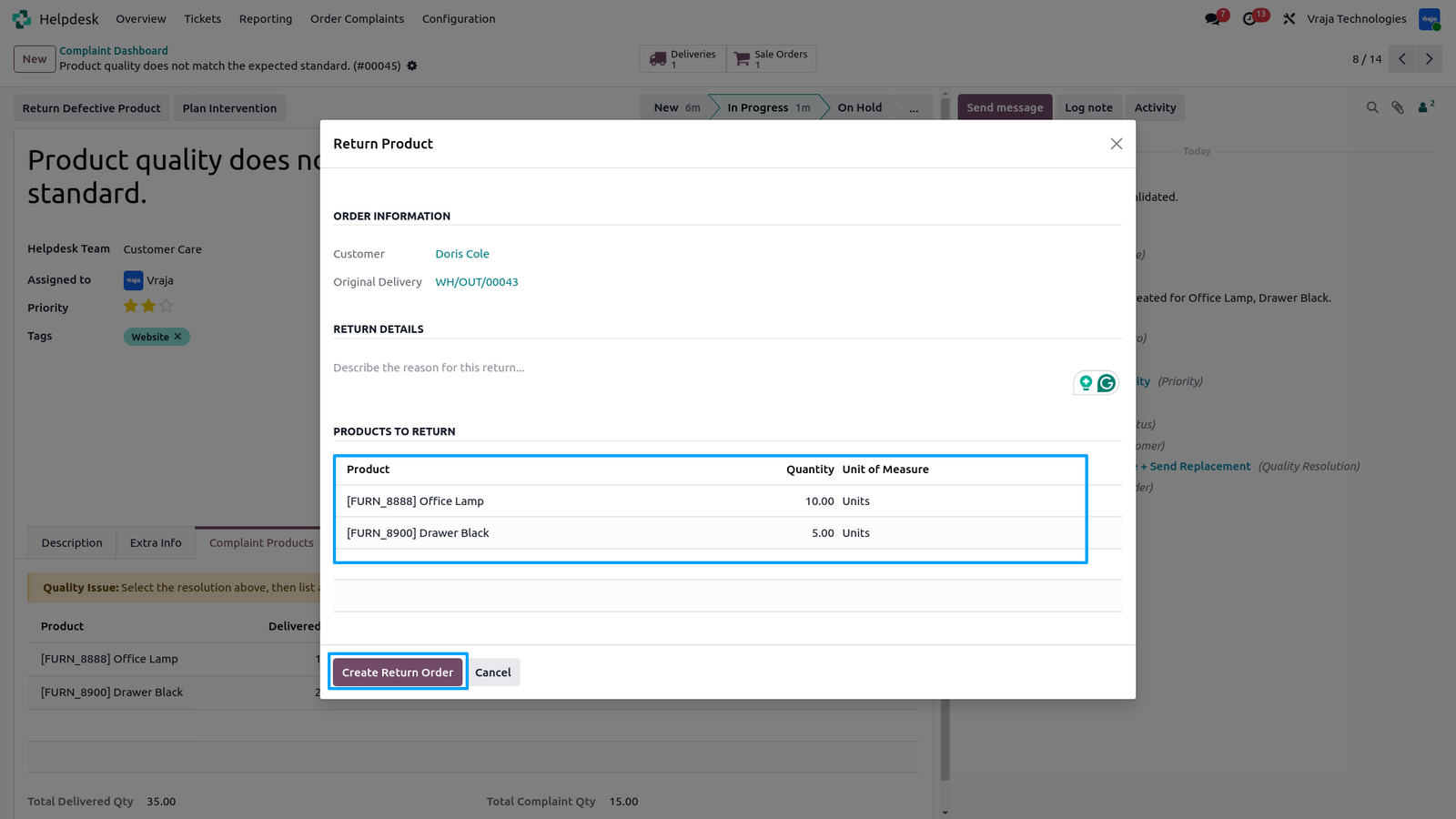
26 Use the search bar to filter and organise tickets instantly.
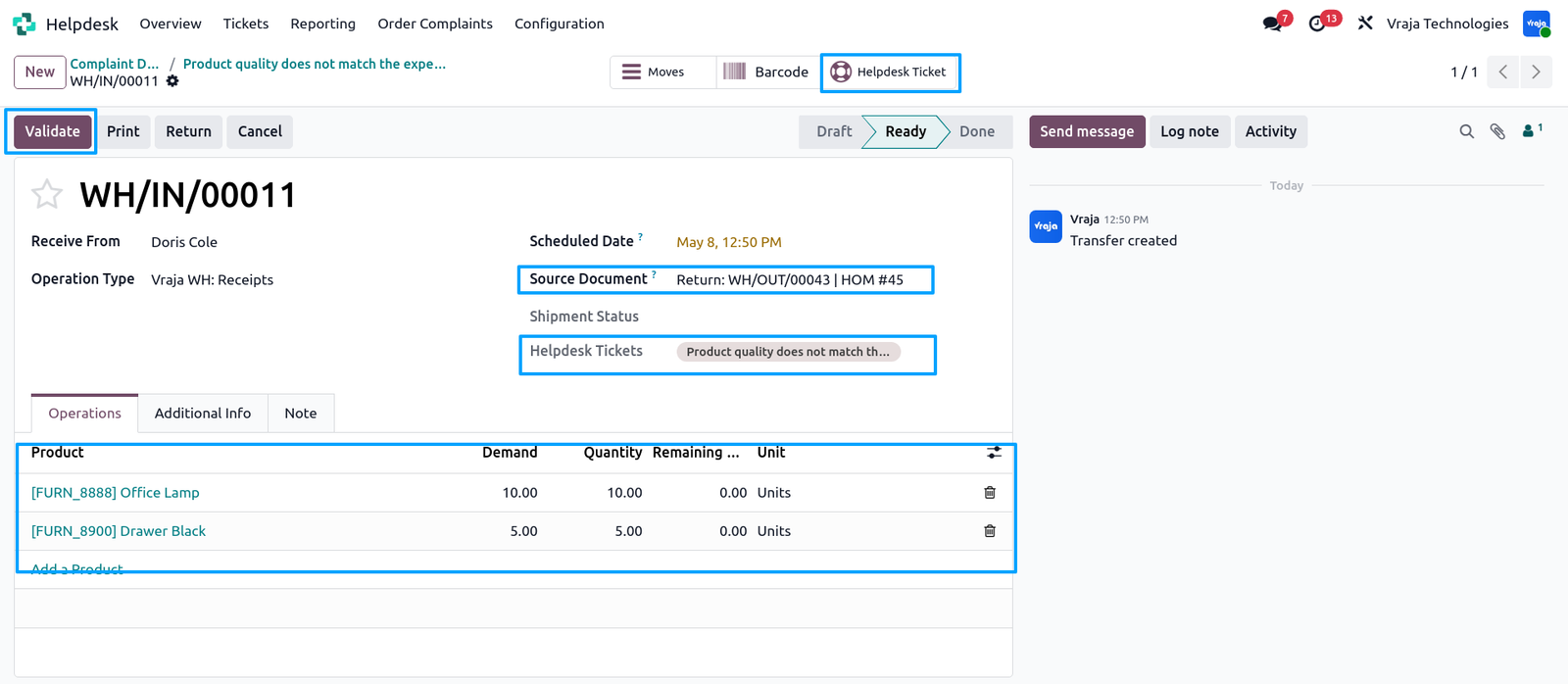
27 Use the search bar to filter and organise tickets instantly.

28 Use the search bar to filter and organise tickets instantly.
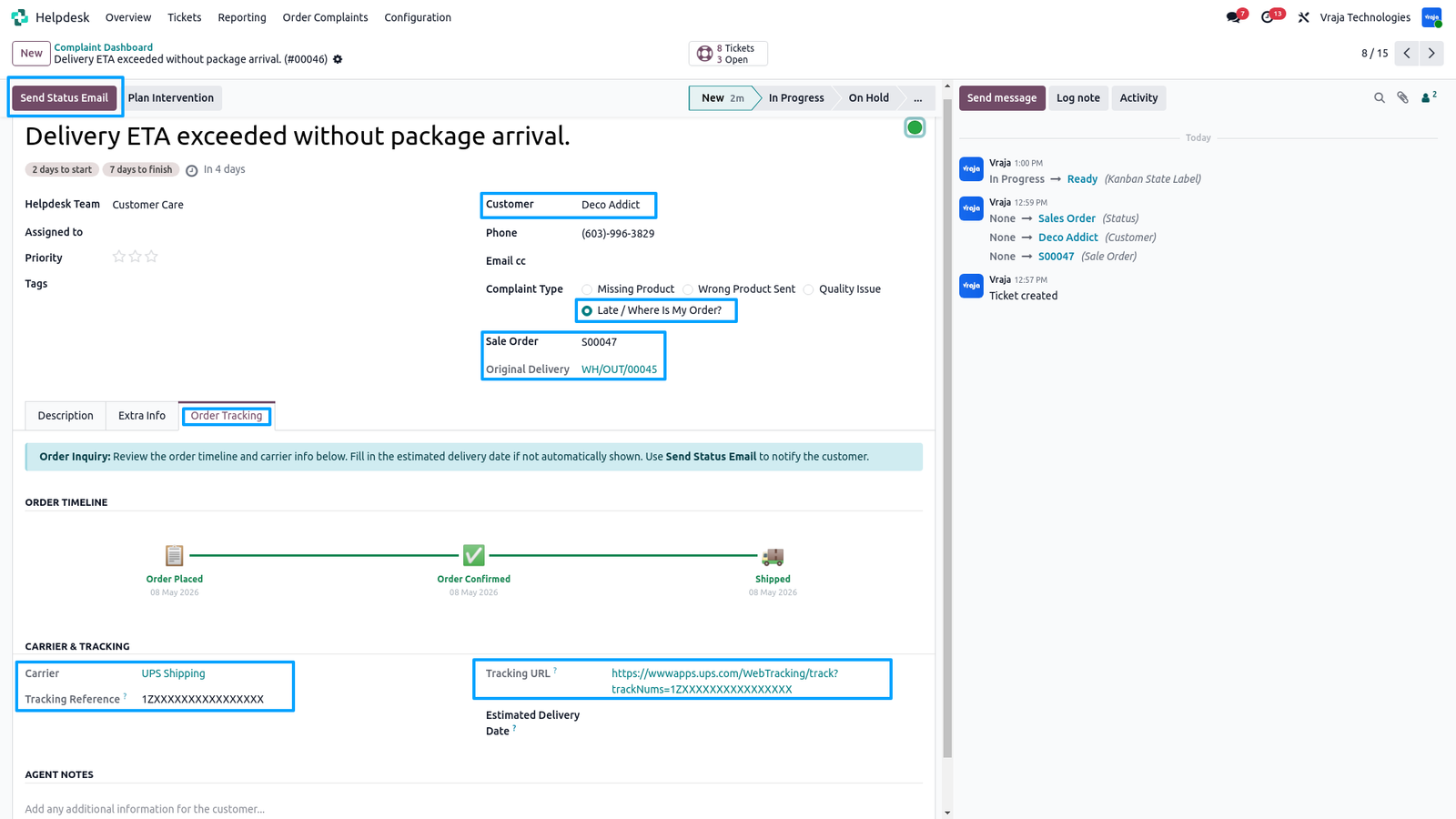
29 Use the search bar to filter and organise tickets instantly.

30 Use the search bar to filter and organise tickets instantly.

|
|
Does this module replace the standard Helpdesk?No. It extends it. All standard Helpdesk features work exactly as before. This module adds order complaint management on top without changing anything existing. |
|
|
Can I process complaint products in separate deliveries?Yes. The wizard shows all pending products. Delete lines to process specific products now and handle the rest later. Each product tracks its own DO Created status. |
|
|
Does the Send with Next Order feature work automatically?When a ticket is put On Hold using Send with Next Order, a Pending Complaints smart button appears on any new Sale Order created for that customer. The agent opens the wizard, selects which products to include and clicks Add Selected to This Order. Products are added as free lines at zero price. The agent stays in full control of which order the missing products go into and when. |
|
|
Is the carrier tracking URL shown automatically?Yes — if the carrier in Odoo supports tracking URLs. If not, the tracking reference is shown with a message to share it with the customer directly. The agent can also fill the Estimated Delivery Date manually. |
|
|
What if the customer received 10 items but only 3 are missing?Set Delivered Qty shows 10 automatically from the delivery. Agent sets Complaint Qty to 3. Only 3 units are processed in the complaint resolution — the rest are ignored. |
|
|
What if the customer has multiple open complaint tickets?Each complaint ticket is managed independently. When using the Send with Next Order flow, the system automatically checks all On Hold complaint tickets for the customer and displays all pending complaint products together in the next Sale Order wizard. The agent can then select which products should be added to the current order, making it easy to handle multiple complaint tickets efficiently from a single Sale Order. |
|
|
Can the agent process a return without creating a delivery first?Yes. For Wrong Product and Quality Issue — both actions are completely independent. Return can be created before or after the delivery. |
|
|
What does the agent see when all products are processed?All action buttons disappear from the ticket header. The Complaint Products tab becomes readonly. The ticket is in Solved stage with a full chatter history. |
|
|
Is there a limit on how many deliveries can be created per ticket?No. The agent can create as many deliveries and returns as needed. All are linked to the ticket and visible via the Deliveries smart button. |
|
|
Is there a report or export for complaint data?Yes. Use the Pivot view on the Complaint Dashboard to analyse complaint data by type and stage. Export to Excel using the standard Odoo export feature. |
|
|
I would like to request a custom feature for this application. What’s the process to get it implemented?We’re happy to help tailor the application to meet your business needs! You can reach us via sales@vrajatechnologies.com |
|
|
Who is the point of contact for technical support, configuration support or bug-related queries?You can reach us via https://vrajatechnologies.com/helpdesk |
|
|
Included App Support90 Days Complimentary Support for Supported Versions If you encounter issues caused by the app itself, our team provides complimentary support for 90 days from the date of purchase for supported Odoo versions. |
Included App Support
90 Days Complimentary Support for Supported Versions
If you encounter issues caused by the app itself, our team provides complimentary support for 90 days from the date of purchase for supported Odoo versions.

Customer SupportNeed help with installation, configuration, technical issues, or general questions about the module? Submit a support ticket through our dedicated support portal. |
||
|
Support Portal
vrajatechnologies.com/helpdesk
|
Support PolicyReview our support policy for complete information about support coverage, issue eligibility, exclusions, version compatibility, and other support conditions. |
||
|
Support Policy
vrajatechnologies.com/support-policy
|
Scan for Support
|
||
|
Support Portal
vrajatechnologies.com/helpdesk
|