Explore the key features, workflow, and value of this Odoo module.
|
|
Cancel Orders in Any StateCancel manufacturing orders in Draft, Confirmed and Done states, including Done orders that standard Odoo does not allow you to cancel. |
|
|
Automatic Stock ReversalWhen a Done order is cancelled, the consumed components are returned to stock and the produced finished goods are removed, so your inventory stays correct. |
|
|
Release Reserved ComponentsCancelling a confirmed order releases its reserved components, making them available again for other orders. |
|
|
Mass CancellationSelect multiple manufacturing orders, even in different states, and cancel them together in one action. |
|
|
Quick Access from Actions MenuA “Cancel Manufacturing Orders” option is added to the Actions menu of the Manufacturing Orders list view. |
|
|
Duplicate Cancel ProtectionIf you try to cancel an order that is already cancelled, the module shows a clear warning and makes no changes. |
|
|
No Configuration NeededInstall the module and start cancelling orders right away; no extra setup is required. |
01 Install the Cancel Manufacturing Orders module from Apps. No extra configuration is needed after installation.

02 The Bill of Materials defines how the product is made. One unit of ZZCMO Finished requires two units of ZZCMO Component.
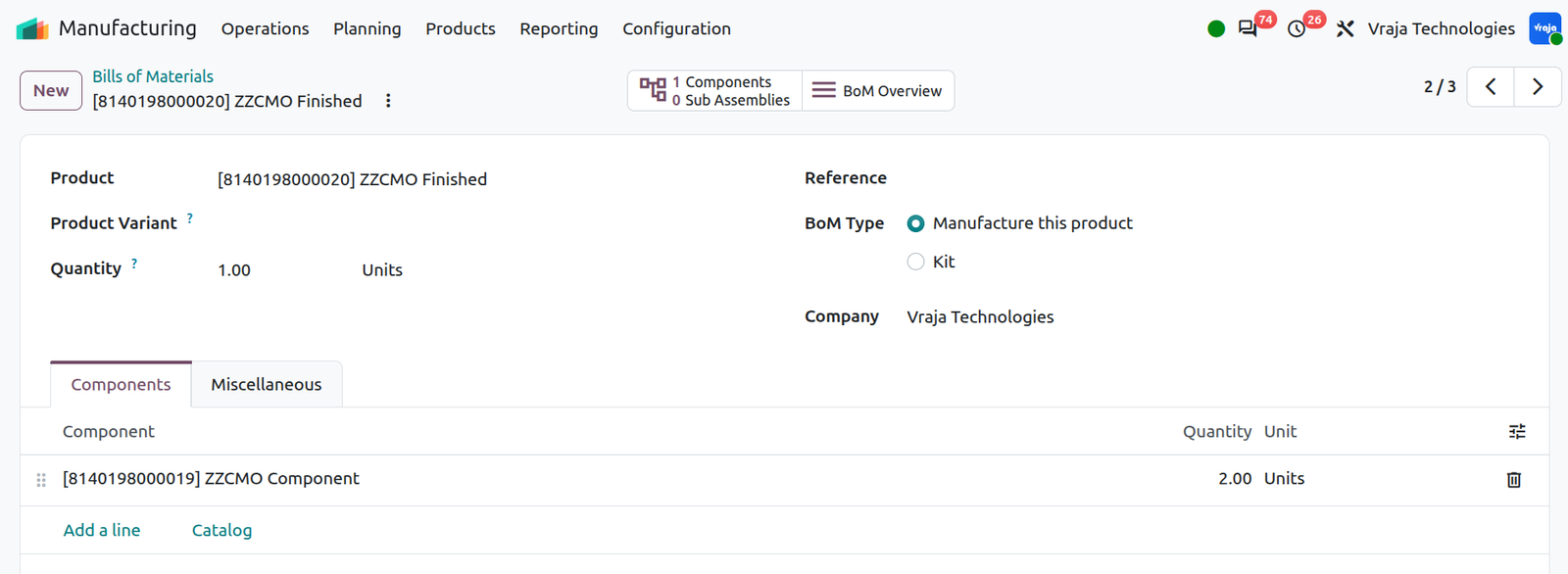
03 Before production, ZZCMO Finished has 48 units on hand. This is the starting stock used to verify the reversal later.

04 Create a manufacturing order for ZZCMO Finished. The BOM and components load automatically. Click Confirm.

05 The order moves to Confirmed and the components are reserved. Click Produce to complete it.

06 The order is marked as Done and the finished product is added to stock (now 49 units). Standard Odoo cannot cancel an order in this state.

07 Select the Done order in the list and click Actions → Cancel Manufacturing Orders.
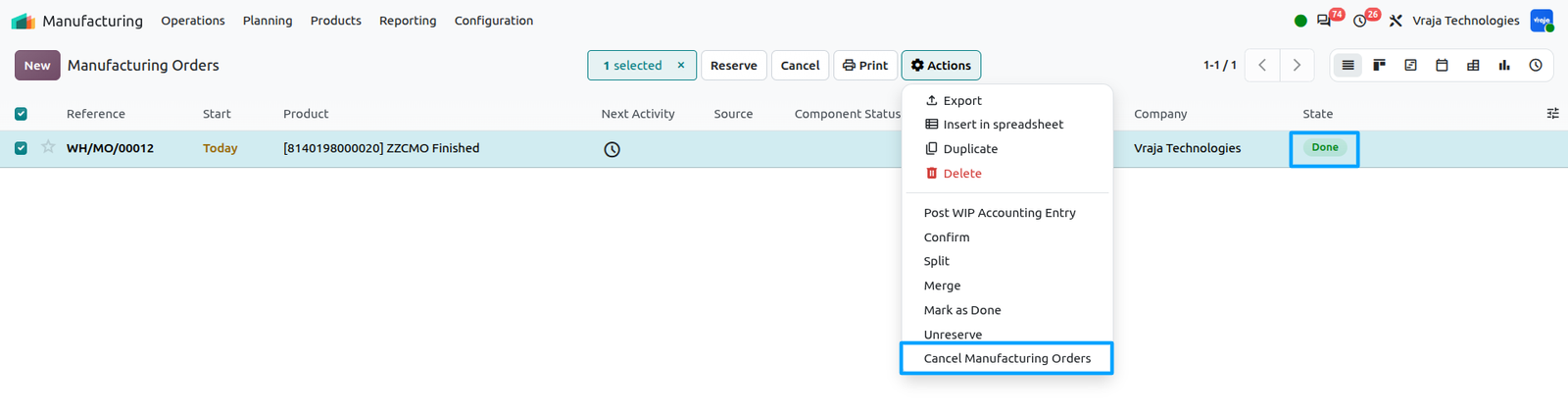
08 The order is cancelled successfully. Its state changes from Done to Cancelled.

09 The stock moves are reversed automatically. ZZCMO Finished returns to 48 units, the same as before production.

|
|
Can I cancel a manufacturing order that is already Done?Yes. This is the main purpose of the module. In standard Odoo, a Done manufacturing order can’t be cancelled. With this module, you can cancel it directly from the Manufacturing Orders list view. |
|
|
What happens to the stock when a Done order is cancelled?The module automatically reverses the stock moves of the order. The produced finished goods are removed from stock and the consumed components are returned, so inventory goes back to the same level as before production. |
|
|
Can I cancel manufacturing orders in Draft or Confirmed state?Yes. The module supports cancelling orders in Draft, Confirmed and Done states. |
|
|
What happens to reserved components when a confirmed order is cancelled?The reserved components are released and become available again for other orders. |
|
|
Can I cancel multiple manufacturing orders at once?Yes. Select the orders in the list view and click Actions → Cancel Manufacturing Orders. The selected orders can be in different states, and all of them are cancelled in one step. |
|
|
Are linked work orders also cancelled?Yes. All work orders linked to the manufacturing order are cancelled together with it. |
|
|
Where do I find the cancel option?Go to Manufacturing → Operations → Manufacturing Orders, select one or more orders, and click Actions → Cancel Manufacturing Orders. |
|
|
Who is the point of contact for technical support, configuration support or bug-related queries?You can reach us via support@vrajatechnologies.com |
|
|
I would like to request a custom feature for this application. What’s the process to get it implemented?We’re happy to help tailor the application to meet your business needs! You can reach us via sales@vrajatechnologies.com |
|
|
Included App Support90 Days Complimentary Support for Supported Versions If you encounter issues caused by the app itself, our team provides complimentary support for 90 days from the date of purchase for supported Odoo versions. |
Included App Support
90 Days Complimentary Support for Supported Versions
If you encounter issues caused by the app itself, our team provides complimentary support for 90 days from the date of purchase for supported Odoo versions.

Customer SupportNeed help with installation, configuration, technical issues, or general questions about the module? Submit a support ticket through our dedicated support portal. |
||
|
Support Portal
vrajatechnologies.com/helpdesk
|
Support PolicyReview our support policy for complete information about support coverage, issue eligibility, exclusions, version compatibility, and other support conditions. |
||
|
Support Policy
vrajatechnologies.com/support-policy
|
Scan for Support
|
||
|
Support Portal
vrajatechnologies.com/helpdesk
|