Explore the key features, workflow, and value of this Odoo module.
|
|
Export Multiple Invoices at OnceSelect several invoices in the list view and export them together in one step, instead of downloading each invoice separately. |
|
|
Standard Invoice LayoutInvoices are generated with Odoo’s standard invoice report, so the exported documents match the invoices sent to customers, including your company layout and branding. |
|
|
Single DownloadAll selected invoices are delivered in one download, so they are easy to store, share or send by email. |
|
|
Works from the List ViewUse Odoo’s filters and grouping to find the invoices you need, for example by customer, date or status, then select them and export. |
|
|
Ideal for Accounting and AuditsShare a full month’s or a full customer’s invoices with your accountant or auditor in one go. |
|
|
Access ControlThe export is controlled by a dedicated user group, so only authorized users can export invoices in bulk. |
|
|
Simple and Ready to UseNo complex setup is needed. Install the module, select the invoices and export. |
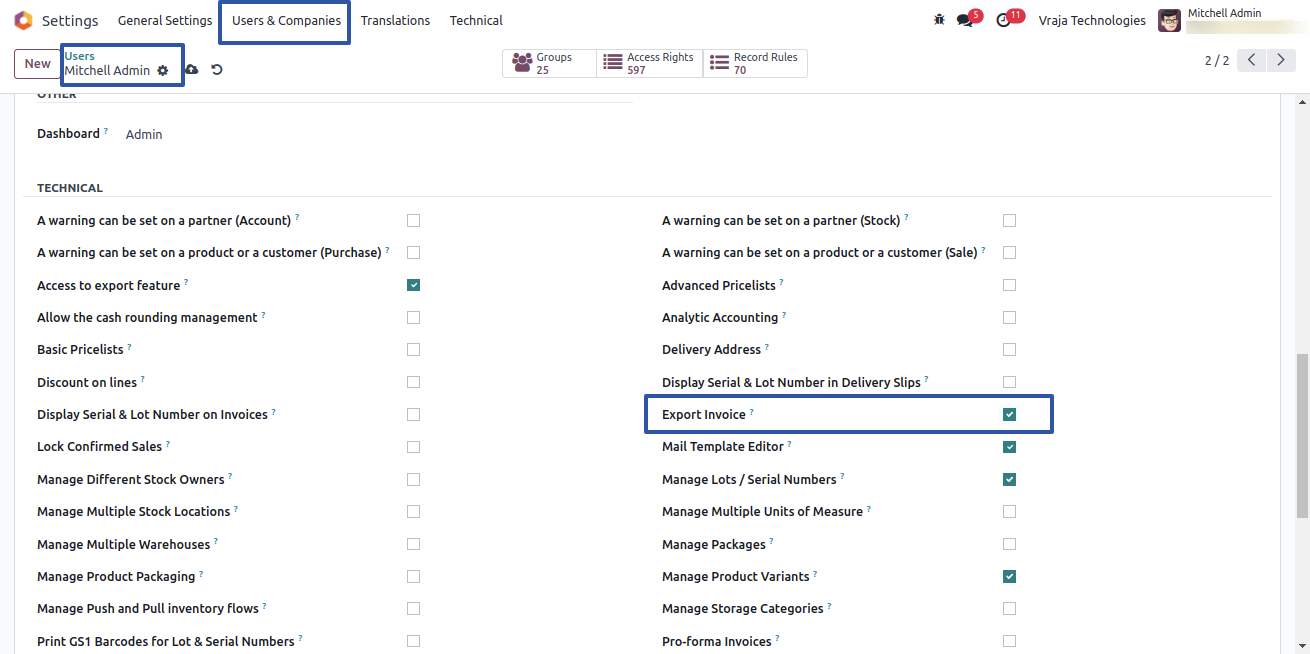
01 Enable the "Export Invoice" option from the User Settings screen.
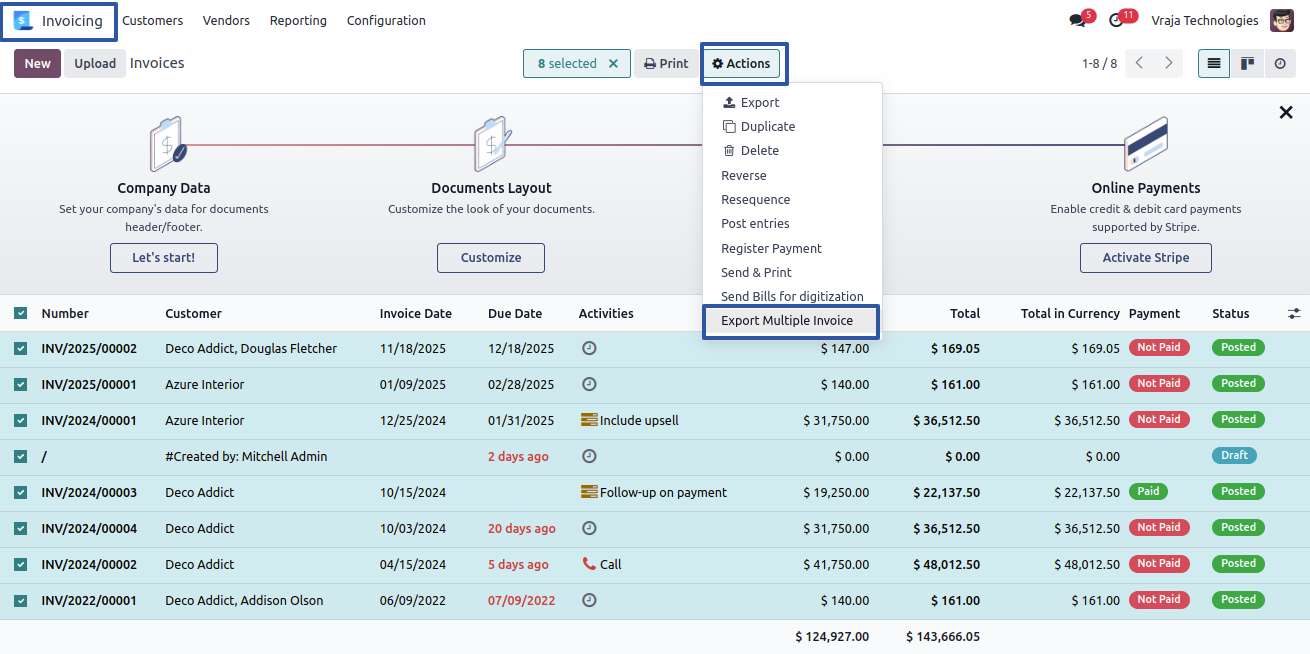
02 Shows the action menu for "Export Multiple Invoices" in the Invoice app.
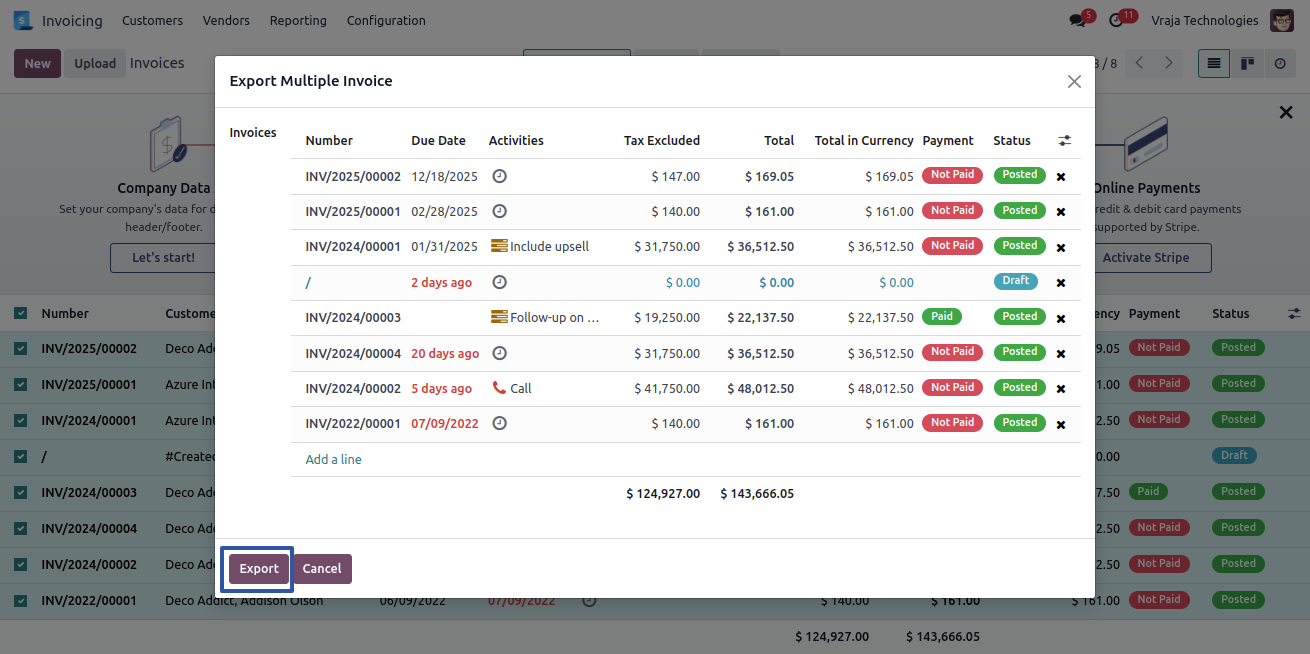
03 Shows the wizard that opens for exporting invoices when clicking on the "Export Multiple Invoices" action menu.
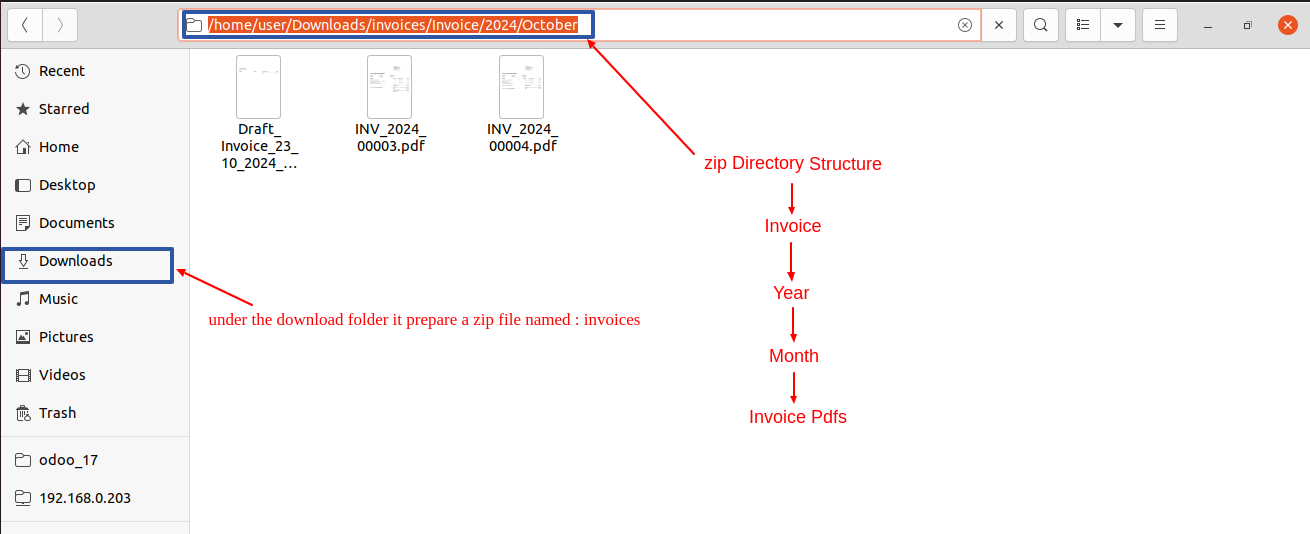
04 Displays the directory structure of the ZIP file containing the exported invoices (after clicking the "Export" button in the wizard).
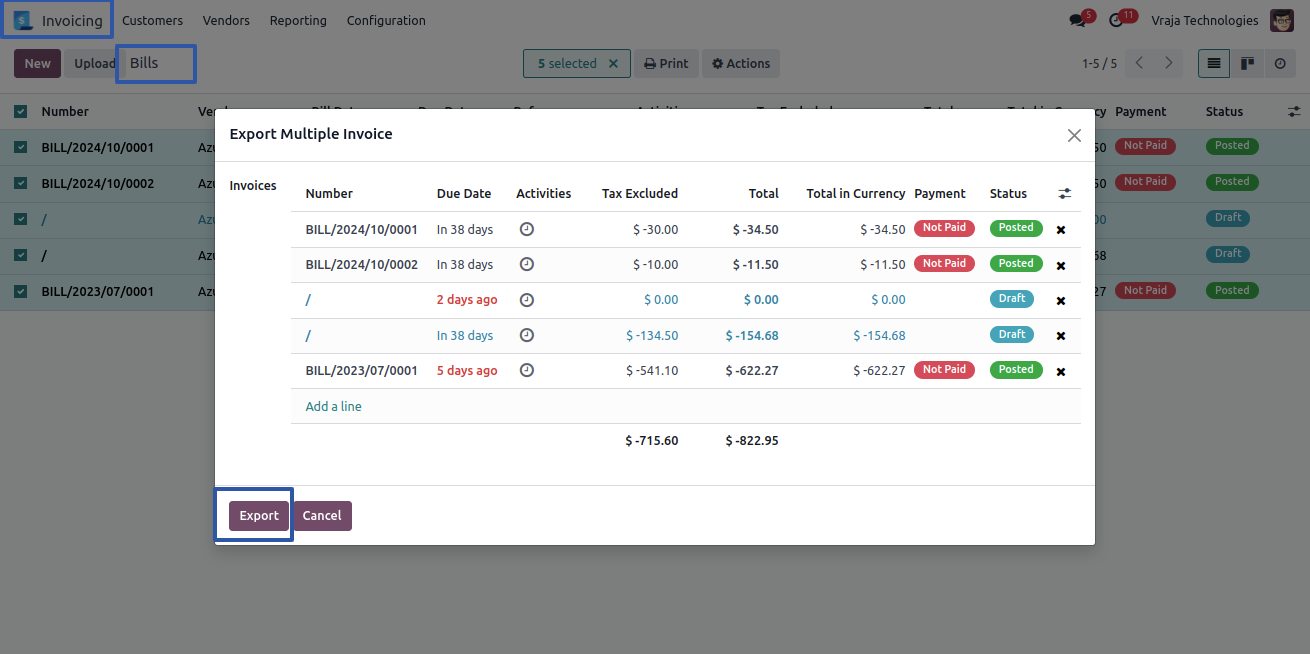
05 Shows the wizard that opens for exporting bills when clicking on the "Export Multiple Invoices" action menu.
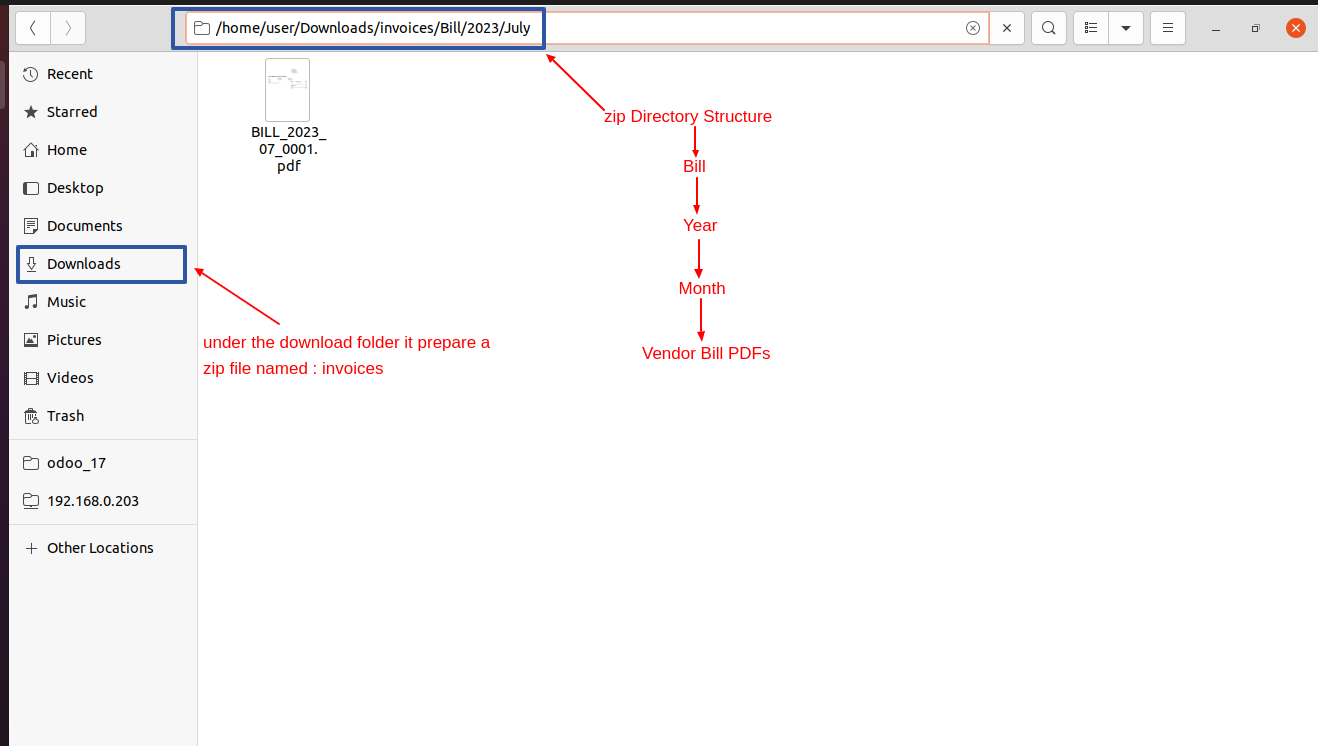
06 Displays the directory structure of the ZIP file containing the exported bills (after clicking the "Export" button in the wizard).
|
|
What does this module do?It lets you export multiple invoices at once from the invoice list view, instead of downloading them one by one. |
|
|
How do I export multiple invoices?Go to the invoice or bill list view, select the records you want, and click Actions → Export Multiple Invoice. In the wizard that opens, click Export to download invoices.zip. |
|
|
Is there a limit on how many invoices I can export?There is no fixed limit. All the PDFs are generated in one request, so for very large selections, export in smaller batches. |
|
|
Which invoice layout is used in the export?Odoo’s standard invoice report, so the PDFs look the same as the invoices you print or send to customers. |
|
|
Can I export invoices for a specific customer or period?Yes. Vendor bills are exported from the Bills list view the same way. Credit notes and refunds are not included. |
|
|
How is the ZIP file organized?Invoices go in Invoice/// and bills in Bill///. Each PDF is named after the invoice number (for example, INV_2026_00001.pdf). |
|
|
Who can use the export?Only users with the Export Invoice access right. An administrator can enable it under Settings → Users & Companies → Users. |
|
|
Does exporting change the invoices in any way?No. The export only generates PDFs. Invoice data, status and payments are not changed. |
|
|
I would like to request a custom feature for this application. What’s the process to get it implemented?We’re happy to help tailor the application to meet your business needs! You can reach us via sales@vrajatechnologies.com |
|
|
Who is the point of contact for technical support, configuration support or bug-related queries?You can reach us via support@vrajatechnologies.com |
|
|
Included App Support90 Days Complimentary Support for Supported Versions If you encounter issues caused by the app itself, our team provides complimentary support for 90 days from the date of purchase for supported Odoo versions. |
Included App Support
90 Days Complimentary Support for Supported Versions
If you encounter issues caused by the app itself, our team provides complimentary support for 90 days from the date of purchase for supported Odoo versions.

Customer SupportNeed help with installation, configuration, technical issues, or general questions about the module? Submit a support ticket through our dedicated support portal. |
||
|
Support Portal
vrajatechnologies.com/helpdesk
|
Support PolicyReview our support policy for complete information about support coverage, issue eligibility, exclusions, version compatibility, and other support conditions. |
||
|
Support Policy
vrajatechnologies.com/support-policy
|
Scan for Support
|
||
|
Support Portal
vrajatechnologies.com/helpdesk
|