Dynamic Export Records

Community Enterprise Odoo.sh

This module allows flexible export of Odoo records into CSV, TSV or Excel formats based on user-defined configurations. Users can dynamically select fields and mark any fields as required for validation. Users can filter records according to their requirements for export. It supports both flat and relational data structures, enabling multi-line exports for one2many relationships. Export configurations are fully customizable per model. This module supports FTP and SFTP servers. Users can download the reports via API call. From the API users can add additional filters onto the existing filters as well. The module also includes export logging and required field checks. Ideal for users needing controlled, structured, and repeatable data exports with options to get the report through API.

It also provides timestamp-based file naming to prevent existing files from being replaced, options to export previously exported records, and separate scheduled actions for each mapping table to automate file generation and server transfers. Complete export logging and required field validation ensure controlled and reliable data exports.

Submit Request Watch on YouTube Trending Apps
Vraja Technologies

End-to-end Odoo solutions for growing companies.

EDI & SWIFT/ACH Payment Integrations

End-to-end EDI automation, including X12, EDIFACT, XML standards, and financial integrations such as SWIFT, ACH, and Fedwire.

ANSI X12 EDIFACT XML SFTP / AS2 More Apps
ANSI X12 EDIFACT XML SFTP / AS2

Ecommerce Integrations

Seamless integration with leading eCommerce platforms to sync products, orders, inventory, and customer data in real time.

Orders Sync Inventory Products Customers More Apps
Orders Sync Inventory Products Customers

Shipping Integrations

Robust shipping connectors for global couriers, offering automated label generation, tracking, and rate computation.

Live Rates Labels Tracking Cancel Shipment More Apps
Live Rates Labels Tracking Cancel Shipment

Most Useful Apps for your ERP

A wide range of highly-rated Odoo modules designed to enhance automation, improve productivity, and simplify business operations.

Sales Inventory Accounting Automation More Apps
Sales Inventory Accounting Automation
App Details

Explore the key features, workflow, and value of this Odoo module.

Automatic Data Export.

Automate data exports from configured Odoo models.

Export Multiple Models Data Simultaneously.

Configure and export data from multiple models independently.

Download the reports through API.

Download generated export reports using API endpoints.

Supports FTP & SFTP servers.

Transfer generated export files to configured FTP/SFTP servers.

Supports CSV, Excel & TSV Formats for Export.

Export data in CSV, XLSX and TSV formats.

Timestamp-Based File Naming

Retain previous export files by adding timestamps to file names instead of replacing existing files.

Automated Scheduled Export

Provides a separate Schedule Action for each mapping table to automatically generate and transfer export files at configured intervals.

Multi-Level Data Export

Export nested relational data across multiple levels of One2many relationships with structured, multi-line Excel, CSV or TSV output.

Complete Log Management.

Track export history, execution status and error details.

Easy to Use Interface.

Easily configure and manage export mappings and settings.

01 Upon installing the application, you can see two main menus. One for server configuration and another for export configuration.

02 You can configure the FTP server under FTP Syncing menu.

03 You can configure the SFTP server under SFTP Syncing menu.

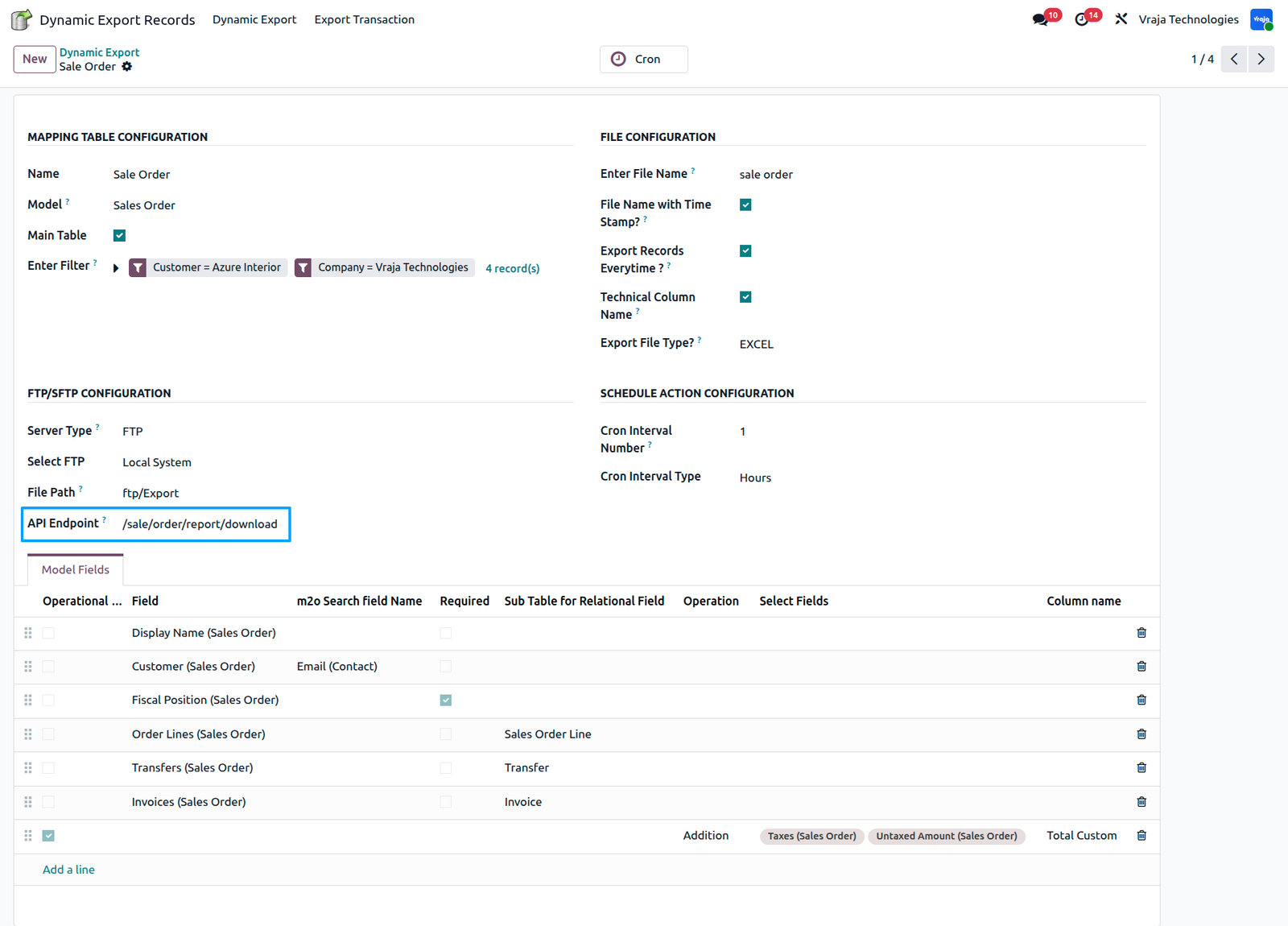
04 Configuration of mapping table:

Name => You need to give the name for the configuration table.

Model => You need to select the model whose records you want to export.

Main Table => You need to enable this option if your configuration is main. For example if you want to add a sale order record then for the sale order model you need to create configuration record with main table enable & you need to create sale order line configuration separately without main table enable.

Enter Filter => If you require specific records of the model, you can add domain here.

Enter File Name => You can add the file name that will export fom this configuration.

Export File Type => You have to select the file type.

Server Type => You have to select the server type in which the file of this configuration will be exported.

Select FTP/SFTP => You have to select the FTP or SFTP record.

File Path => You have to enter the destination file path from your ftp/sftp server.

API Endpoint => You have to set the enpoint to download the report via API.

Operational Column => If in your report you would like to add the customised column that can add or multiply the values from different fields then you have to check this field.

Field => You can select fields of the model that you want to export in the file.

m2o Search field Name => You can select field which you want to export from many2one field's model.

Required => You can mark this true, if that field's value should not be empty. If empty and marked required then file will not be prepared.

Technical Column Name =>When enabled, the export file uses technical field names as column headers instead of their display names.

File Name with Time Stamp =>The generated export file name automatically includes a timestamp.

Export Records Every time =>When enabled, records are included in every export, regardless of whether they were exported previously.

Cron Interval Number =>Specifies how frequently the scheduled action runs based on the selected interval type.

Cron Interval Type => Defines the time unit for the scheduled action, such as minutes, hours, days, or weeks.

Sub Table for Relational Field => For One2Many field you have to select a sub table in which there is a separate configuration available for One2Many field's model. (In sub table there is the same concept to follow, the only difference is in that table you don’t need to enable Main table.)

Operation => You can select the addition or multiplication based on your requirement of the new column.

Select Fields => Choose the fields on which you would like to perform the operation on. You can choose more than just couple of fields.

Column Name => Enter the name of the new column that you want to add.

05 This is sub table configuration in which you have to select name, model, domain if you require specific record and do not select the main table.

06 Each mapping table has its own schedule action to generate the export file.

07 Schedule to prepare file according to mapping table.

08 Upon running the schedule action, you can see new transaction records are created under Export Transaction menu.

09 After successfully generating the file, you can see it in transaction with generated file.

10 If we have given some field value as required and that field is empty, file will not generate.

11 Transaction with failed state will create and you will see one new button to re-generate the file with log details of why file is not generated.

12 We can check the log details from transaction. In this case, we have marked one field as required and it does not have any value.

13 This is the second schedule action that will export the file which are in Draft state to the configured server.

14 You can check the state of transaction as Done after file is successfully exported to the server with log details.

15 You can check the detailed logs from transaction record and from the FTP/SFTP Syncing menu as well.

16 This is an example of exported file.

17 You can also get the report through API. You have to call the API with the endpoint you have set in the configuration.
18 You can call the API with the filters you would like to add on to the default filter set in the configuration. You can directly download the report in your system.

I need an extra customization in this application, how can I get it?

Yes, you can contact us https://vrajatechnologies.com/helpdesk or can schedule a DEMO with our team to customize additional features.

Is the application compatible with Odoo Enterprise and Community?

Yes, this application module is supported by both. It is also compatible with test and production environments.

Do I get free upgrades and support if I purchase this application?

If there is a bug or any issues, our team will be there to help you out. If you need to add any new features, you will need to upgrade the application.

Is technical knowledge required to set up the integration?

While some technical understanding may be helpful, the integration is designed to be user-friendly. Detailed documentation and support may be provided to aid in the setup process.

Is this free customization and implementation?

Our team has produced a support video that guides you through the implementation process step by step. If you encounter any issues, please feel free to contact us for assistance.

Which protocol you have used to transfer file?

We have used FTP & SFTP protocol to transfer files.

Which file format supported?

CSV, TSV, EXCEL file formats are supported.

Once records exported from Odoo to FTP, is that export again?

Records that have already been exported from Odoo to FTP will be exported again only if the Export Records Everytime option is enabled in the export configuration. Otherwise, previously exported records will not be exported again.

Will the existing export file be replaced?

When enabled, the timestamp option prevents the existing export file from being replaced by adding date and time information to the new filename.

Can I export odoo images ?

Yes, images are supported in Excel (.xlsx) exports. Image export is not supported for CSV and TSV formats.

Included App Support

90 Days Complimentary Support for Supported Versions

If you encounter issues caused by the app itself, our team provides complimentary support for 90 days from the date of purchase for supported Odoo versions.

Included App Support

90 Days Complimentary Support for Supported Versions

If you encounter issues caused by the app itself, our team provides complimentary support for 90 days from the date of purchase for supported Odoo versions.

Customer Support

Customer Support

Need help with installation, configuration, technical issues, or general questions about the module? Submit a support ticket through our dedicated support portal.

Customer Support

Customer Support

Need help with installation, configuration, technical issues, or general questions about the module? Submit a support ticket through our dedicated support portal.

Support Policy

Review our support policy for complete information about support coverage, issue eligibility, exclusions, version compatibility, and other support conditions.

Support Policy

Review our support policy for complete information about support coverage, issue eligibility, exclusions, version compatibility, and other support conditions.

Scan for Support

Vraja Technologies Support Portal QR Code

Scan for Support

Vraja Technologies Support Portal QR Code
Discover Trending Apps

Dynamic Dashboard Builder

This module lets users create fully configurable, model-driven Odoo dashboards without coding, with dynamic fields, filters, relational data, calculated columns, and website-based visualization. It supports date filters, summary cards, dynamic tables, quick Today records, live selection updates, and custom colors for a modern and user-friendly dashboard experience.

Dynamic Field Mapping

Dynamic field mapping between two models in Odoo involves setting up mechanisms to automatically transfer or update data from one model to another. This can be useful in various scenarios, such as synchronising data between CRM leads and sales orders, sales orders and Invoice or any other custom models.

CRM to Rental Dynamic Field Mapping

Dynamic field mapping from CRM to Rental in Odoo involves automatically transferring data from the CRM model (crm.lead) to the Rental model (sale.order).This setup will dynamically map custom fields from CRM to Rental in Odoo, ensuring seamless data synchronization and enhanced workflow automation.

CRM To Sales Dynamic Field Mapping

Dynamic field mapping between Odoo CRM and Sales helps automatically transfer selected CRM fields to matching Sales Order fields, ensuring consistent and accurate data across both modules.It streamlines the workflow by allowing users to define source CRM fields and corresponding Sales fields, reducing manual entry and improving sales process efficiency.

Delivery Order To Invoice Dynamic Field Mapping

Dynamic field mapping from Delivery Order/picking to Invoice in Odoo involves automatically transferring data from the picking model (stock.picking) to the Invoice model (account.move).This can be particularly useful for maintaining data consistency and streamlining workflows. Identify the fields in the Picking model that you want to map to the Invoice model. Determine the corresponding fields in the invoice model.

Helpdesk Ticket To Repair Dynamic Field Mapping

Dynamic field mapping from Helpdesk Ticket to Repair in Odoo involves automatically transferring data from the Helpdesk Ticket model (helpdesk.ticket) to the Repair model (stock.picking). This setup will dynamically map custom fields from Helpdesk Ticket to Repair in Odoo, ensuring seamless data synchronization and enhanced workflow automation.

Helpdesk Ticket To Return Dynamic Field Mapping

Dynamic field mapping from Helpdesk Ticket to Return in Odoo involves automatically transferring data from the Helpdesk Ticket model (helpdesk.ticket) to the Return model (stock.picking). This setup will dynamically map custom fields from Helpdesk Ticket to Return in Odoo, ensuring seamless data synchronization and enhanced workflow automation.

Purchase To Vendor Bill Dynamic Field Mapping

Dynamic field mapping from Purchase Order to Vendor Bill in Odoo involves automatically transferring data from the Purchase Order model (purchase.order) to the Vendor Bill model (account.move). This setup will dynamically map custom fields from Purchase Orders to Vendor Bills in Odoo, ensuring seamless data synchronization and enhanced workflow automation.

Purchase To Receipt Order Dynamic Field Mapping

Dynamic field mapping from Purchase Order to Incoming Order in Odoo involves automatically transferring data from the Purchase Order model (purchase.order) to the Incoming Order model (stock.picking). This setup will dynamically map custom fields from Purchase Orders to Incoming Orders in Odoo, ensuring seamless data synchronization and enhanced workflow automation.

Repair To Sale Order Dynamic Field Mapping

Dynamic field mapping from Repair Order to Sale Order in Odoo involves automatically transferring data from the Repair Order model (repair.order) to the Sale Order model (sale.order). This setup will dynamically map custom fields from Repair Orders to Sale Orders in Odoo, ensuring seamless data synchronization and enhanced workflow automation.

SaleOrder To PurchaseOrder(Dropshipping) Dynamic Field Mapping

Dynamic Field Mapping from Sales Order to Purchase Order in Odoo automatically transfers selected standard or custom fields from `sale.order` to `purchase.order`, ensuring accurate data synchronization and workflow automation. It supports flexible model and field mapping for sales-to-purchase, dropshipping, custom modules, and changing business requirements without repeated code changes.

SaleOrder To Project Task Dynamic field mapping

Dynamic Field Mapping from Sales Order to Project Task in Odoo automatically transfers selected standard or custom fields from `sale.order` to `project.task`, ensuring seamless data synchronization and workflow automation. It supports flexible and customizable model-field mapping for sales-to-task workflows, custom modules, integrations, and changing business requirements without repeated code changes.

Sale To Delivery Dynamic Field Mapping

Dynamic Field Mapping from Sales Order to Delivery Order in Odoo automatically transfers selected standard or custom fields from "sale.order" to "stock.picking". It ensures seamless data synchronization, reduces manual entry, and improves workflow automation between sales and delivery operations.

Sale To Invoice Dynamic Field Mapping

Dynamic field mapping from Sales to Invoice in Odoo involves automatically transferring data from the Sales Order model (sale.order) to the Invoice model (account.move).This can be particularly useful for maintaining data consistency and streamlining workflows. Identify the fields in the Sales moodel that you want to map to the Invoice model. Determine the corresponding fields in the invoice model.

Sale To Manufacturing Dynamic Field Mapping

Dynamic Field Mapping from Sales Order to Manufacturing Order in Odoo automatically transfers selected standard or custom fields from "sale.order" to "mrp.production". It ensures seamless data synchronization, reduces manual work, and improves workflow automation between sales and manufacturing operations.

Helpdesk Ticket To Refund Invoice Dynamic field mapping

Dynamic Field Mapping from Helpdesk Ticket to Refund Invoice in Odoo automatically transfers selected standard or custom fields from "helpdesk.ticket" to "account.move". It ensures seamless data synchronization, reduces manual entry, and supports flexible field mapping for refund workflows, custom modules, and changing business needs.

Helpdesk Ticket To Project Task Dynamic field mapping

Dynamic Field Mapping from Helpdesk Ticket to Project Task in Odoo automatically transfers selected standard or custom fields from helpdesk.ticket to project.task. It ensures seamless data synchronization, reduces manual entry, and supports flexible field mapping for ticket-to-task workflows, custom modules, and changing business needs.

ALL IN ONE Import Record From SFTP Import CSV & XLSX File Manually

ALL IN ONE Import Records is a flexible Odoo import solution that allows users to import any type of data using configurable mappings, multiple file formats, and automated workflows. It also supports dynamic translation during import, enabling multilingual data import in a single operation for accurate, consistent, and efficient data management.

Dynamic Import Records From Email

Automates record creation in Odoo from email attachments (Excel/CSV) with dynamic model mapping. This module automates the processing of incoming emails with Excel or CSV attachments. It searches for unread emails from specific partner email addresses, parses and extracts attachments from emails (it supports .xlsx and .csv files), and dynamically creates records in the configured Odoo model.

Dynamic Import XML Records(FTP/SFTP Import/Manually Upload)

Dynamic XML Import for Odoo allows businesses to import XML files of any structure into Odoo using flexible node mapping without hardcoding. It supports XML-based integrations for products, orders, customers, invoices, stock, and custom records, with Dynamic Translation support for multilingual data import.

Explore Before Purchase

Start with a free trial

Test the connector with your real workflows using our 15-day free trial. If you need help, our product experts will guide you throughout the trial.

Test the connector with your real workflows.

Our product experts will guide you during the trial to help you evaluate, configure, and use the connector with confidence.

15-Day Trial Expert Guidance Real Workflow Testing
