Vraja Technologies

Manufacturing Dashboard

Community Enterprise Odoo.sh

Manufacturing Dashboard is an advanced Odoo module developed by Vraja Technologies that provides a real-time overview of manufacturing operations in a single screen. It helps production managers and supervisors monitor key KPIs such as planned, queued, in-progress, completed, overdue, and material-blocked manufacturing orders within a selected date range.

The dashboard offers visibility into manufacturing order progress, raw material shortages, low-stock alerts, work center utilization, pending order reasons, and production queues. It also includes efficiency metrics such as Availability, Performance, Quality, and OEE, along with scrap analysis to track production losses and costs.

By consolidating critical manufacturing data into an intuitive interface, the dashboard enables faster decision-making, improved production monitoring, and better resource utilization.

Submit Request Trending Apps
Vraja Technologies

End-to-end Odoo solutions for growing companies.

EDI & SWIFT/ACH Payment Integrations

End-to-end EDI automation, including X12, EDIFACT, XML standards, and financial integrations such as SWIFT, ACH, and Fedwire.

ANSI X12 EDIFACT XML SFTP / AS2 More Apps
ANSI X12 EDIFACT XML SFTP / AS2

Ecommerce Integrations

Seamless integration with leading eCommerce platforms to sync products, orders, inventory, and customer data in real time.

Orders Sync Inventory Products Customers More Apps
Orders Sync Inventory Products Customers

Shipping Integrations

Robust shipping connectors for global couriers, offering automated label generation, tracking, and rate computation.

Live Rates Labels Tracking Cancel Shipment More Apps
Live Rates Labels Tracking Cancel Shipment

Most Useful Apps for your ERP

A wide range of highly-rated Odoo modules designed to enhance automation, improve productivity, and simplify business operations.

Sales Inventory Accounting Automation More Apps
Sales Inventory Accounting Automation
App Details

Explore the key features, workflow, and value of this Odoo module.

Date Range Filter

KPI Cards

MO Progress Status

Raw Material Availability

Orders Pending by Reason

Production Efficiency

MO Wise Scrap Table

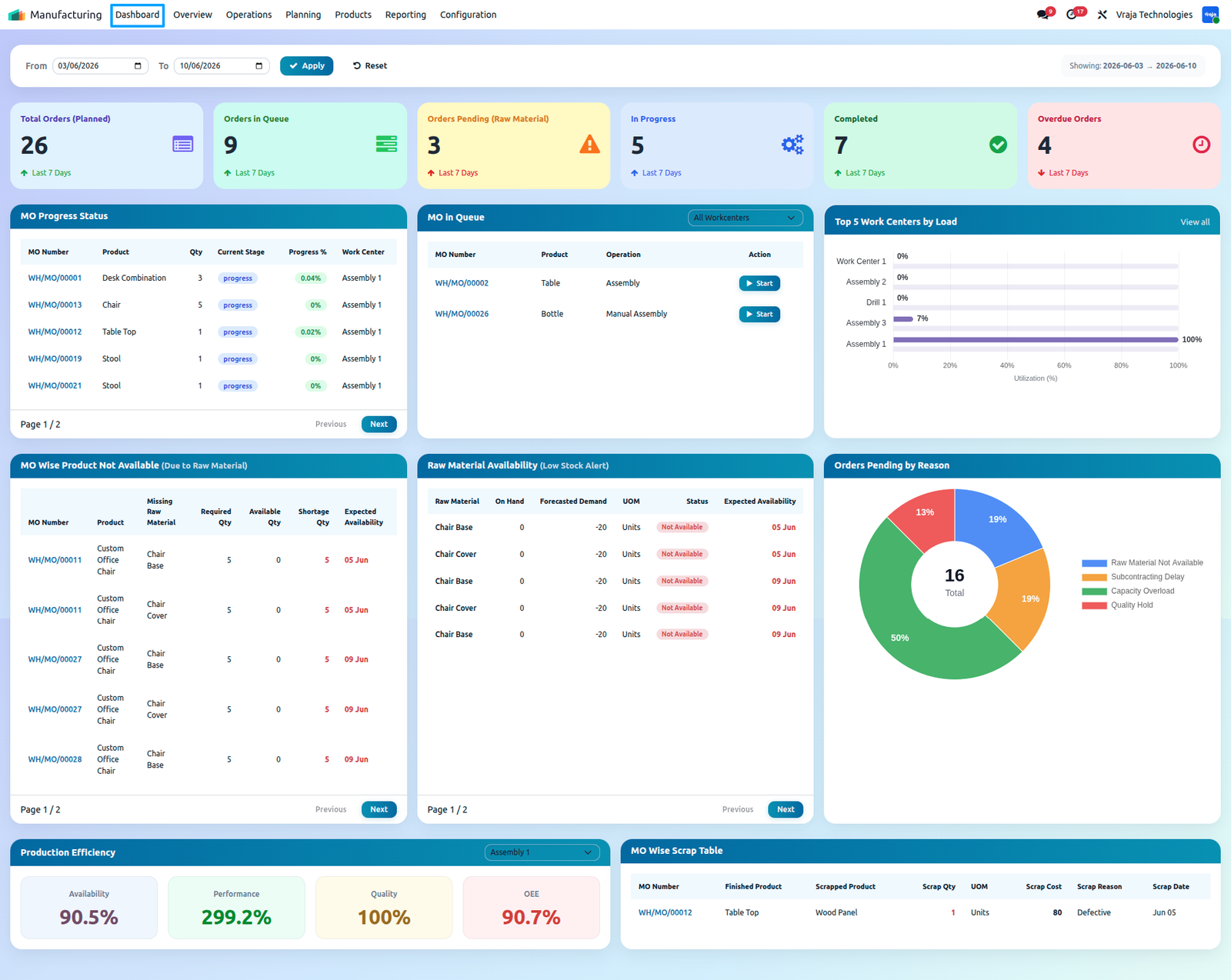
01 Once the module is installed, a dedicated Dashboard menu appears directly within the Odoo Manufacturing application. No additional configuration is required. The dashboard loads automatically and presents a complete overview of all manufacturing activity. Every section of the dashboard — including cards, tables, and charts — responds to the date range specified in the filter at the top, ensuring users always view accurate and period-specific production data at a glance.

02 Six color-coded summary cards at the top of the dashboard provide an instant snapshot of manufacturing status within the selected date range, displaying Total Planned Orders, Orders in Queue, Orders Pending due to Raw Material unavailability, In Progress, Completed, and Overdue Orders. Each card is clickable and opens the corresponding filtered list of manufacturing orders, allowing users to drill down into the exact records behind each count.

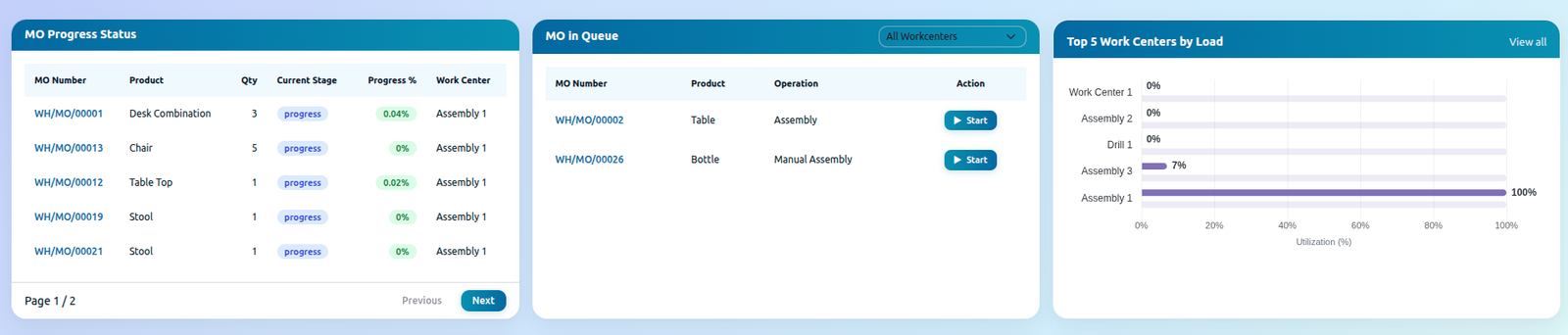
03 MO Progress Status : Displays all active manufacturing orders with MO number, product, quantity, current stage, work center, and completion percentage — helping supervisors quickly identify which orders are on track and which need attention. MO in Queue : Lists all work orders that are queued and ready to start, with MO number, product, operation, and work center. Filter by work center to focus on a specific area and use the Start button to begin a work order directly from the dashboard. Top 5 Work Centers by Load : This section displays a horizontal bar chart showing the top 5 most utilized work centers on the production floor.This helps in making informed decisions around workload balancing, scheduling, and resource allocation to avoid bottlenecks and ensure smooth production flow.

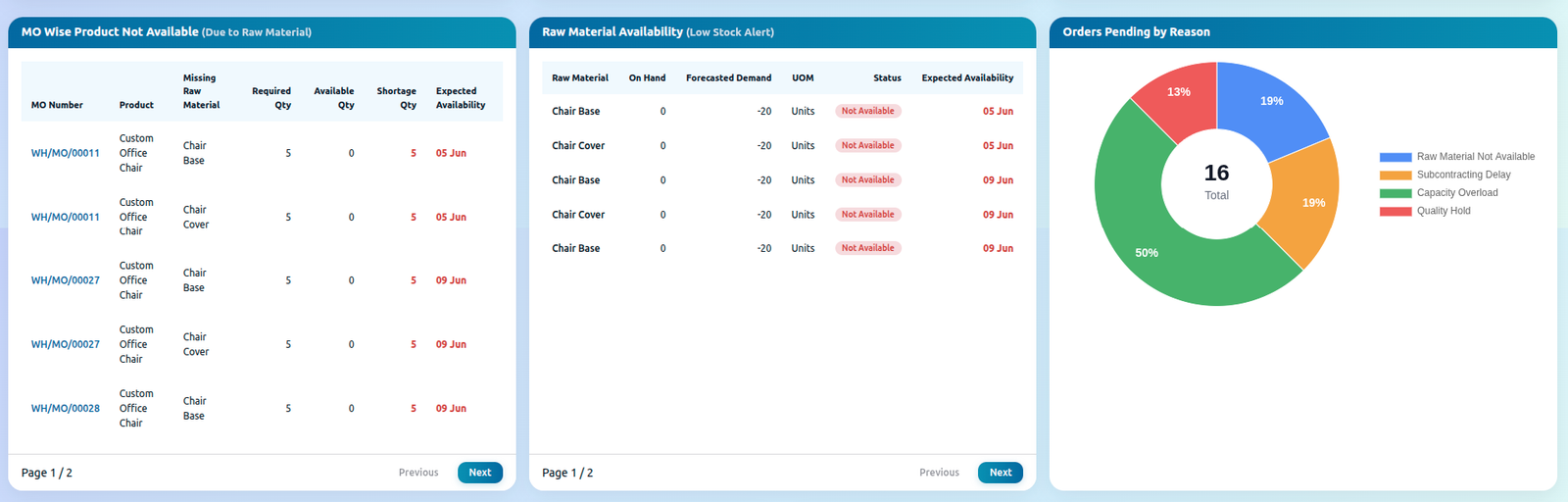
04 MO Raw Material Availability : This section provides a detailed view of manufacturing orders that are on hold or pending due to raw material unavailability. For each affected MO, it displays the MO number, finished product, missing raw material, required quantity, available quantity, shortage quantity, and expected availability date. Orders Pending By Reason : This section presents a visual donut chart that breaks down all pending manufacturing orders by the reason they are blocked or on hold.This gives management an instant visual understanding of the most common causes of production delays within the selected date range.

05 Production Efficiency : Displays key OEE metrics per work center including Availability, Performance, Quality, and overall OEE percentage. Users can switch between work centers using the dropdown to compare efficiency across the floor and identify underperforming areas that need attention Scrap Table : Provides a complete log of all scrap entries linked to their respective manufacturing orders within the selected date range, showing the scrapped product, quantity, unit of measure, scrap cost, reason, and date. This helps production and quality teams track material waste, identify which orders are generating the most scrap, and take action to reduce losses.

Can I see completed and pending orders from the view ?

Yes, to see completed order clcik on Completed Order card and for Pending order click on pending order card.

Can I start work order directly from dashboard ?

Yes, to start work order use MO in queue table.

Can I see quantity unavailable of the product ?

Yes, availabilty of the product is shown in the Raw material Availability Table.

Can I get a demo of the module before making a purchase?

Yes, to test this module please contact us at sales@vrajatechnologies.com

Included App Support

90 Days Complimentary Support for Supported Versions

If you encounter issues caused by the app itself, our team provides complimentary support for 90 days from the date of purchase for supported Odoo versions.

Included App Support

90 Days Complimentary Support for Supported Versions

If you encounter issues caused by the app itself, our team provides complimentary support for 90 days from the date of purchase for supported Odoo versions.

Customer Support

Customer Support

Need help with installation, configuration, technical issues, or general questions about the module? Submit a support ticket through our dedicated support portal.

Customer Support

Customer Support

Need help with installation, configuration, technical issues, or general questions about the module? Submit a support ticket through our dedicated support portal.

Support Policy

Review our support policy for complete information about support coverage, issue eligibility, exclusions, version compatibility, and other support conditions.

Support Policy

Review our support policy for complete information about support coverage, issue eligibility, exclusions, version compatibility, and other support conditions.

Scan for Support

Vraja Technologies Support Portal QR Code

Scan for Support

Vraja Technologies Support Portal QR Code
Discover Trending Apps

Klaviyo Odoo Integration

Connect Odoo with Klaviyo to sync customers, products, orders, and marketing data smoothly. Automate email and SMS marketing campaigns using real-time Odoo eCommerce and sales information. Improve customer engagement, abandoned cart recovery, and repeat sales with powerful Klaviyo automation.

Multi Company Microsoft Outlook

Manage Microsoft Outlook email configuration for multiple companies directly inside Odoo. This app helps each company use its own Outlook email account for sending and receiving emails. It is useful for businesses operating with multi-company setups and separate communication channels.

Dynamic Export Records

Export any Odoo model records dynamically without custom development or manual technical work. Users can configure export fields, filters, and formats based on business requirements. This app saves time and helps businesses generate flexible reports from Odoo data easily.

PrintNode Odoo Connector

It helps automate labels, reports, and attachment printing without manual downloads, making printer management and printing workflows faster and easier.

Stripe Terminal Odoo Integration

This module enables Stripe Terminal payments directly from the Odoo backend for Customer Invoices and Sale Quotations. It supports real-time physical card payments using devices such as WisePOS E and Stripe S700 Reader. With one-click installation, automated Odoo Accounting synchronization.

Disable Shipping Method

Control and restrict shipping methods on the Odoo website based on business rules and conditions. You can hide specific carriers depending on products, customers, order amount, location, or other criteria. This app improves checkout accuracy and helps businesses show only valid delivery options to customers.

BigCommerce Odoo Integration

Connect BigCommerce with Odoo to manage products, customers, orders, and inventory in one system. The integration helps automate order import, stock updates, and product synchronization between both platforms. It is ideal for eCommerce businesses looking to centralize BigCommerce operations inside Odoo.

Shopify Odoo Integration

Sync Shopify store data with Odoo including products, customers, orders, inventory, and fulfillment details. This app reduces manual data entry and keeps Shopify and Odoo records updated automatically. It helps online retailers manage eCommerce, warehouse, accounting, and order processing from Odoo.

EDIFACT Odoo Integration

Integrate EDIFACT EDI messages with Odoo to automate document exchange with trading partners. Support common EDIFACT flows such as ORDERS, INVOIC, DESADV, PRICAT, INVRPT, and acknowledgements. This solution helps businesses reduce manual work and manage supplier or customer EDI communication efficiently.

ANSI X12 EDI Odoo Integration

Connect Odoo with ANSI X12 EDI standards for automated B2B document exchange. Support key EDI transactions such as 850 purchase orders, 855 acknowledgements, 856 ASN, 810 invoices, and 997 acknowledgements. This app helps retailers, suppliers, distributors, and logistics businesses streamline EDI operations inside Odoo.

Explore Before Purchase

Start with a free trial

Test the connector with your real workflows using our 15-day free trial. If you need help, our product experts will guide you throughout the trial.

Test the connector with your real workflows.

Our product experts will guide you during the trial to help you evaluate, configure, and use the connector with confidence.

15-Day Trial Expert Guidance Real Workflow Testing