Website Order Multi-Address | Website Multi Delivery Address

Community Enterprise Odoo.sh

This application is designed to significantly enhance the website shopping experience by providing customers with greater flexibility and control over product deliveries directly from the cart page. Rather than placing multiple separate orders for different delivery destinations, customers can conveniently assign a unique delivery address to each individual product within a single order.

The solution streamlines multi-address purchasing by introducing advanced cart functionalities such as product-wise address selection, easy product duplication, item-specific notes, drag-and-drop product sequence management, and intelligent delivery processing. This allows customers to send multiple products—or even multiple quantities of the same product—to different recipients and locations without needing to repeat the shopping process or place separate transactions.

Customers can also organize their cart items based on their preferred priority by simply reordering products using an intuitive drag-and-drop feature directly on the cart page.

By simplifying complex delivery requirements into one seamless checkout flow, the application helps save time, reduce ordering effort, and improve overall customer satisfaction.

Submit Request Watch on YouTube Trending Apps
Vraja Technologies

End-to-end Odoo solutions for growing companies.

EDI & SWIFT/ACH Payment Integrations

End-to-end EDI automation, including X12, EDIFACT, XML standards, and financial integrations such as SWIFT, ACH, and Fedwire.

ANSI X12 EDIFACT XML SFTP / AS2 More Apps
ANSI X12 EDIFACT XML SFTP / AS2

Ecommerce Integrations

Seamless integration with leading eCommerce platforms to sync products, orders, inventory, and customer data in real time.

Orders Sync Inventory Products Customers More Apps
Orders Sync Inventory Products Customers

Shipping Integrations

Robust shipping connectors for global couriers, offering automated label generation, tracking, and rate computation.

Live Rates Labels Tracking Cancel Shipment More Apps
Live Rates Labels Tracking Cancel Shipment

Most Useful Apps for your ERP

A wide range of highly-rated Odoo modules designed to enhance automation, improve productivity, and simplify business operations.

Sales Inventory Accounting Automation More Apps
Sales Inventory Accounting Automation
App Details

Explore the key features, workflow, and value of this Odoo module.

Multi Delivery Address Selection:

Customers can select a separate delivery address for each product directly from the cart page.

Address Selection Popup:

A user-friendly popup window opens when clicking the change address button, allowing customers to quickly choose a delivery address.

Add, Edit, and Delete Address Options:

Customers can manage their saved addresses easily through options to add new addresses, edit existing ones, or remove unused addresses.

Product-wise Delivery Management:

Each product line in the cart can have its own selected delivery address.

Duplicate Product:

Customers can duplicate a cart item with one click, making it easy to order the same product for another address.

Add Product Notes:

A note option is available for each product so customers can provide special delivery instructions or product-related comments.

Drag-and-Drop Product Sequence Management:

Customers can easily rearrange product lines in the cart using drag-and-drop functionality to set their preferred product sequence.

Faster Multi-Address Ordering:

Users do not need to go back to the shop page to reorder the same product for another location.

Smart Delivery Processing:

When the order is confirmed, separate delivery operations are automatically created based on selected addresses.

Better Customer Experience:

Provides a smoother and more convenient shopping process for customers with multiple delivery needs.

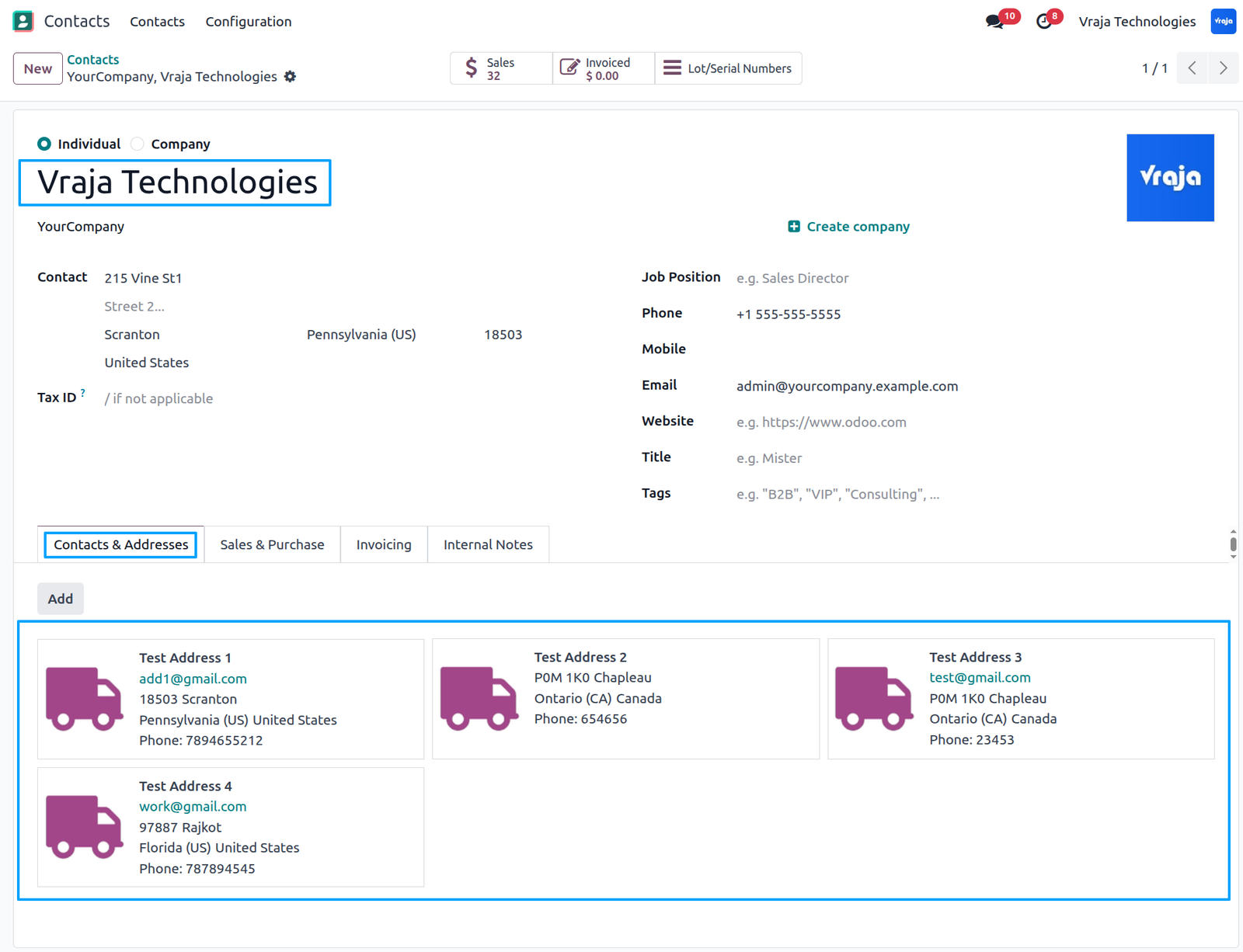
01 Navigate to Contacts, open the required customer record, and add multiple delivery addresses under the Contacts & Addresses tab for that customer.
02 Navigate to the Website, open the Shop page, select the desired product, and click Add to Cart.

03 On the Website Cart page, each product line displays its assigned delivery address, along with an option to change the delivery address as needed.
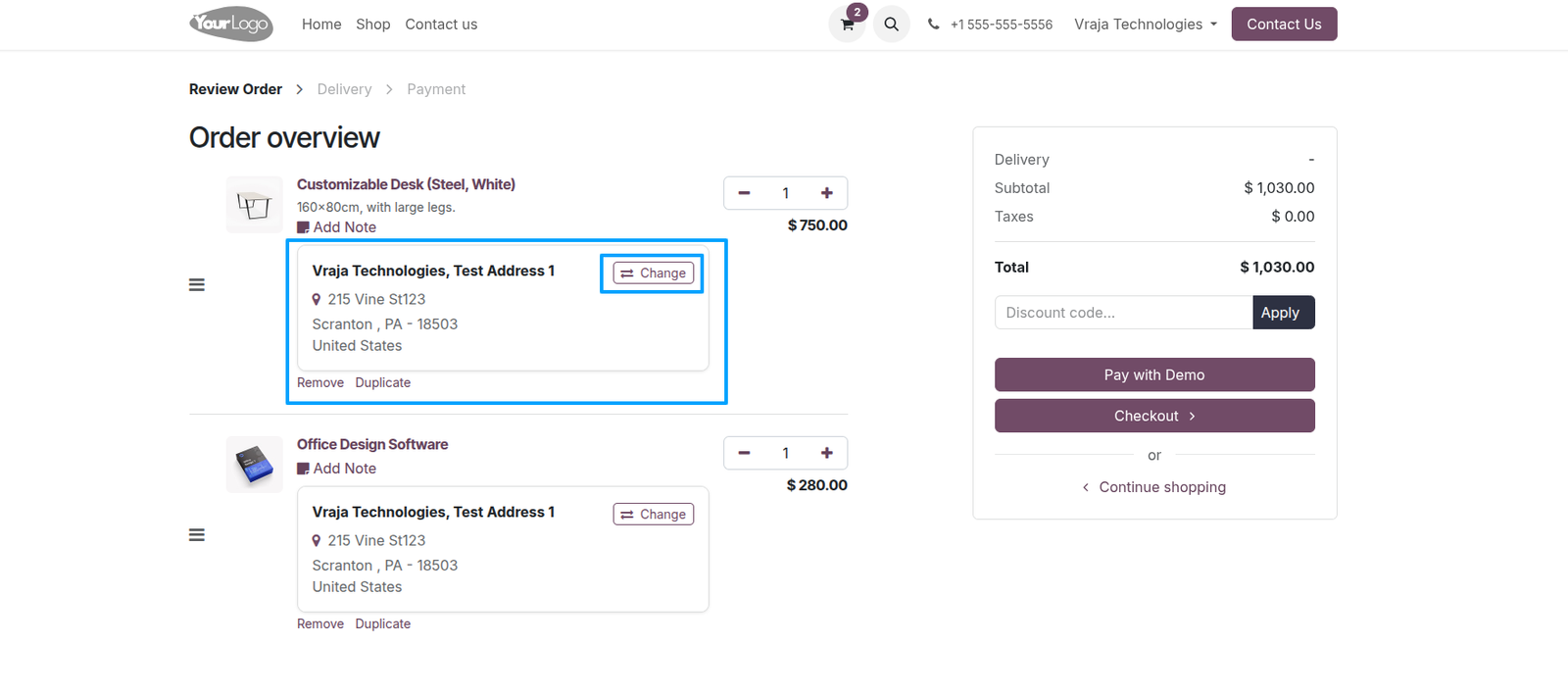
04 When you click the Change button for an address, a popup window will display the customer’s multiple saved delivery addresses. Click on any address to update the delivery address based on your requirement.
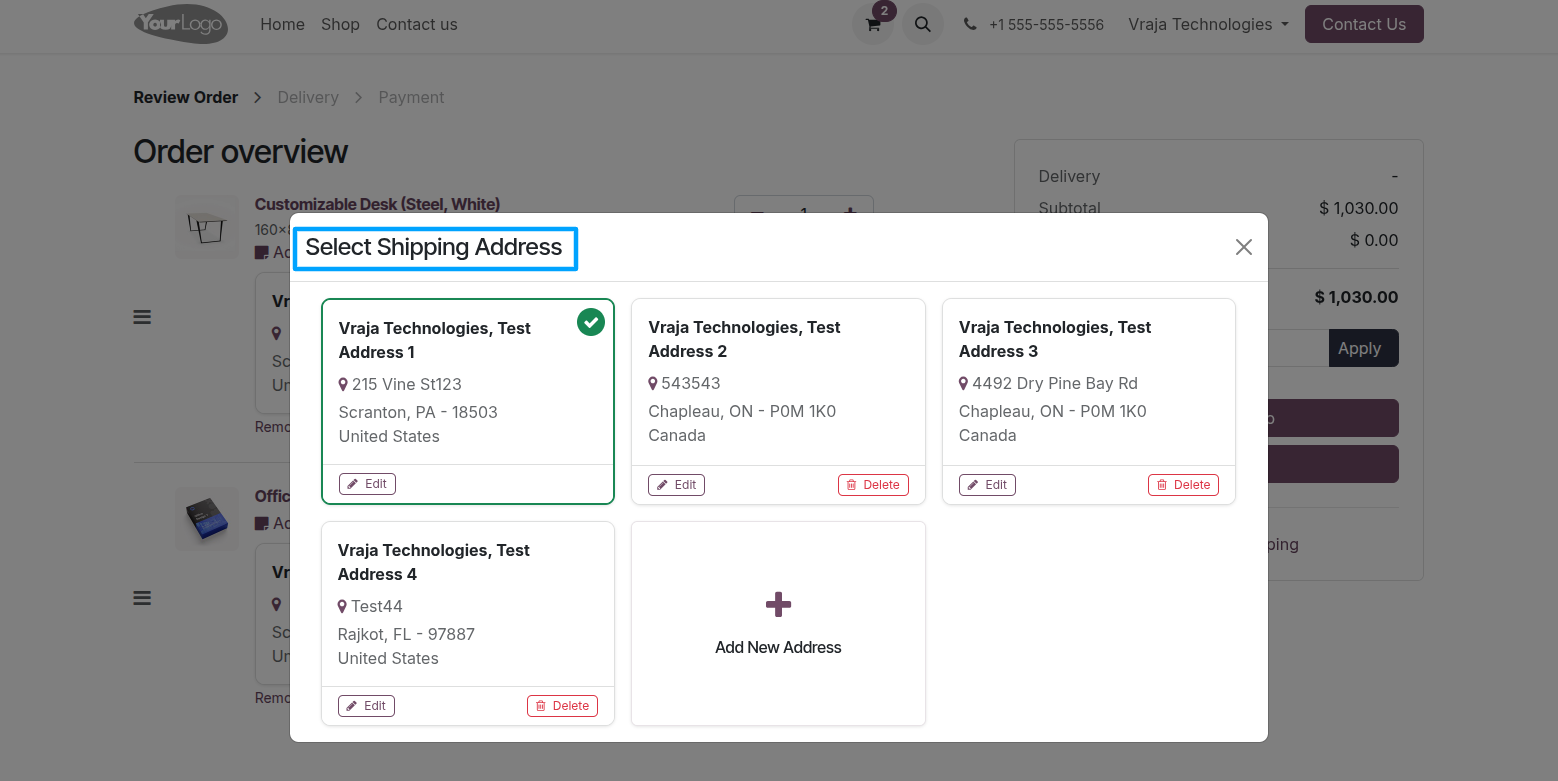
05 Inside the popup, customers have options to Edit or Delete existing addresses. If a new delivery address is required, they can also add a new address directly from the popup.

06 When you click the Edit button, the contact form will open, allowing you to update the selected delivery address.
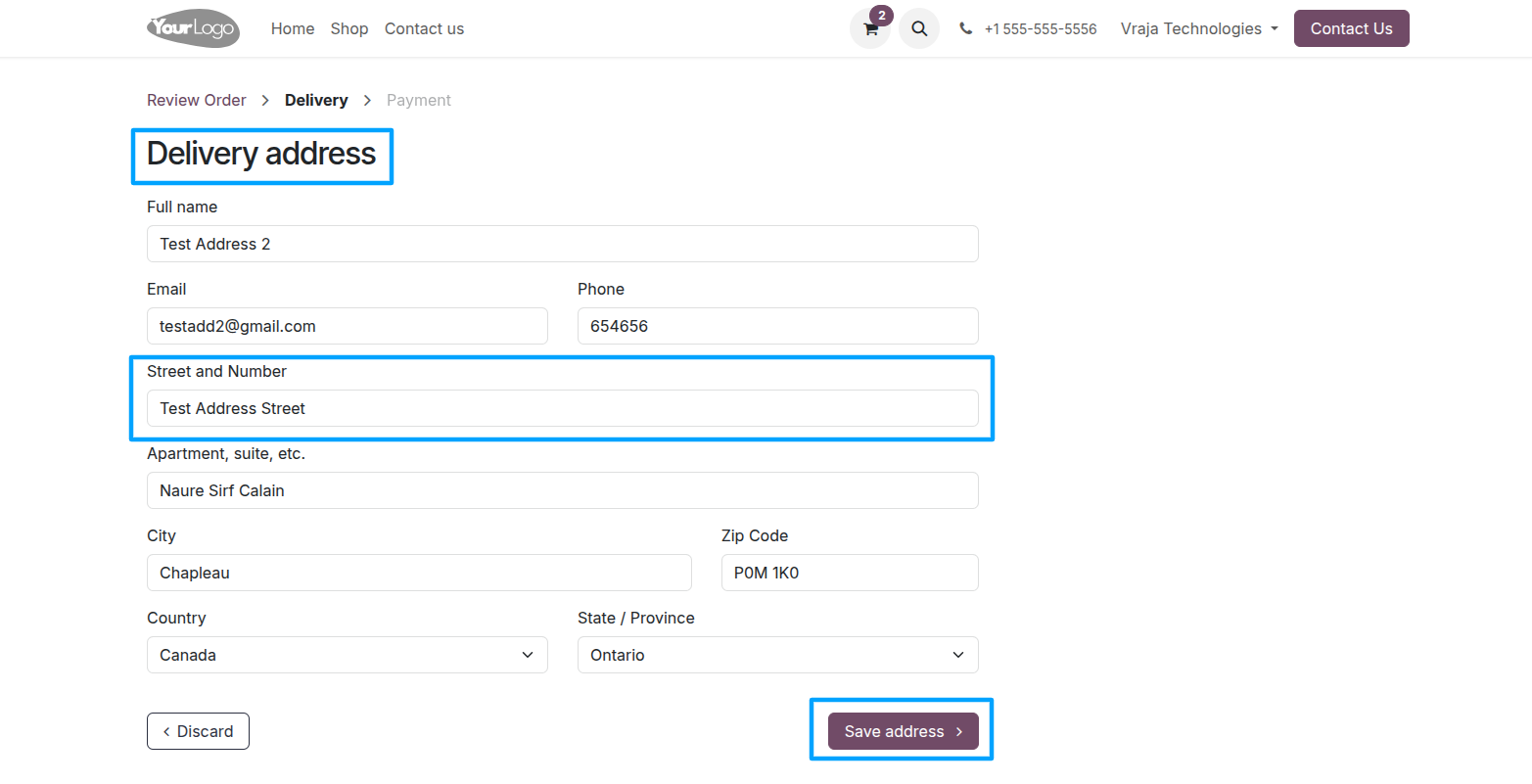
07 After updating the address, the system will redirect you to the cart page, and the updated address will be displayed for the selected product.

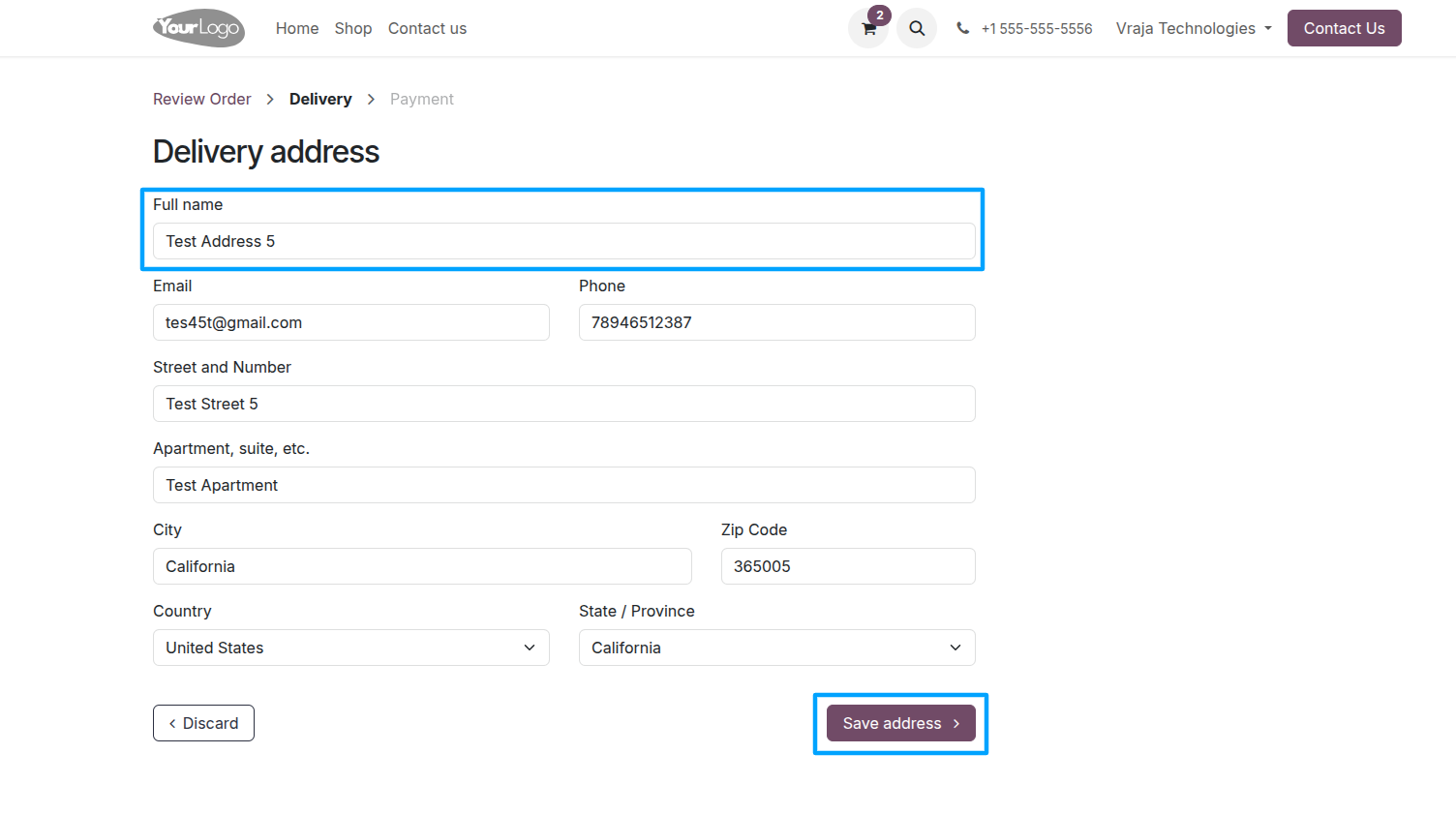
08 On the delivery dialog, when you click New Address, a delivery address form will open. Enter the new address details and save it. After saving, you will be redirected to the cart page.
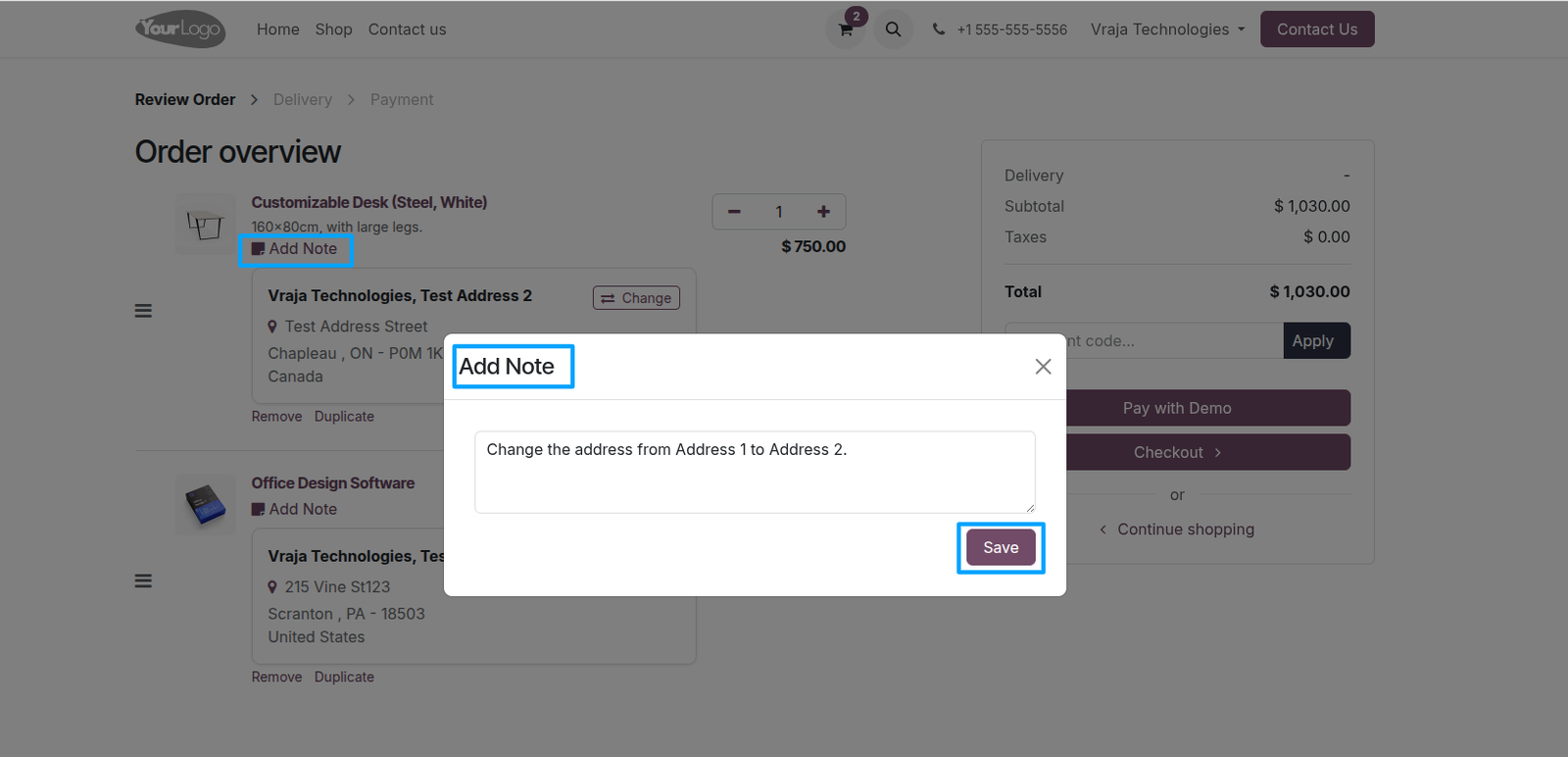
09 On the cart page, an Add Note button is available for each product. When you click the Add Note button, a popup window will open where you can enter notes or special instructions for that specific product.

10 When the note is saved for a product, it will be displayed under the respective product on the cart page.
11 On the cart page, a Duplicate option is available for each product. When you click Duplicate, the selected product will be duplicated in the cart as a new product line.

12 On the cart page, a drag-and-drop option is available to rearrange the sequence of products based on your preference.

13 After updating the delivery address for each product, click Checkout to proceed with the order confirmation process.

14 On the Confirm Order page, review your order details carefully and click Pay Now to proceed with your order.

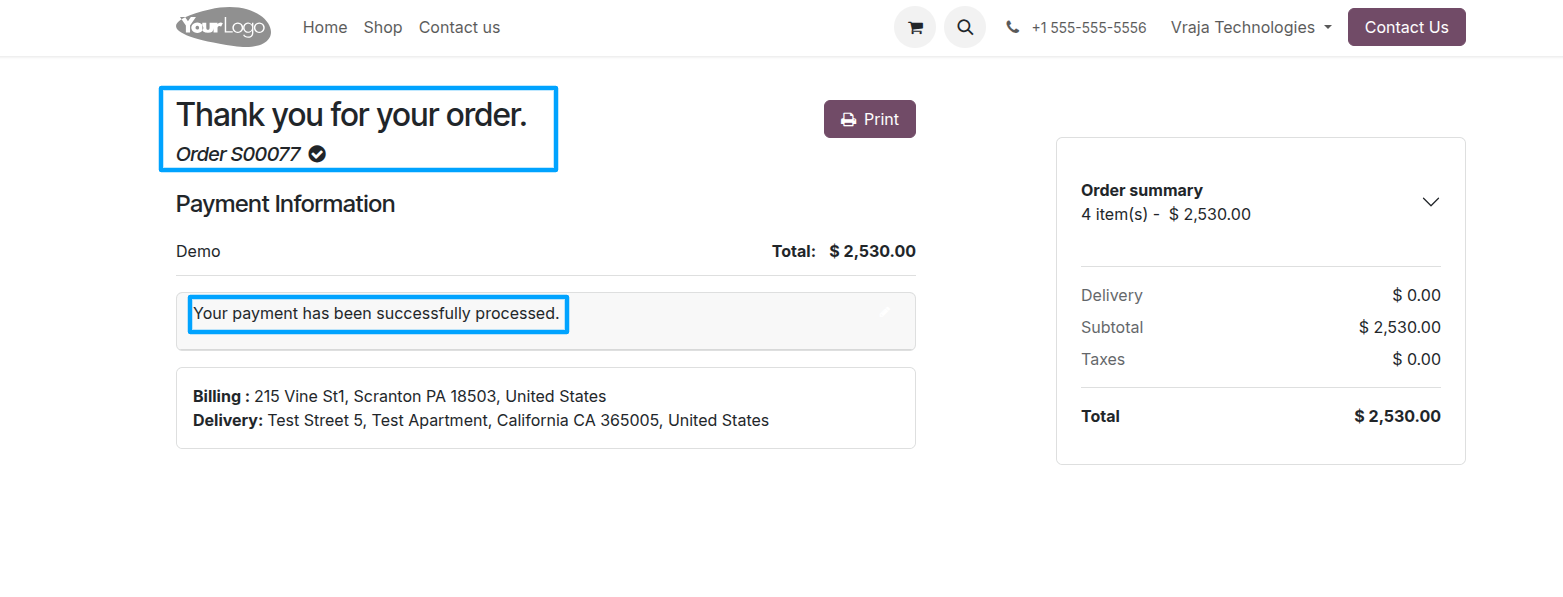
15 Once the payment is completed successfully, the website order will be confirmed.

16 Go to Website → Orders. Here, you can view the created order along with the assigned delivery address for each product.
17 The product note is an optional field. To view it, click on Order Line Options and enable the Note field to make the product note visible.

18 When you click on the Delivery of the order, you will see separate deliveries created for each selected delivery address, with their respective products assigned based on the product-wise delivery selection.

19 When you open any delivery associated with the order, you will be able to view the specific product, the ordered quantity, and the assigned delivery address for that particular delivery.

What is the purpose of this application?

This application allows customers to assign different delivery addresses to individual products within a single website order, making multi-address ordering simple and efficient.

Can I select a different delivery address for each product?

Yes, each product in the cart can have its own separate delivery address.

Do I need to place multiple orders for multiple delivery addresses?

No, you can place a single order and assign different delivery addresses to each product line.

How can I change the delivery address of a product?

On the cart page, click the Change Address button available for the product and select the preferred delivery address.

Can I add a new delivery address during checkout?

Yes, customers can add a new delivery address directly from the address selection popup.

Can I edit or delete saved delivery addresses?

Yes, the popup provides options to edit existing addresses or delete unused addresses.

What is the Duplicate Product feature?

The Duplicate option allows customers to quickly duplicate the same product in the cart and assign it to another delivery address.

Can I add notes for specific products?

Yes, each product has an Add Note option where customers can enter special instructions or comments.

Is the product note mandatory?

No, the product note is optional and can be added only when required.

Can I rearrange products in the cart?

Yes, products can be reordered easily using the drag-and-drop sequence feature on the cart page.

What happens after order confirmation?

Once the payment is completed successfully, the website order will be confirmed automatically.

How are deliveries created after order confirmation?

Separate deliveries are automatically created based on the selected delivery addresses for each product.

Can I view delivery details after placing the order?

Yes, you can open the delivery record to view the assigned product, quantity, and delivery address.

I would like to request a custom feature for this application. What’s the process to get it implemented?

We’re happy to help tailor the application to meet your business needs! You can reach us via sales@vrajatechnologies.com

Who is the point of contact for technical support, configuration support or bug-related queries?

You can reach us via support@vrajatechnologies.com

Included App Support

90 Days Complimentary Support for Supported Versions

If you encounter issues caused by the app itself, our team provides complimentary support for 90 days from the date of purchase for supported Odoo versions.

Included App Support

90 Days Complimentary Support for Supported Versions

If you encounter issues caused by the app itself, our team provides complimentary support for 90 days from the date of purchase for supported Odoo versions.

Customer Support

Customer Support

Need help with installation, configuration, technical issues, or general questions about the module? Submit a support ticket through our dedicated support portal.

Customer Support

Customer Support

Need help with installation, configuration, technical issues, or general questions about the module? Submit a support ticket through our dedicated support portal.

Support Policy

Review our support policy for complete information about support coverage, issue eligibility, exclusions, version compatibility, and other support conditions.

Support Policy

Review our support policy for complete information about support coverage, issue eligibility, exclusions, version compatibility, and other support conditions.

Scan for Support

Vraja Technologies Support Portal QR Code

Scan for Support

Vraja Technologies Support Portal QR Code
Discover Trending Apps

Website Sale Side Cart Drawer

The Website Sale Cart Drawer module for Odoo provides a modern, side-sliding cart interface that significantly enhances the eCommerce shopping experience. Instead of redirecting users to a separate cart page every time they add a product, a sleek cart drawer slides in from the side of the screen. This allows customers to review their cart, update quantities, apply coupon codes, and see recently viewed and recommended products—all without leaving their current page or waiting for a page reload.

Reorder From Previous Orders

With this module you can enhances the native Quick Reorder functionality with accurate real-time stock status checks and alternative product suggestions — so customers are never left stuck with unavailable items.

Website Smart Popups

Website Smart Popups enables you to create and manage multiple website popups from a single place in Odoo. Configure Newsletter, First Order Coupon, Exit Intent, Time Delay, Cart Abandonment, and Country-Based popups to engage visitors. Easily activate or deactivate each popup based on your requirements. Capture newsletter subscribers, generate first-order coupons, recover abandoned carts, and display country-specific popup content to your website visitors. Ideal for running targeted promotions, growing mailing lists, and improving conversions across your website.

Website Shop Enhancements

Enhance the Odoo website shop with advanced eCommerce marketing and customer engagement features designed to improve the online shopping experience. Display dynamic Free Shipping Indicator messages based on cart value and selected delivery method, helping customers understand how much more they need to spend to qualify for free shipping.

Website Upsell & Cross-Sell

Website Upsell & Cross-Sell maximizes average order value with two powerful cart engagement tools. Loyalty Program Cart Hints show customers real-time progress toward earning rewards, encouraging them to add more products to qualify. Premium Variant Upgrades recommend the next higher-priced variant for each cart product, allowing customers to upgrade in one click while preserving their original quantity.

Website Signup Custom Fields & User Approval

The Dynamic Signup Fields module improves the user registration process by allowing additional fields to be added based on business needs. It helps collect important customer information during signup. Added fields also appear on the account edit information, where users can update fields that are allowed for editing. The module also includes a signup approval feature, allowing new registrations to be reviewed and approved before login access is granted.

Dynamic Website Product Search

Dynamic Website Product Search enhances the default Odoo website shop search by allowing administrators to configure searchable product fields directly from the backend. Instead of limiting product search to standard fields only, this module gives full flexibility to choose additional fields such as product name, internal reference, barcode, descriptions, and custom text fields. Customers can then search products on the website using values stored in those selected fields.

Website Minimum Checkout Amount

The Website Minimum Checkout Amount module restricts customers from proceeding to checkout unless their order meets a defined minimum value. It supports applying the restriction on either the total amount or the untaxed amount based on configuration. The restriction message is configurable, and the same message defined in settings is displayed to the customer when the minimum amount is not reached.

Website Product Restock Date & Incoming Qty

This module enhances the Odoo eCommerce product page by displaying incoming stock quantity and expected arrival dates when a product is out of stock. Instead of leaving customers without information, it shows a clear and structured incoming stock table based on confirmed Purchase Orders.

Website Product Catalog Downloader

This module enables businesses to attach product catalogs or specification documents directly to product templates in Odoo. A download button is automatically displayed on the website product page, allowing customers to easily access and download relevant files such as PDFs, manuals, or specification sheets.

Dynamic Portal Fields (No-Code Customization)

The Dynamic Portal Fields module for Odoo empowers backend administrators to configure and display any existing model field directly on the customer portal — without writing a single line of custom code. Instead of a rigid, fixed-column portal, businesses can tailor what customers see across their Sales Orders, Purchase Orders, Invoices, and Contact (My Account) pages by simply selecting fields from a unified backend configuration menu.

Website Delivery Date, Time Slot & Same-Day Delivery

The Website Delivery Date, Time Slot & Same-Day Delivery module enhances the eCommerce checkout experience by allowing customers to choose a preferred delivery date and time slot based on configured shipping methods.

Hide Variant On Website

The Hide Variant on website module for Odoo provides advanced control over how product variants are displayed on the eCommerce website. It allows businesses to selectively hide specific variants without deleting or archiving them, ensuring better catalog management while maintaining backend data integrity.

Advanced Sales & Shipping Management

Streamline Odoo Sales and Delivery processes with enhanced shipping charge management and customer-specific discount functionality. Define Shipping Discounts, Insurance Charges, Fuel Surcharges, and Remote Area Surcharges to ensure precise delivery cost calculations. Automatically apply customer-level discounts on sales orders, record customer payments directly from sales orders.

Explore Before Purchase

Start with a free trial

Test the connector with your real workflows using our 15-day free trial. If you need help, our product experts will guide you throughout the trial.

Test the connector with your real workflows.

Our product experts will guide you during the trial to help you evaluate, configure, and use the connector with confidence.

15-Day Trial Expert Guidance Real Workflow Testing
