Website Shop Enhancements

Community Enterprise Odoo.sh

Enhance the Odoo website shop with advanced eCommerce marketing and customer engagement features designed to improve the online shopping experience. Display dynamic Free Shipping Indicator messages based on cart value and selected delivery method, helping customers understand how much more they need to spend to qualify for free shipping. Show live Price Countdown Timers for active pricelist discounts using configured start and end dates to create urgency for promotional offers. Automatically identify and highlight top-selling products with Best Seller badges based on recent sales data and configurable Best Seller Product settings. The module also includes Recently Viewed Products functionality, allowing customers to quickly revisit up to 10 previously viewed products directly from the website shop.

Submit Request Watch on YouTube Trending Apps
Vraja Technologies

End-to-end Odoo solutions for growing companies.

EDI & SWIFT/ACH Payment Integrations

End-to-end EDI automation, including X12, EDIFACT, XML standards, and financial integrations such as SWIFT, ACH, and Fedwire.

ANSI X12 EDIFACT XML SFTP / AS2 More Apps
ANSI X12 EDIFACT XML SFTP / AS2

Ecommerce Integrations

Seamless integration with leading eCommerce platforms to sync products, orders, inventory, and customer data in real time.

Orders Sync Inventory Products Customers More Apps
Orders Sync Inventory Products Customers

Shipping Integrations

Robust shipping connectors for global couriers, offering automated label generation, tracking, and rate computation.

Live Rates Labels Tracking Cancel Shipment More Apps
Live Rates Labels Tracking Cancel Shipment

Most Useful Apps for your ERP

A wide range of highly-rated Odoo modules designed to enhance automation, improve productivity, and simplify business operations.

Sales Inventory Accounting Automation More Apps
Sales Inventory Accounting Automation
App Details

Explore the key features, workflow, and value of this Odoo module.

Best Seller Products

Automatically identify and display top-selling products on the website shop based on recent sales performance.

Sale Product Indicator

Displays a Sale ribbon on products that have an active discount through the pricelist.

New Arrival Product Badge

Highlights products created on or after the configured New Arrival Date with a New Arrival badge.

Sticky Add to Cart Bar

Provides a Sticky Add to Cart section on the product page that remains accessible while customers scroll through product details.

Price Countdown Timer

Display real-time countdown timers on website product pages for active pricelist discounts.

Recently Viewed Products Tracking

Automatically store and manage up to 10 recently viewed products for website visitors.

Free Shipping Indicator Message

Show customers a message on the checkout page indicating how much more they need to spend to qualify for free shipping.

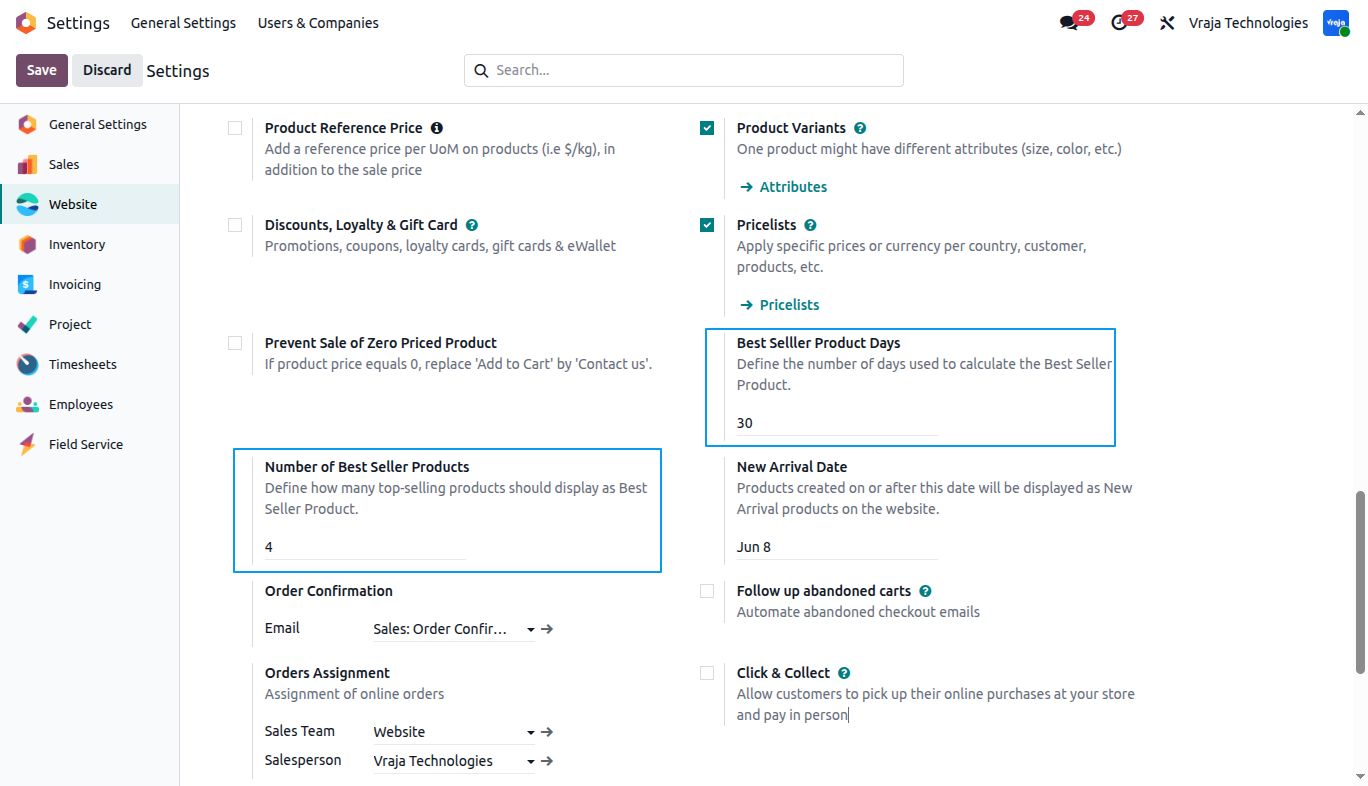
01 Best Seller Products: Navigate to Website → Configuration → Settings to configure the Best Seller Product settings. Define the Best Seller Product Days and Number of Best Seller Products to control how top-selling products are highlighted on the website shop.
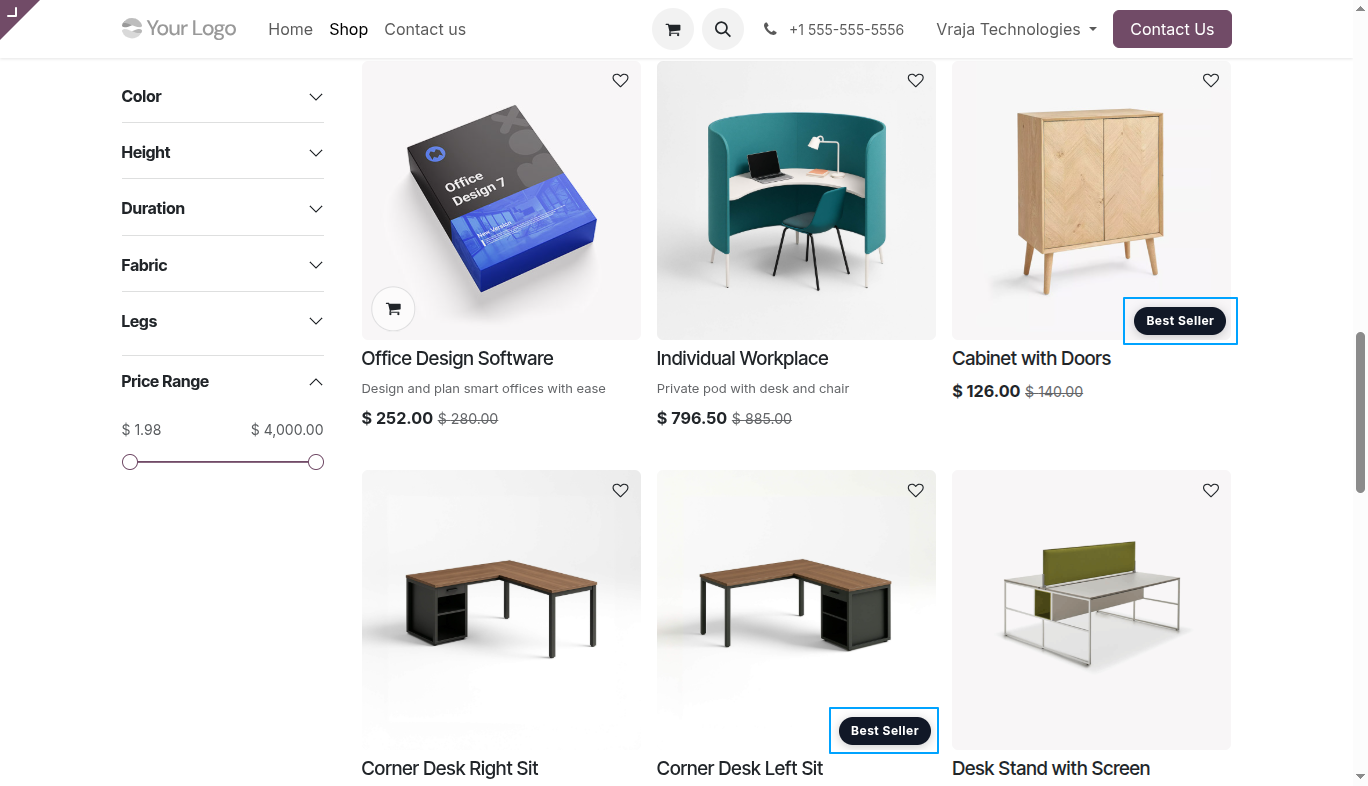
02 The Best Seller badge is automatically displayed on top-selling products in the website shop based on the configured sales period and product limit settings.
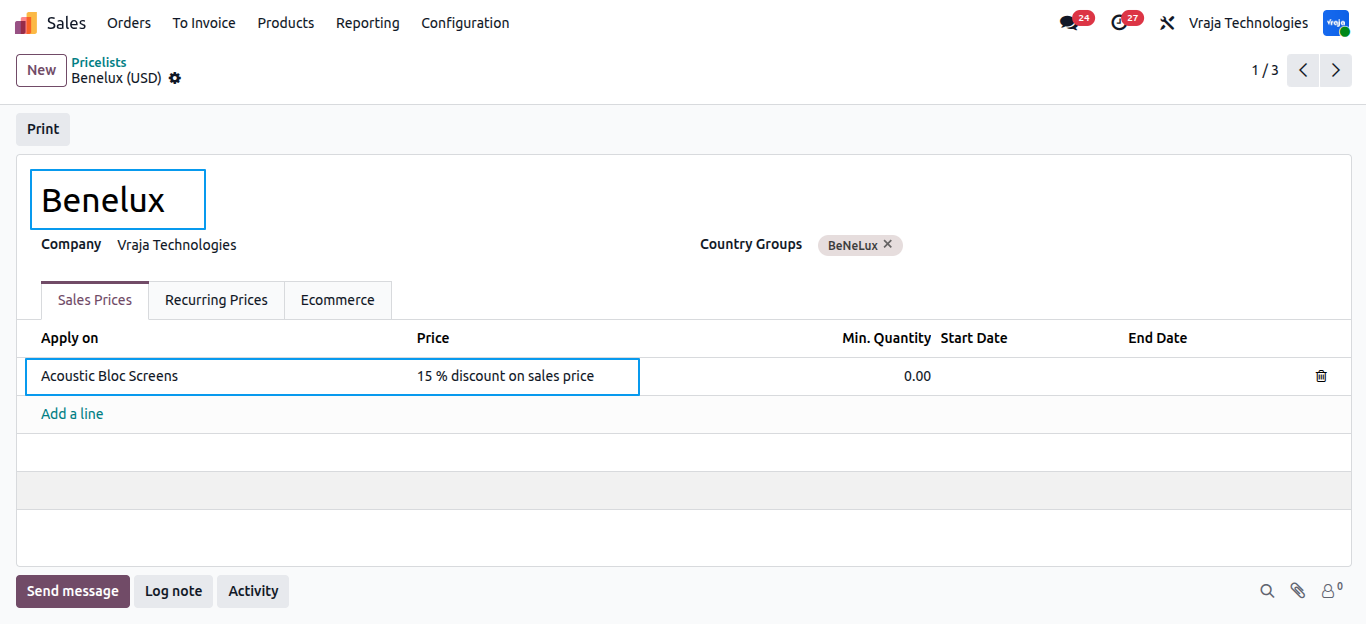
03 The Benelux pricelist applies a 15% discount to the Acoustic Bloc Screens product.
04 A Sale ribbon is displayed on products with a discounted price.

05 Configure the New Arrival Date to automatically mark products created on or after the selected date as New Arrival products on the website.

06 Newly added products are highlighted with a New Arrival badge to help customers easily identify the latest products on the website.

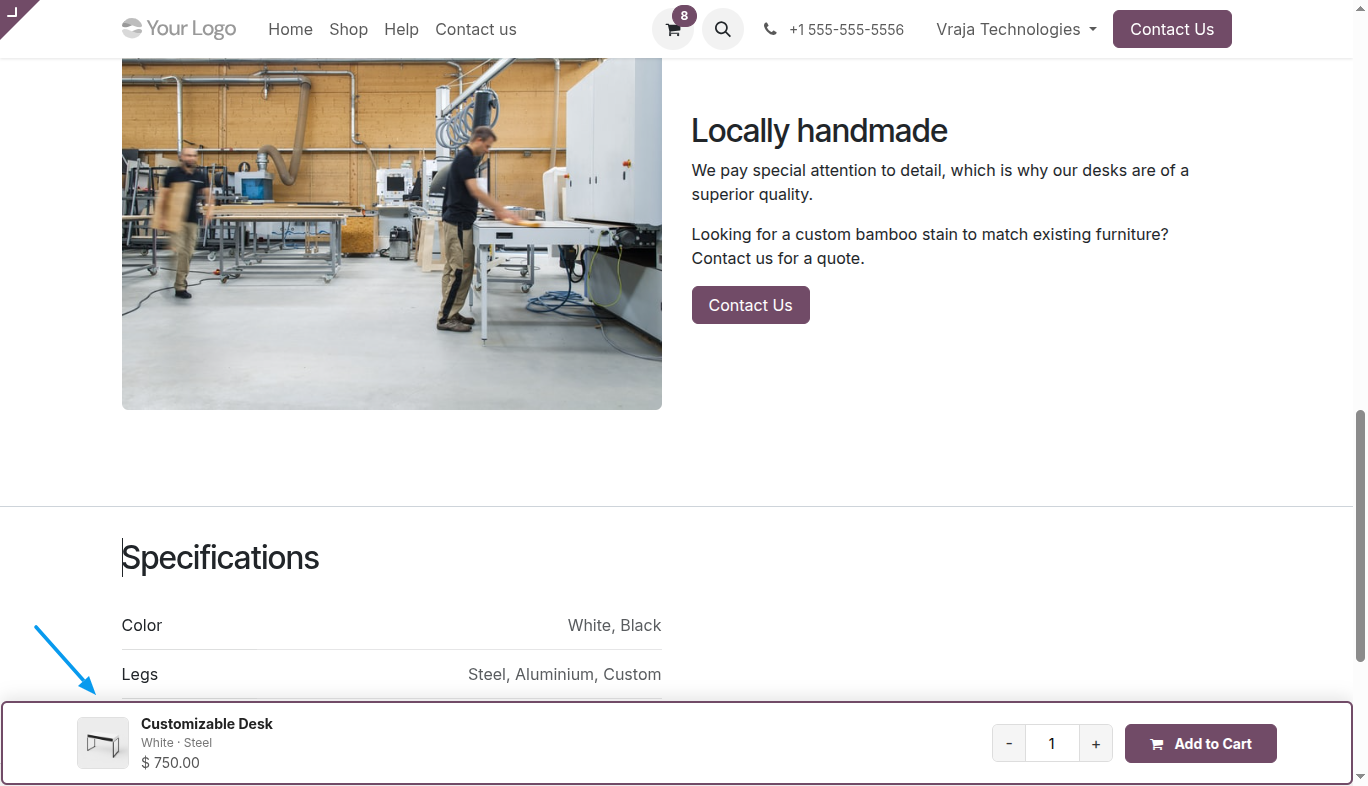
07 A sticky Add to Cart bar appears while scrolling, allowing customers to quickly view product details, adjust quantity, and add the product to the cart without returning to the top of the page.
08 Free Shipping Indicator: Configure the delivery method and enable the "Free if order amount is above" option to define the minimum cart amount required for free shipping on the website shop. This is provided by odoo base
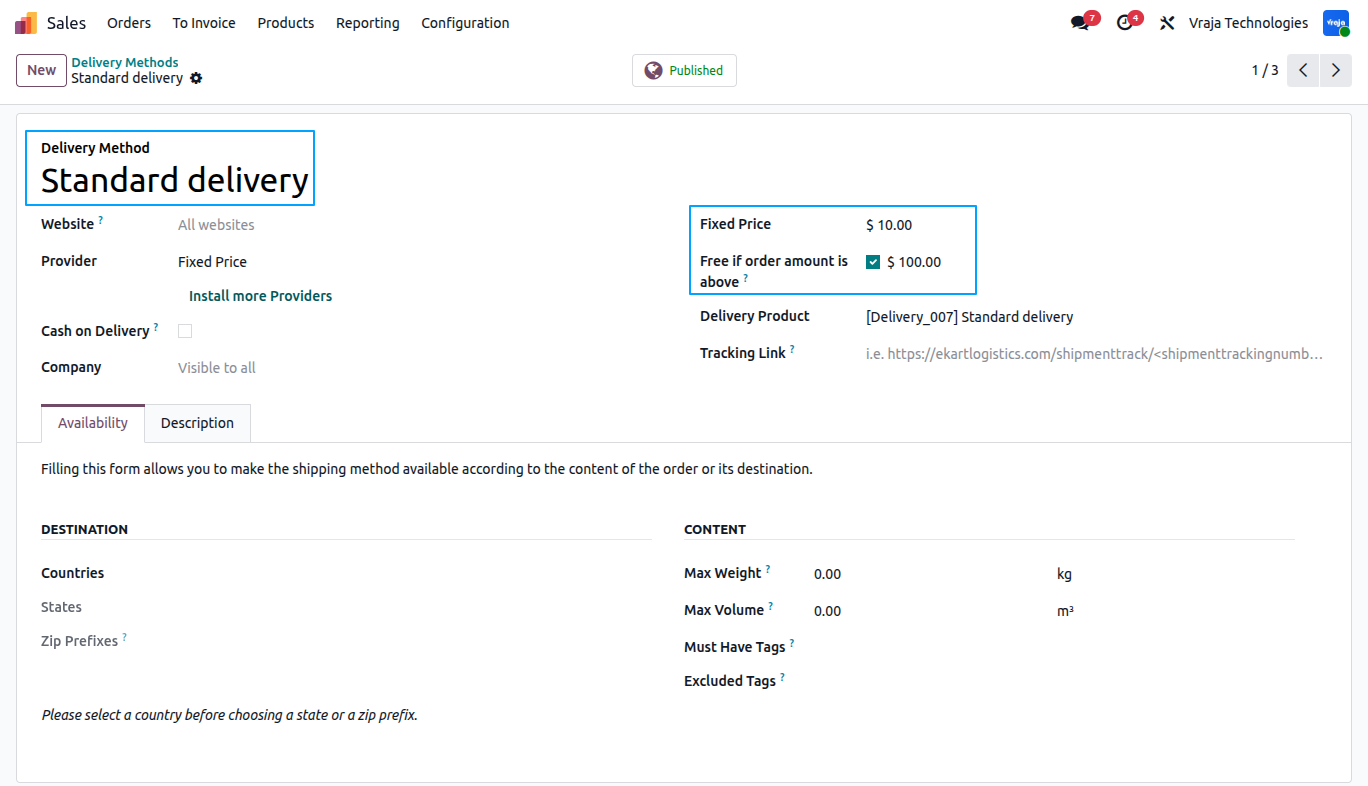
09 Customers can view dynamic Free Shipping Indicator messages during checkout, showing how much more needs to be added to the cart to qualify for free delivery based on the selected shipping method.

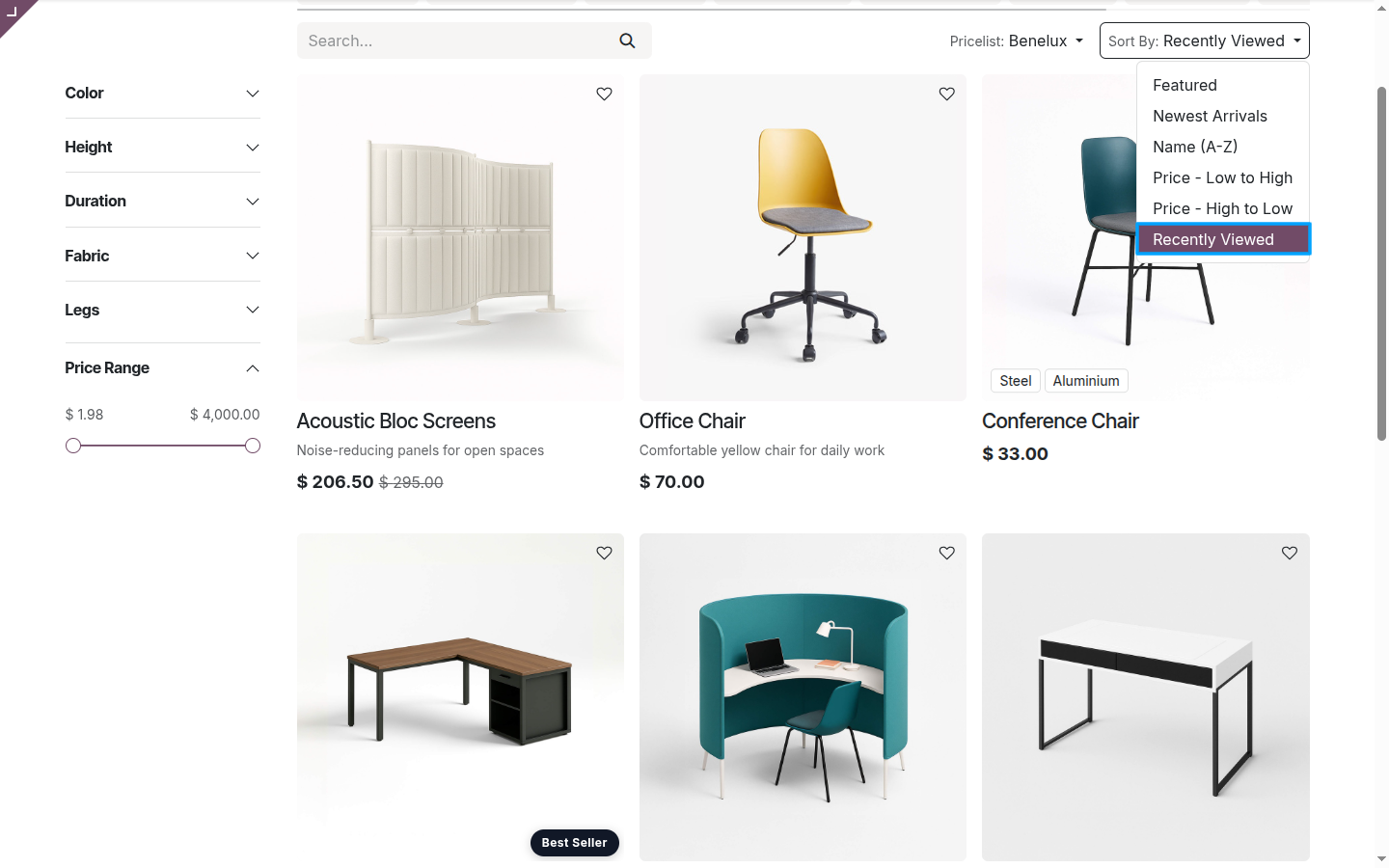
10 Recently Viewed Products: The Recently Viewed Products feature adds a "Recently Viewed" option in the website shop, allowing customers to quickly access up to 10 recently viewed products.
11 Price Countdown Timer: Configure pricelist rules with a Validity Period to enable Price Countdown Timers for applied pricelist discount. Use the highlighted option to configure the end date along with the start date for the pricelist rule. The Price Countdown Timer is displayed only when both the start date and end date are configured.

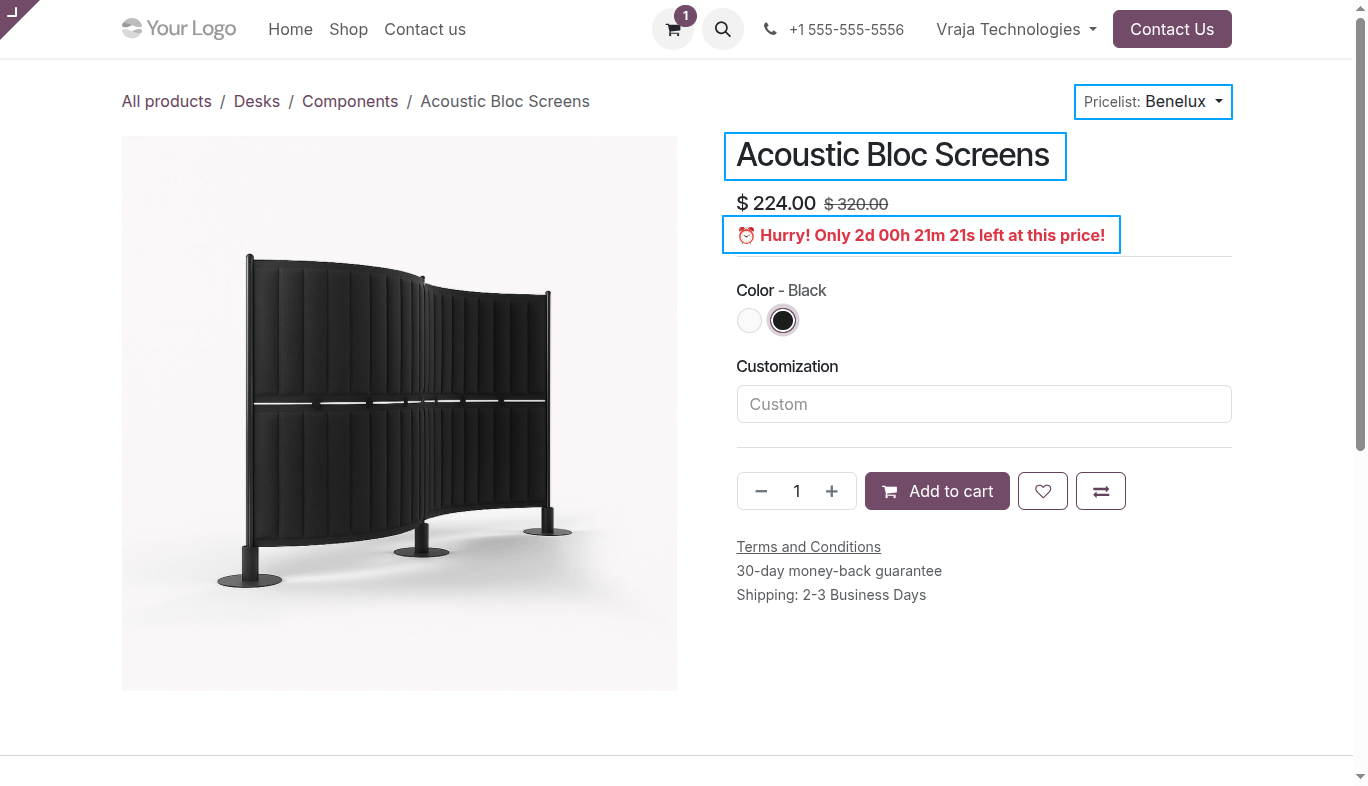
12 The sales price discount is applied to the product Acoustic Bloc Screens for the configured start date and end date defined in the pricelist rule. The Price Countdown Timer remains visible on the website product page during the active discount period.

13 The Price Countdown Timer is displayed on the website product page for products with active pricelist discount, showing the remaining discount duration based on the configured start date and end date.
Can the number of Best Seller products be configured?

Yes, the module allows configuration of how many top-selling products should display the Best Seller label on the website shop.

Which products are displayed with the New Arrival badge?

Products created on or after the configured New Arrival Date are automatically displayed with the New Arrival badge.

Does the Recently Viewed functionality support multiple products?

Yes, the module can display up to 10 recently viewed website products.

When does the Price Countdown Timer appear on the product page?

The countdown timer is displayed only when both the start date and end date are configured in the applied pricelist rule.

Does the module support free shipping calculation messages for different delivery methods?

Yes, the remaining amount required for free shipping is calculated based on the selected delivery method and current cart total.

I would like to request a custom feature for this application. What’s the process to get it implemented?

We’re happy to help tailor the application to meet your business needs! You can reach us via sales@vrajatechnologies.com

Who is the point of contact for technical support or bug-related queries?

You can reach us via support@vrajatechnologies.com

Can I get a demo of the module before making a purchase?

Yes, to test this module please contact us at sales@vrajatechnologies.com

Included App Support

90 Days Complimentary Support for Supported Versions

If you encounter issues caused by the app itself, our team provides complimentary support for 90 days from the date of purchase for supported Odoo versions.

Included App Support

90 Days Complimentary Support for Supported Versions

If you encounter issues caused by the app itself, our team provides complimentary support for 90 days from the date of purchase for supported Odoo versions.

Customer Support

Customer Support

Need help with installation, configuration, technical issues, or general questions about the module? Submit a support ticket through our dedicated support portal.

Customer Support

Customer Support

Need help with installation, configuration, technical issues, or general questions about the module? Submit a support ticket through our dedicated support portal.

Support Policy

Review our support policy for complete information about support coverage, issue eligibility, exclusions, version compatibility, and other support conditions.

Support Policy

Review our support policy for complete information about support coverage, issue eligibility, exclusions, version compatibility, and other support conditions.

Scan for Support

Vraja Technologies Support Portal QR Code

Scan for Support

Vraja Technologies Support Portal QR Code
Discover Trending Apps

Website Sale Side Cart Drawer

The Website Sale Cart Drawer module for Odoo provides a modern, side-sliding cart interface that significantly enhances the eCommerce shopping experience. Instead of redirecting users to a separate cart page every time they add a product, a sleek cart drawer slides in from the side of the screen. This allows customers to review their cart, update quantities, apply coupon codes, and see recently viewed and recommended products—all without leaving their current page or waiting for a page reload.

Reorder From Previous Orders

With this module you can enhances the native Quick Reorder functionality with accurate real-time stock status checks and alternative product suggestions — so customers are never left stuck with unavailable items.

Website Smart Popups

Website Smart Popups enables you to create and manage multiple website popups from a single place in Odoo. Configure Newsletter, First Order Coupon, Exit Intent, Time Delay, Cart Abandonment, and Country-Based popups to engage visitors. Easily activate or deactivate each popup based on your requirements. Capture newsletter subscribers, generate first-order coupons, recover abandoned carts, and display country-specific popup content to your website visitors. Ideal for running targeted promotions, growing mailing lists, and improving conversions across your website.

Website Upsell & Cross-Sell

Website Upsell & Cross-Sell maximizes average order value with two powerful cart engagement tools. Loyalty Program Cart Hints show customers real-time progress toward earning rewards, encouraging them to add more products to qualify. Premium Variant Upgrades recommend the next higher-priced variant for each cart product, allowing customers to upgrade in one click while preserving their original quantity.

Website Signup Custom Fields & User Approval

The Dynamic Signup Fields module improves the user registration process by allowing additional fields to be added based on business needs. It helps collect important customer information during signup. Added fields also appear on the account edit information, where users can update fields that are allowed for editing. The module also includes a signup approval feature, allowing new registrations to be reviewed and approved before login access is granted.

Dynamic Website Product Search

Dynamic Website Product Search enhances the default Odoo website shop search by allowing administrators to configure searchable product fields directly from the backend. Instead of limiting product search to standard fields only, this module gives full flexibility to choose additional fields such as product name, internal reference, barcode, descriptions, and custom text fields. Customers can then search products on the website using values stored in those selected fields.

Website Order Multi-Address

This application is designed to significantly enhance the website shopping experience by providing customers with greater flexibility and control over product deliveries directly from the cart page. Rather than placing multiple separate orders for different delivery destinations, customers can conveniently assign a unique delivery address to each individual product within a single order.

Website Minimum Checkout Amount

The Website Minimum Checkout Amount module restricts customers from proceeding to checkout unless their order meets a defined minimum value. It supports applying the restriction on either the total amount or the untaxed amount based on configuration. The restriction message is configurable, and the same message defined in settings is displayed to the customer when the minimum amount is not reached.

Website Product Restock Date & Incoming Qty

This module enhances the Odoo eCommerce product page by displaying incoming stock quantity and expected arrival dates when a product is out of stock. Instead of leaving customers without information, it shows a clear and structured incoming stock table based on confirmed Purchase Orders.

Website Product Catalog Downloader

This module enables businesses to attach product catalogs or specification documents directly to product templates in Odoo. A download button is automatically displayed on the website product page, allowing customers to easily access and download relevant files such as PDFs, manuals, or specification sheets.

Dynamic Portal Fields (No-Code Customization)

The Dynamic Portal Fields module for Odoo empowers backend administrators to configure and display any existing model field directly on the customer portal — without writing a single line of custom code. Instead of a rigid, fixed-column portal, businesses can tailor what customers see across their Sales Orders, Purchase Orders, Invoices, and Contact (My Account) pages by simply selecting fields from a unified backend configuration menu.

Website Delivery Date, Time Slot & Same-Day Delivery

The Website Delivery Date, Time Slot & Same-Day Delivery module enhances the eCommerce checkout experience by allowing customers to choose a preferred delivery date and time slot based on configured shipping methods.

Hide Variant On Website

The Hide Variant on website module for Odoo provides advanced control over how product variants are displayed on the eCommerce website. It allows businesses to selectively hide specific variants without deleting or archiving them, ensuring better catalog management while maintaining backend data integrity.

Advanced Sales & Shipping Management

Streamline Odoo Sales and Delivery processes with enhanced shipping charge management and customer-specific discount functionality. Define Shipping Discounts, Insurance Charges, Fuel Surcharges, and Remote Area Surcharges to ensure precise delivery cost calculations. Automatically apply customer-level discounts on sales orders, record customer payments directly from sales orders.

Explore Before Purchase

Start with a free trial

Test the connector with your real workflows using our 15-day free trial. If you need help, our product experts will guide you throughout the trial.

Test the connector with your real workflows.

Our product experts will guide you during the trial to help you evaluate, configure, and use the connector with confidence.

15-Day Trial Expert Guidance Real Workflow Testing