
Description

AI Cashflow Intelligence Agent
Cashflow AI is an advanced Odoo module developed by Vraja Technologies that brings CFO-level financial intelligence directly into your Odoo backend. It connects to the OpenAI (ChatGPT) API to analyse your real-time Accounts Receivable (AR), Accounts Payable (AP), bank balances, expense pipelines, and sales/purchase order pipelines — then delivers actionable insights, liquidity scoring, cash runway forecasts, and a full executive summary.
The module is built on top of the Vraja AI common platform (vraja_ai) and the Odoo account module. It uses a token-optimised CSV approach to minimise OpenAI API costs while maximising the quality of AI-generated intelligence.
Stop guessing about your cash position. Cashflow AI connects to your Odoo accounting data and uses ChatGPT to deliver instant CFO-level insights.
End-to-end Odoo solutions for growing companies.
Explore the key features, workflow, and value of this Odoo module.
AI-Powered Cashflow AnalysisThe module’s core feature is its AI analysis engine. it collects financial data from multiple Odoo models, serialises it into a compact CSV payload, sends it to the OpenAI GPT model via the API, and parses the structured JSON response back into the Odoo database. |
AI KPI DashboardOnce analysis is complete, the results are displayed on an interactive OWL-based dashboard inside the Dashboard panel. |
AI Insights & Attention AlertsThe AI model returns insights ranked HIGH → MEDIUM → LOW, covering categories such as AR (receivables risk), AP (payables urgency), EXPENSE (employee cost exposure), FORECAST (30-day outlook), BANKING (liquidity health), and RISK (strategic threats). |
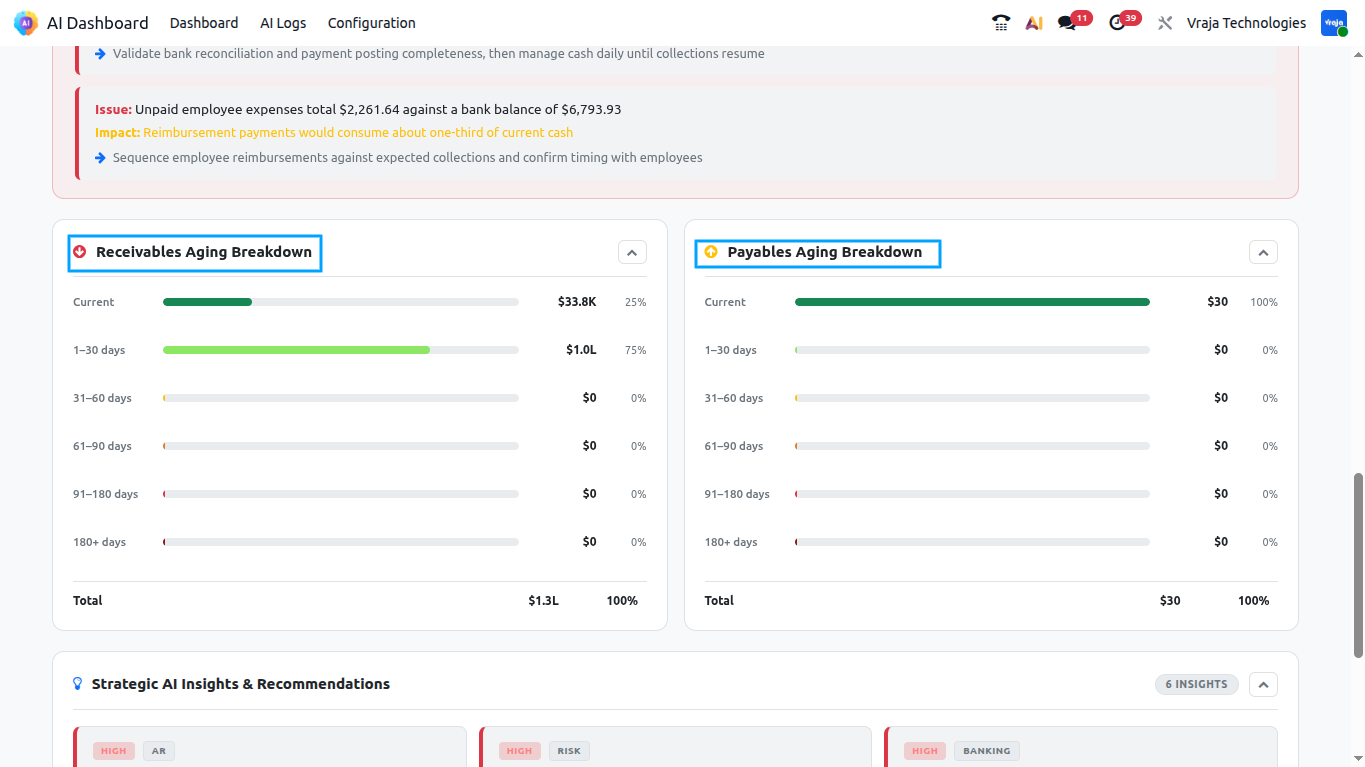
Top AR Risks & AP PrioritiesThe dashboard presents a focused table of the top 5 high-risk AR customers with overdue invoices, colour-coded as RED, AMBER, or GREEN. Similarly, the top 5 urgent AP vendors are listed with a priority level of URGENT, HIGH, or MEDIUM, along with a recommended action for each. |
Cash Runway & Liquidity IntelligenceCash runway is computed using CFO-level logic: if a consistent historical burn rate exists (30-day average daily net outflow > 0), the runway is calculated as Bank Balance ÷ Avg Daily Net Outflow. If no historical burn data is available, the AI uses AP pipeline or expense data to estimate burn. If truly indeterminate, the result is capped at Indefinite. Also The zero-cash date is projected as today + runway days. |
Executive SummaryEach analysis run produces a 2–3 sentence AI-generated executive summary that captures the most critical financial signals in plain language, suitable for presenting directly to leadership or board members. |
CFO Report (Automated Email)
A configurable scheduled action runs every night and automatically sends the latest Executive Report PDF to the designated CFO user. The email includes a summary table with Liquidity Status, Liquidity Score, Cash Runway, and Analysis Period, plus the full AI Executive Summary. The PDF is the same report available for manual download from the dashboard.
|
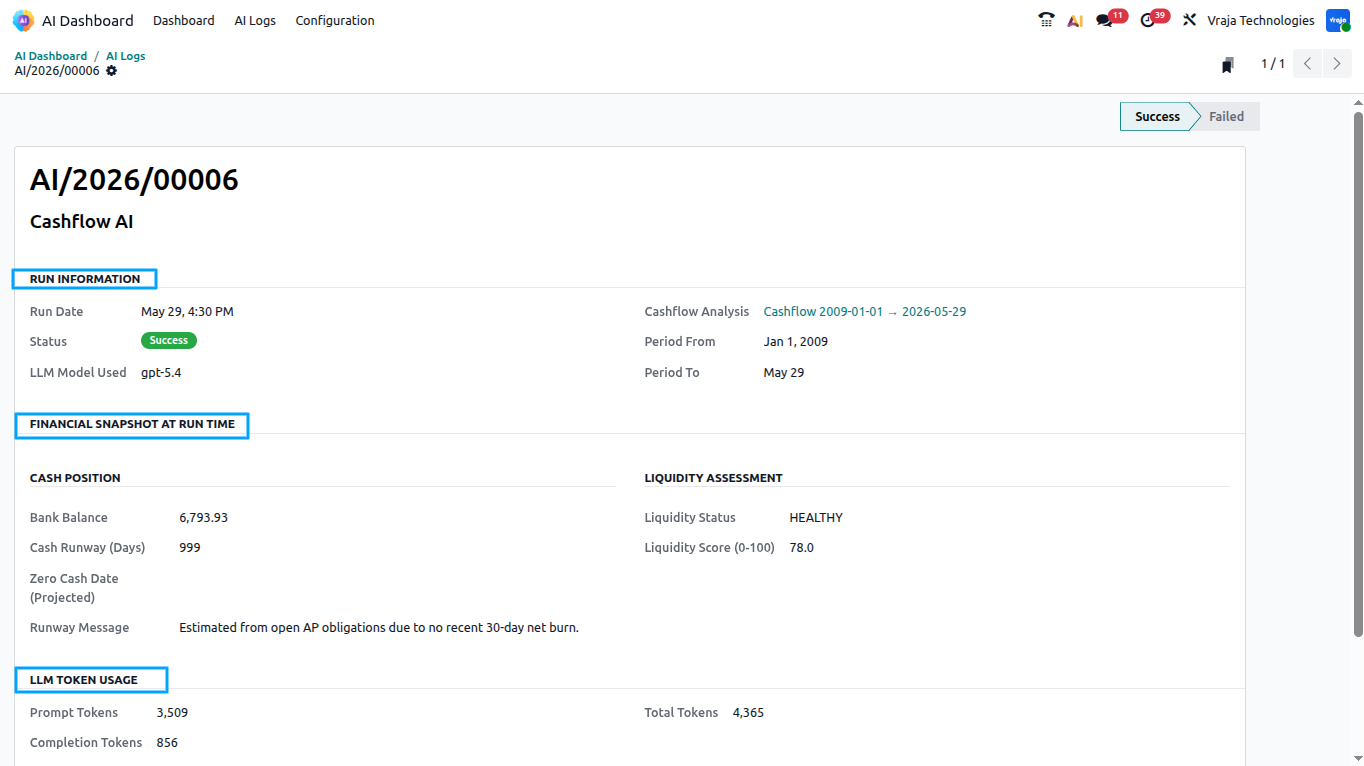
AI Log & Audit TrailEvery analysis run — successful or failed — is recorded in the Vraja AI Log. The log captures token usage (prompt, completion, and total tokens), the LLM model used, financial snapshot at the time of the run, and the full executive summary or error message. Logs can be viewed directly from the Dashboard card’s Log button. |
Generate Cashflow Intelligence WizardWhen a Cashflow AI card is first opened with no existing analysis, a wizard is presented to let the user choose the analysis date range. The default date range is the current month plus the two preceding months. Once confirmed, the wizard triggers the analysis and opens the populated dashboard automatically. |
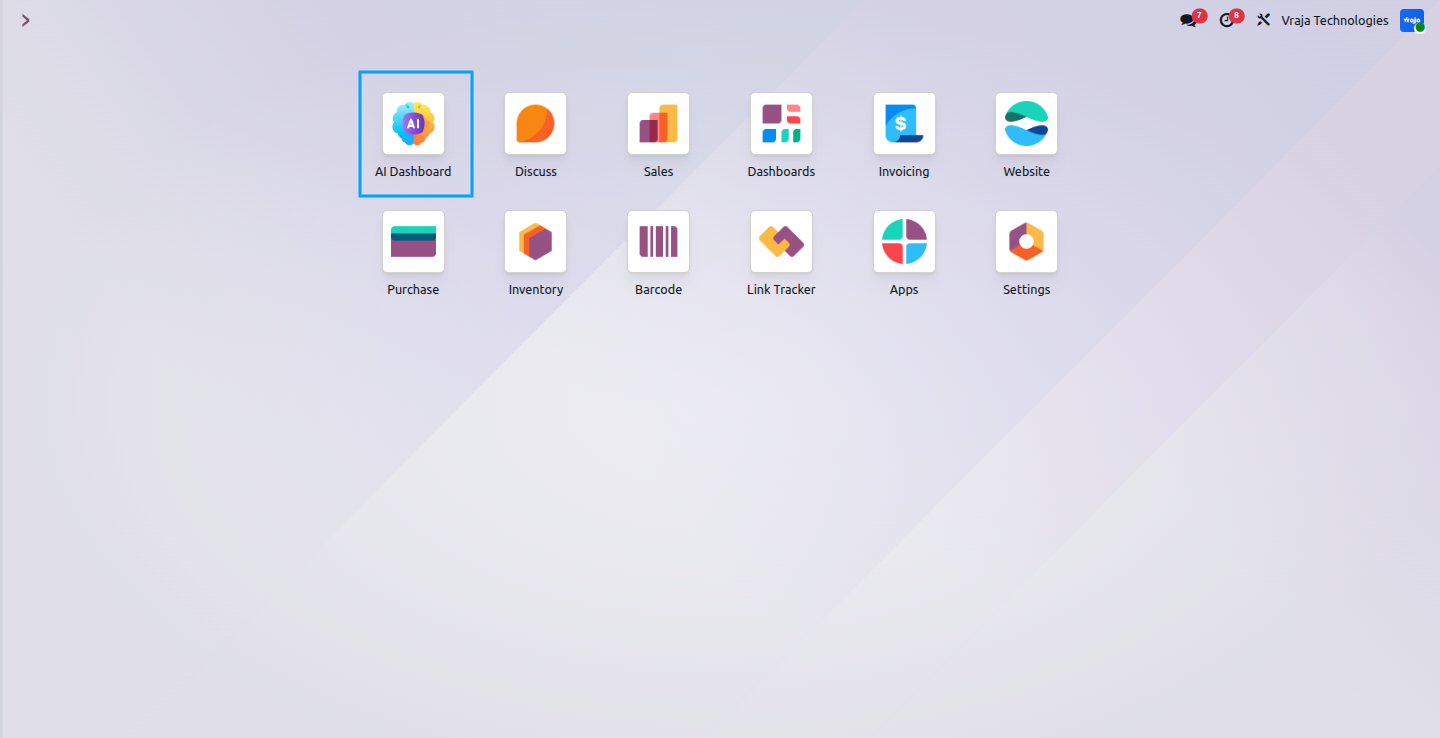
01 After installing the module, the AI Dashboard app appears directly on your home screen, giving you quick and easy access to all AI features and configuration options from one place.
02
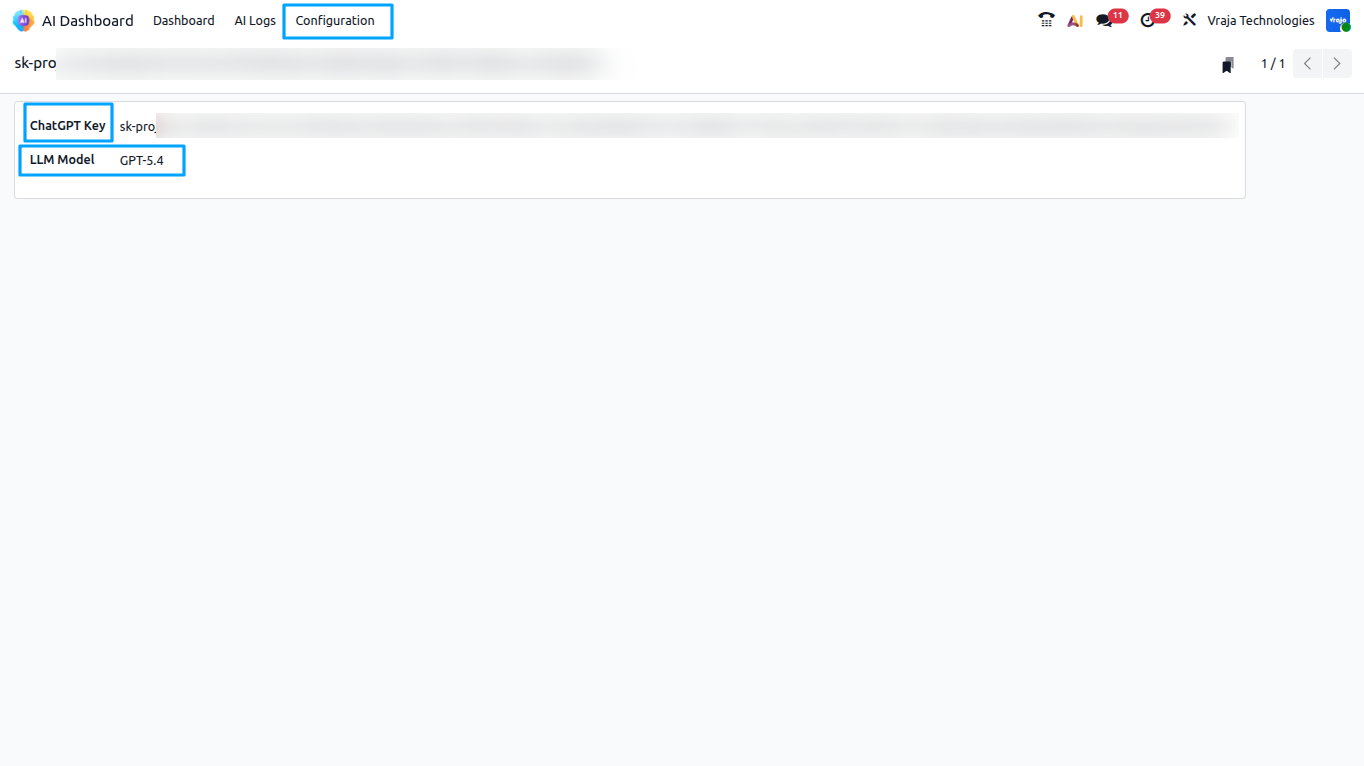
Before generating any analysis, you must configure your OpenAI API key inside the configuration panel. Without a valid key, the analysis wizard will display an error prompting you to add the key.
For that Navigate to the main menu.
Click on Configuration.
Enter your OpenAI API Key in the provided field and use any OpenAI model.
Save the configuration.
03
Open the Vraja AI Dashboard
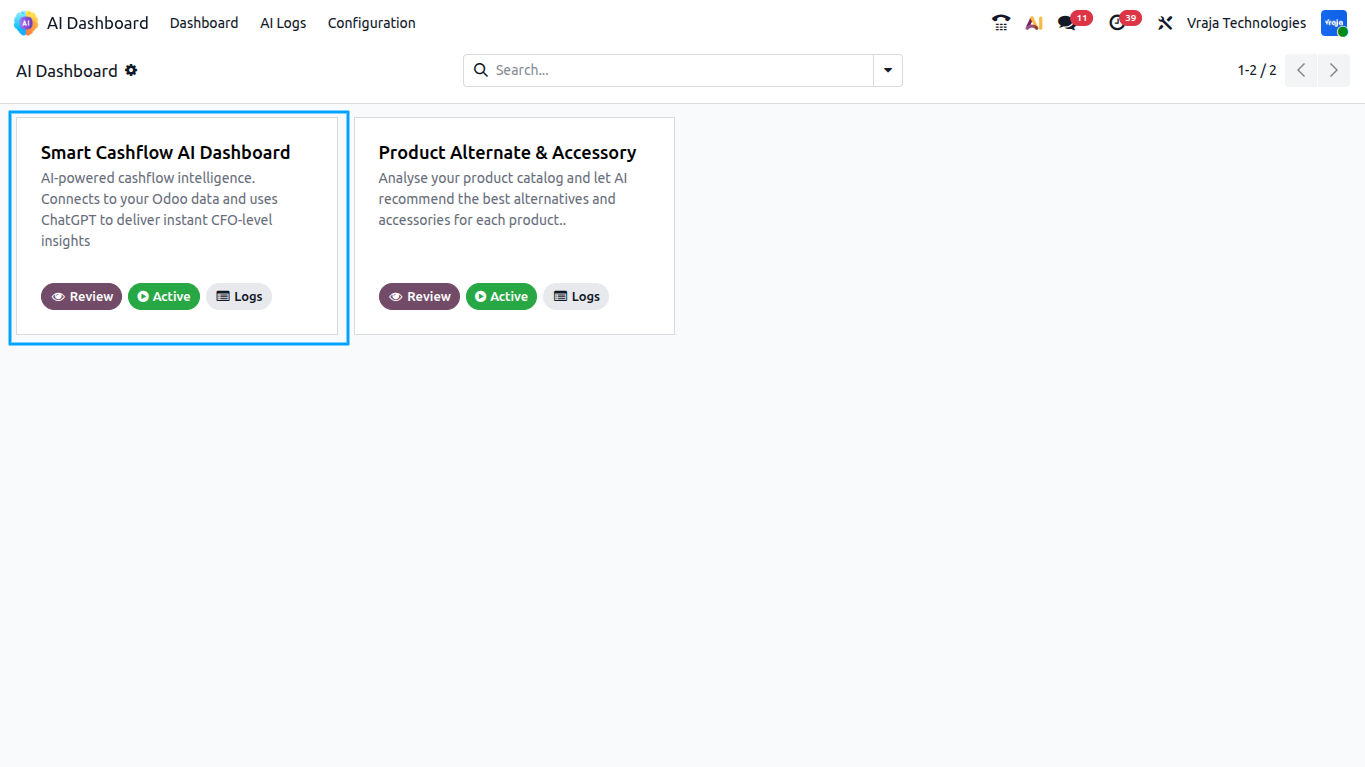
From the Odoo main menu, navigate to Vraja AI → Dashboard. You will see all available AI cards, including the Cashflow AI Dashboard card that was automatically created on module installation.
04
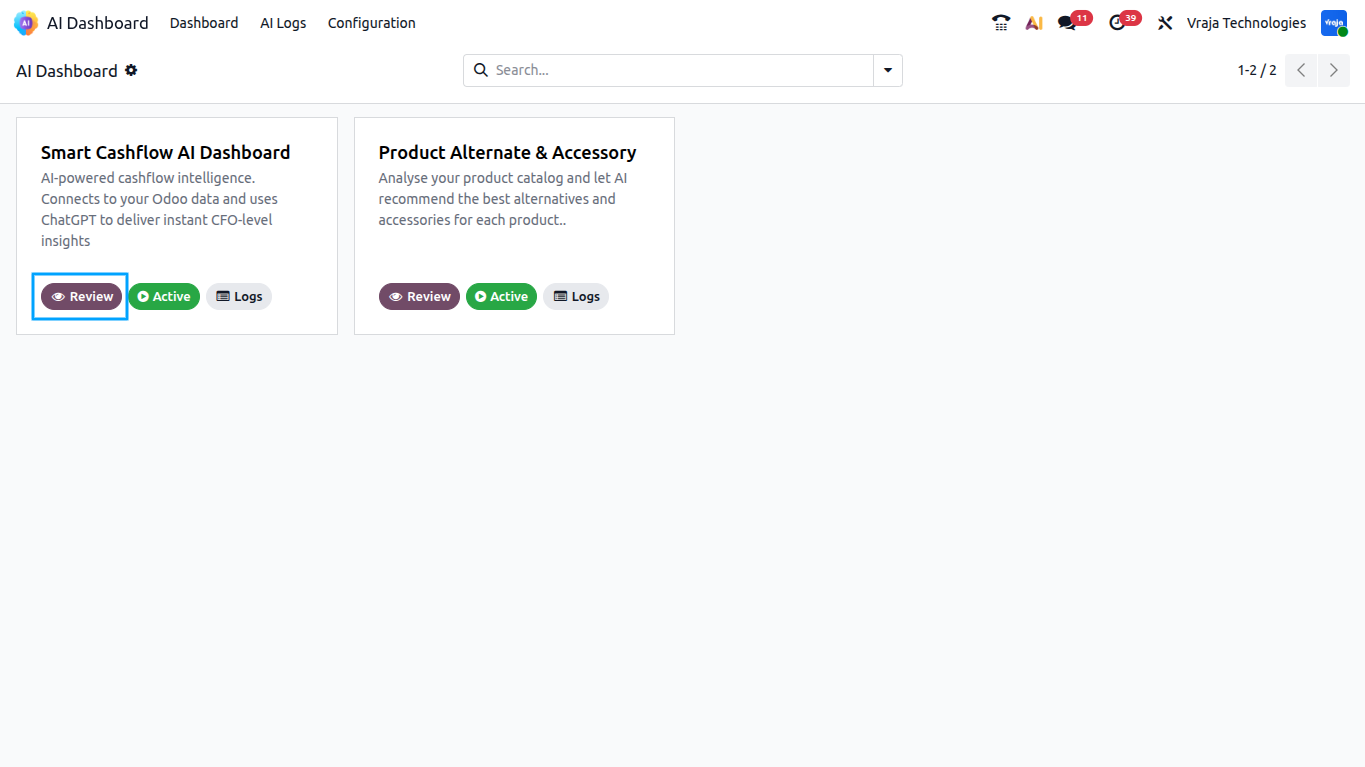
Open the Cashflow AI Card
Click the Review button on the Cashflow AI card. If no analysis has been generated yet, the Generate Cashflow Intelligence wizard will automatically open.
05
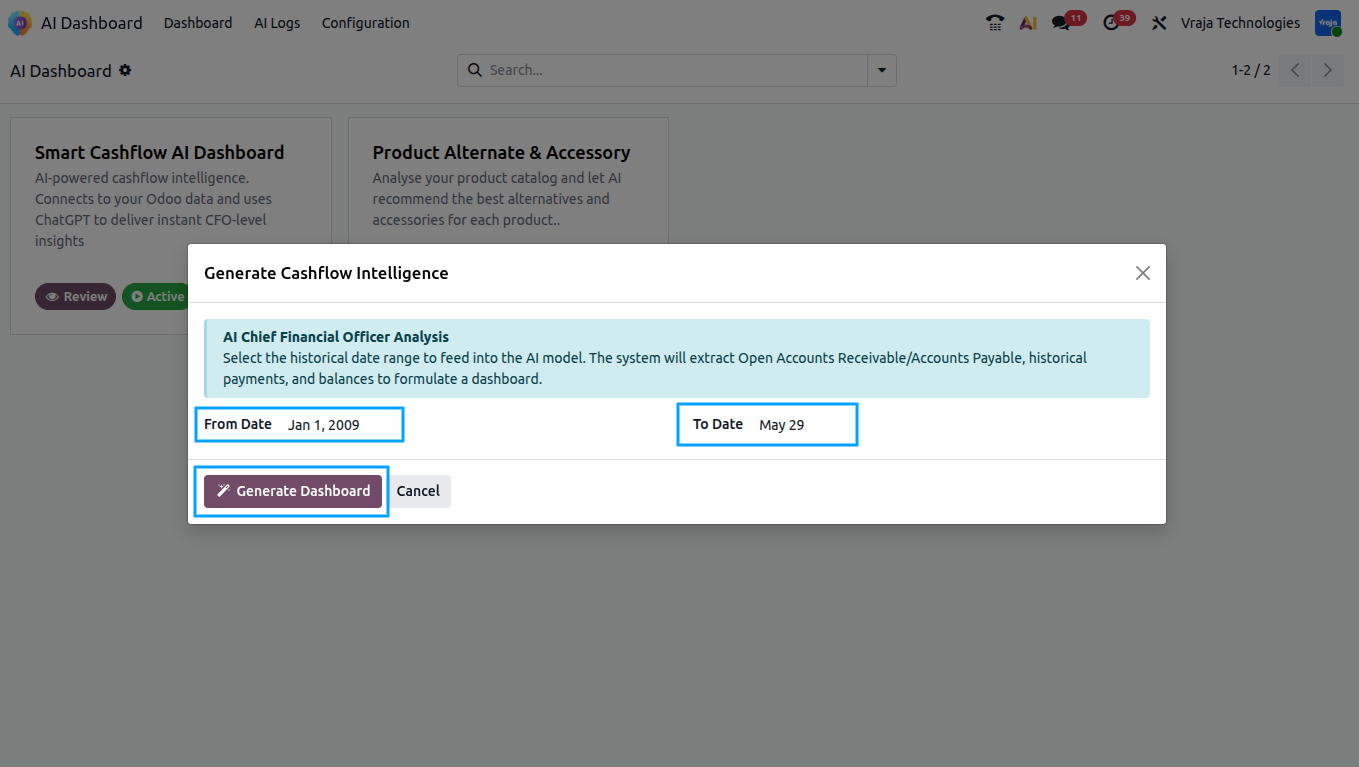
Generate Cashflow Intelligence Wizard
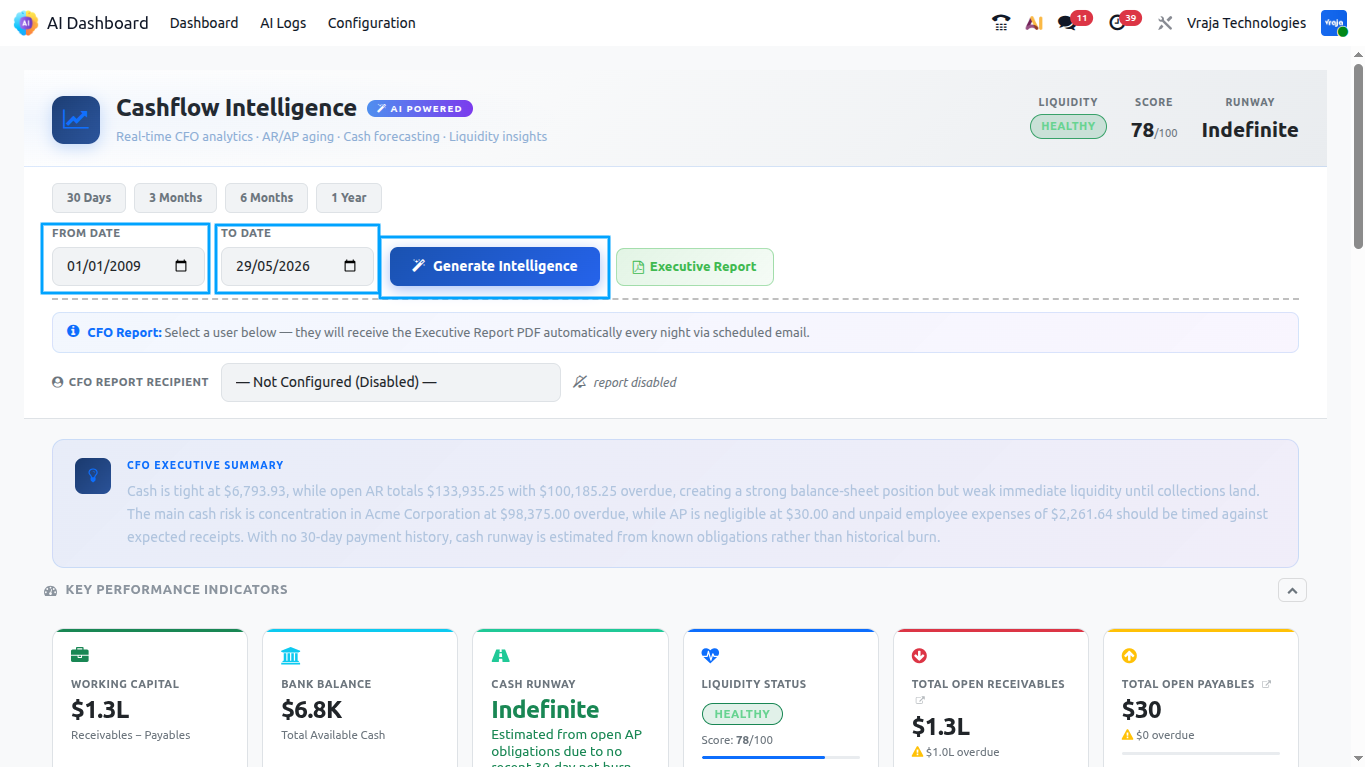
The wizard presents two date fields: From Date and To Date. The defaults are automatically set to the start of three months ago through today, giving a broad financial picture.
Click Generate Dashboard. The system will collect all financial data, send it to the AI, and open the populated dashboard once the analysis is complete.
06
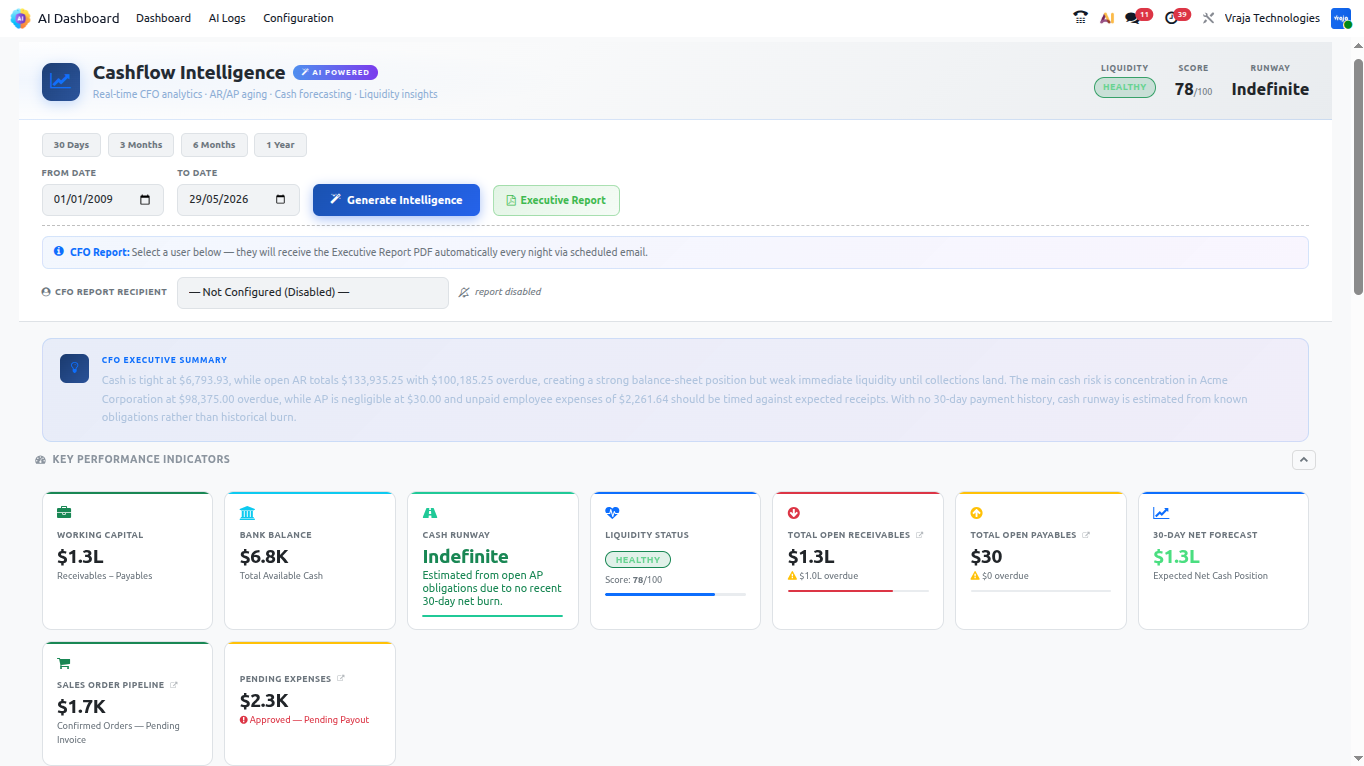
Review the Dashboard
for example, Overdue AR and Overdue AP are highlighted in red when significant, while the Liquidity Score badge is green (Healthy), amber (Caution), or red (Critical).
- Bank Balance — total liquid cash available right now.
- Total AR and Overdue AR — receivables health.
- Total AP and Overdue AP — payables urgency.
- Working Capital — net liquidity (Bank + AR − AP).
- SO Pipeline and PO Pipeline — near-term order-based cash flows.
- Cash Runway — days until cash depletion at current burn.
- Liquidity Score and Status — composite AI health rating.
07
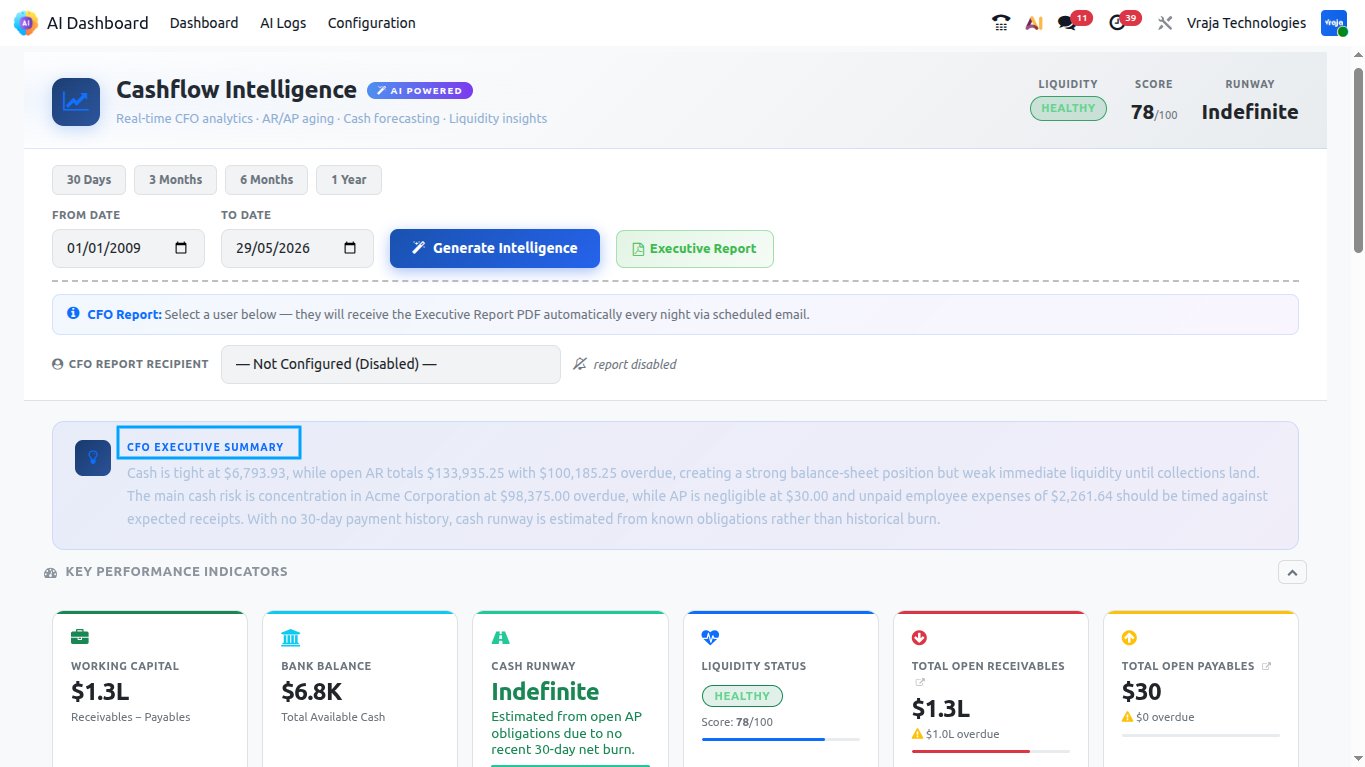
Review the Executive Summary
Below the KPI tiles, the AI Executive Summary is displayed as a highlighted text block. This is a 2–3 sentence CFO-level summary of the most critical financial signals derived from the analysis. This text is also included in the CFO email.
08
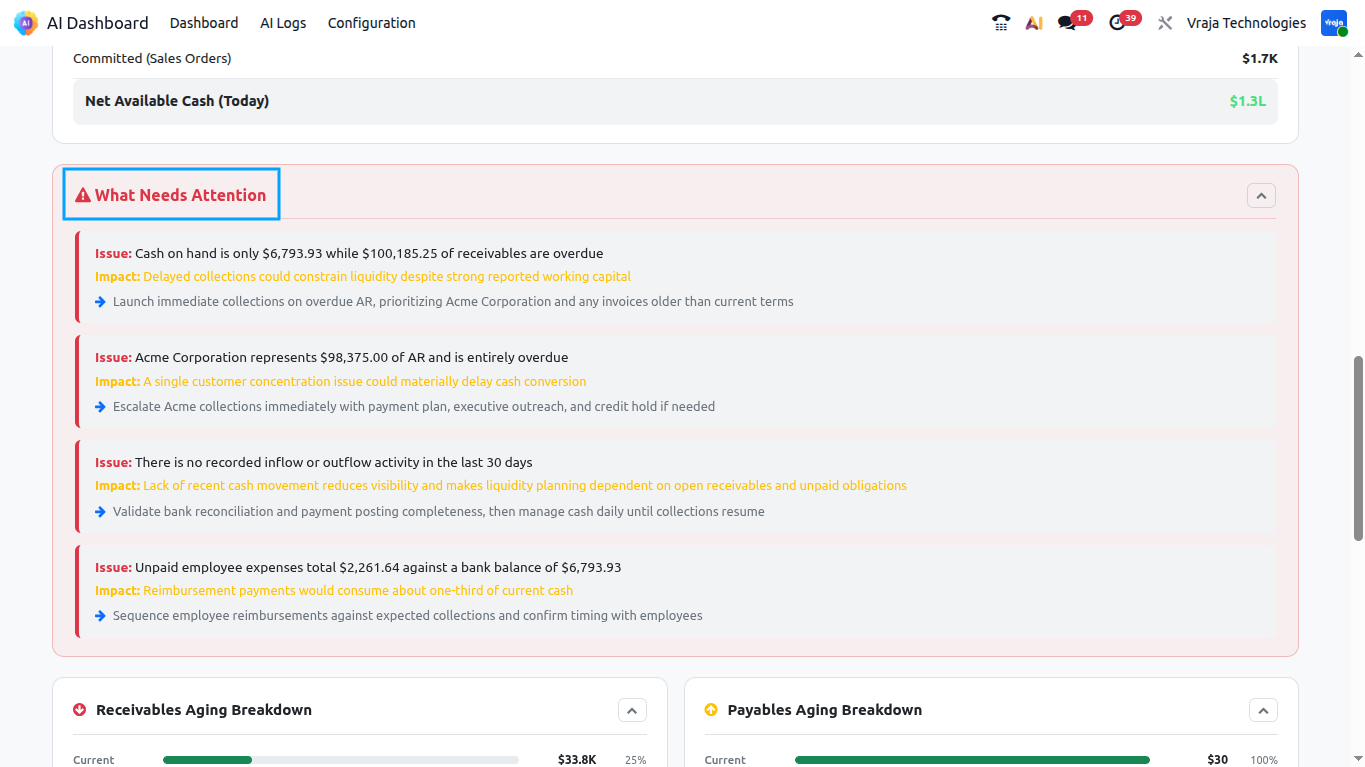
Review What Needs Attention
The ‘What Needs Attention’ panel lists up to 5 critical issues that require immediate action. Each item includes:
- Issue — a brief summary of the problem.
- Impact — the expected cash impact (in monetary terms where applicable).
- Action — the specific recommended action to resolve or mitigate the issue.
09
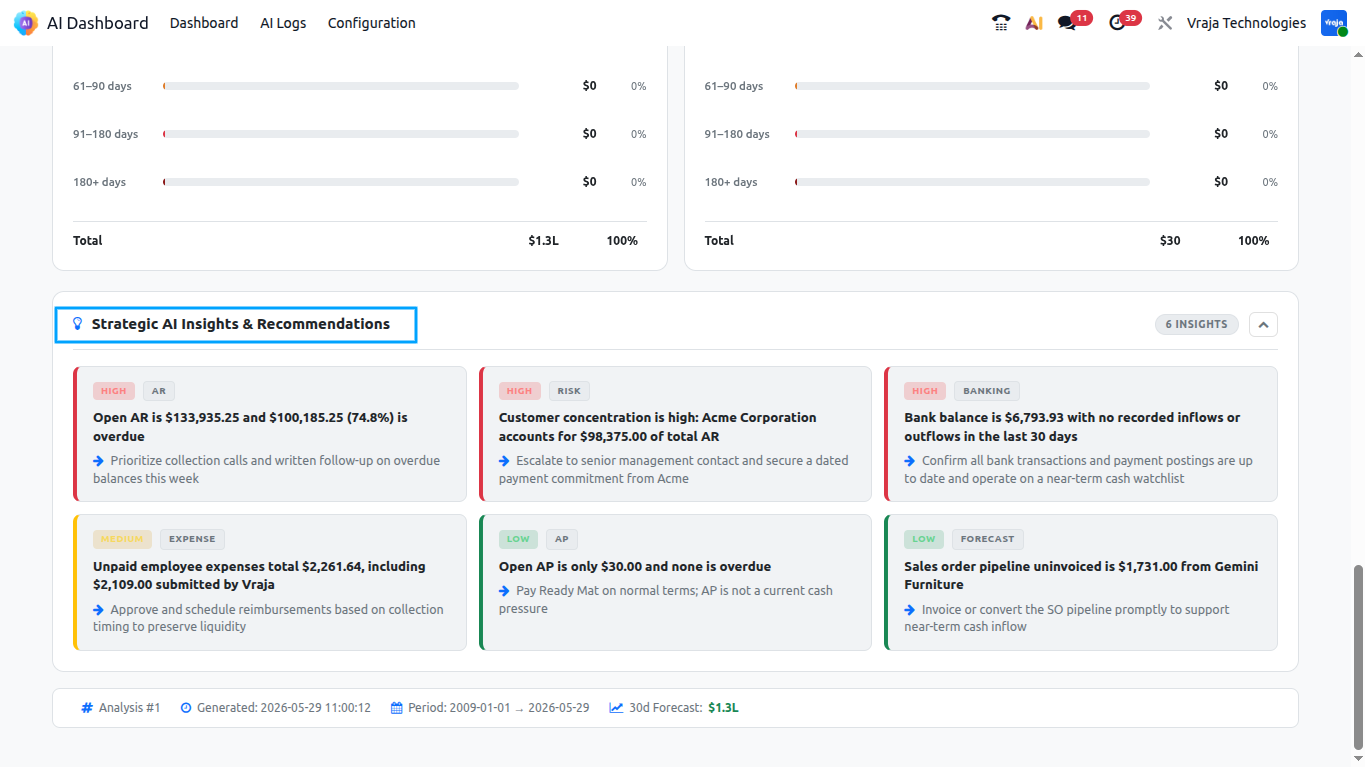
Review AI Insights
The AI Insights panel lists up to 8 insights sorted by severity (HIGH → MEDIUM → LOW). Each insight includes a category badge, a severity label, a finding with specific dollar amounts, and a recommended action.
10 Review Top AR Risks And Review Top AP Priorities.
11
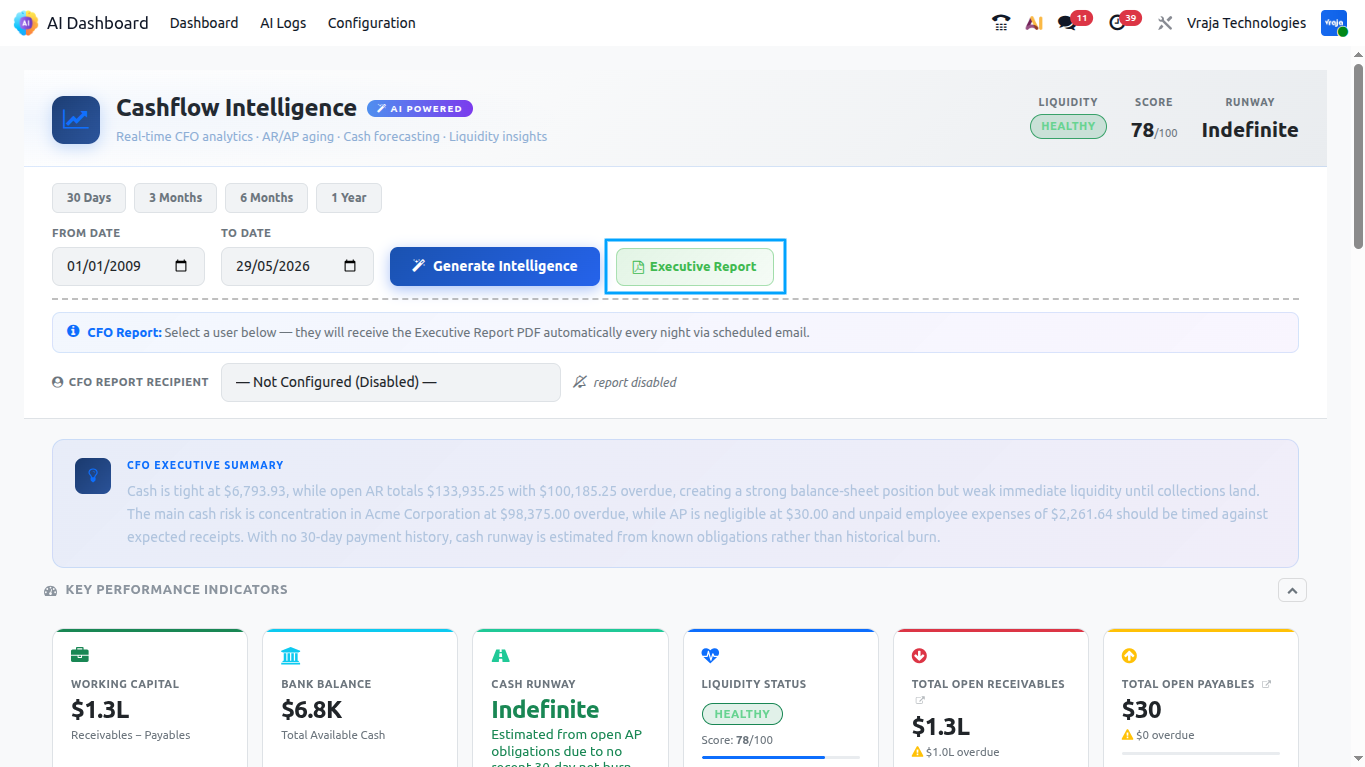
Download Executive Report PDF
Click the Download Report button on the dashboard to generate and download the Executive Cash Flow Report as a PDF.
12
Regenerate Analysis
To run a fresh analysis (for example, after a week has passed or after new invoices have been posted), click the Generate Intelligence button on the dashboard.
Important: Regenerating analysis will consume OpenAI API tokens. Each run sends your financial data (as a compact CSV) to the OpenAI API. Token usage is logged in the AI Log for each run.
13
CFO Report Configuration
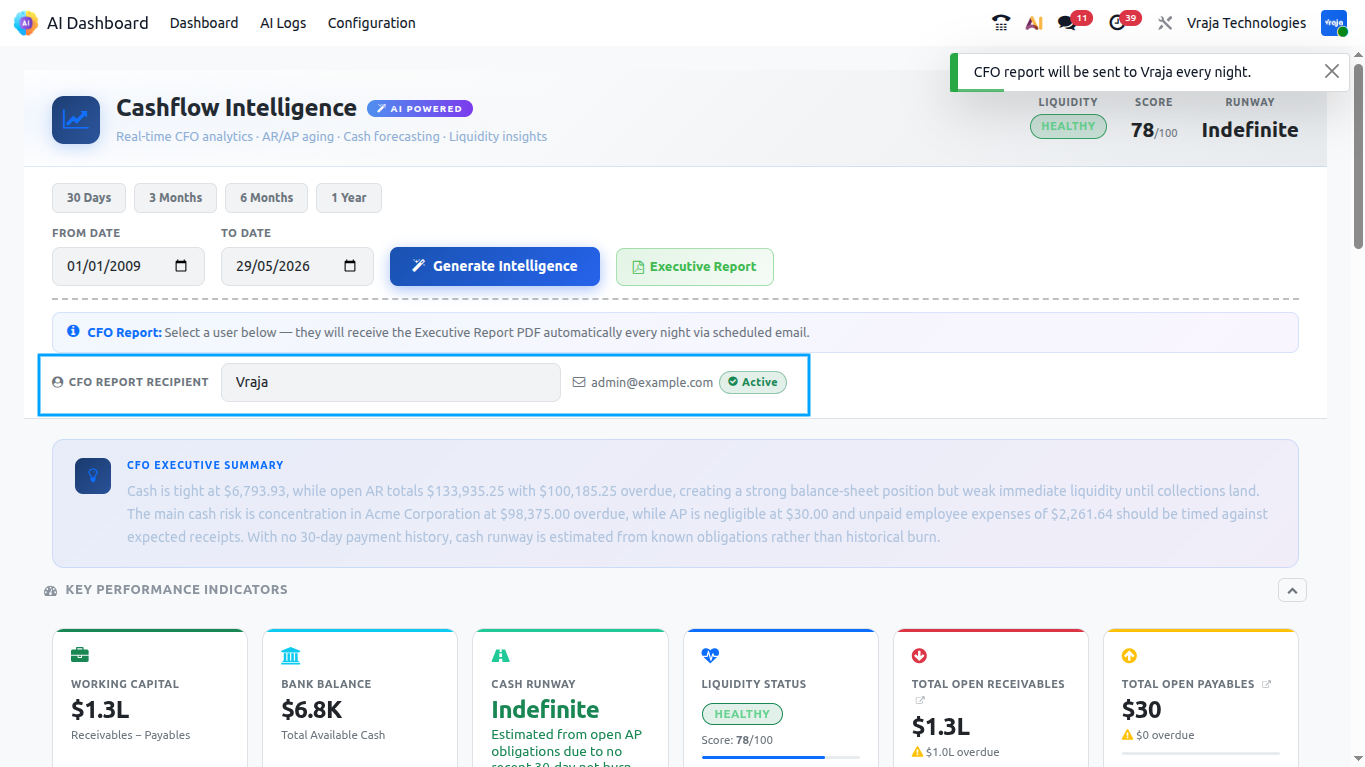
Setting the CFO Report Recipient
The CFO report is sent to a designated internal Odoo user. To configure it:
Look for the CFO Report Recipient field (or access it from the card settings).
Select the internal user (e.g., the CFO or Finance Manager) from the dropdown.
Save the card. The auto job will now send reports to this user’s email address.
To disable nightly reports, clear the CFO Report Recipient field.
14
Viewing the Log
Every analysis run creates a log entry in the AI Log. To view logs for the Cashflow AI card:
Open the Cashflow AI Dashboard card.
Click the Log button on the card.
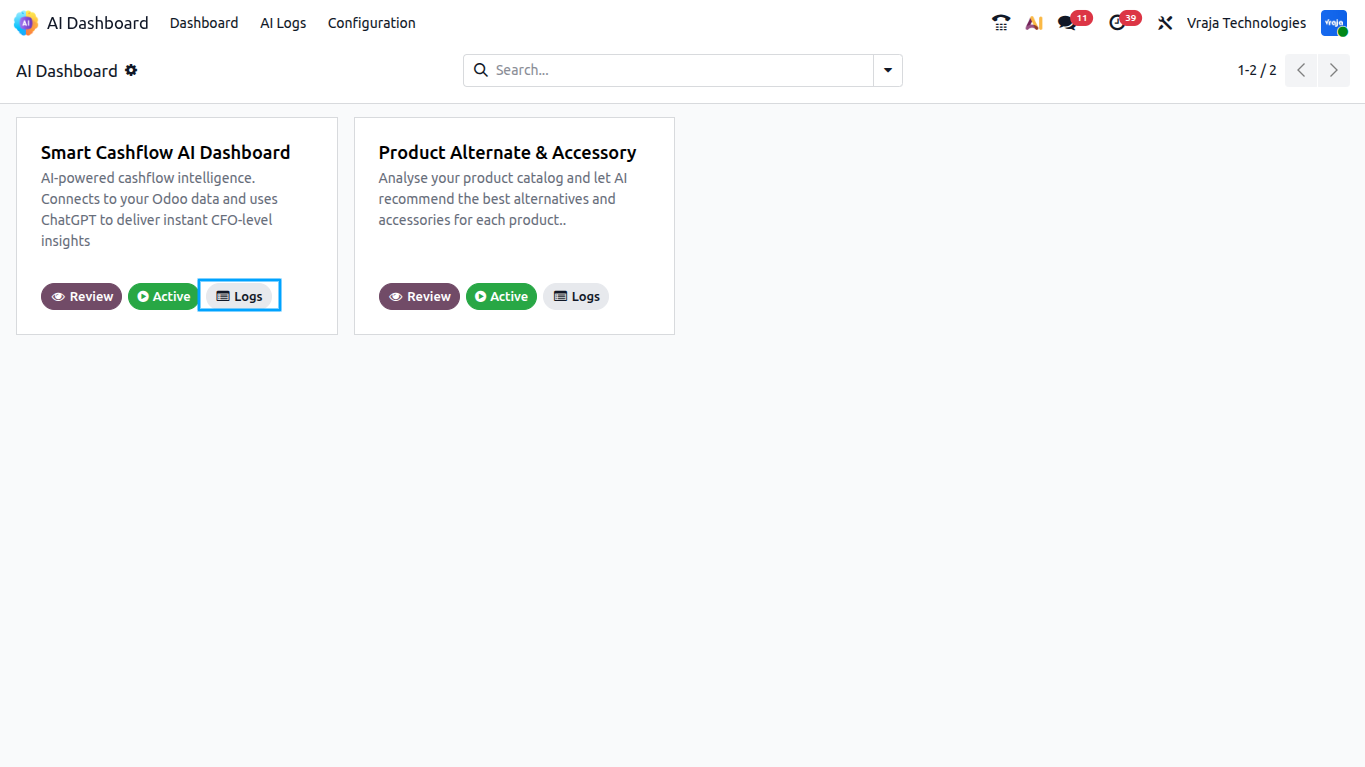
The log list will be pre-filtered to show only Cashflow AI logs.
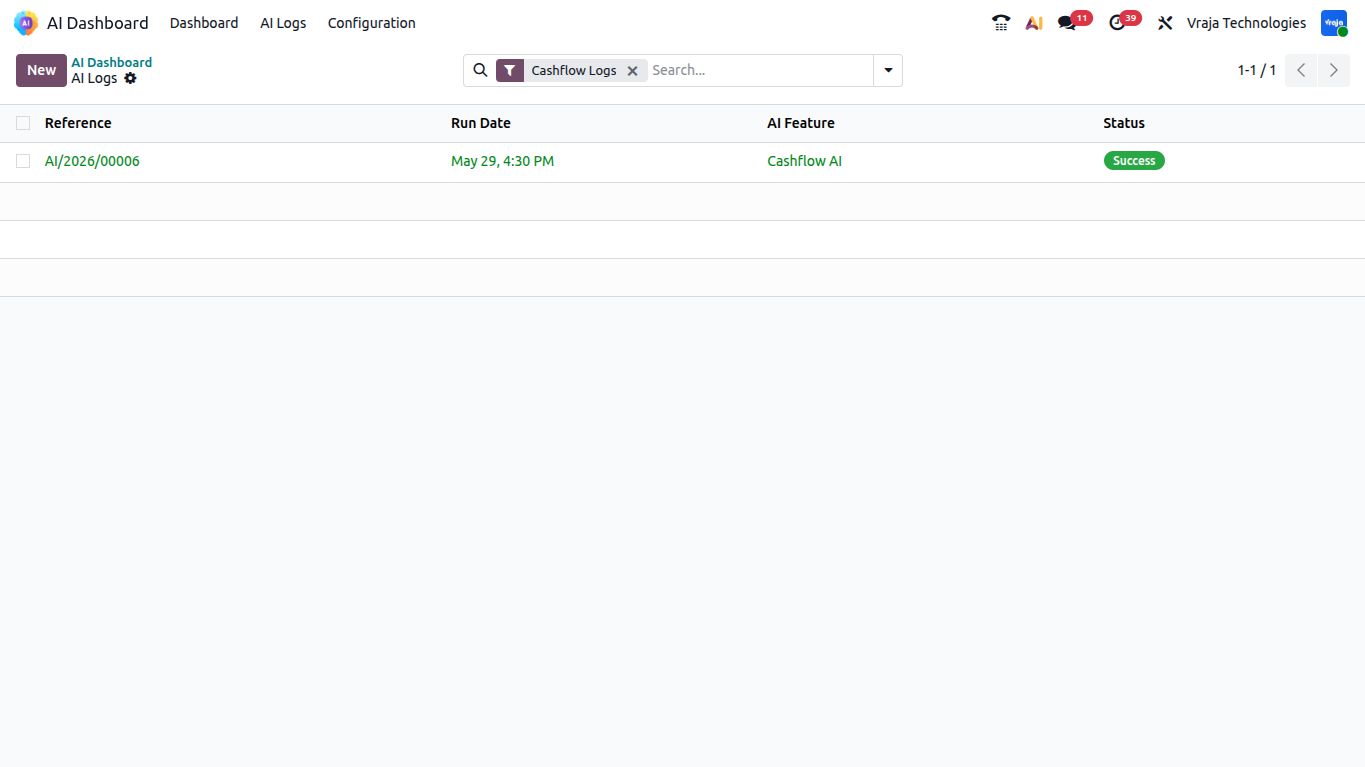
Click any log entry to view the full details.
|
|
How often should I run the analysis?For most businesses, a weekly or bi-weekly refresh is sufficient. For real-time monitoring during critical periods (e.g., end of month, funding rounds), you can regenerate on demand at any time using the Generate Intelligence button. |
|
|
Does the analysis consume a lot of OpenAI tokens?No. The module uses a token-optimised approach — financial data is serialised into a compact format rather than verbose JSON. Token usage is logged in the AI Log for each run for you reference. |
|
|
Can I use any OpenAI model?The model is configurable in the Vraja AI Configuration. The module defaults to the latest available model configured in vraja ai config. |
|
|
What happens if the AI call fails?The analysis record is set to ‘error’ state and the error message is stored both on the analysis record and in the AI Log. The dashboard will display the error. You can regenerate the analysis once the issue (e.g., API key problem, network error) is resolved. |
|
|
Are historical analysis results kept?Yes. Each analysis run for a unique date range is stored as a separate cashflow analysis record. When you regenerate for the same date range, the previous record for that range is deleted and replaced with the new one. |
|
|
Does the module work if I have no sales orders or expenses?Yes. The module gracefully handles empty datasets. If no SO, PO, or expense data exists, those pipeline values are simply 0. The AI is instructed to base all findings only on available data and will not hallucinate values. |
|
|
Can I export or share the analysis results?Yes — use the Download Report button to generate a PDF of the Executive Cash Flow Report. This PDF can be shared with stakeholders or board members. The CFO email also automatically distributes the PDF to the designated recipient. |
|
|
What does a Liquidity Score of -1 mean for cash runway?A cash runway of -1 means the AI could not reliably determine a runway figure — typically because there is no historical burn data and no AP or expense pipeline to estimate from. The dashboard displays this as ‘N/A’. It does not indicate a problem; it simply means insufficient data for a meaningful estimate. |
|
|
How do I track how many API tokens are being used?Every AI log record shows the Total Tokens Used for that particular run. You can refer to this figure to monitor your API consumption and plan your OpenAI usage accordingly. |
|
|
Who is the point of contact for technical support or bug-related queries?You can reach us via support@vrajatechnologies.com |
|
|
Can I get a demo of the module before making a purchase?Yes, to test this module please contact us at sales@vrajatechnologies.com |
|
|
Included App SupportNo Time-Limit Support for Supported Versions |
If you encounter any issues while using our app that are caused by the app itself, we offer complimentary support for 90 days from the date of purchase.
Klaviyo Odoo Integration
Connect Odoo with Klaviyo to sync customers, products, orders, and marketing data smoothly. Automate email and SMS marketing campaigns using real-time Odoo eCommerce and sales information. Improve customer engagement, abandoned cart recovery, and repeat sales with powerful Klaviyo automation.
Multi Company Microsoft Outlook
Manage Microsoft Outlook email configuration for multiple companies directly inside Odoo. This app helps each company use its own Outlook email account for sending and receiving emails. It is useful for businesses operating with multi-company setups and separate communication channels.
Dynamic Export Records
Export any Odoo model records dynamically without custom development or manual technical work. Users can configure export fields, filters, and formats based on business requirements. This app saves time and helps businesses generate flexible reports from Odoo data easily.
PrintNode Odoo Connector
It helps automate labels, reports, and attachment printing without manual downloads, making printer management and printing workflows faster and easier.
Stripe Terminal Odoo Integration
This module enables Stripe Terminal payments directly from the Odoo backend for Customer Invoices and Sale Quotations. It supports real-time physical card payments using devices such as WisePOS E and Stripe S700 Reader. With one-click installation, automated Odoo Accounting synchronization.
Disable Shipping Method
Control and restrict shipping methods on the Odoo website based on business rules and conditions. You can hide specific carriers depending on products, customers, order amount, location, or other criteria. This app improves checkout accuracy and helps businesses show only valid delivery options to customers.
BigCommerce Odoo Integration
Connect BigCommerce with Odoo to manage products, customers, orders, and inventory in one system. The integration helps automate order import, stock updates, and product synchronization between both platforms. It is ideal for eCommerce businesses looking to centralize BigCommerce operations inside Odoo.
Shopify Odoo Integration
Sync Shopify store data with Odoo including products, customers, orders, inventory, and fulfillment details. This app reduces manual data entry and keeps Shopify and Odoo records updated automatically. It helps online retailers manage eCommerce, warehouse, accounting, and order processing from Odoo.
EDIFACT Odoo Integration
Integrate EDIFACT EDI messages with Odoo to automate document exchange with trading partners. Support common EDIFACT flows such as ORDERS, INVOIC, DESADV, PRICAT, INVRPT, and acknowledgements. This solution helps businesses reduce manual work and manage supplier or customer EDI communication efficiently.
ANSI X12 EDI Odoo Integration
Connect Odoo with ANSI X12 EDI standards for automated B2B document exchange. Support key EDI transactions such as 850 purchase orders, 855 acknowledgements, 856 ASN, 810 invoices, and 997 acknowledgements. This app helps retailers, suppliers, distributors, and logistics businesses streamline EDI operations inside Odoo.
Explore Before Purchase |
Start with a free trial
Test the connector with your real workflows using our 15-day free trial. If you need help, our product experts will guide you throughout the trial.
|
|
Test the connector with your real workflows.Our product experts will guide you during the trial to help you evaluate, configure, and use the connector with confidence.
15-Day
Trial
Expert
Guidance
Real
Workflow Testing
|


Reviews
There are no reviews yet.