
Description
.png)
 Enterprise Community Odoo.sh
ANSI Shipper Side Odoo Integration
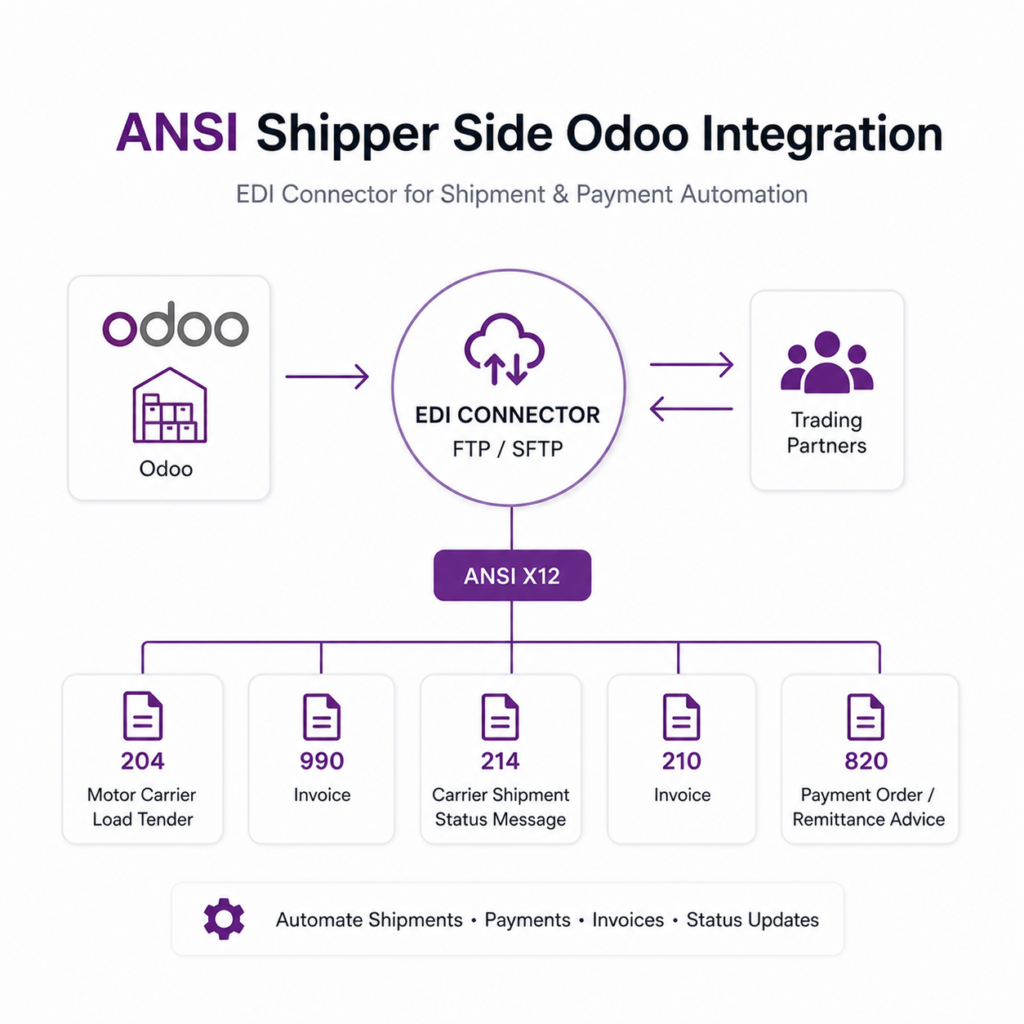
The ANSI Shipper Side Odoo Integration module manages the complete EDI-based transportation workflow within Odoo. It covers the full cycle of shipment processing and payment handling using standard ANSI EDI messages. The module enables shippers to send Load Tender (204) requests to one or multiple carriers simultaneously through configured FTP connections. It provides full support for carrier communication, including receiving and managing carrier responses (990) with accept or reject options. Additionally, the module handles shipment tracking through 214 (Shipment Status) updates, automates vendor bill creation using 210 (Freight Invoice) files, and supports exporting payment details via 820 (Payment Order). Moreover,it supports FTP communication protocols, providing a secure and reliable method for data exchange with trading partners.
 Watch on YouTube
We specialize in delivering advanced Odoo solutions across multiple domains. Our expertise includes:

EDI & SWIFT/ACH Payment Integrations
End-to-end EDI automation, including X12, EDIFACT, XML standards, & financial integrations such as SWIFT, ACH, & Fedwire.


eCommerce Integrations
Seamless integration with leading eCommerce platforms to sync products, orders, inventory, and customer data in real time.

Shipping Integrations
Robust shipping connectors for global couriers, offering automated label generation, tracking, and rate computation.

Most Useful Apps for your ERP
A wide range of highly-rated Odoo modules designed to enhance automation, improve productivity, & simplify business operations.
 Features
 Process
 FAQs
FAQs
 Export Load Requests to Carriers (204)
This module allows shippers to send Load Tender (204) requests to carriers by selecting the appropriate FTP configuration.
Carrier Acknowledgement & Tender Response (990)
Automatically imports carrier responses (990) and displays them in the ‘Carrier Response’ tab for review and processing.
Shipment Status Updates (214)
Provides shipment tracking updates from carriers with statuses such as Arrived at Pickup, Departed Pickup, Delayed, and Delivered. When marked as Delivered, the shipment is automatically moved to the Done state.
Automated Vendor Bill Creation (210)
Supports automatic creation of vendor bills from carrier freight invoices (210) using scheduled cron jobs.
Payment & Remittance Export (820)
Exports payment details including payment type, currency, payment method, and total amount.
Multi-Carrier Load Tender Management
Enables sending shipment requests to multiple carriers simultaneously using different FTP configurations.
Shipper-Side EDI Connector
Provides a complete transportation workflow for shipper-side integration in Odoo using standard EDI processes.
FTP Integration Support
Supports FTP protocol for seamless import and export of EDI files.
After installing the application, the FTP syncing menu becomes accessible.

On this screen, enter the FTP credential details for server connection. Use the ‘Check Connection’ button to verify connectivity. Next, select the ‘ANSI Shipper Odoo Records’ store, specify the sender id, and define the server directory names for importing/exporting.

The scheduled action (cron job) is successfully created.

To send requests to carriers, ensure that each carrier has a configured Receiver ID and SCAC number in the Delivery Method.

Using the ‘Export 204’ button, the shipper can send Load Tender (204) requests to multiple carriers at once by selecting the relevant FTP configuration.

The file has been successfully attached to the shipment.

The FTP configuration used for export is set in the ‘Related Shipper FTP’ section.”

The system uses a scheduled cron job to import 990 (Load Tender Response) messages from carriers and associate them with the corresponding shipment records.

The 990 Carrier Response is now available in the ‘Carrier Response’ tab. By clicking the ‘Use Carrier’ button, the selected carrier response is accepted and the carrier is assigned to the shipment.


The system uses a cron job to import 214 (Shipment Status) files and automatically update the tracking status of the corresponding shipments.

The 214 Shipment Tracking response is now displayed in the ‘Shipment Tracking’ tab, and the 214 file is attached to the shipment.

The carrier sends a 210 Freight Invoice, which is processed by a cron job to automatically create the corresponding vendor bill.

The vendor bill has been successfully created, and the file is also attached to the vendor bill.

By clicking on ‘Export Payment Details’, the payment order file is successfully exported, and the file is attached to the payment record.

 Which protocol you have used to transfer file?
- We used FTP protocol to transfer file.
Can we view the exported file? If yes, where?
- Yes, you can view and download the exported file from the message thread (chatter) of the respective record.
Can I send requests to multiple carriers at the same time?
- Yes, you can send requests to multiple carriers simultaneously by selecting multiple FTP configurations in the wizard.
Do we receive any confirmation or message after the scheduled action (cron job) is executed?
- Yes, the system maintains logs for all import and export operations, which can be reviewed for confirmation and tracking.
How can I use a carrier for the shipment process?
- You can select a carrier from the ‘Carrier Response’ tab by clicking the ‘Use Carrier’ button, which assigns the carrier to the shipment for further processing.
What file formats are supported for import and export?
- The system supports ANSI (EDI) and text (.txt) file formats for both import and export operations.
I would like to request a custom feature for this application. What’s the process to get it implemented?
- We’re happy to help tailor the application to meet your business needs! You can reach us via sales@vrajatechnologies.com
Who is the point of contact for technical support, configuration support or bug-related queries?
- You can reach us via support@vrajatechnologies.com
Submit a Support Ticket
If you encounter any issues while using our app that are caused by the app itself, we offer complimentary support for 90 days from the date of purchase.
To create a support ticket, please register via the Vraja Technologies Support Email and provide the necessary details so we can assist you in resolving the issue.

Email Us
support@vrajatechnologies.com

 1.png)
Contact Us
vrajatechnologies.com/contactus

Support
vrajatechnologies.com/support-policy
Vraja Technologies Services

Odoo Implementation

Odoo App Integration Services

Odoo Customization

Odoo Consultation

Odoo Support & Maintenance

Odoo Developer Outsourcing
Suggested Application




Reviews
There are no reviews yet.