
Description
.png)
 Enterprise Community Odoo.sh
EDIFACT Supplier Odoo Integration
Integrating EDIFACT with Odoo on the supplier side helps automate the processing of orders, invoices, and advanced ship notices by enabling automatic data exchange between systems. With this integration, suppliers can automatically import Purchase Orders received through EDIFACT and convert them into Sales Orders in Odoo, reducing manual work and saving processing time. It also allows the export of Bills and Advanced Ship Notices (delivery orders), making it easy to send Customer Invoices and ASN directly from Odoo to clients. In addition, the solution supports exporting Sales Pricelists and Product Inventory data from Odoo through EDIFACT. This allows trading partners to receive updated pricing details and accurate stock availability, helping improve coordination between suppliers and customers and providing better visibility across the supply chain. By using the EDIFACT file format, communication remains standardised between trading partners, while FTP protocols ensure secure and reliable data transfer. Overall, this solution improves operational efficiency, reduces errors, and speeds up business transactions between partners.
 Watch on YouTube
We specialize in delivering advanced Odoo solutions across multiple domains. Our expertise includes:

EDI & SWIFT/ACH Payment Integrations
End-to-end EDI automation, including X12, EDIFACT, XML standards, & financial integrations such as SWIFT, ACH, & Fedwire.


eCommerce Integrations
Seamless integration with leading eCommerce platforms to sync products, orders, inventory, and customer data in real time.

Shipping Integrations
Robust shipping connectors for global couriers, offering automated label generation, tracking, and rate computation.

Most Useful Apps for your ERP
A wide range of highly-rated Odoo modules designed to enhance automation, improve productivity, & simplify business operations.
 Features
 Process
 FAQs
FAQs
 Automatically import Purchase Orders and create Sales Orders in Odoo.
Export Bills -> send Customer Invoices from Odoo.
Export ASN -> send Advanced Ship Notice from Odoo.
Export Sales Pricelist -> send updated pricing information with trading partners.
Export Product Inventory -> send accurate product stock availability from Odoo.
Utilize the EDIFACT file format (D96A) for seamless data exchange.
Supports FTP communication protocols for secure data transfer.
Automatically import Purchase Orders and create Sales Orders in Odoo.
Export Bills -> send Customer Invoices from Odoo.
Export ASN -> send Advanced Ship Notice from Odoo.
Export Sales Pricelist -> send updated pricing information with trading partners.
Export Product Inventory -> send accurate product stock availability from Odoo.
Utilize the EDIFACT file format (D96A) for seamless data exchange.
Supports FTP communication protocols for secure data transfer.
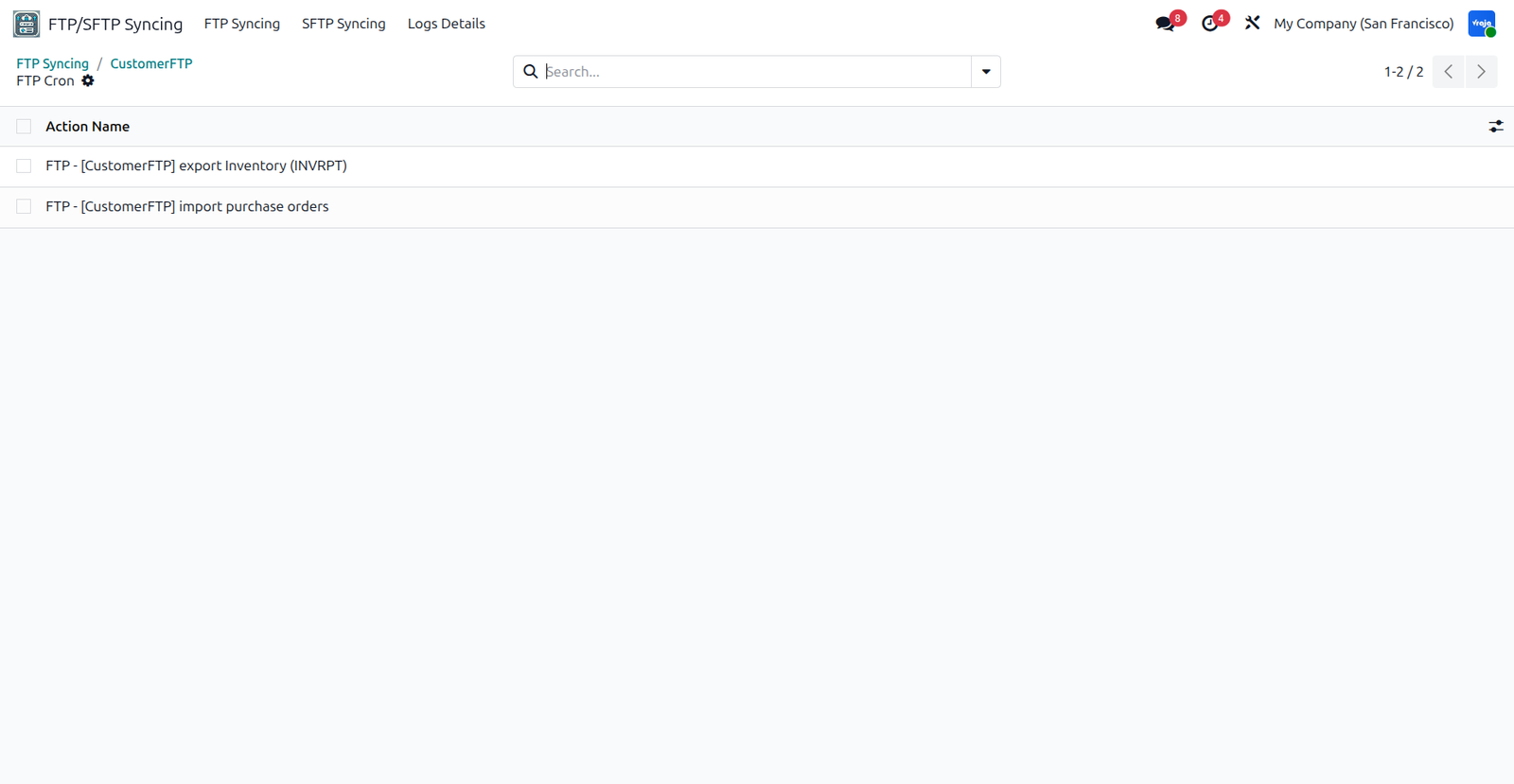
Upon successfully installing the application you can see the FTP/SFTP Syncing menu.

First, you have to enable the Pricelists from the sales configuration menu and save it.

You have to configure the FTP on the left side and on the right side you have to configure the file paths for import and export with Sender ID. You will see the green banner after successfully connected to the FTP.

You have to create schedule actions for import purpose. You can view the created Schedule Action from the smart button on top.
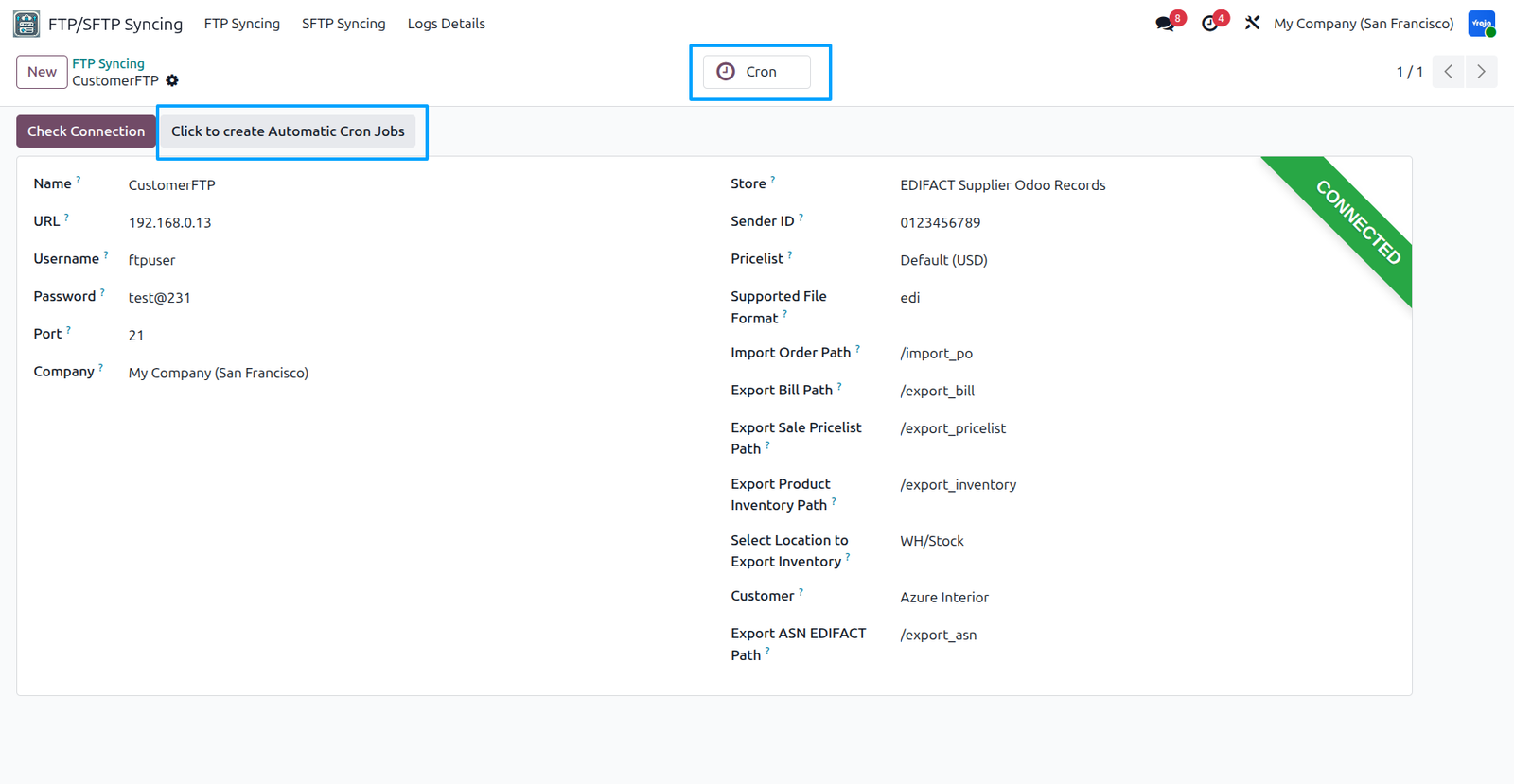
This is your created schedule actions.
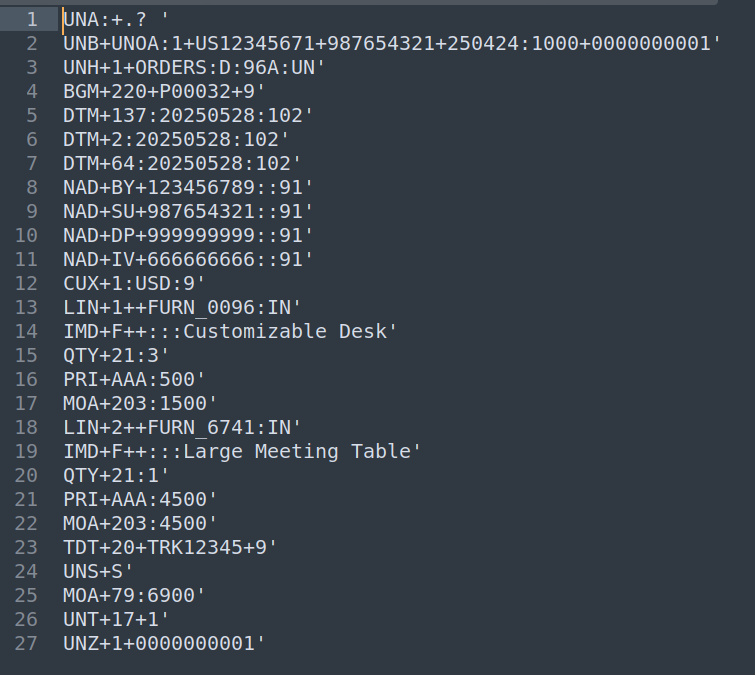
To import the Purchase Order you have to run this schedule action.

This is EDIFACT format for Purchase Order.
You can see that new Sale Order is created from the imported Purchase Order. You can also see the file from which this SO is created with newly created activity.

You can see the related PO reference and FTP used to import this file.

For Import and export purpose you have to provide ID at the company level and you have to select whether you want to export the invoice and DESADV (ASN) for this partner or not.

You have set the ID for delivery partner and invoice partner at individual partner level.

If you have selected to export the invoice then upon confirmation it will export the invoice to the FTP.

After successfully confirming the invoice, file is exported to the FTP and attached to the message post.

This is the format of the EDIFACT invoice that we exported.

You can also see the FTP used to export this invoice.

You can also export the ASN. At the delivery level you have to select SSSC number to reflect on the ASN EDIFACT format.

Upon validating the DO, you can see the file is exported to the FTP and attached to the message post. You can also the FTP used to export this file.

This is the format of the ASN for EDIFACT that we just exported.

You can export Sales Pricelist form the Sales Menu as well to the FTP.

You have to select the FTP form the wizard field to export the file to that FTP.

You can see the exported file in the chatter area with the FTP used to export that file.

To export product inventory, you must set a related partner on the product. The inventory will be exported only for that partner, ensuring the correct data is sent to each trading partner.

A scheduled cron job automatically exports inventory in EDIFACT format to the configured FTP location. sending accurate product and stock data to trading partners.

You can see the logs under the FTP/SFTP syncing menu for all the operations.

 I need an extra customization in this application, how can I get it?
- Yes, you can contact us on support@vrajatechnologies.com or can schedule a DEMO with our team to customize additional features.
Is the application compatible with Odoo Enterprise and Community?
- Yes, this application module is supported by both. It is also compatible with test and production environments.
Do I get free upgrades and support if I purchase this application?
- We provide free support for the first 90 days following the purchase date.
Is technical knowledge required to set up the integration?
- While some technical understanding may be helpful, the integration is designed to be user-friendly. Detailed documentation and support may be provided to aid in the setup process.
Is this free customization and implementation?
- Our team has produced a support video that guides you through the implementation process step by step. If you encounter any issues, please feel free to contact us for assistance.
Which protocol you have used to transfer file?
- We have used FTP protocol to transfer files.
Can we see the exported file? If yes, where?
- Yes, you can view or download the exported file from the message post as shown in the screenshots.
Do we get any confirmation or message after schedule action performs its tasks?
- Yes, we have managed logs for all the process whether it is export or import.
Submit a Support Ticket
If you encounter any issues while using our app that are caused by the app itself, we offer complimentary support for 90 days from the date of purchase.
To create a support ticket, please register via the Vraja Technologies Support Email and provide the necessary details so we can assist you in resolving the issue.

Email Us
support@vrajatechnologies.com

 1.png)
Contact Us
vrajatechnologies.com/contactus

Support
vrajatechnologies.com/support-policy
Vraja Technologies Services

Odoo Implementation

Odoo App Integration Services

Odoo Customization

Odoo Consultation

Odoo Support & Maintenance

Odoo Developer Outsourcing
Suggested Application







Reviews
There are no reviews yet.