
Description
.png)
Enhanced Subscription Management | Odoo Sales Subscription Enhancer
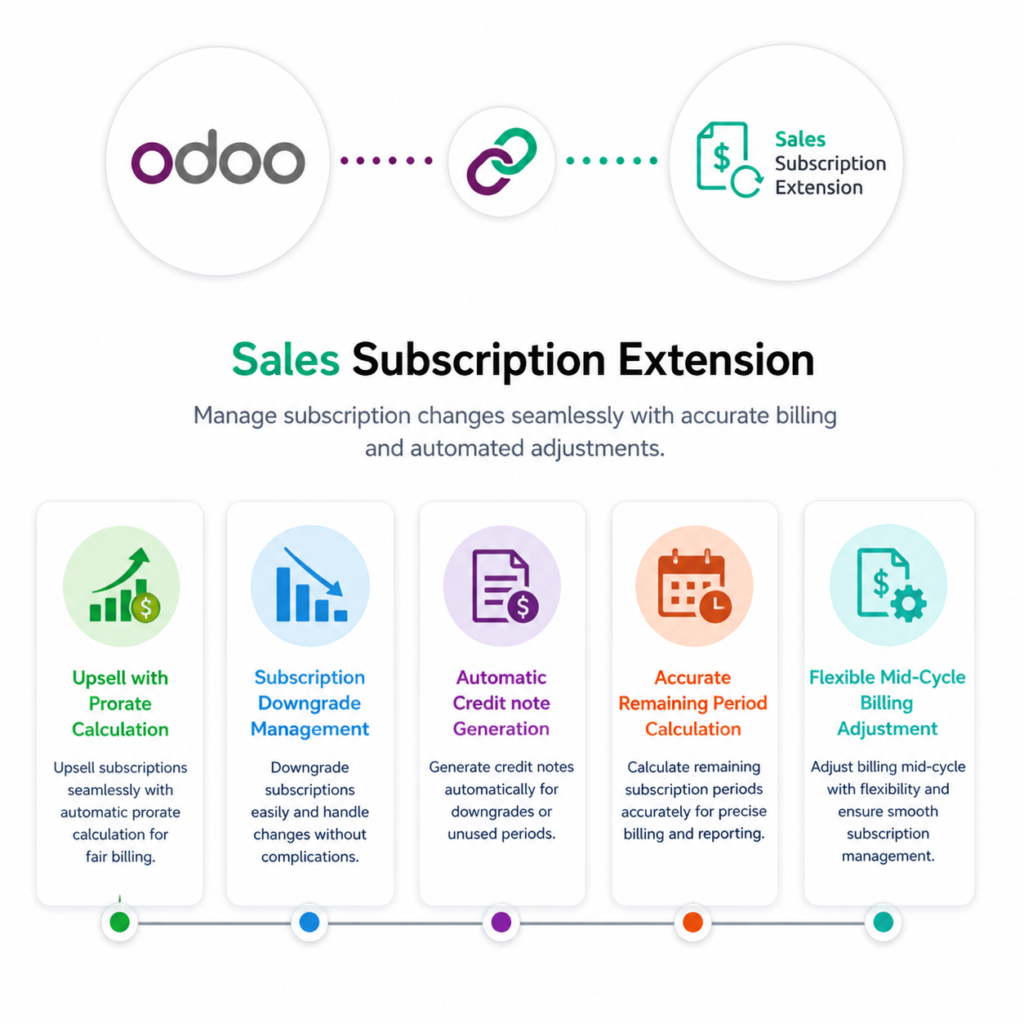
This module enhances the Odoo Subscription Sales workflow by introducing advanced management for subscription upgrades (upsell) and downgrades with fully automated prorated billing calculations. When a customer upgrades their subscription during an active billing cycle, the system automatically calculates the prorated amount based on the remaining days of the current subscription period to ensure accurate and fair pricing. In the case of a downgrade, the module determines the unused value of the subscription and automatically generates a credit note for the remaining amount. By accurately calculating the remaining subscription period and applying the appropriate financial adjustments, the system eliminates manual calculations and reduces billing errors and providing businesses with greater flexibility to manage mid-cycle subscription changes efficiently.
We specialize in delivering advanced Odoo solutions across multiple domains. Our expertise includes:
EDI & SWIFT/ACH Payment Integrations
End-to-end EDI automation, including X12, EDIFACT, XML standards, & financial integrations such as SWIFT, ACH, & Fedwire.

eCommerce Integrations
Seamless integration with leading eCommerce platforms to sync products, orders, inventory, and customer data in real time.

Shipping Integrations
Robust shipping connectors for global couriers, offering automated label generation, tracking, and rate computation.

Most Useful Apps for your ERP
A wide range of highly-rated Odoo modules designed to enhance automation, improve productivity, & simplify business operations.
 Features
 Upsell
.png) Downgrade
Downgrade
 FAQs
FAQs
 Automated Prorated Billing:
Automatically calculates prorated amounts for subscription upgrades based on the remaining billing period, ensuring accurate and fair pricing.
Subscription Downgrade Management:
Allows customers to downgrade their subscription plans while maintaining proper billing adjustments.
Automatic Credit Note Generation:
Generates credit notes automatically when a downgrade occurs by calculating the unused portion of the subscription.
Improved Billing Accuracy:
Eliminates manual calculations and reduces the risk of billing errors during mid-cycle subscription changes.
User-Friendly Workflow:
Keeps the subscription modification process simple and aligned with standard Odoo workflows.
Accurate Remaining Period Calculation:
Precisely determines the remaining days in the current subscription cycle to ensure correct financial calculations.
First, a new subscription is created and confirmed. After confirming the order, an invoice is generated for the subscription according to the standard Odoo workflow. If the user wants to upgrade (upsell) the existing subscription plan during the active subscription period, they can simply click the Upsell button available on the subscription order, following the default Odoo subscription workflow.
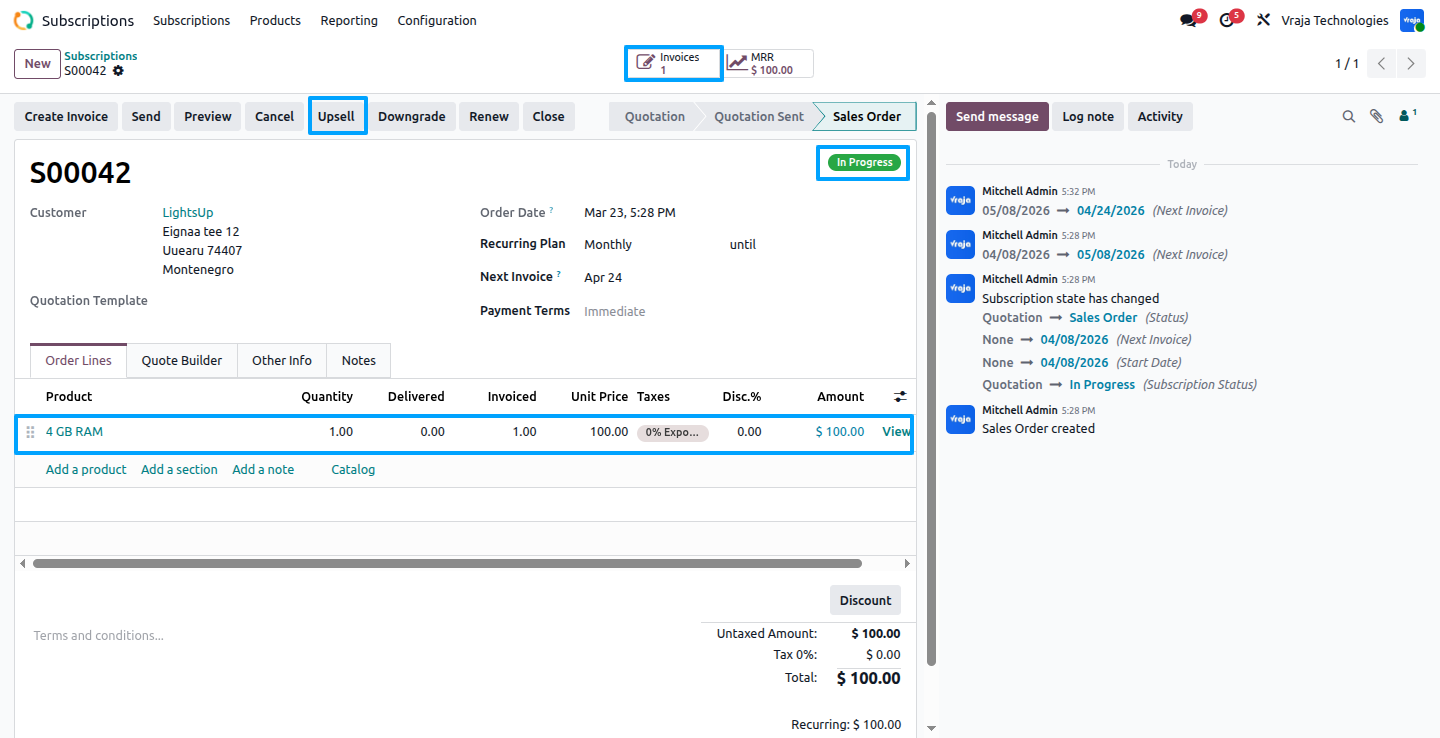
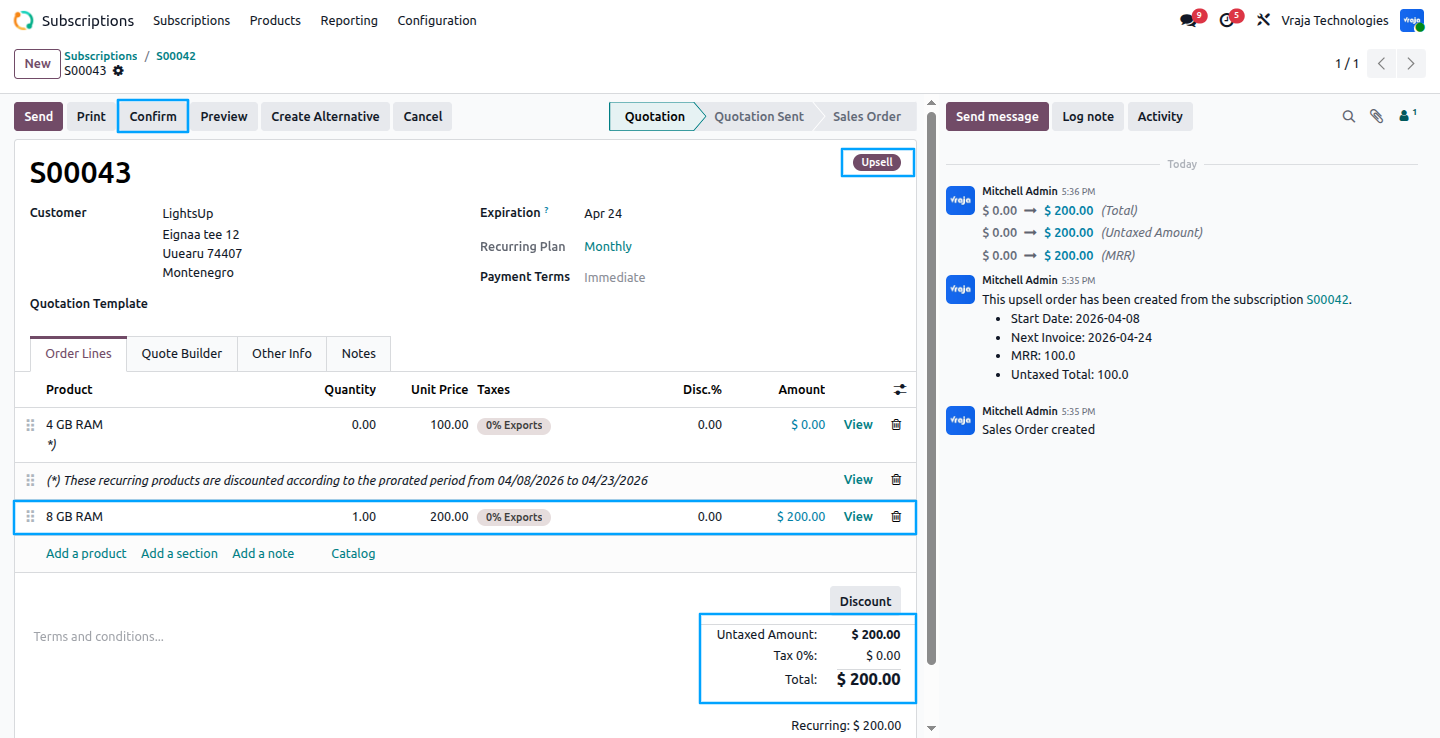
In this step, the subscription is upgraded by performing an upsell, and the order state is updated to “Upsell” to reflect the ongoing upgrade process. The user can modify the products in the existing subscription order as needed and then confirm the upsell order to apply the changes.
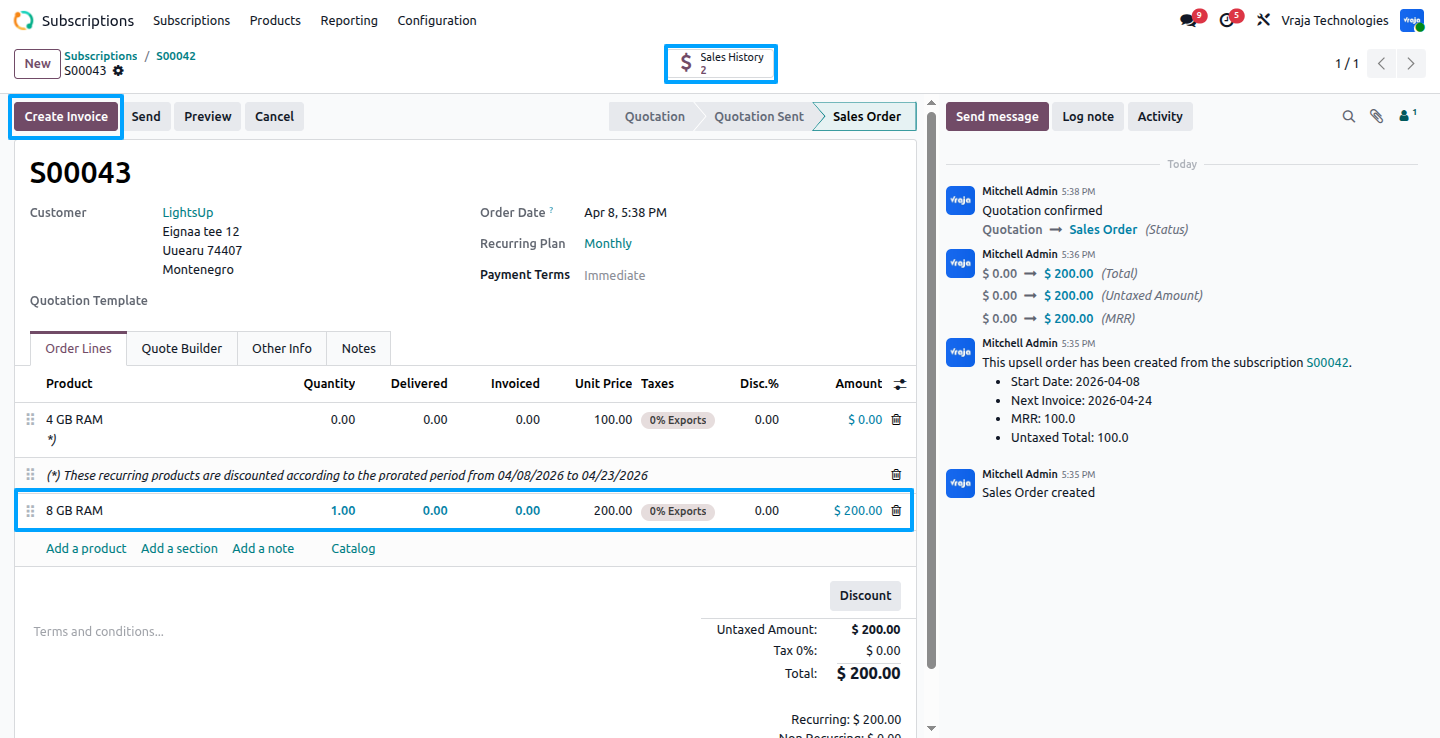
Once the upsell order is confirmed, you can view the Sales History, which displays both the original subscription order and the upsell order. And From this section, the user can also access the option to create invoices related to these orders.
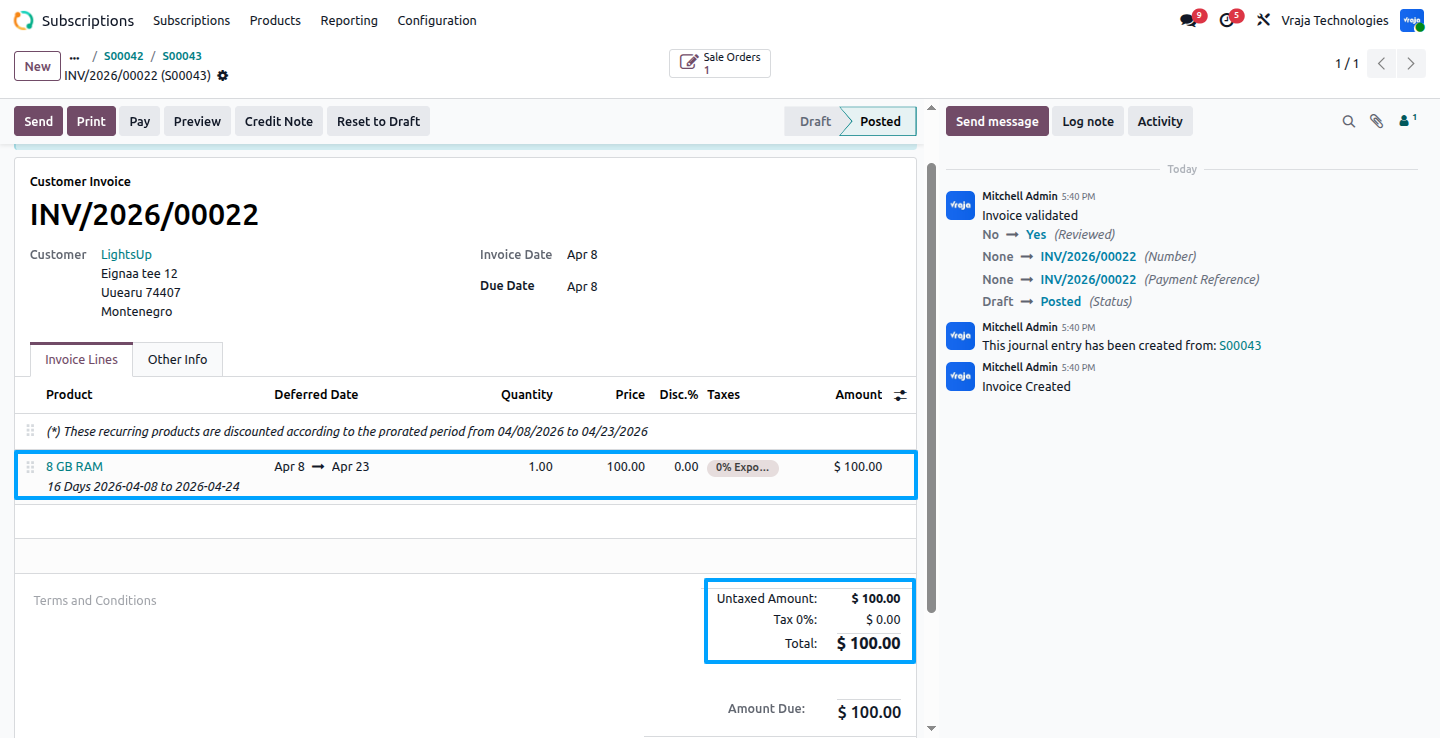
After Creating invoice, the invoice amount is automatically calculated based on the remaining time of the current subscription period. The prorated calculation is applied only to the upsell order, ensuring that the customer is charged accurately for the upgraded product according to the remaining days in the active subscription cycle.
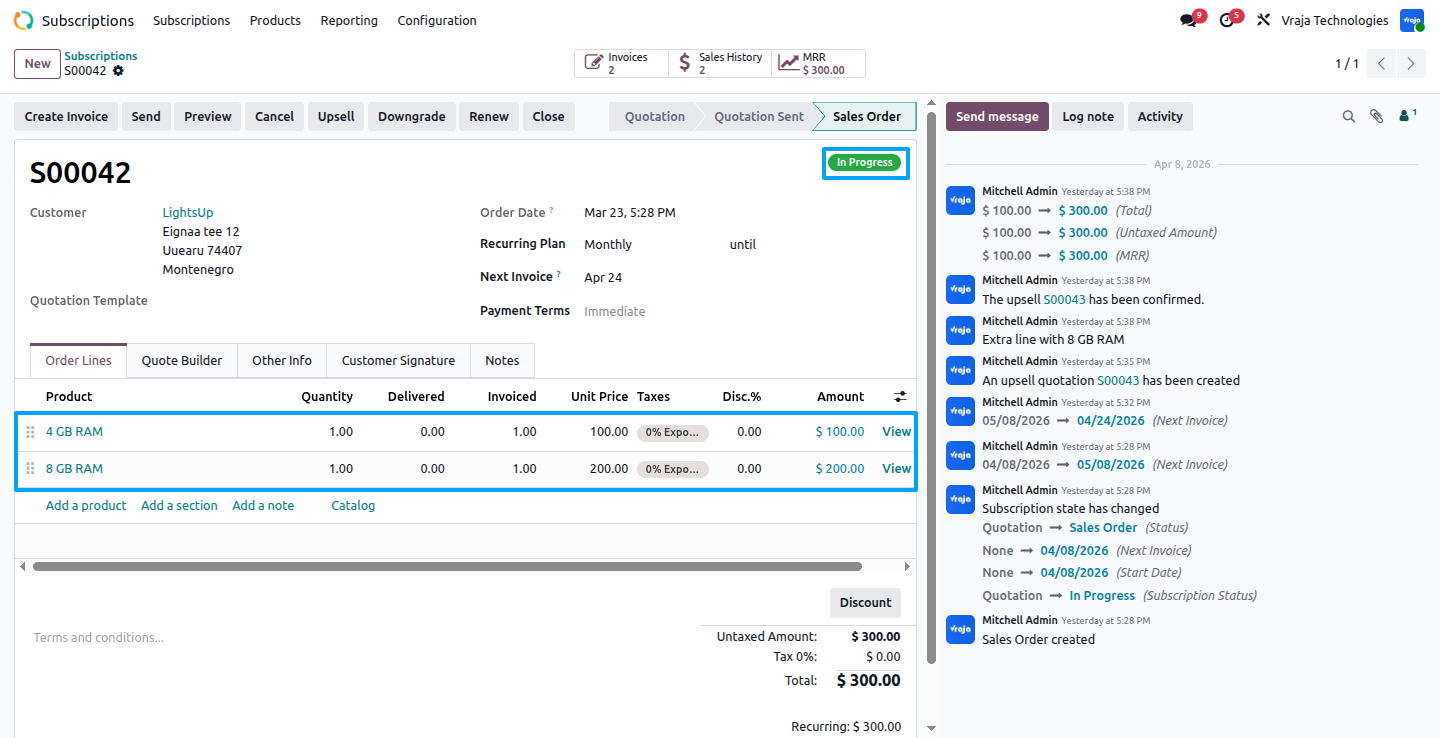
Now, you can see that the upsell product has been added to the subscription order according to the standard Odoo workflow.
We also provide an option to downgrade the subscription order. To do this, the user needs to click on the Downgrade button, after which a new order is automatically created to process the downgrade according to the subscription workflow.
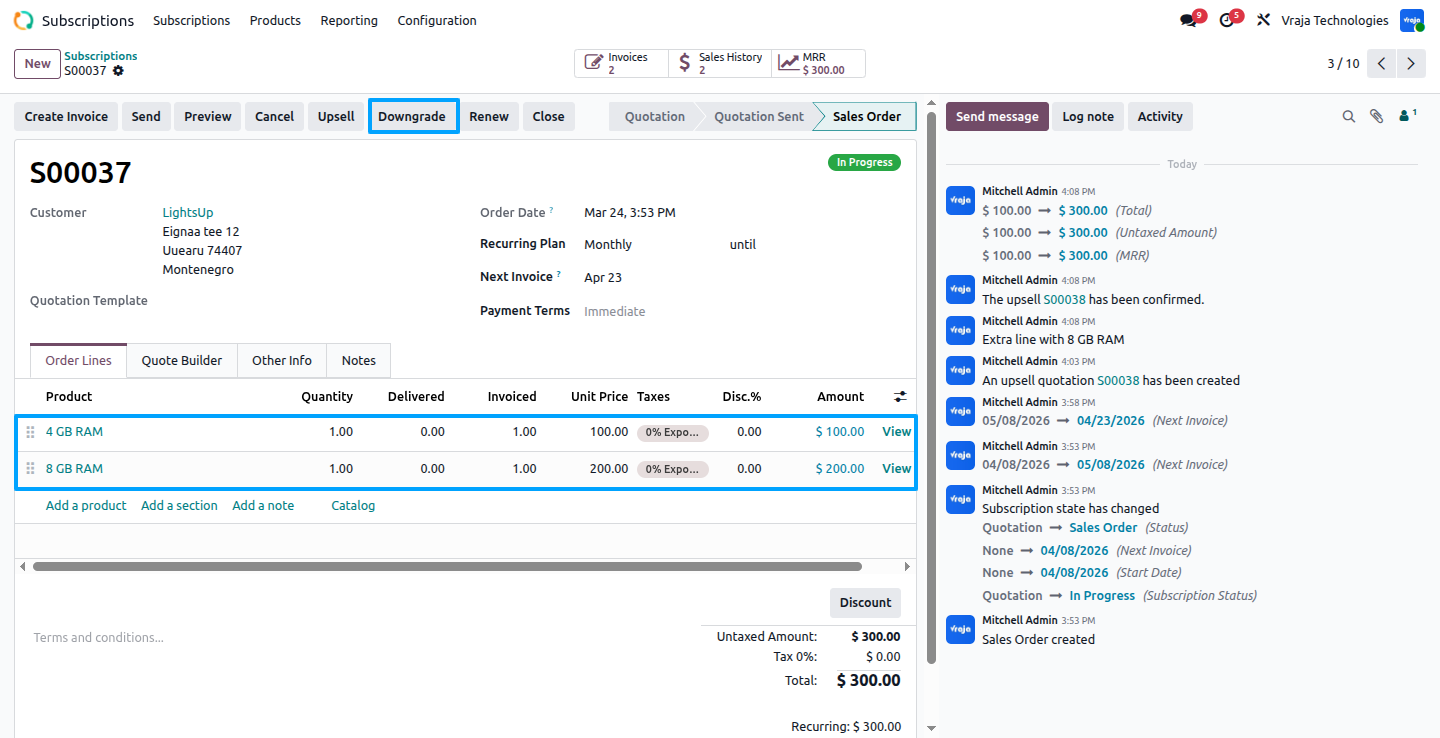
In the downgrade order, the state is set to Downgrade. You can modify the subscription according to your requirements, Note that to perform a downgrade, the total amount of the order must be less than the parent subscription order.click Confirm to apply the downgrade and update the order accordingly.
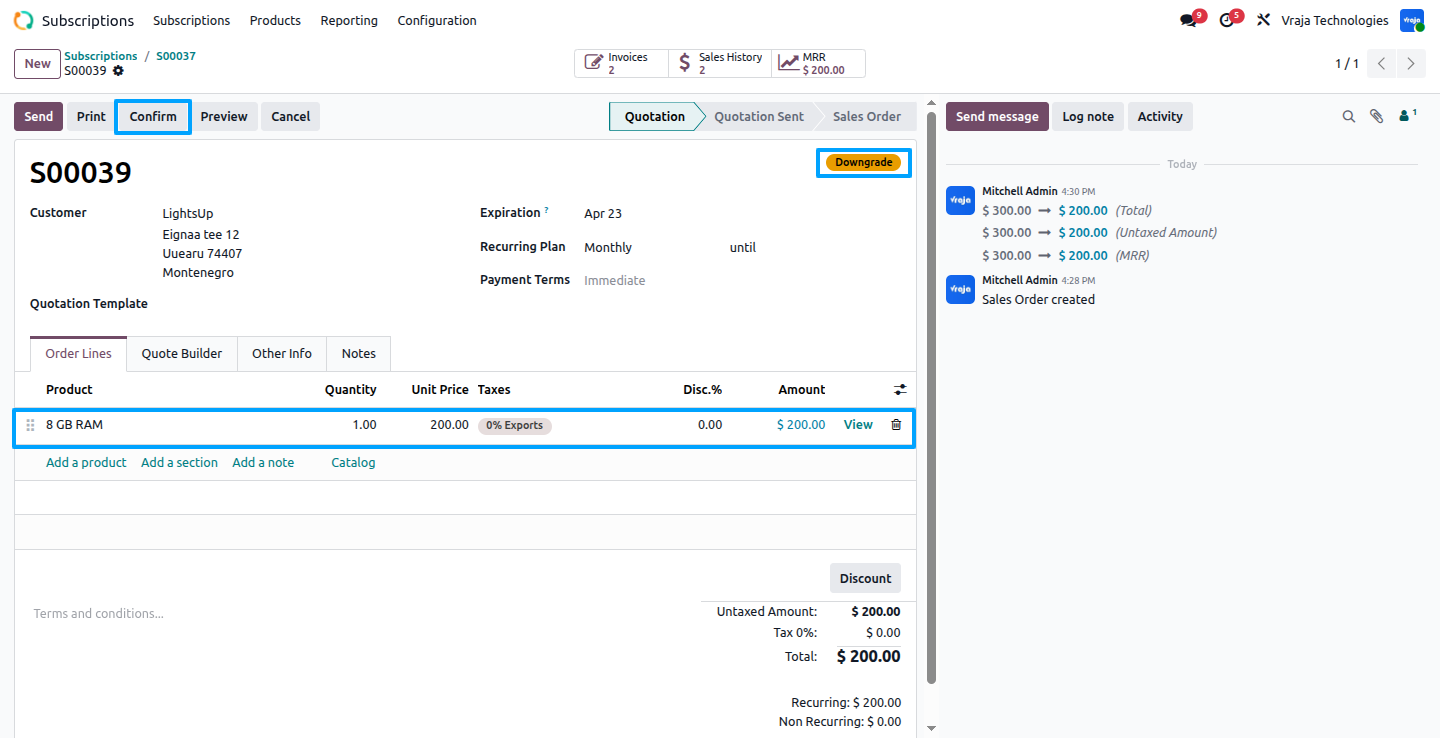
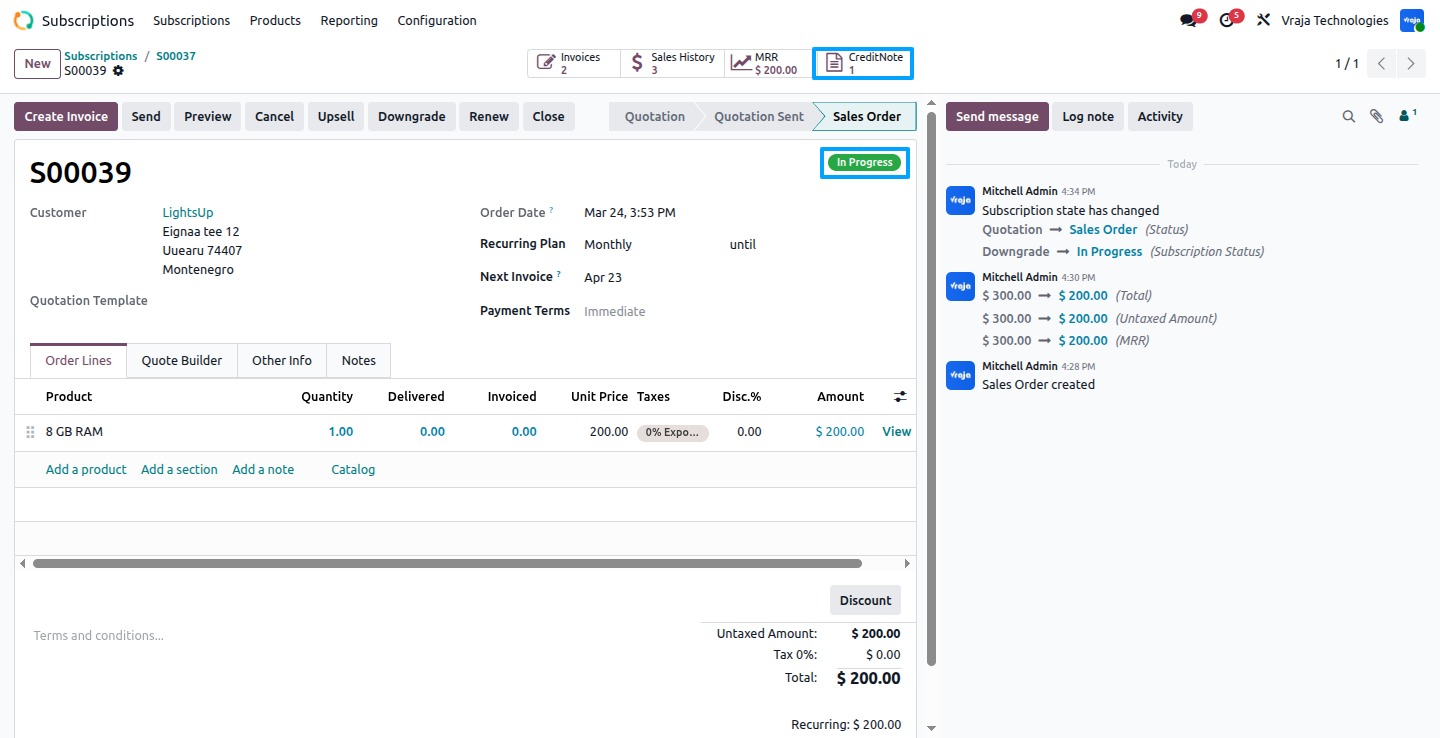
Once you confirm the downgrade order, the system automatically generates a credit note.You can view the generated credit note by clicking the credit note smart button.
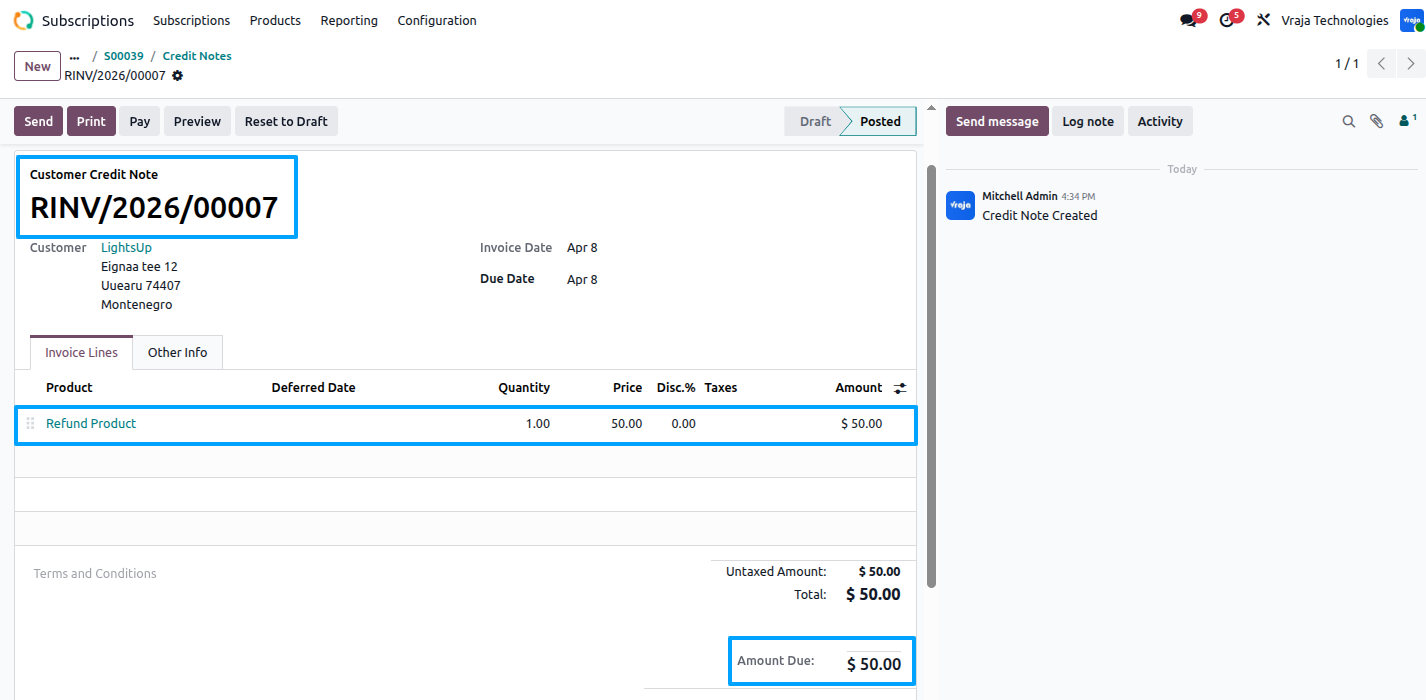
Here, you can see the generated credit note, This credit note reflects the remaining credit amount, calculated based on the unused portion of the subscription according to the remaining days in the current subscription period.
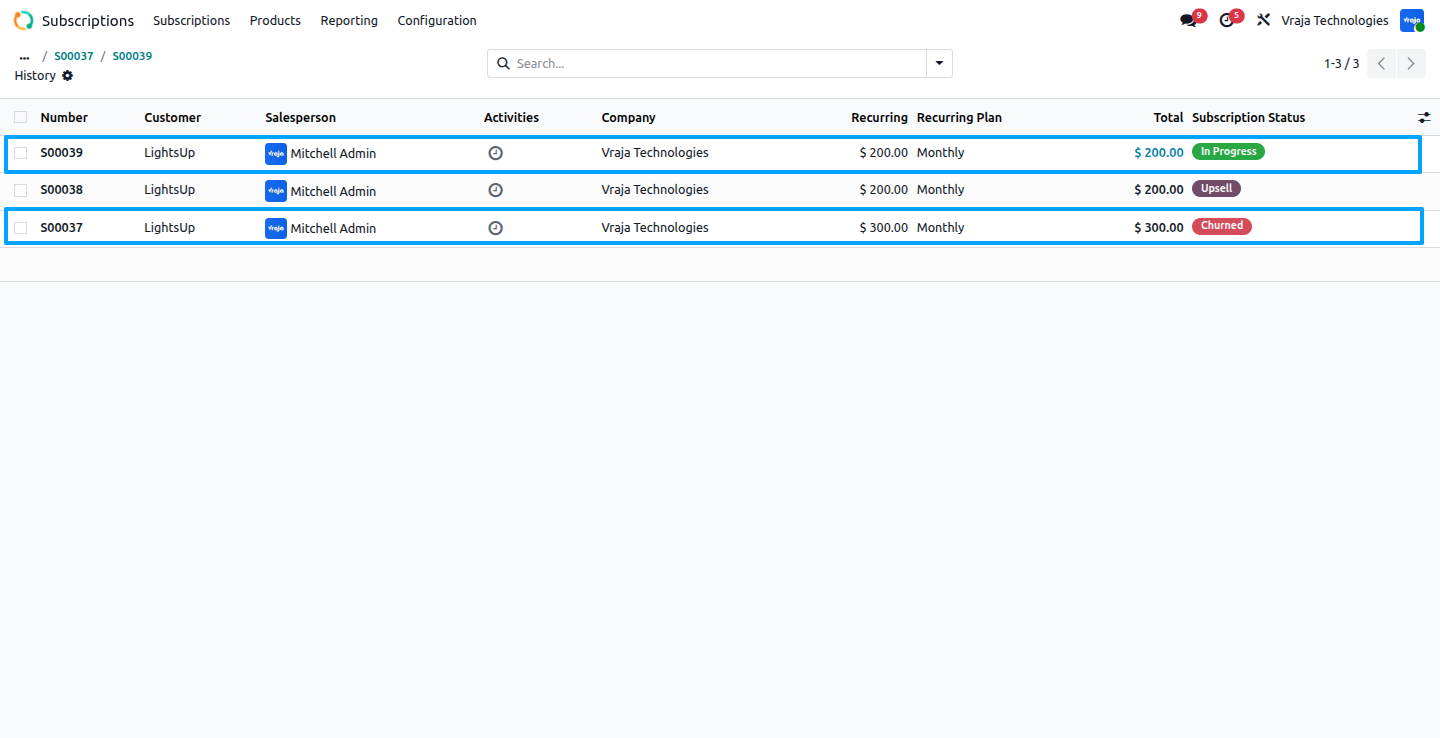
After the downgrade is processed, the previous subscription order is marked as churned (closed), and the new downgrade order’s state is set to “In Process.” From this point onward, during each renewal cycle, this downgrade order will be used as the reference to generate invoices and to manage any future upsell or further downgrade actions.
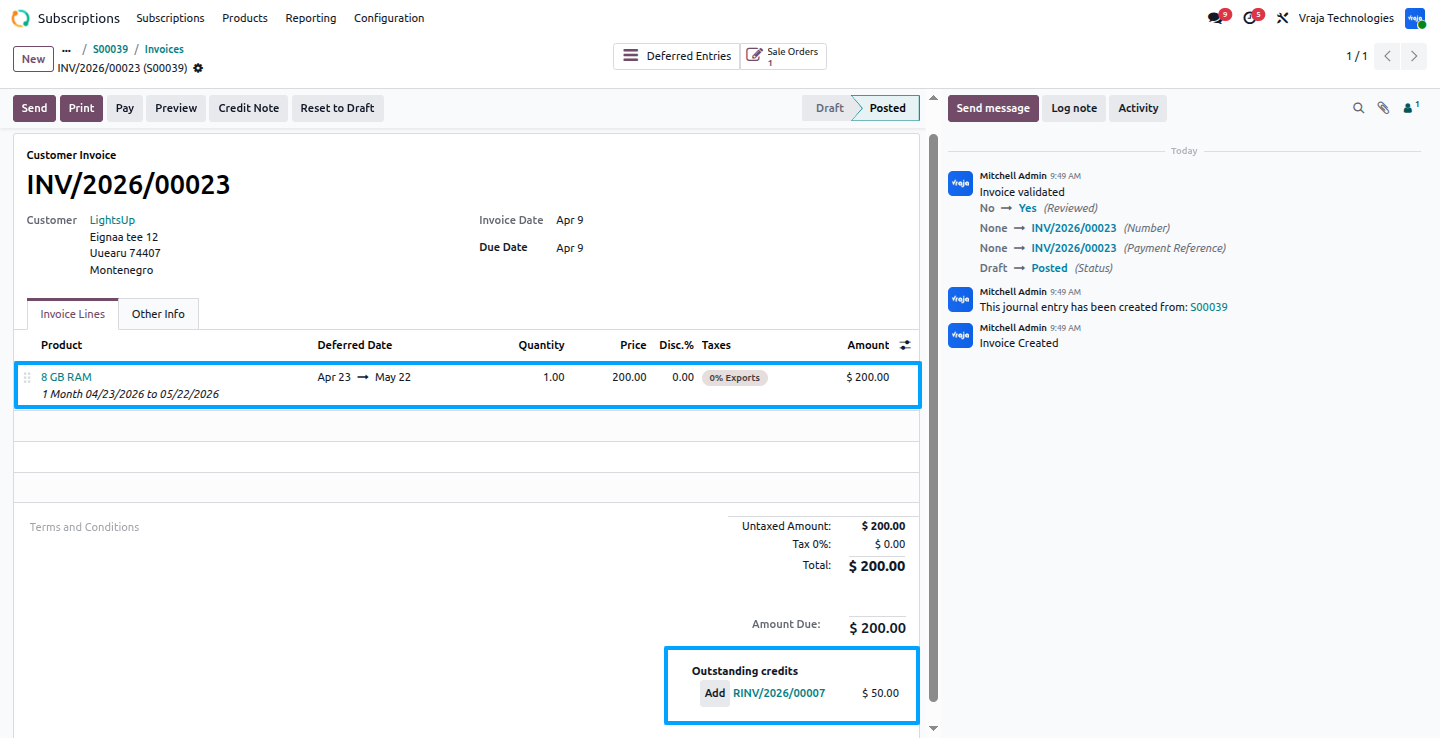
After the subscription is renewed and a new invoice is created, you can apply the credit note generated during a previous downgrade. This ensures the customer is credited for any unused portion of the subscription. Selecting the credit note automatically adjusts the invoice amount to reflect the remaining balance. This makes subscription management easier and accurate. Note: This downgrade process is not provided by default in Odoo.
 What does this module do?
- This module enhances Odoo Subscriptions by allowing users to upgrade (upsell) or downgrade subscription orders mid-cycle with automated prorated billing and credit note generation.
How is the upsell amount calculated?
- When upgrading a subscription, the system calculates the prorated amount based on the remaining days in the current subscription period to ensure accurate billing.
How does downgrade work?
- When a subscription is downgraded, the module automatically creates a new downgrade order, modify subscription, and generates a credit note for the unused portion of the original subscription.
Are credit notes generated automatically?
- Yes, for any downgrade,Once the order is confirmed the system automatically calculates the unused subscription value and generates a credit note for the remaining amount.
Can I modify a downgrade order?
- Yes, the downgrade order can be edited while in the Downgrade state, allowing you to remove or adjust products before confirming the order. However, the total amount of the downgrade order must always be less than to the parent subscription order.
Is the module compatible with standard Odoo subscription workflows?
- Yes, the module extends the Sale Order model and integrates seamlessly with Odoo’s standard subscription, invoicing, and renewal workflows.
Can I perform multiple upsells or downgrades on a single subscription?
- Yes, multiple upsells and downgrades can be performed during the active subscription period, and the system will automatically calculate prorated amounts for each change.
Is this module suitable for businesses with a large number of subscriptions?
- Yes, it is scalable and can efficiently handle high volumes of subscription transactions, providing accurate billing and order management.
Can I get a demo of the module before making a purchase?
- Yes, to test this module, please contact us at sales@vrajatechnologies.com.
I would like to request a custom feature for this application. What’s the process to get it implemented?
- We’re happy to help tailor the application to meet your business needs! You can reach us via sales@vrajatechnologies.com
Who is the point of contact for technical support, configuraion support or bug-related queries?
- You can reach us via support@vrajatechnologies.com
Submit a Support Ticket
If you encounter any issues while using our app that are caused by the app itself, we offer complimentary support for 90 days from the date of purchase.
To create a support ticket, please register via the Vraja Technologies Support Email and provide the necessary details so we can assist you in resolving the issue.

Email Us
support@vrajatechnologies.com

 1.png)
Contact Us
vrajatechnologies.com/contactus

Support
vrajatechnologies.com/support-policy
Vraja Technologies Services

Odoo Implementation

Odoo App Integration Services

Odoo Customization

Odoo Consultation

Odoo Support & Maintenance

Odoo Developer Outsourcing
Suggested Application













Reviews
There are no reviews yet.