

Description
.png)
Fruugo Marketplace Integration
The Odoo Fruugo Connector is a powerful, fully automated integration solution designed to seamlessly synchronize your Odoo store products with the global Fruugo marketplace. Whether you are a small retailer or a large enterprise, this module simplifies the complexities of multi-channel e-commerce by providing an robust engine that automatically generates highly detailed, Fruugo-compliant XML product feeds directly from your existing Odoo inventory. Unlike manual export processes, this connector acts as a reliable, hands-off bridge. It dynamically compiles essential product data—including variants, accurate stock levels across multiple locations, category hierarchies, detailed descriptions, and complex VAT pricing models—into a properly formatted XML structure. Once configured, it exposes this feed via a secure, fixed public URL that Fruugo’s servers can automatically poll, guaranteeing your marketplace listings accurately reflect your live Odoo database. To ensure long-term stability and traceability, the module boasts a comprehensive internal architecture. It handles large catalogs efficiently with customizable domain filtering and pagination, manages manufacturer exceptions seamlessly, and provides detailed, transparent logging for every generation cycle. Built-in, scheduled cron jobs guarantee daily synchronization without human intervention, while automated cleanup routines maintain server health. By leveraging the Odoo Fruugo Connector, businesses can effortlessly scale their international sales reach, minimize listing errors, and focus on order fulfillment rather than manual data entry.
 Watch on YouTube
We specialize in delivering advanced Odoo solutions across multiple domains. Our expertise includes:
EDI & SWIFT/ACH Payment Integrations
End-to-end EDI automation, including X12, EDIFACT, XML standards, & financial integrations such as SWIFT, ACH, & Fedwire.

eCommerce Integrations
Seamless integration with leading eCommerce platforms to sync products, orders, inventory, and customer data in real time.

Shipping Integrations
Robust shipping connectors for global couriers, offering automated label generation, tracking, and rate computation.

Most Useful Apps for your ERP
A wide range of highly-rated Odoo modules designed to enhance automation, improve productivity, & simplify business operations.
 Features
 Process
 FAQs
FAQs
 Automated XML Feed Generation:
Generates Fruugo-compliant XML feeds automatically.
Fixed Public URLs:
Provides a unique, fixed URL per feed for Fruugo to fetch without requiring authentication.
Multi-Feed Support:
Create different feeds for different store URLs, domains, languages, or currencies.
Taxonomy Sync:
Import and manage the full standardized Fruugo category hierarchy directly in Odoo.
Extensive Product Mapping:
Map Odoo categories to Fruugo categories, handle manufacturer EAN exceptions, set custom lead times and restrict visibility by country.
Comprehensive Logging:
Keeps a complete history of feed generations, attach the XML file output, and track generation time and file sizes.
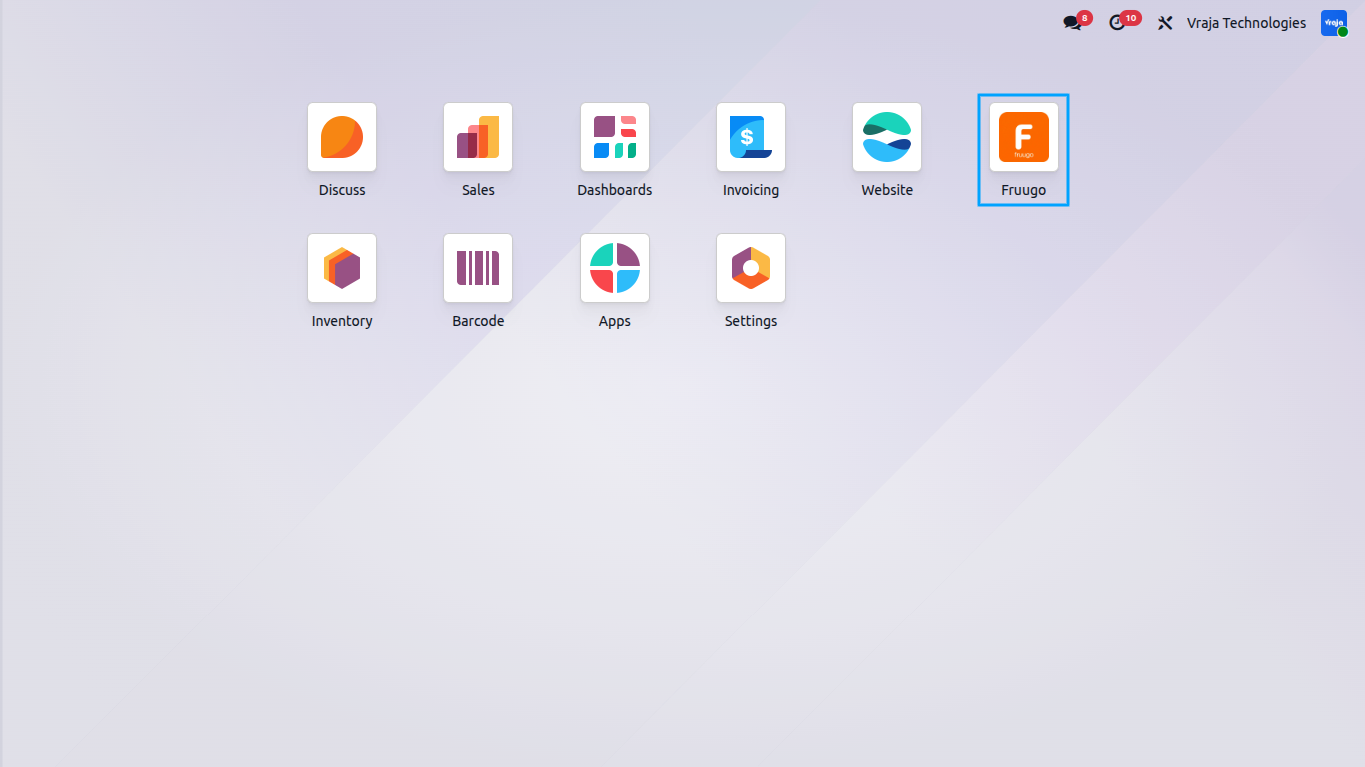
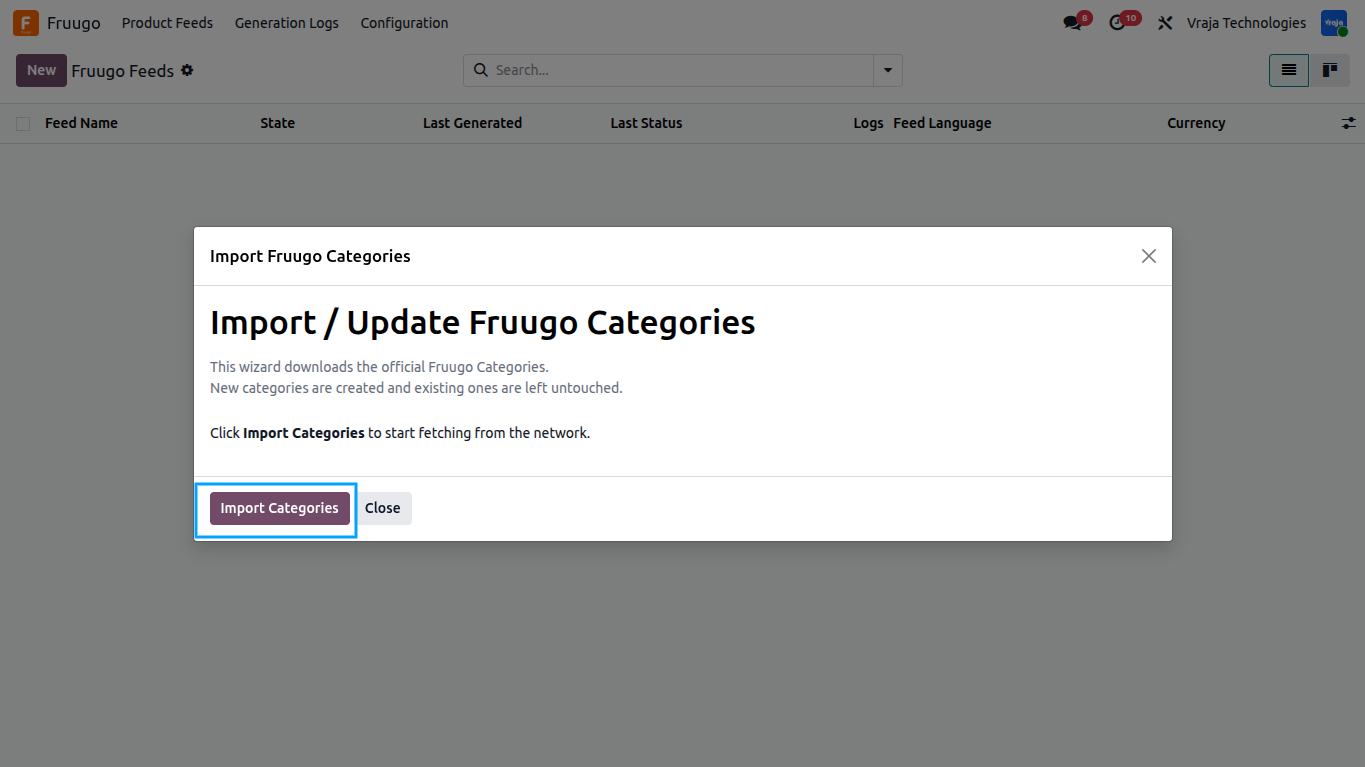
After installing the module, navigate to the new `Fruugo` menu in your Odoo dashboard.
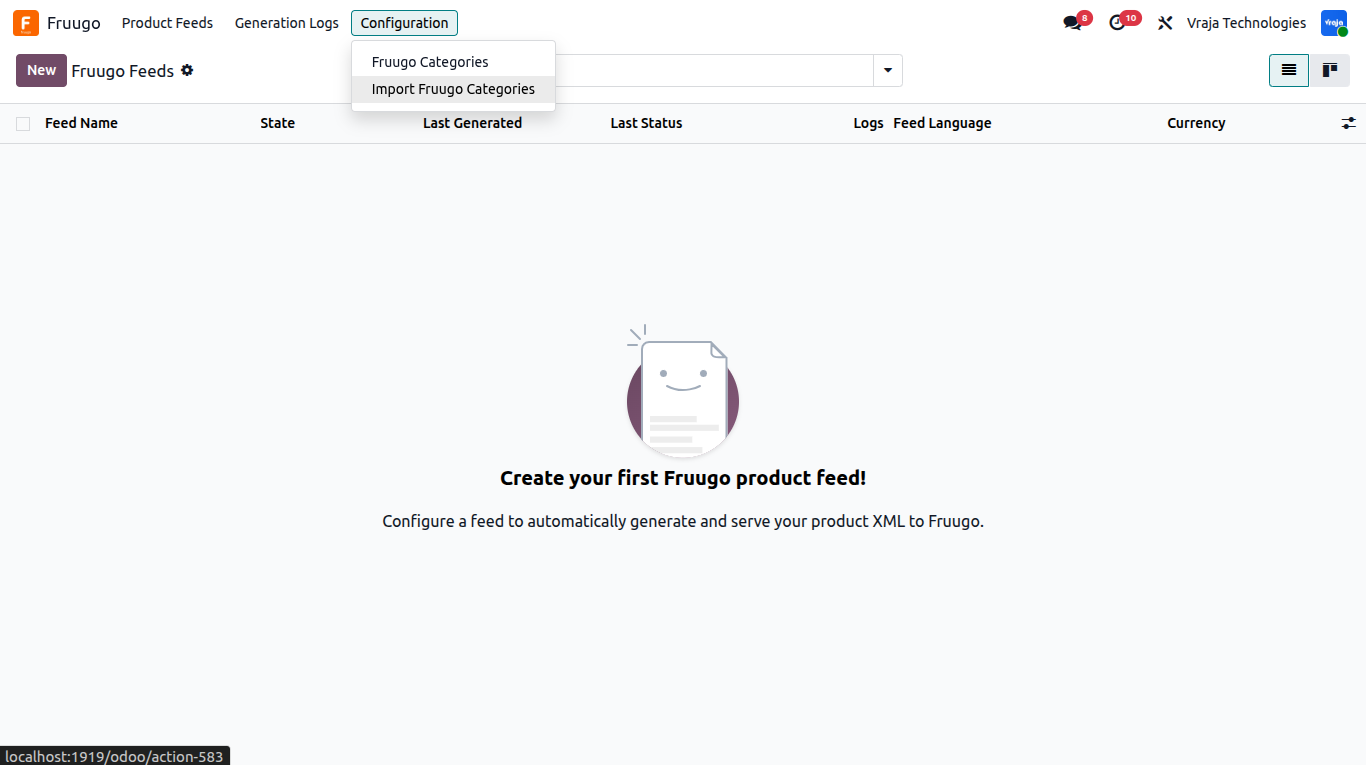
Importing Fruugo Categories, To map your products to Fruugo’s categories, you must first import the taxonomy list: Go to Fruugo > Configuration > Import Categories. The system pulls the latest taxonomy tree.
Click “Import” in the wizard. The wizard will show you how many categories were imported, updated, or skipped.
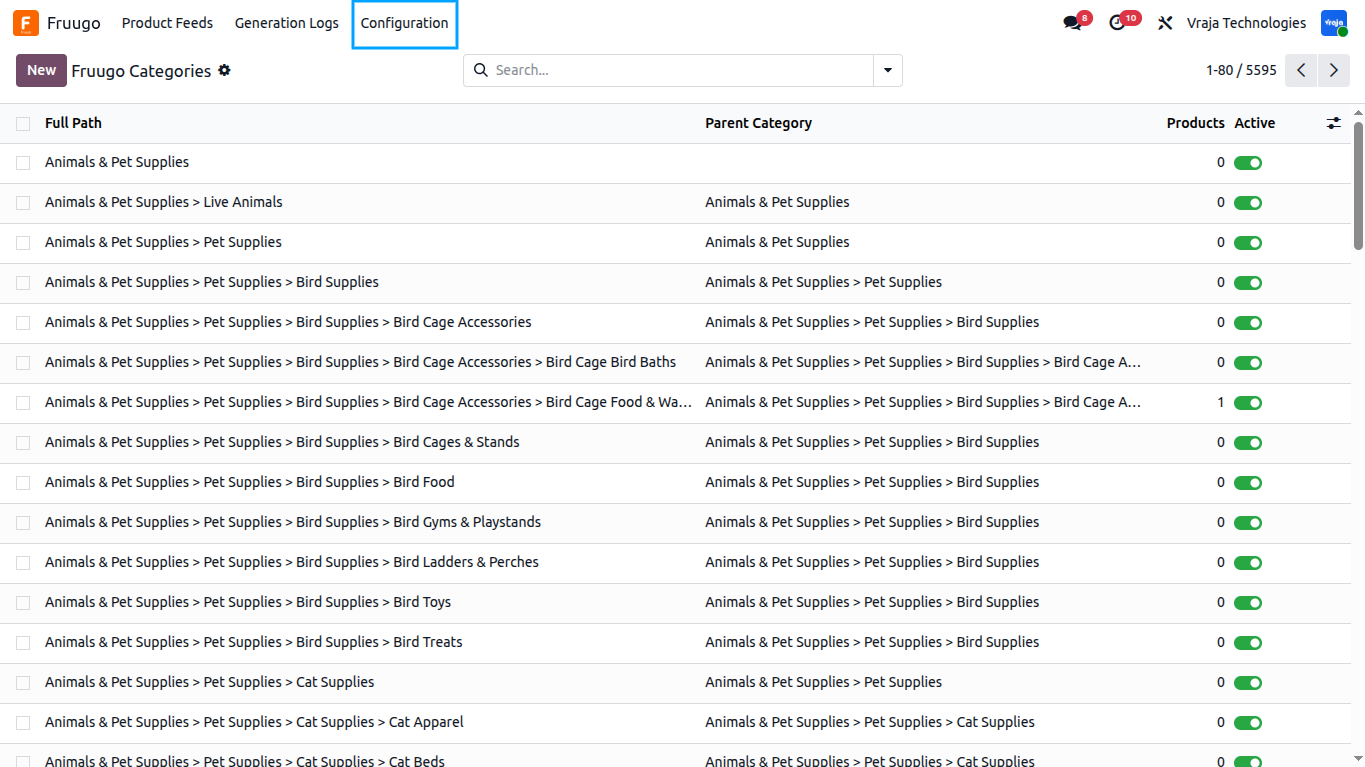
Once completed, you can view the full hierarchy under Fruugo > Configuration > Categories.
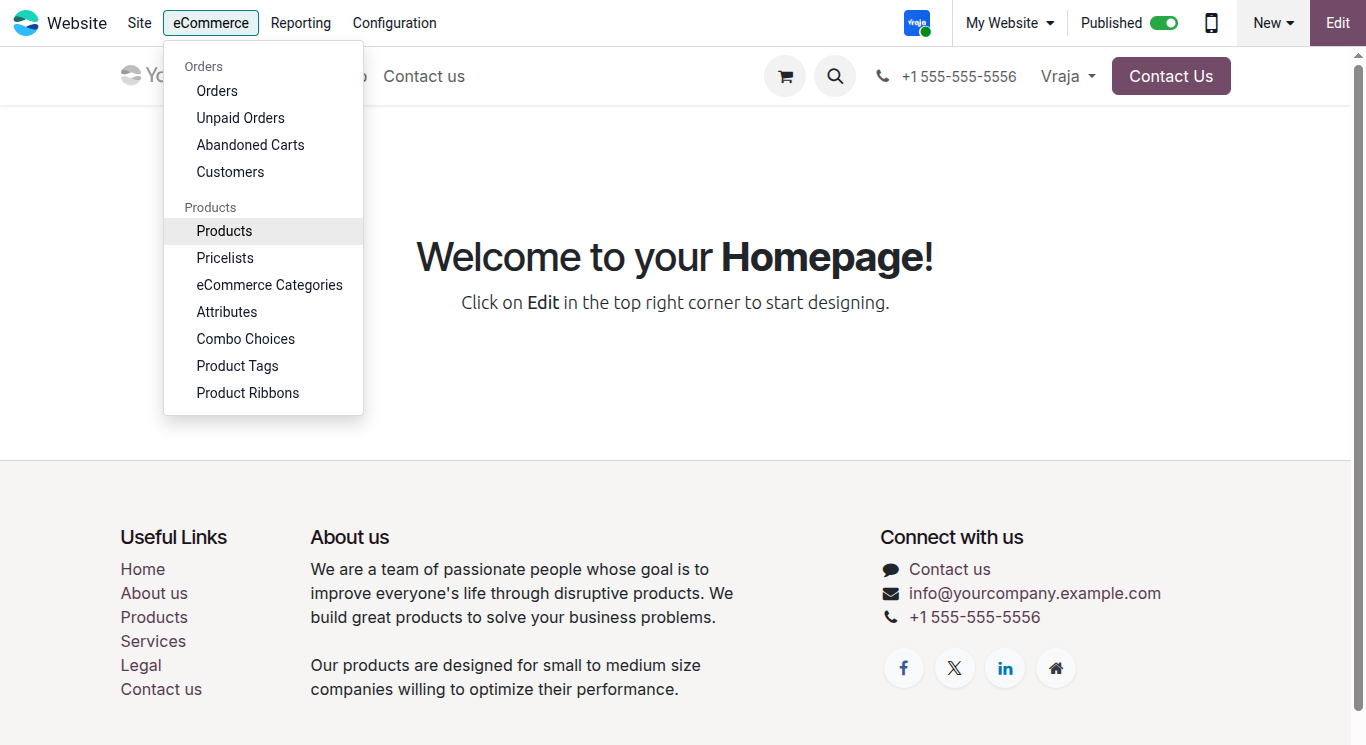
Product Configuration for Fruugo, Go to Website > eCommerce > Products.
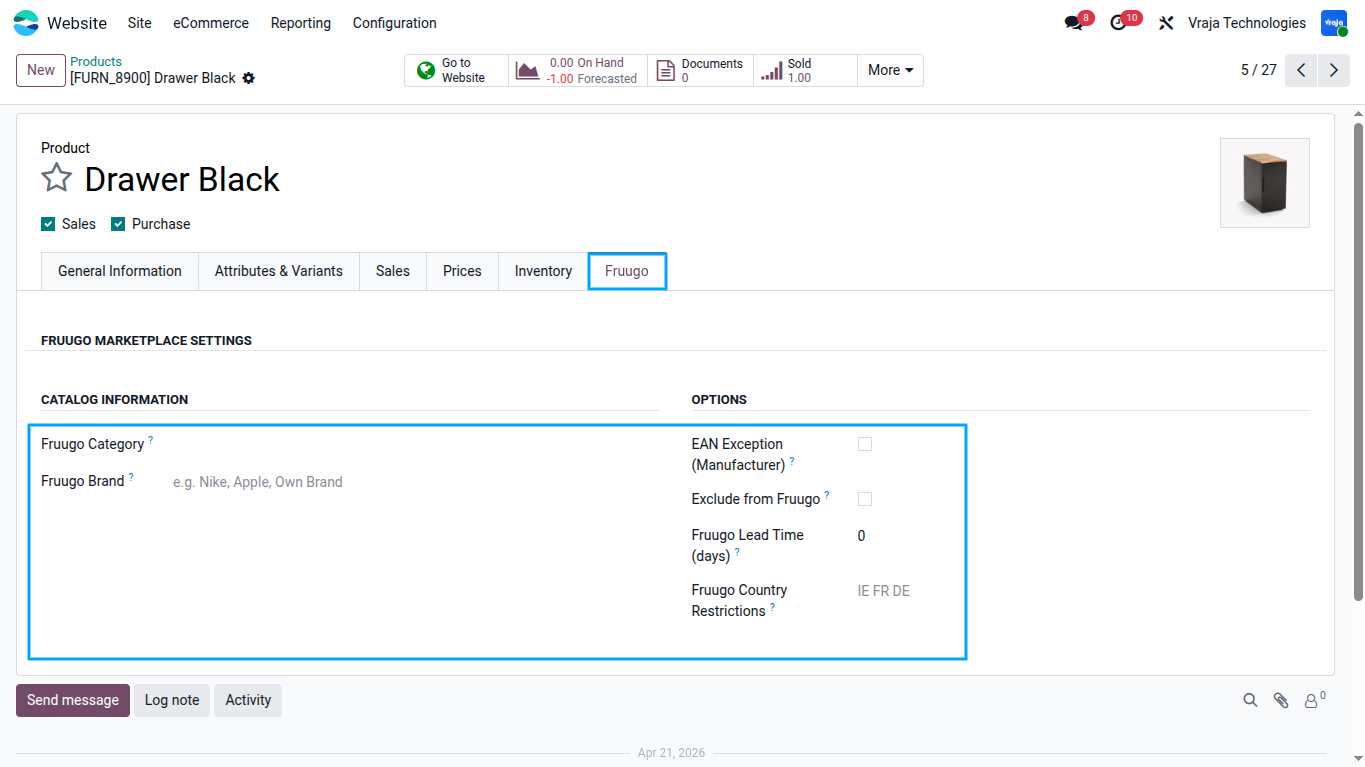
Inside the “Fruugo” tab Edit a category , Select the appropriate Fruugo category.
As well as, in the “Fruugo” tab configure:
- – Fruugo Category: Overrides the category set at the internal category level.
- – Fruugo Brand: Set the specific brand name. If left blank, it falls back to the product’s internal category name.
- – EAN Exception: Tick this if you are the manufacturer and the product does not have an EAN/barcode. It will export “EXCEP” as required by Fruugo.
- – Exclude from Fruugo: Tick this to block the product from appearing in any Fruugo feed.
- – Fruugo Lead Time: Set the number of days required to dispatch the item. Only required if the lead time is greater than 1 day.
- – Fruugo Country Restrictions: Enter space-separated ISO 3166 two-letter country codes (example: “IE FR DE”) to restrict product visibility to specific countries.
To create a feed:
- – Go to Fruugo > Feeds and click “New”.
- – Store & Identity:
- – Feed Name: Enter a descriptive name (e.g., “UK Fruugo Feed”).
- – Store Base URL: The base URL of your shop, used to generate product image links.
- – Feed Language / Currency / Pricelist: Select the language to translate titles/descriptions into, the currency to output, and an optional pricelist to determine prices.
- Pricing & VAT:
- – Price Includes VAT: Check this if you want the feed to output the NormalPriceWithVAT tag. Uncheck it for NormalPriceWithoutVAT.
- – Default VAT Rate: Enter a default VAT percentage (e.g., 20) if a product does not have specific taxes set.
- Product Filter & Stock:
- – Include Variants: Toggle whether to export product variants as individual products or just the base templates.
- – Max Products: Limit the number of products exported (0 = unlimited).
- – Product Domain: Set an Odoo domain filter to selectively include products.
- – Stock Locations: Choose specific internal warehouse locations to calculate stock from. Leave empty to use total on-hand quantity.
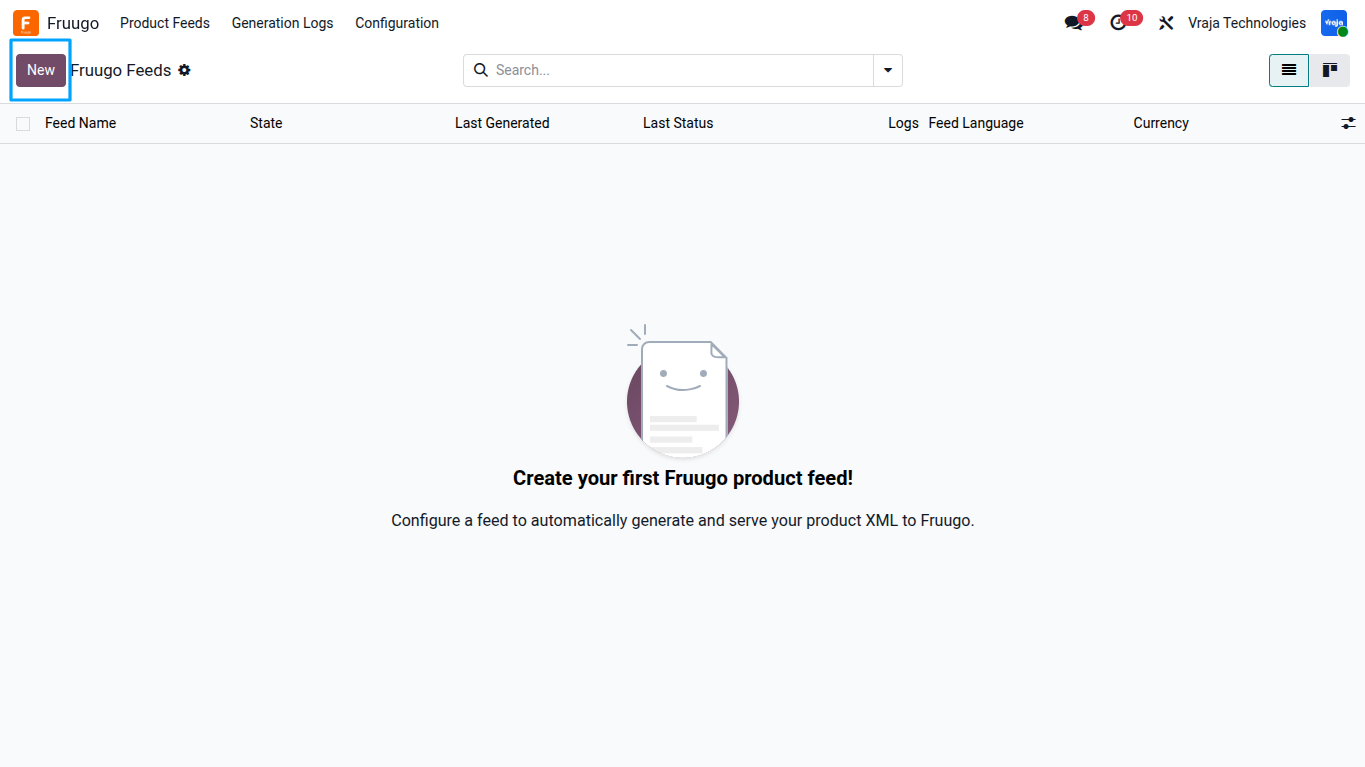
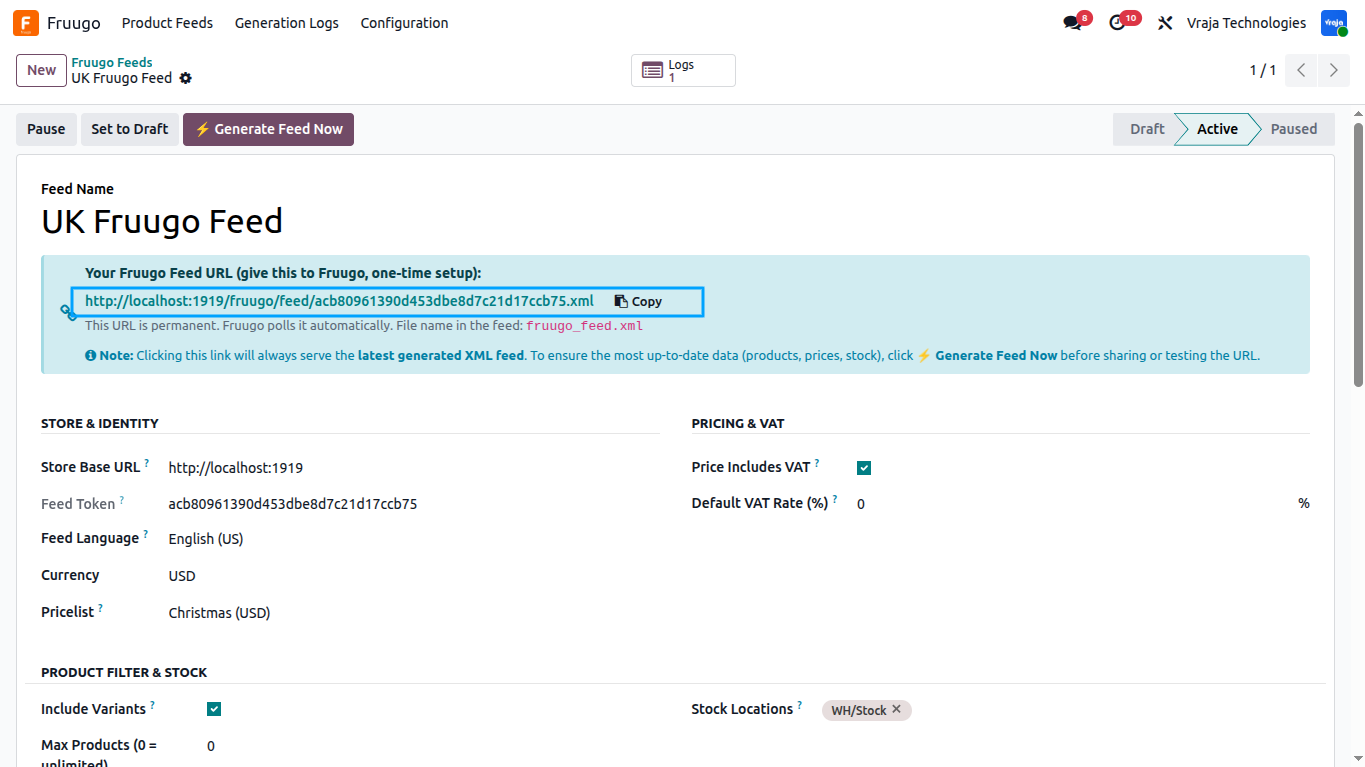
Once your feed is configured, click the “Activate” button.
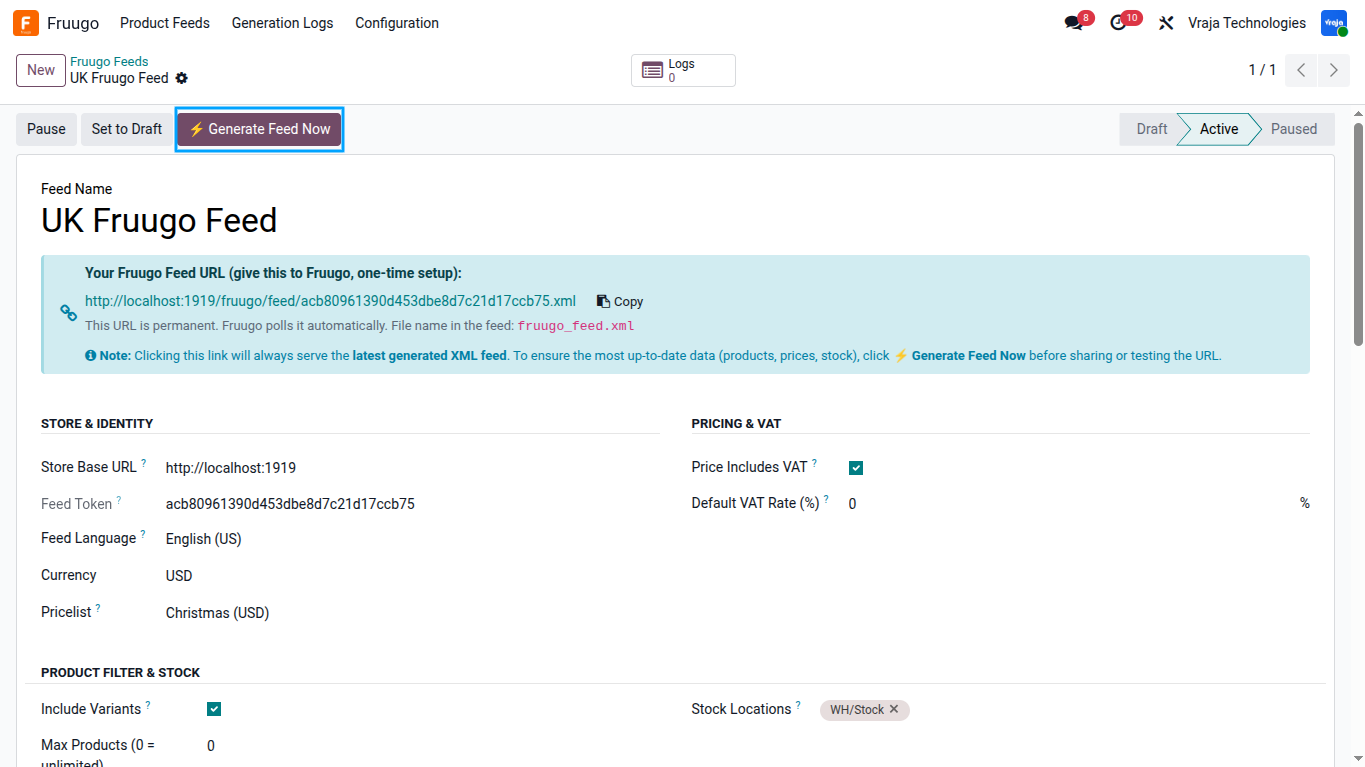
The system will generate a “Feed URL” displayed in a blue banner.
- – Copy this URL and provide it in your Fruugo Retailer Portal. This URL is permanent and fixed.
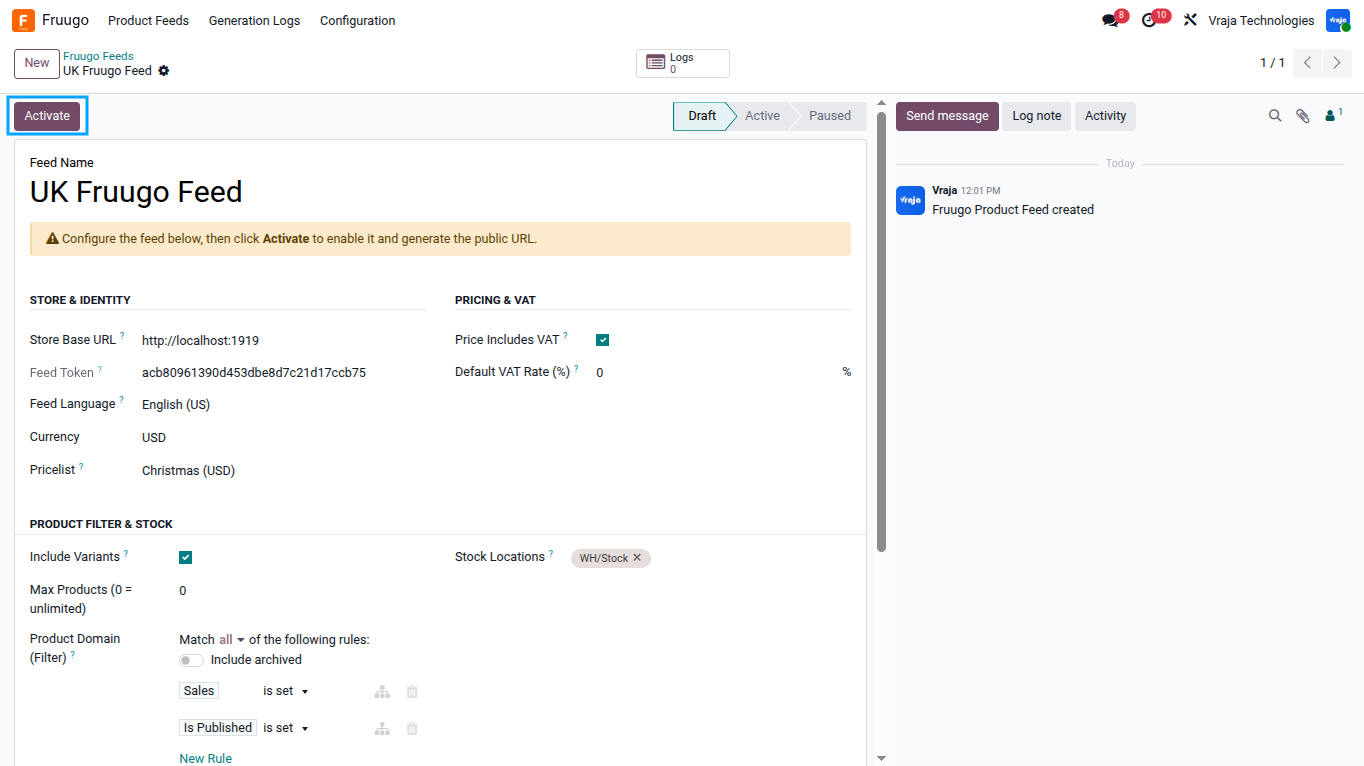
If the URL is ever compromised, you can use “Regenerate Feed Token” under the Instructions tab to secure the feed (Note: you will need to update Fruugo with the new URL).
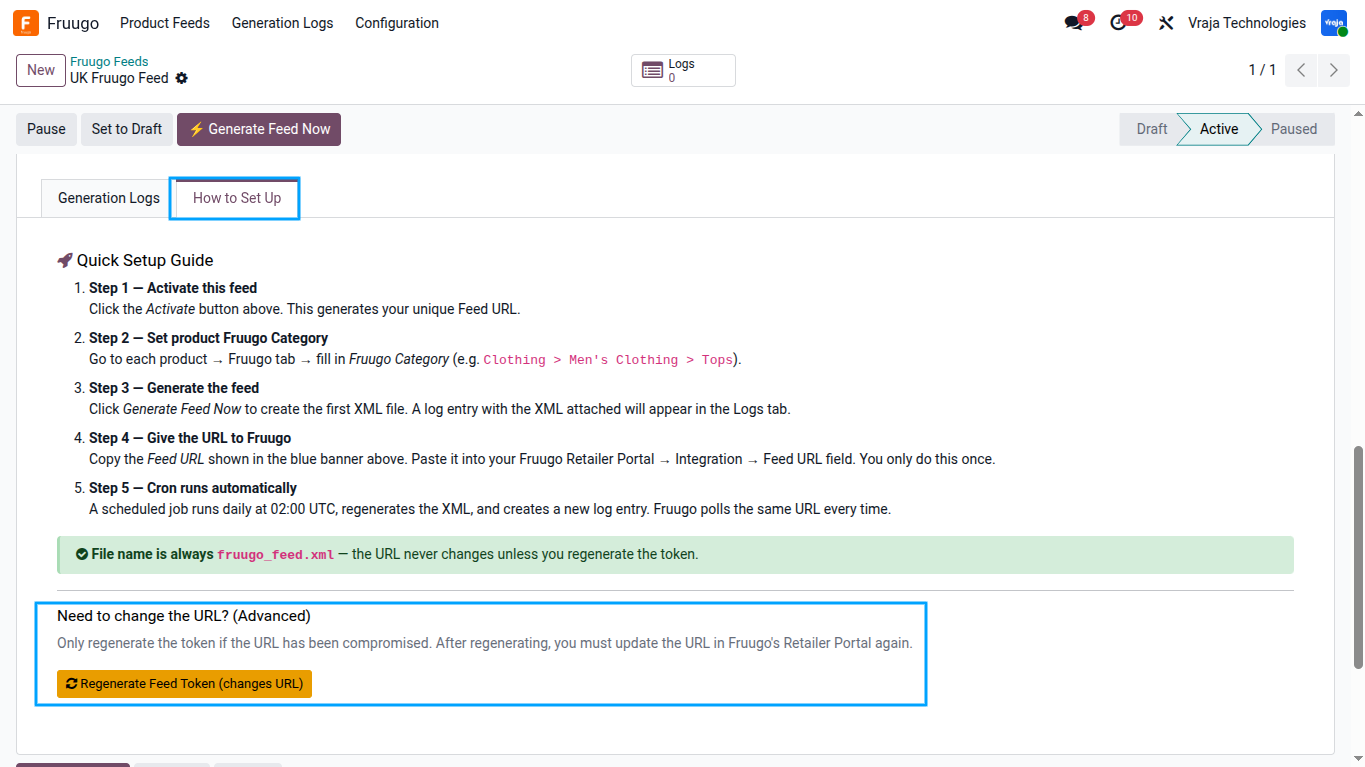
Manual Feed Generation:
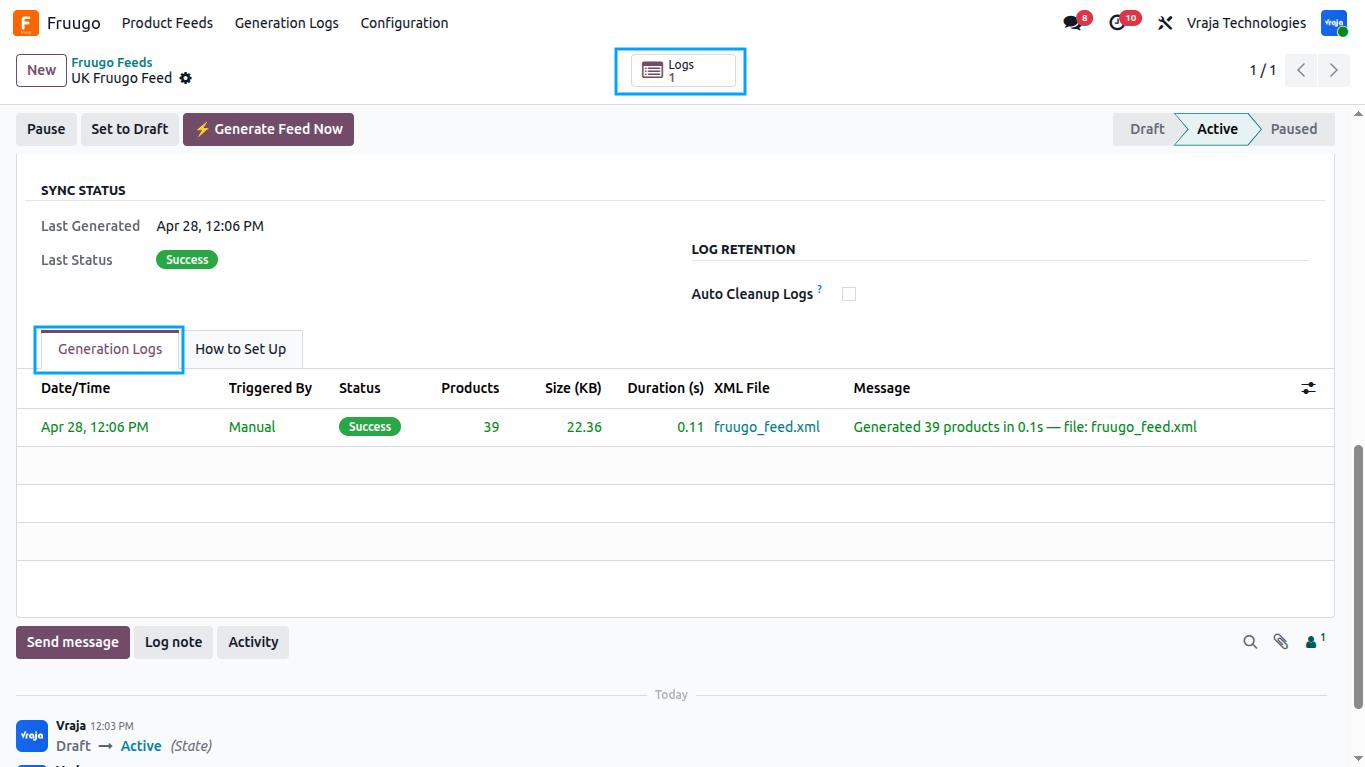
To instantly generate the feed: Click the “⚡ Generate Feed Now” button.
Once generated, navigate to the “Generation Logs” tab or click the “Logs” smart button to view the entry. You can click on the log entry to download and review the actual `fruugo_feed.xml` file generated.
Feed live Serving:
Fruugo will poll your Feed URL. The URL is engineered to immediately serve the most recently successfully generated XML file from the logs without putting strain on the Odoo server.
Automated Actions (Cron Jobs)
The module installs two automated actions (Cron Jobs) to maintain the system:
- – Daily Feed Generation: Runs automatically at 02:00 UTC. It loops through all ‘Active’ feeds and regenerates their XML files, creating a fresh log and ensuring Fruugo gets up-to-date data.
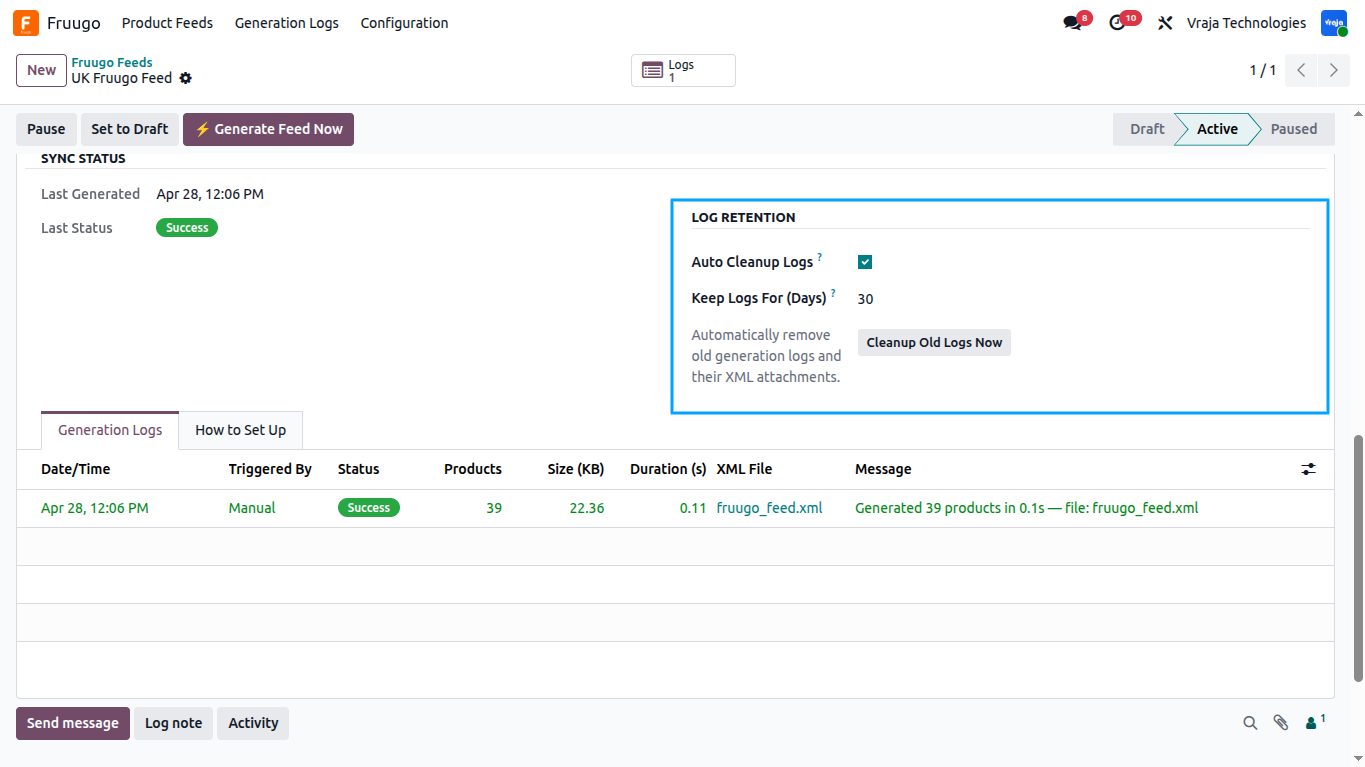
- – Log Cleanup: Runs automatically at 03:00 UTC. To prevent server storage bloat from saved XML files, it deletes old feed logs and attachments based on the retention days specified in your feed’s “Sync Status” section. You can enable/disable “Auto Cleanup Logs” and define “Keep Logs For (Days)” directly on the Feed form view.
 Can I create multiple feeds for different markets or currencies?
- Yes. The module supports an unlimited number of feeds. Each feed has its own independent configuration — including its own URL, language, currency, pricelist, product domain, and VAT settings. For example, you can have a “UK Feed” in GBP and an “EU Feed” in EUR running simultaneously without any conflict.
Will the Feed URL change every time the feed is generated?
- No. The Feed URL is fixed and permanent. It is generated once when you first activate a feed, based on a secure unique token. The URL remains the same regardless of how many times the feed is regenerated. Fruugo only needs to be given this URL once. The only time the URL changes is if you manually click “Regenerate Feed Token,” which should only be done if the URL has been compromised.
What happens when Fruugo requests the feed URL — is the XML generated live on each request?
- No. For performance, the module serves the most recently generated XML file from the internal logs. Fruugo polling the URL does not put any generation load on your server. If no feed has been generated yet (e.g., fresh install before the first cron run), the module will generate it on-the-fly for the first request only.
What product data is included in the Fruugo XML feed?
- Each exported product row contains: ProductId, SkuId, EAN (or EXCEP), Brand, Category, Image URL, StockStatus (INSTOCK / OUTOFSTOCK / NOTAVAILABLE), StockQuantity, Title, Description, Price (with or without VAT), VATRate, AttributeColor, AttributeSize, PackageWeight, LeadTime (if greater than 1 day), Country restriction, Language, and Currency.
How does the module handle product variants?
- When “Include Variants” is enabled on the feed, every product variant is exported as a separate Product row in the XML. Each variant gets its own SkuId (from its internal reference or barcode), while all variants of the same template share the same ProductId. Variant attribute values for Color and Size are automatically extracted and placed in the AttributeColor and AttributeSize tags. If “Include Variants” is disabled, only the base product template is exported.
What is the EAN Exception field for?
- If you manufactured the product yourself and it does not have a standard EAN/barcode, Fruugo still requires an EAN field in the feed. Enabling the “EAN Exception (Manufacturer)” checkbox on the product will cause the feed to export “EXCEP” as the EAN value, which satisfies Fruugo’s data requirement.
How is stock quantity calculated in the feed?
- By default, the total on-hand quantity across all internal locations is used. If you configure specific “Stock Locations” on the feed, only the available quantity across those selected internal warehouse locations is used. This is useful if you want to feed Fruugo only from a dedicated fulfilment location.
What is StockStatus and how is it assigned?
- StockStatus can be one of three values:
- INSTOCK: The product has a quantity greater than zero.
- OUTOFSTOCK: The product has zero stock but is still active and available for listing.
- NOTAVAILABLE: The product is archived in Odoo or has been ticked as “Exclude from Fruugo.” Fruugo will delist it.
What Fruugo languages are supported?
- The module supports all languages officially accepted by Fruugo: English (en), French (fr), German (de), Spanish (es), Portuguese (pt), Dutch (nl), Polish (pl), Italian (it), Danish (da), Swedish (sv), Finnish (fi), Norwegian (no), Czech (cs), Greek (el), Hungarian (hu), Turkish (tr), Slovak (sk), and Romanian (ro). If an unsupported Odoo language is selected, it will automatically fall back to English (en).
Can I limit which products are included in the feed?
- Yes. The “Product Domain” field on the feed configuration accepts any standard Odoo domain filter. The default domain includes only products that are saleable and published on the website. You can expand, restrict, or completely clear the domain to customise which products appear. Additionally, you can set a “Max Products” limit to cap the total number of products exported.
How are category mappings resolved — product level or category level?
- Product-level mapping takes priority. If a product template has a “Fruugo Category” set directly on its Fruugo tab, that is used. If not, the system checks whether the product’s internal Odoo category has a “Fruugo Category” mapped. This two-level fallback ensures broad default coverage while still allowing per-product overrides.
What happens to the feed logs over time? Will they fill up the server disk?
- Each feed generation creates a new log entry with the full XML file attached. To prevent disk usage from growing indefinitely, you can enable “Auto Cleanup Logs” on a feed and set “Keep Logs For (Days)” to define how long logs are retained. The daily cleanup cron (running at 03:00 UTC) will automatically delete logs and their XML attachments older than the configured retention period. You can also trigger cleanup manually using the “Cleanup Old Logs Now” button.
Can I use a custom pricelist for Fruugo instead of the product’s base price?
- Yes. The “Pricelist” field on the feed configuration allows you to select any Odoo pricelist. When set, all product prices in the generated XML will be computed using that pricelist’s rules instead of the standard list price. This is useful if Fruugo requires a specific pricing tier or currency conversion.
What if a product has no description? What will appear in the feed?
- The description field in the feed is populated in the following priority order: Sales Description (description_sale), Internal Description (description), and finally the product name itself as a final fallback. The module ensures the Description tag is never empty, as Fruugo requires it for all listings.
Is the module compatible with both Odoo 18 and Odoo 19?
- Yes. The module is available for both Odoo 18 and Odoo 19. They are maintained as separate versions. Please ensure you install the correct version matching your Odoo installation.
I would like to request a custom feature for this application. What’s the process to get it implemented?
- We’re happy to help tailor the application to meet your business needs! You can reach us via sales@vrajatechnologies.com
Who is the point of contact for technical support, configuration support or bug-related queries?
- You can reach us via support@vrajatechnologies.com
Submit a Support Ticket
If you encounter any issues while using our app that are caused by the app itself, we offer complimentary support for 60 days from the date of purchase.
To create a support ticket, please register via the Vraja Technologies Support Email and provide the necessary details so we can assist you in resolving the issue.

Email Us
support@vrajatechnologies.com

 1.png)
Contact Us
vrajatechnologies.com/contactus

Support
vrajatechnologies.com/support-policy
Vraja Technologies Services
Odoo Implementation
Odoo App Integration Services
Odoo Customization

Odoo Consultation
Odoo Support & Maintenance

Odoo Developer Outsourcing
Suggested Application








Reviews
There are no reviews yet.