
Description
.png)
 Enterprise Community Odoo.sh
ANSI X12 Supplier 3PL Odoo Integration
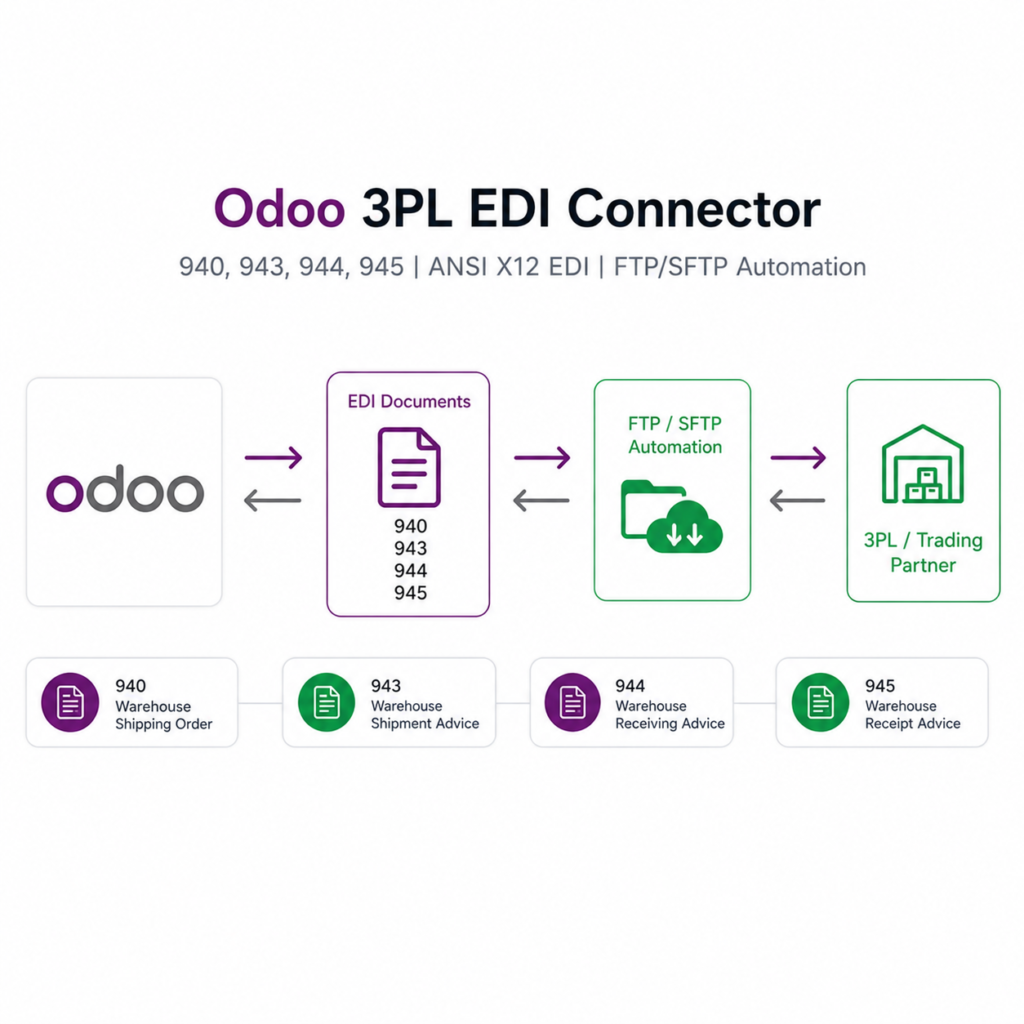
Our 3PL EDI module helps automate warehouse operations by exchanging standardized EDI documents between Odoo and your logistics partner. Instead of manual communication or CSV files, this module sends and receives real-time EDI transactions to streamline inventory, fulfilment, and shipping workflows.
This integration supports ANSI X12 EDI standards and can be connected to any 3PL provider that supports EDI, such as eStore Logistics, ShipHero, Amware, Bleckmann, Mainfreight, and more.This integration supports ANSI X12 EDI standards and can be connected to any 3PL provider that supports EDI, such as eStore Logistics, ShipHero, Amware, Bleckmann, Mainfreight, and more.
This module enables smooth ANSI X12 EDI communication between Odoo and third-party logistics (3PL) warehouses.
- 943 Shipment Advice Export – Automatically generate and send Warehouse Stock Transfer Shipment Advice (943) from Odoo to the 3PL warehouse.
- 944 Receipt Advice Import – Receive and process the 3PL’s Warehouse Stock Transfer Receipt Advice (944) back into Odoo.
- 940 Shipping Order Export – Send Warehouse Shipping Orders (940) from Odoo to the 3PL warehouse for outbound shipments.
- 945 Shipping Confirmation Import – Import the 3PL’s Warehouse Shipping Advice (945) into Odoo for real-time shipment updates.
- Automated FTP/SFTP Integration – Supports secure file transfers to and from the 3PL’s FTP/SFTP servers.
We specialize in delivering advanced Odoo solutions across multiple domains. Our expertise includes:

EDI & SWIFT/ACH Payment Integrations
End-to-end EDI automation, including X12, EDIFACT, XML standards, & financial integrations such as SWIFT, ACH, & Fedwire.


eCommerce Integrations
Seamless integration with leading eCommerce platforms to sync products, orders, inventory, and customer data in real time.

Shipping Integrations
Robust shipping connectors for global couriers, offering automated label generation, tracking, and rate computation.

Most Useful Apps for your ERP
A wide range of highly-rated Odoo modules designed to enhance automation, improve productivity, & simplify business operations.
 Features
 Process
 FAQs
FAQs
Features
 Automatically Export Warehouse Shipping Order (EDI 940) and Stock Transfer Shipment Advice (EDI 943) from Odoo.
Automatically Import Warehouse Shipping Advice (EDI 945) and Stock Transfer Receipt Advice (EDI 944) into Odoo.
Supports FTP communication protocols for secure data transfer.
Automatically Export Warehouse Shipping Order (EDI 940) and Stock Transfer Shipment Advice (EDI 943) from Odoo.
Automatically Import Warehouse Shipping Advice (EDI 945) and Stock Transfer Receipt Advice (EDI 944) into Odoo.
Supports FTP communication protocols for secure data transfer.
Why Choose Our 3PL EDI Integration
Specialized team with 3PL API & EDI expertise
Experience with ShipHero, Amware, Mainfreight, eStore, and more
Ability to develop new EDI integrations for any 3PL not already supported
Seamless setup with Odoo Inventory, Sales, Purchase & Accounting modules
Fully customizable according to 3PL requirements
Upon Installing the application, you can see the FTP/SFTP Syncing menu.

You have to configure the FTP on the left side and on the right side you have to configure the file paths for import and export with Warehouse, 3PL client, Sender Id and, choose backorder configuration for orders. You also have to create schedule actions for import purpose.

These are your schedule actions for importing file and process them accordingly.

You can export the EDI 943 (Stock Transfer Shipment Advice) through button on internal transfer.

Upon successfully exporting the file, you can view the file in the chatter area and FTP used in exporting the file.

Sample file for 943 (Stock Transfer Shipment Advice).

This Schedule Action will import the 944 (Stock Transfer Receipt Advice) file and process it.

After successful operation of schedule action, you can see the transfer in Done state and message post giving the information about the file used to confirm the transfer.

You can Export the EDI 940 (Warehouse Shipping Order) through export button or you can export the sale order by confirming the order as well. For auto export of the order, you have to select the configuration for that.

Upon successfully exporting the file, you can view the file in the chatter area and FTP used in exporting the file.

This Schedule Action will import the 945 (Warehouse Shipping Advice) file and process it.

Module can process all the steps (1 step, 2 steps, or 3 steps) configured for Delivery automatically. Our example has 2 steps configured.

As you can see, both transfer are validated successfully after schedule action run.

Module also sets the Tracking reference and the 3PL delivery carrier on all transfers.


You can view the log history from the FTP/SFTP Syncing menu under Log Details.

You can see the detailed log operation as well.

 I need an extra customization in this application, how can I get it?
- You can contact us on support@vrajatechnologies.com or can schedule a DEMO with our team to customize additional features.
Is the application compatible with Odoo Enterprise and Community?
- Yes, this application is supported by both. It is also compatible with test and production environments.
Do I get free upgrades and support if I purchase this application?
- We provide free support for the first 90 days following the purchase date.
Is technical knowledge required to set up the integration?
- While some technical understanding may be helpful, the integration is designed to be user-friendly. Detailed documentation and support may be provided to aid in the setup process.
Which protocol you have used to transfer file?
- We have used FTP protocol to transfer files.
Can we see the exported file? If yes, where?
- Yes, you can view or download the exported file from the message post as shown in the screenshots.
Do we get any confirmation or message after schedule action performs its tasks?
- Yes, we have managed logs for all the process whether it is export or import.
Submit a Support Ticket
If you encounter any issues while using our app that are caused by the app itself, we offer complimentary support for 90 days from the date of purchase.
To create a support ticket, please register via the Vraja Technologies Support Email and provide the necessary details so we can assist you in resolving the issue.

Email Us
support@vrajatechnologies.com

 1.png)
Contact Us
vrajatechnologies.com/contactus

Support
vrajatechnologies.com/support-policy
Vraja Technologies Services

Odoo Implementation

Odoo App Integration Services

Odoo Customization

Odoo Consultation

Odoo Support & Maintenance

Odoo Developer Outsourcing
Suggested Application




Reviews
There are no reviews yet.