

Description
.png)
Product Alternate & Accessory Management Automation | Smart Product Linking & Recommendation
Auto Alternate & Accessory Product Management brings a smarter and more efficient way to manage product relationships in Odoo by eliminating the need for manual linking. Instead of setting alternatives and accessories for each product individually, the module uses rule-based automation to build connections automatically. Businesses can define conditions using product category, brand, tags, attributes, or custom criteria, allowing the system to identify and link the most relevant products with precision. It also considers real-time stock availability, ensuring that only active and in-stock products are suggested, which helps maintain accurate recommendations and improves the overall user experience across sales and eCommerce platforms.
As product data evolves, the module keeps everything in sync by automatically updating relationships without any manual effort. This ensures that product links always remain relevant and up to date. To provide complete visibility, a detailed logging system tracks every change made to alternative and accessory products, including what was added or removed. This not only helps maintain data integrity but also gives users full control over the automation process. Overall, this automation improves product management efficiency, enhances cross-selling and upselling opportunities, and ensures consistent and reliable product relationships across your Odoo system.
We specialize in delivering advanced Odoo solutions across multiple domains. Our expertise includes:

EDI & SWIFT/ACH Payment Integrations
End-to-end EDI automation, including X12, EDIFACT, XML standards, & financial integrations such as SWIFT, ACH, & Fedwire.


eCommerce Integrations
Seamless integration with leading eCommerce platforms to sync products, orders, inventory, and customer data in real time.

Shipping Integrations
Robust shipping connectors for global couriers, offering automated label generation, tracking, and rate computation.

Most Useful Apps for your ERP
A wide range of highly-rated Odoo modules designed to enhance automation, improve productivity, & simplify business operations.
 Features
 Alternative Products
.png) Accessory Products
Accessory Products
 FAQs
FAQs
 Saves Time:
Automatically link alternative products based on price range, brand, and tags to ensure relevant and meaningful product suggestions without manual effort.
Efficient Management:
Handles large product catalogs with ease by automatically managing product relationships, allowing you to focus on more important tasks.
Better Customer Experience:
Customers see useful alternative products and related accessories for the selected item.
Scalable:
Easily supports growing product catalogs and business expansion without adding extra workload.
Consistent:
Maintains uniform product relationships across all products, avoiding mismatched or missing links.
Accurate Linking:
Ensures that only relevant, matching products are linked, improving the quality of product suggestions.
Transparent:
Gives clear visibility into all automated changes with tracking, helping you stay in control of your data.
Rule-Based Configuration:
Create and manage rules such as price, brand, tags, attributes, and stock to control how products are automatically linked.
Auto Sync Between Products:
When one product is linked, the reverse relationship is also created automatically to maintain synchronized product connections.
Our module provides an additional feature for managing product brands, allowing you to create a product brand by following the path: Inventory → Products → Product Brand.

A product brand is created with its description and complete brand details available for reference.

In the Product tab, you can view all products associated with the same brand, along with their detailed information.

To enable the auto alternative product linking feature, go to Settings → Alternate Product Linking.
In alternative rules, you can select the rule by which alternate products should be linked. You can filter products by category or brand as per your requirements.
Using additional rules, you can filter products based on criteria such as similar price, matching tags, shared attributes, or stock availability.
When filtering alternate products by price, you can define minimum and maximum price deviation to include only products within a specific price range.
Currently, we support two primary rules (Brand and Category), while additional rules such as Attributes, Price, Tags, and Product Availability in Stock can also be applied.

Here, we have a product named Samsung S23, which includes details such as category, product brand, quantity on hand, and sale price.

The product includes attributes such as brand, color, and other smartphone characteristics. Based on these attributes, alternate products can be selected. If a matching product is found according to the rules defined in the settings, it will be linked as an alternate product to the current item, and the relationship will apply in both directions.

Here, we assign product tags based on the defined rules to identify and match alternative products.

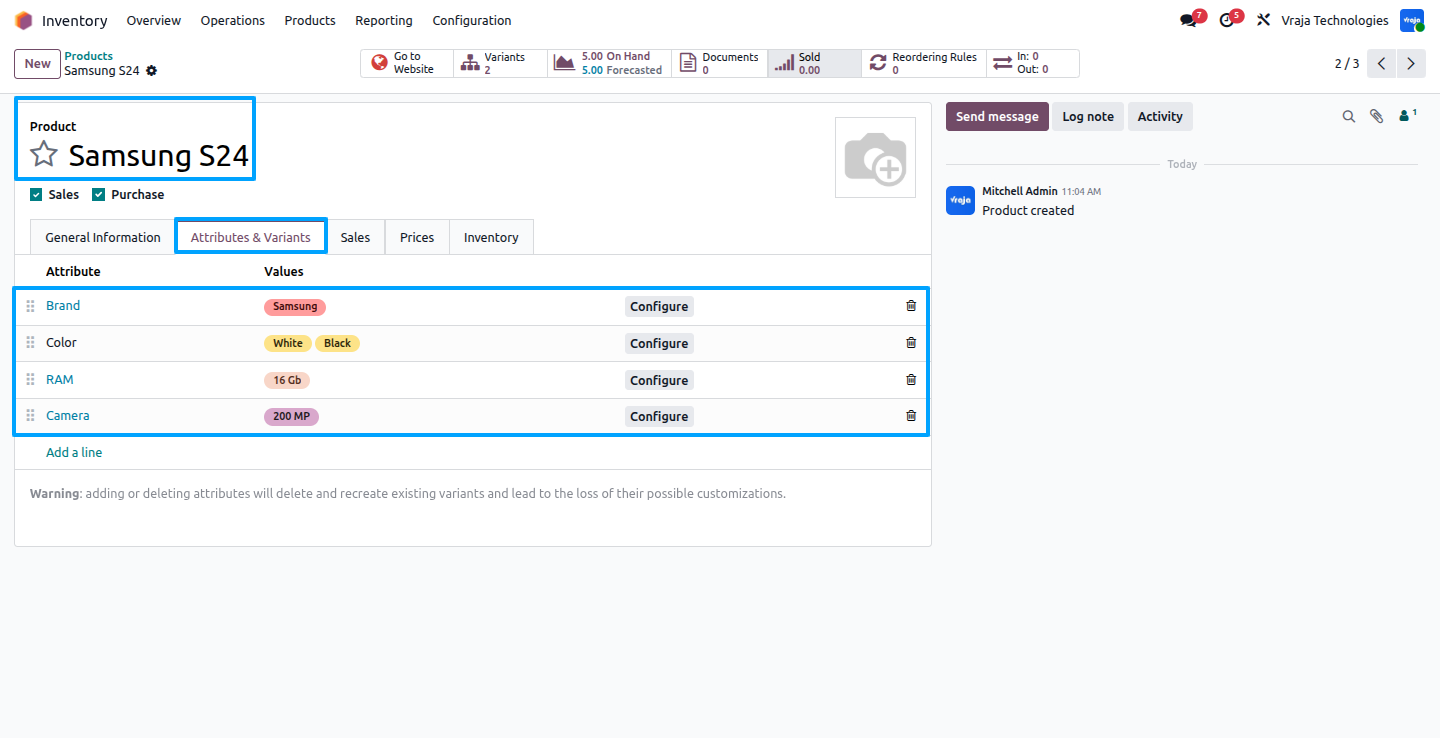
A new product with the same brand and category is created here. If it satisfies all the rules configured at the settings level such as attributes, price range, tags, and other conditions, it will be linked as an alternate product to the previous product (Samsung S23).

The product attributes are also defined here. If attributes are included in the rule, at least 50% of attributes must match for a product to be linked as an alternate product.
Here, we assign product tags based on the defined rules to identify and match alternative products.

Once the changes are saved, the product is automatically linked with matching alternate products based on the defined rules. For example, Samsung S24 is automatically linked with Samsung S23 as an alternate product.

The linking is bidirectional, so Samsung S24 is also set as an alternate product for Samsung S23.

To track all operations, a logbook feature is provided that records and displays all relevant information. To view the logs, navigate to Inventory → Products → Product Log History → Log Book.

A complete history of all operations is maintained in the log history, showing which products were added as alternates and which were removed.

Not only during product creation, but also when a product is updated—if it no longer meets the defined rules, the corresponding alternate product links are automatically removed, and the same applies in reverse.


Now, let’s look at the reverse logic: if the price of Samsung S24 is increased, it will no longer satisfy the defined rules and will automatically be removed as an alternate product from both products.

Here you can see the detailed log of the remove operation, where Samsung S24 and Samsung S23 are both removed as alternate products.

We also provide options to define alternative products based on specific criteria such as brand or category. In this example, all products with the same brand are added as alternative products without applying additional filters. However, you can further refine the selection using tags, attributes, price range, stock availability, and other rules.

Here, when the product price is updated and the changes are saved, all matching products from the same brand are automatically linked as alternative products.

Here all the products with the same brand (e.g., Samsung) are automatically added as alternative products. This feature streamlines the process, reduces manual effort, and simplifies the management of product alternatives.

We also provide a feature to add product accessories automatically based on defined rules. To configure these rules, navigate to Inventory → Products → Accessories Product Rules.

Click on New to create a rule, where you can define the main product categories to which accessories will be applied, select the accessory categories, and configure the rules that determine how those accessories are added or removed. You can create multiple rules according to your business needs.

A new product named Samsung Charger is created with its Brand, Tags, and Category defined according to the configured rules. Once all details are saved, it is automatically added as an accessory to all products that belong to the Smartphone category and contain the Samsung brand and matching tags.


Here, the product has the same brand and category, is available in stock, and contains matching tags. Therefore, the product (Samsung Charger) is automatically added as an accessory based on the defined rules.

Although the product has the same brand and category, it does not contain the required tags. Therefore, according to the defined rules, the accessory product is not added to this product.

If changes are made to either the main product or the accessory product, the accessory relationships are updated automatically based on the defined rules. For example, if the required tags are removed from the main product, the accessory product is also removed automatically.


We have created a new product in the “Parts” category with the same brand name and saved all the changes.

Here, you can see that the previous product has been automatically added as an accessory to this product according to the defined rules.

We also schedule a cron job that deletes log records older than 15 days. This cron runs daily to keep the database clean and prevent unnecessary log storage accumulation.

 How are products matched?
- Products are matched using conditions like category, brand, tags, attributes, and stock availability.
Can I control how products are linked?
- Yes, you can fully control the linking logic by configuring rules based on your business needs.
Does it work for large product catalogs?
- Yes, the module is designed to handle large and growing product catalogs efficiently.
Is it useful for eCommerce?
- Yes, it improves product suggestions on your website, helping customers discover alternatives and accessories.
Do I need technical knowledge to use this module?
- No, the module is user-friendly and can be configured easily without technical expertise.
Can I track changes made by the system?
- Yes, all changes are tracked, so you can clearly see what was added or removed.
What happens if product data changes frequently?
- The module automatically adjusts product links to keep them accurate, updated, and relevant.
Submit a Support Ticket
If you encounter any issues while using our app that are caused by the app itself, we offer complimentary support for 90 days from the date of purchase.
To create a support ticket, please register via the Vraja Technologies Support Email and provide the necessary details so we can assist you in resolving the issue.

Email Us
support@vrajatechnologies.com

 1.png)
Contact Us
vrajatechnologies.com/contactus

Support
vrajatechnologies.com/support-policy
Vraja Technologies Services

Odoo Implementation

Odoo App Integration Services

Odoo Customization

Odoo Consultation

Odoo Support & Maintenance

Odoo Developer Outsourcing
Suggested Application



Reviews
There are no reviews yet.