
Description
.png)
SMS Automation — Auto Reminders & Alerts for Any Model
Running a business means managing countless important deadlines every day — invoice due dates, delivery schedules, contract expirations, subscription renewals, and customer follow-ups. Missing even a single reminder can result in delayed payments, dissatisfied customers, missed renewals, or lost business opportunities.
However, many businesses still rely on manual processes such as:
- Calling customers individually
- Sending SMS messages one by one
- Tracking important dates in spreadsheets
These traditional methods are often:
- Time-consuming
- Inconsistent
- Error-prone
Businesses need a smarter, faster, and more reliable way to manage customer communication and reminders.
What Is SMS Automation Engine?
SMS Automation Engine is a powerful and user-friendly Odoo module that automates SMS notifications and reminders across any Odoo model based on date-driven events.
Whether you need payment reminders, delivery updates, subscription renewal alerts, or customer follow-ups, the module automatically ensures the right message reaches the right customer at the right time.
By automating repetitive communication workflows inside Odoo, businesses can:
- Reduce manual follow-up work
- Avoid missed reminders and delays
- Improve customer communication
- Save time and increase operational efficiency
The automation runs seamlessly in the background through scheduled actions, helping businesses manage customer communication more efficiently and reliably.
🎯 Problem vs Solution
We specialize in delivering advanced Odoo solutions across multiple domains. Our expertise includes:

EDI & SWIFT/ACH Payment Integrations
End-to-end EDI automation, including X12, EDIFACT, XML standards, & financial integrations such as SWIFT, ACH, & Fedwire.


eCommerce Integrations
Seamless integration with leading eCommerce platforms to sync products, orders, inventory, and customer data in real time.

Shipping Integrations
Robust shipping connectors for global couriers, offering automated label generation, tracking, and rate computation.

Most Useful Apps for your ERP
A wide range of highly-rated Odoo modules designed to enhance automation, improve productivity, & simplify business operations.
 Features
 Process
 FAQs
FAQs
 Works With Any Odoo Model
Create SMS rules for Invoices, Sales Orders, Purchase Orders,Deliveries, Contacts, Contracts, Subscriptions and more.
Date Based Triggers
Send SMS Before, On or After any date field. Set exact day or catchup mode to include missed records automatically.
Advanced Filter Builder
Use Odoo’s native domain filter to target specific records only. No coding or technical knowledge needed.
Dynamic Message Templates
Insert dynamic fields like customer name, invoice amount and due date directly into your SMS message.
Full SMS Log and Tracking
Track every SMS with sent and failed status. View failure reasons, message content and customer details in one place.
Duplicate Prevention
Built-in duplicate check ensures the same SMS is never sent twice to the same record.
Manual Run and Auto Cron
Run rules manually anytime for instant testing or let the daily cron job handle everything automatically.
Global SMS Limit Control
Set a global daily SMS limit to control credit usage. Admin gets notified automatically when limit is reached.
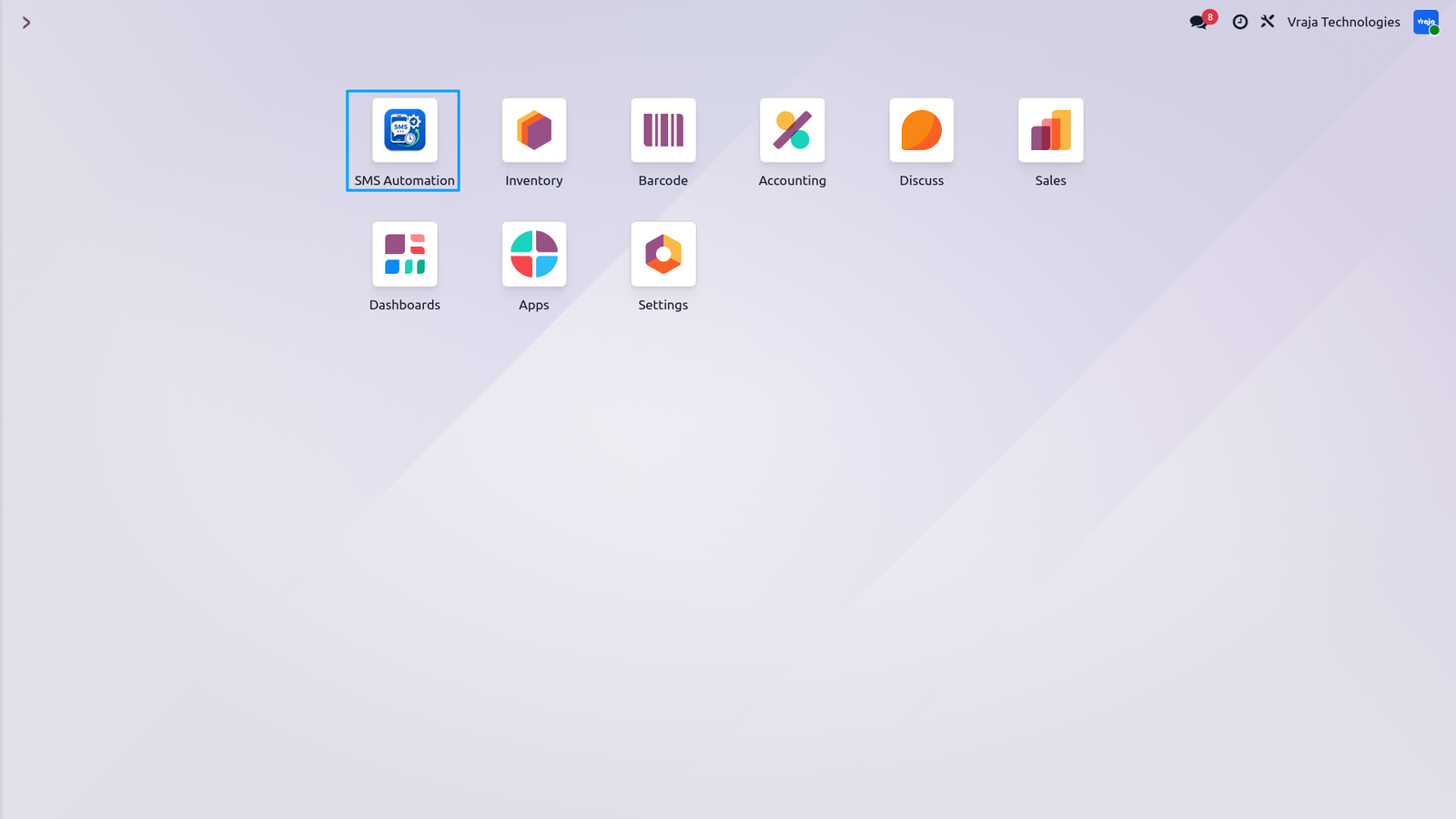
SMS Automation Engine is accessible directly from the Odoo main navigation menu. Access your Rules and SMS Logs with a single click from anywhere in Odoo.
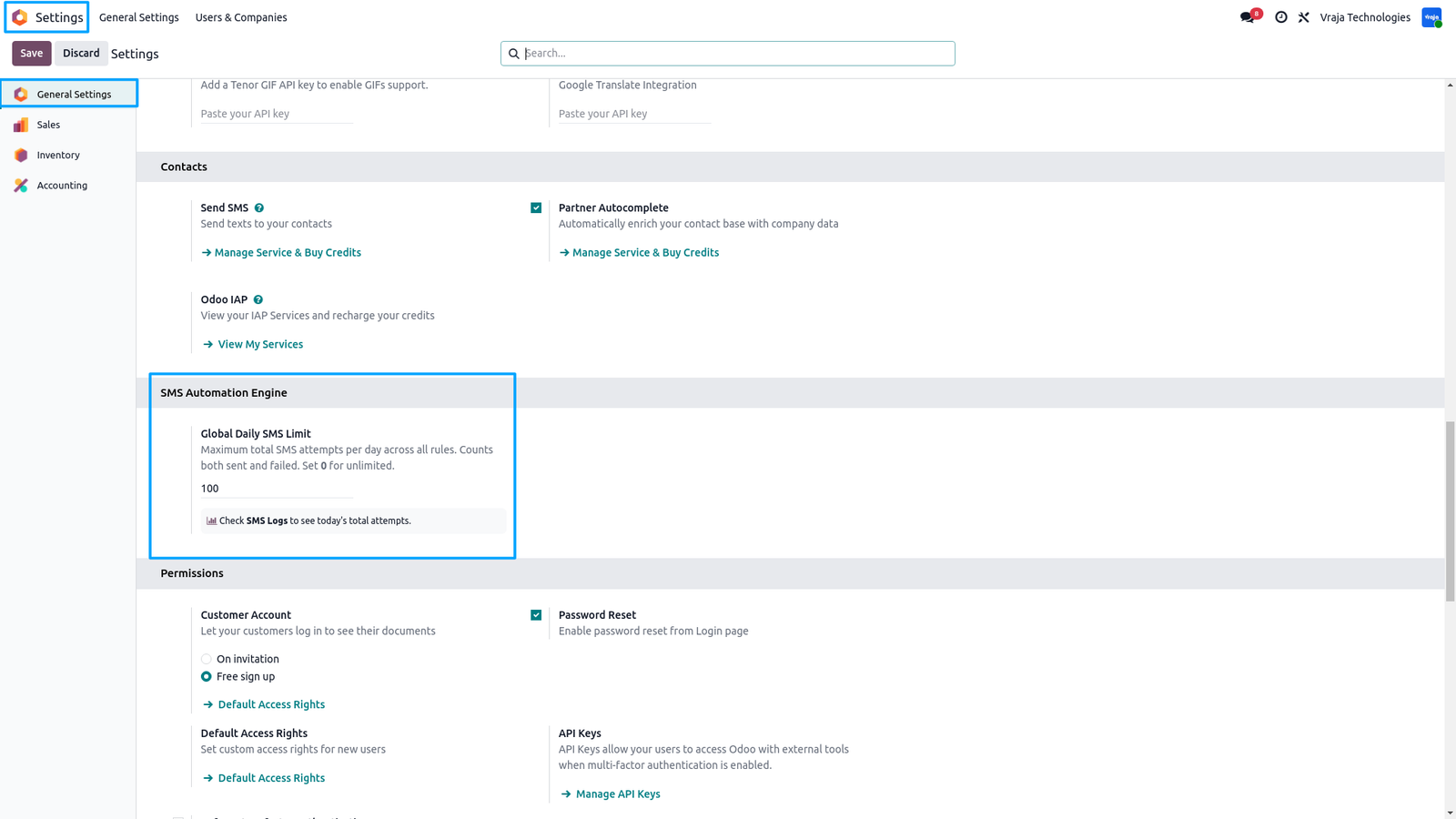
SMS Automation Engine adds a dedicated section inside Odoo Settings to control SMS usage globally.
- – Set a Global Daily SMS Limit to restrict the maximum number of SMS attempts per day across all rules. Both sent and failed attempts are counted — as every attempt consumes an IAP credit.
- – Set 0 for unlimited usage.
- – When the limit is reached the system automatically stops all rules and notifies the admin via an activity warning — no manual monitoring needed.
- – Visit SMS Logs anytime to track today’s usage.
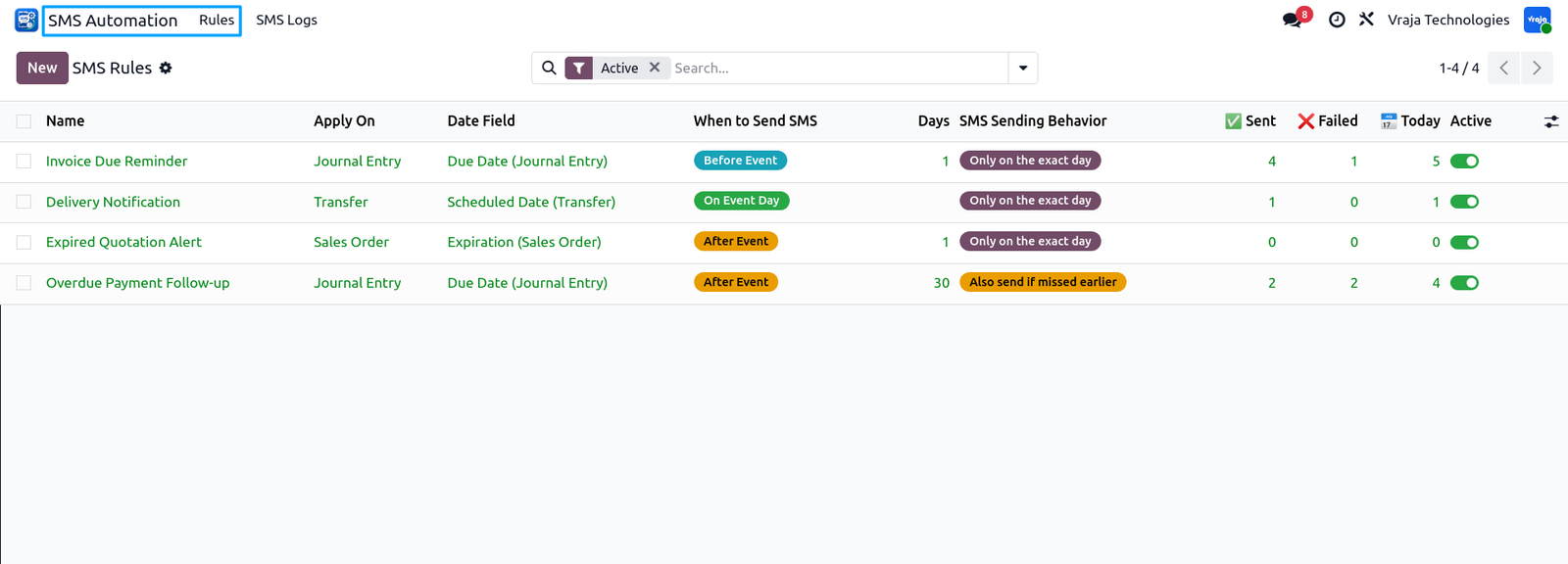
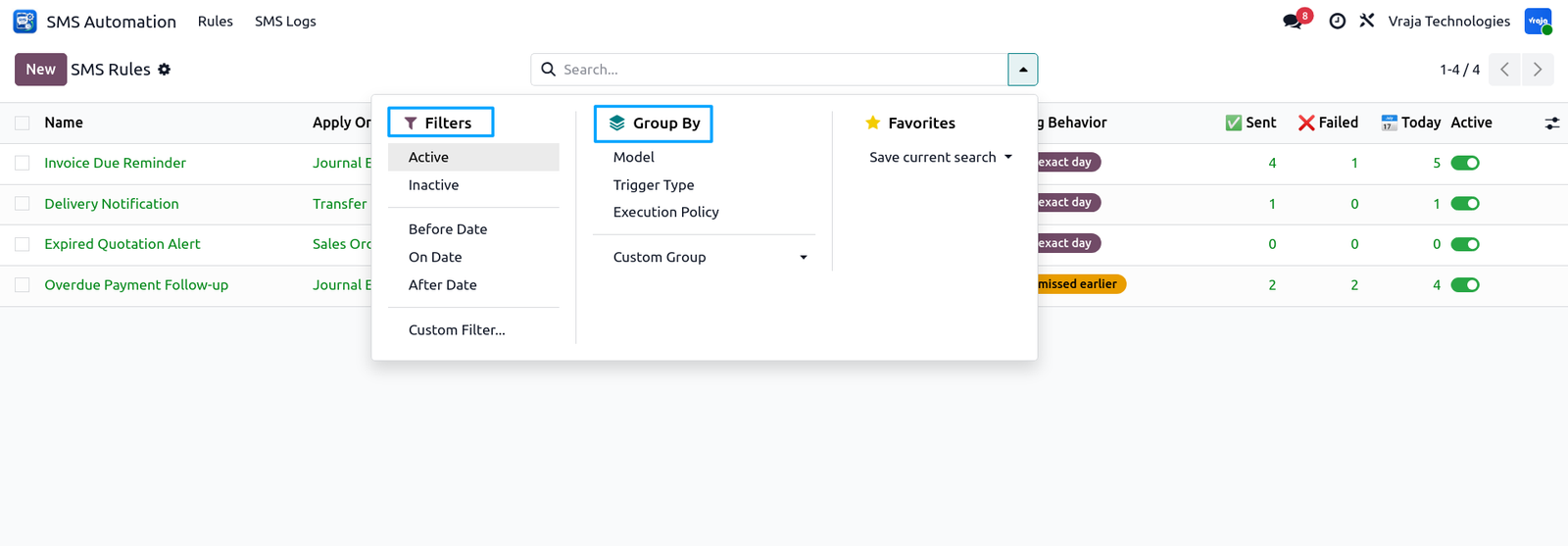
The SMS Rules list view gives you complete visibility over all your automation rules in one place.
- – Color coded badges make it easy to identify trigger types at a glance — Blue for Before, Green for On and Yellow for After date.
- – Sending Behavior badge shows whether the rule runs on exact day only or includes missed records using Catchup mode.
- – Track performance of each rule directly from the list — see total sent, failed and today’s SMS count without opening any record.
- – Active rules are highlighted in green.Inactive rules appear muted. Toggle any rule on or off with a single click without deleting or reconfiguring it.
- – Multi edit is supported — select multiple rules and update them together in one action.
Filter rules by Active, Inactive, Before, On or After trigger type.
- – Group by Model or Trigger Type for better visibility.
- – Find any rule instantly with built-in search filters.
Creating a new SMS rule is simple and straightforward.
The form is divided into four clear sections:
- Configuration — Select model and date field to watch
- When to Send — Choose trigger type and sending behavior
- Filter Records — Apply conditions to target specific records
- SMS Message — Write message with dynamic field support
- A built-in guide at the top of the form walks you through each step automatically. No technical knowledge required.
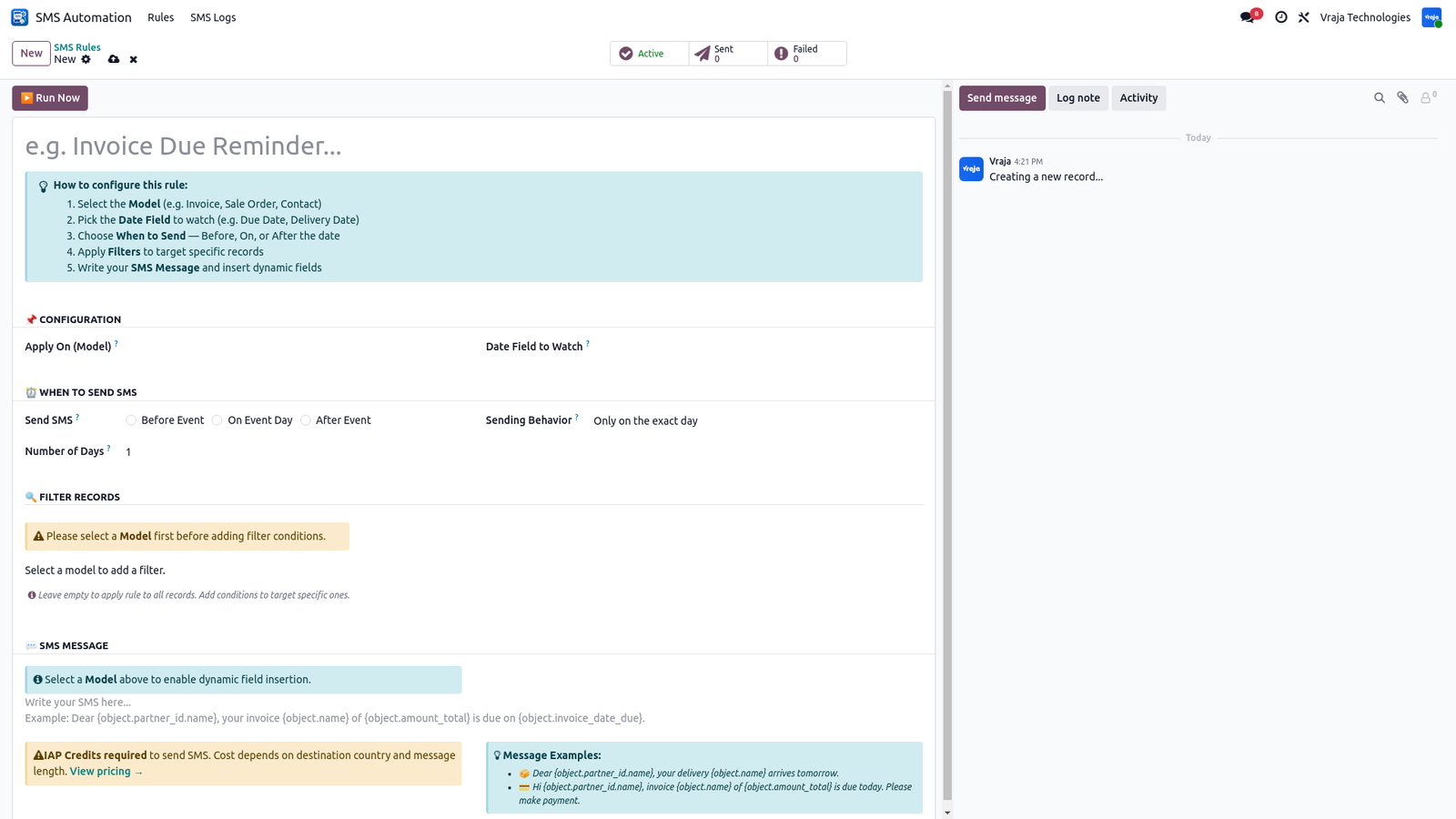
The SMS Rule form is clean and simple.Configure a complete automation rule in minutes without any technical knowledge.
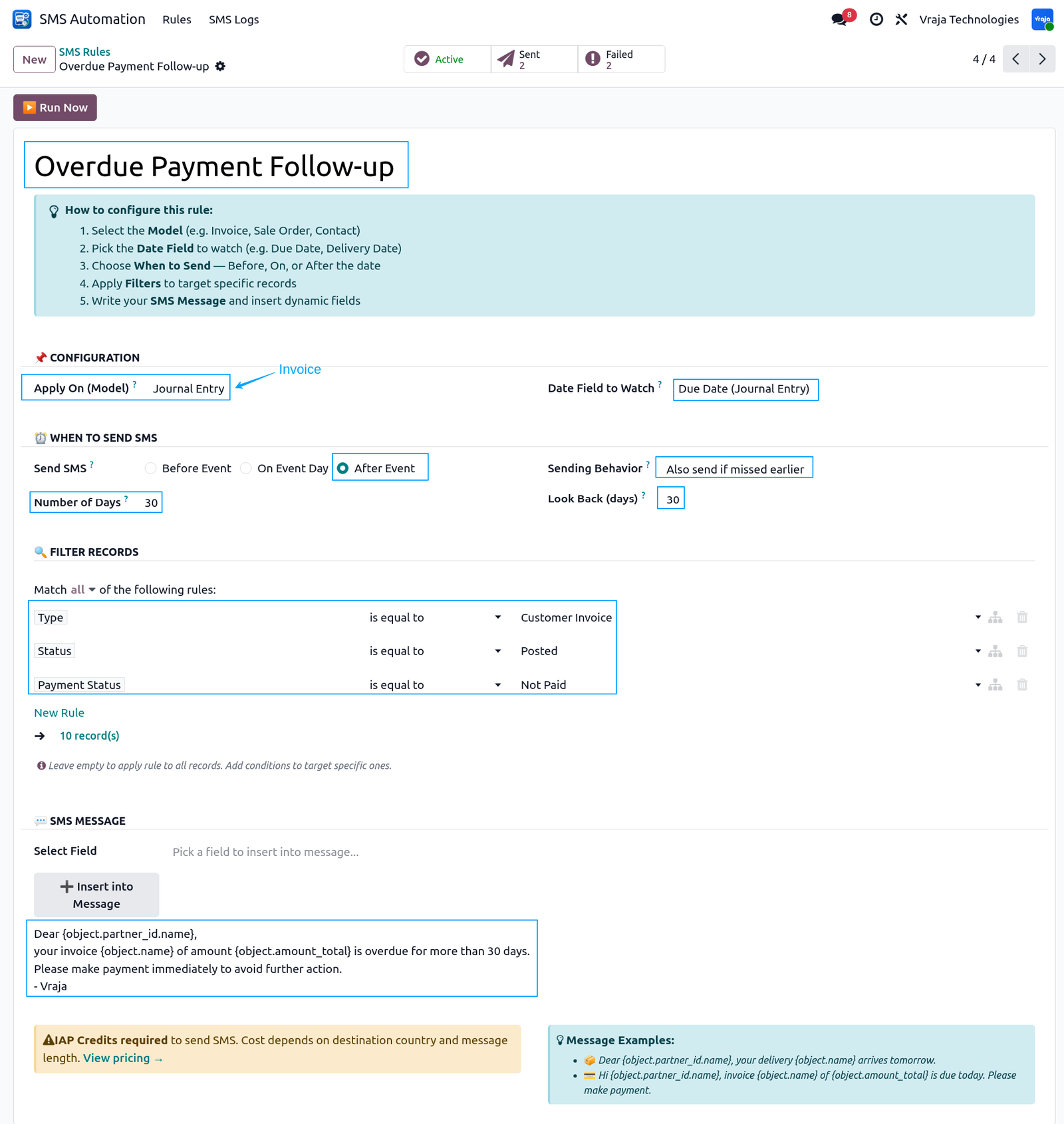
Field by Field Explanation:
- NAME : Give your rule a meaningful name so you can identify it easily.Example: Overdue Payment Follow-up
- CONFIGURATION:
- Model: Select which Odoo module this rule applies to. Example: Account Move (Invoice)
- Date Field: Select which date field to watch for this rule. Example: Invoice Date Due
- A built-in guide at the top of the form walks you through each step automatically. No technical knowledge required.
WHEN TO SEND SMS:
- Trigger Type: Choose when to send the SMS relative to the date.Example: After
- Before — send X days before the date
- On — send exactly on the date
- After — send X days after the date
- Number of Days: How many days before or after the date. Example: 30 days
Sending Behavior:
- Exact Day — send only on the exact scheduled day
- Catchup — also include records missed in past days
- Example: Catchup
- Look Back Days: How many past days to consider for missed records.Example: 30 days
FILTER RECORDS:
- Use Odoo’s native filter builder to target only specific records.Leave empty to apply rule to all records.
- Example filters:
- Invoice Type = Customer Invoice
- State = Posted
- Payment State = Not Paid
- Only unpaid posted customer invoices will receive this SMS.
SMS MESSAGE:
- Select Field : Pick any field from the selected model.Click Insert to add it into your message.
- Example fields:
- Customer Name → {object.partner_id.name}
- Invoice Name → {object.name}
- Total Amount → {object.amount_total}
- Message : Write your SMS message with dynamic variables.
- Example:
- Dear {object.partner_id.name},
- your invoice {object.name} of amount {object.amount_total} is overdue for more than 30 days.
- Please make payment immediately to avoid further action.
- — Team vraja
- When SMS is sent variables are replaced with real values automatically:
- Dear John,
your invoice INV/2025/001 of amount $1,500.00 is overdue for more than 30 days.
Please make payment immediately to avoid further action.
– Team vraja
SMART BUTTONS:
- Active — rule is running and will execute daily.Click Active → rule becomes Inactive instantly
- Sent — total SMS successfully sent by this rule.Click Sent → opens list of all sent SMS logs
- Failed — total SMS failed for this rule.Click Failed → opens list of all failed SMS logs
- RUN NOW BUTTON
- Click Run Now to execute the rule instantly without waiting for the daily cron job.Perfect for testing your rule configuration before going live.
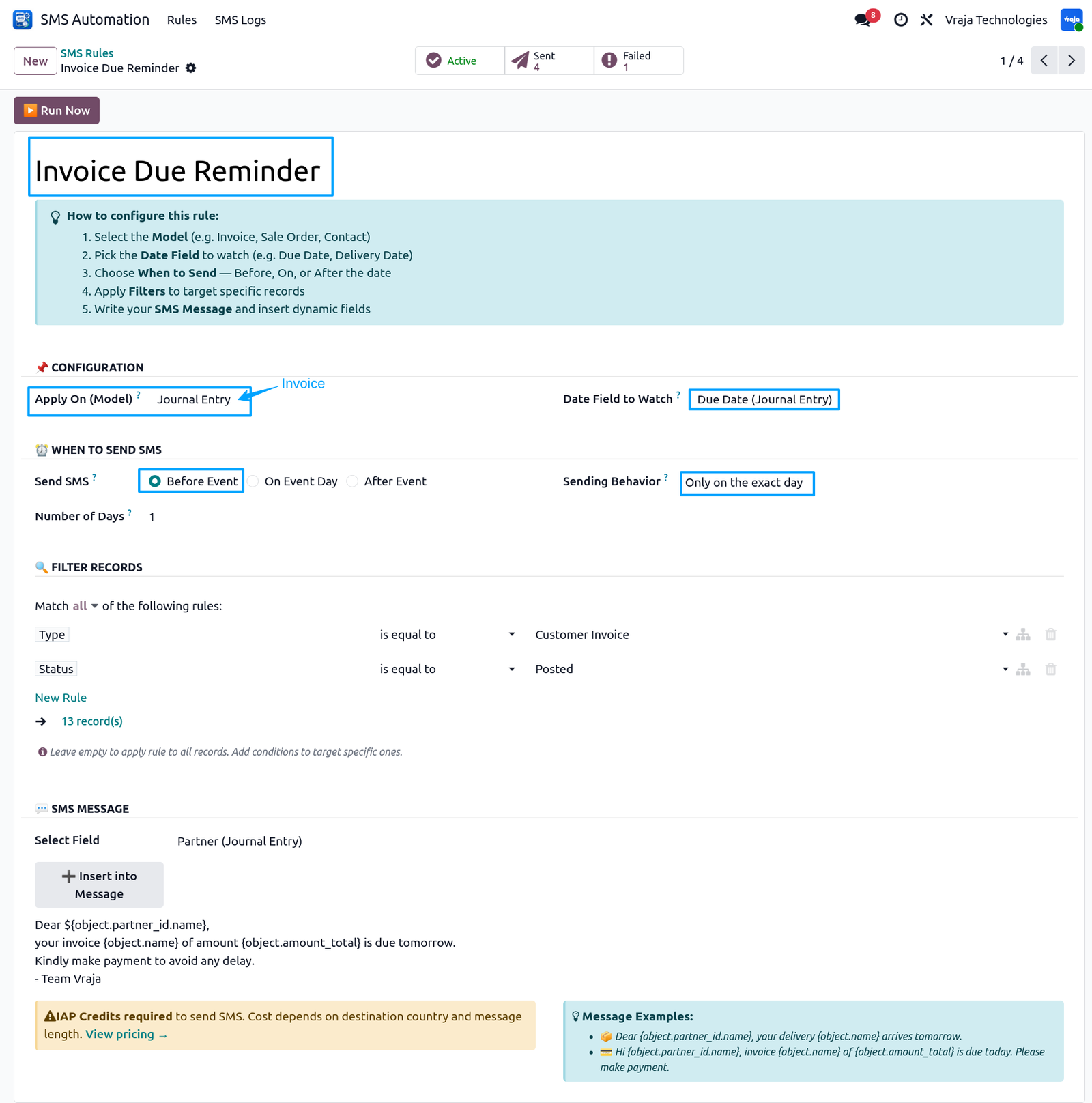
(Before Date Trigger)
Before Date
- Before Date trigger sends SMS X days
- before the date field.
- Example:
- Invoice due May 2 → SMS sends May 1
- Days = 1
- Use for:
- Invoice reminders, Delivery alerts,
- Subscription warnings
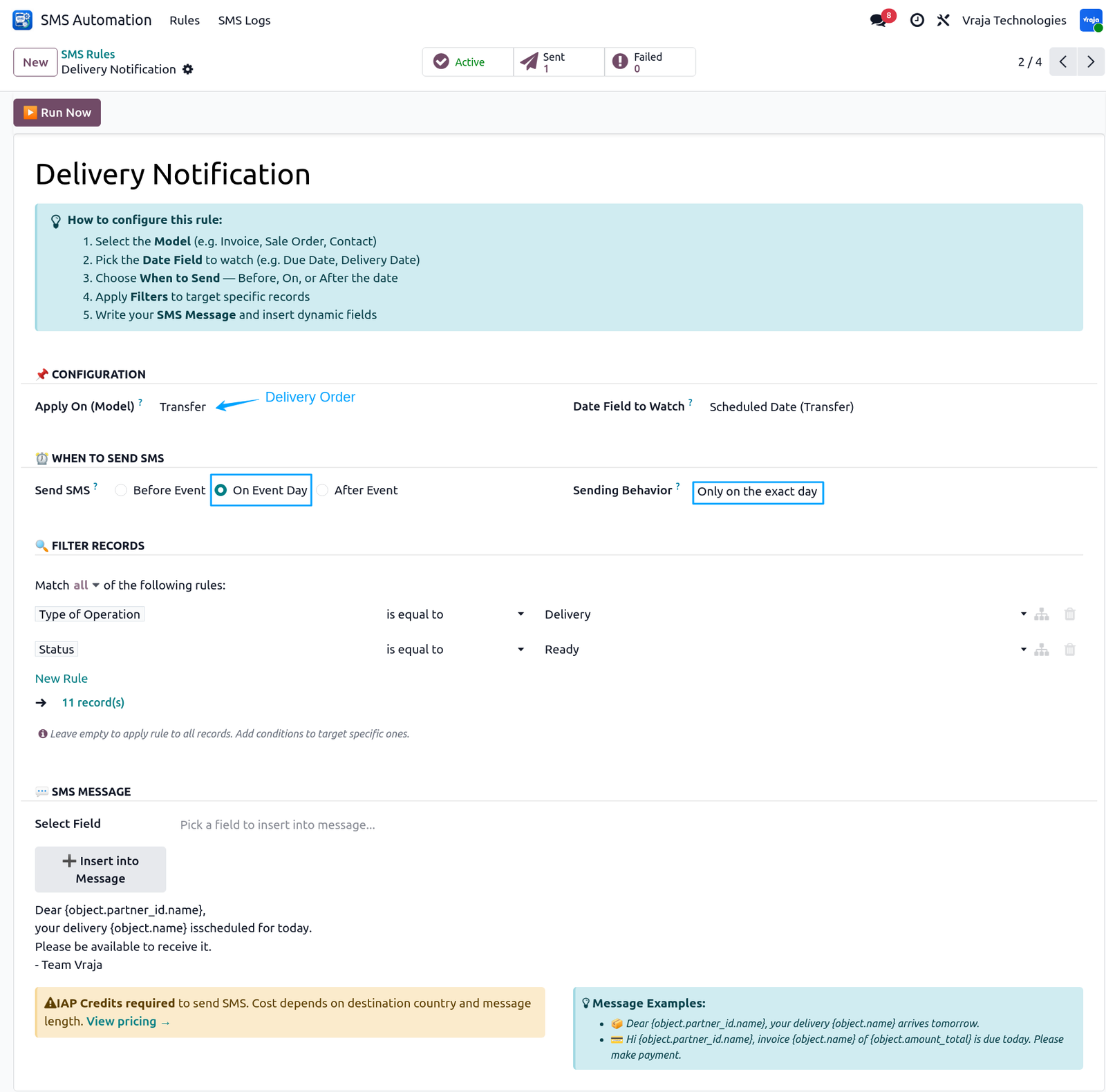
(On Date Trigger)
- On Date trigger sends SMS exactly on the date field.
- Days field is hidden automatically as it is not needed.
- Example:
- Delivery on May 2 → SMS sends May 2
- Use for:
- Delivery notifications, Appointment reminders, Event alerts
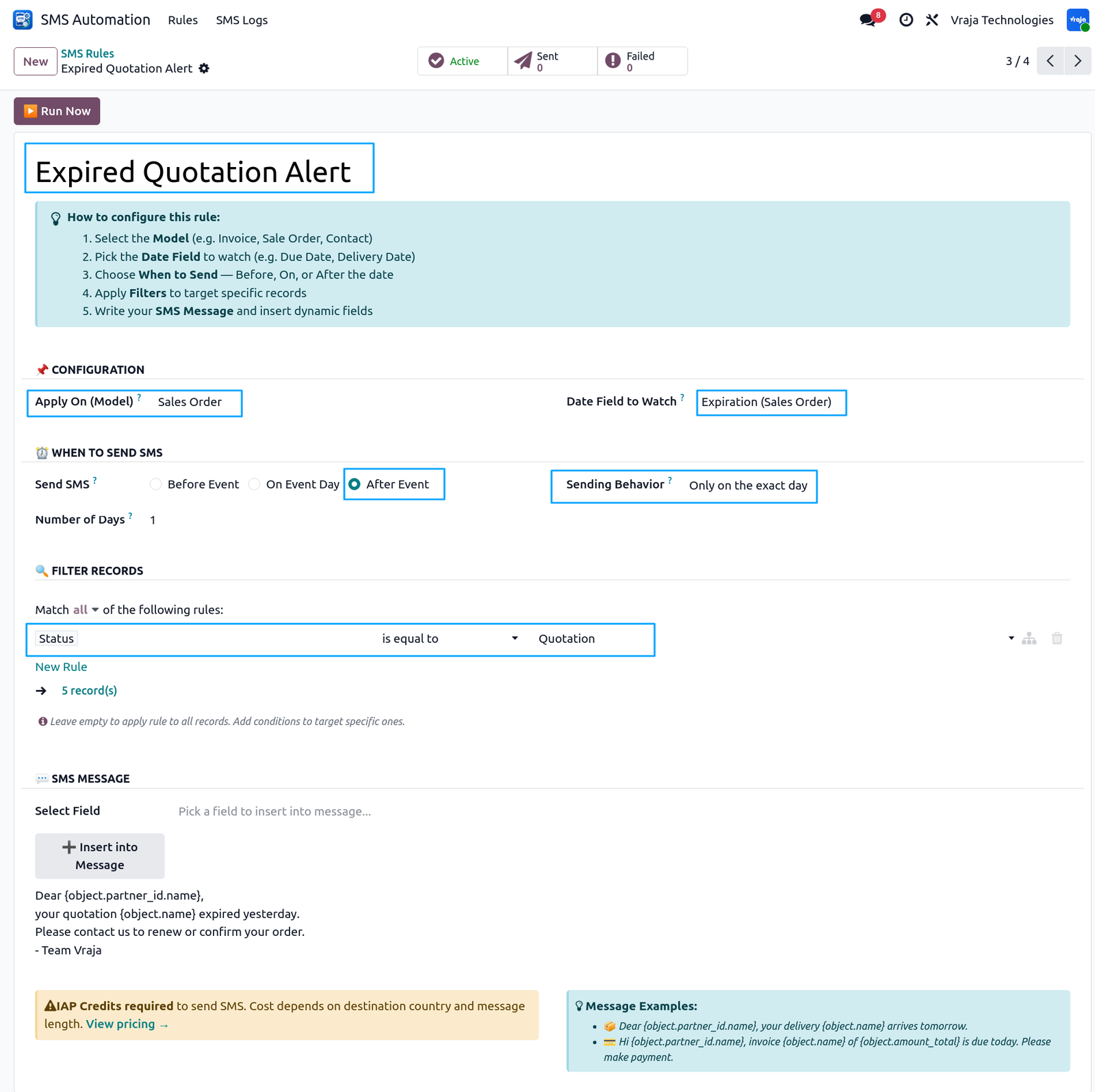
(After Date Trigger)
After Date trigger sends SMS after the date has passed.
- Example:
- Quotation expired yesterday → Customer receives follow-up SMS today.
- Days = 1 means SMS sends exactly
- 1 day after expiry date.
- Never lose a sales opportunity — let the system follow up automatically.
SMS Log List View
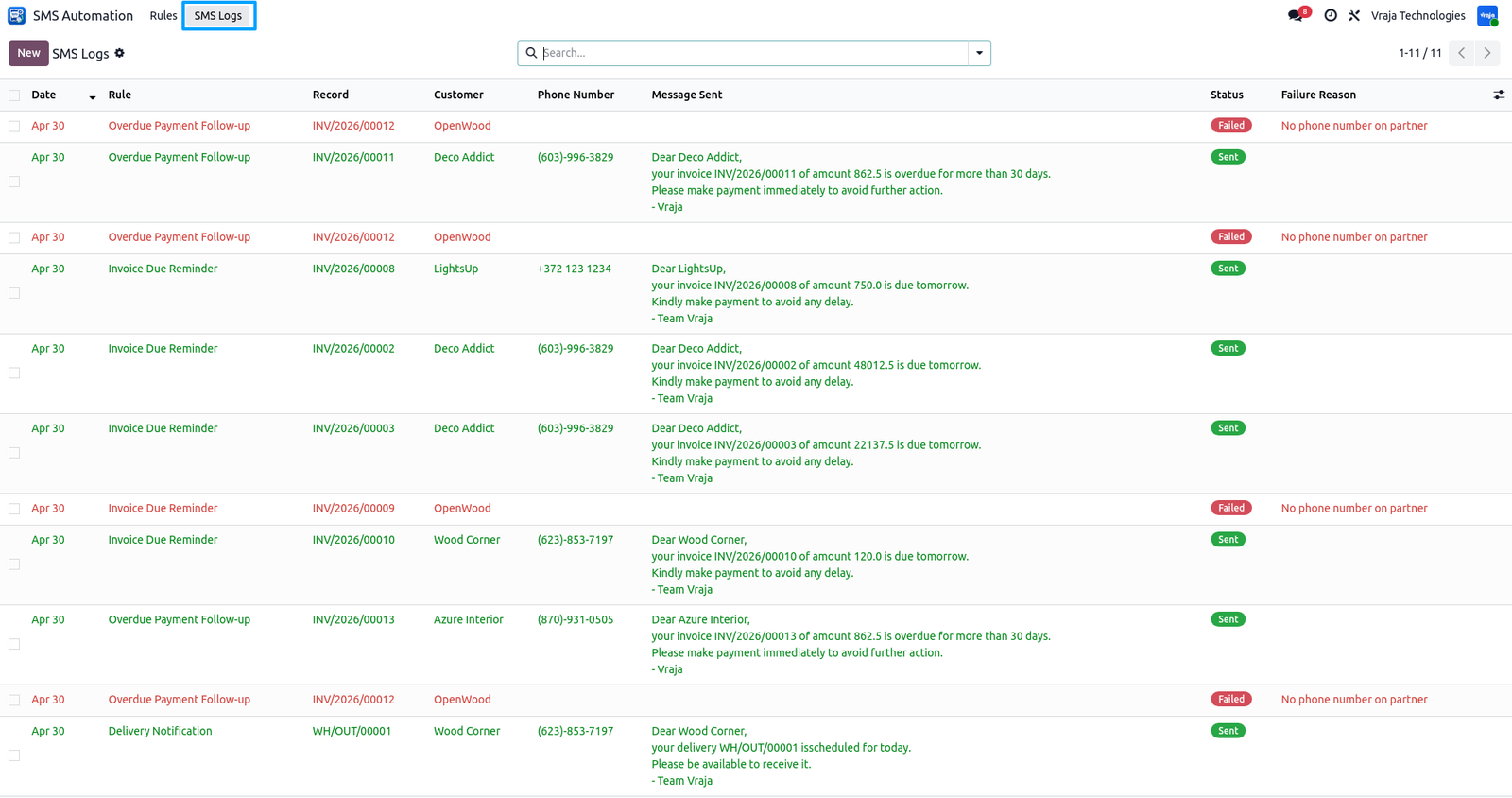
SMS Automation Engine maintains a complete log of every SMS attempt across all rules.
- Each log entry shows date, rule name, record, customer, phone number, status and failure reason — everything you need in one place.
- Filter by Sent, Failed or Today.
- Group by Rule, Status, Date or Customer for quick analysis.
- Never miss a failed SMS —see the exact failure reason and fix it instantly without any guesswork.
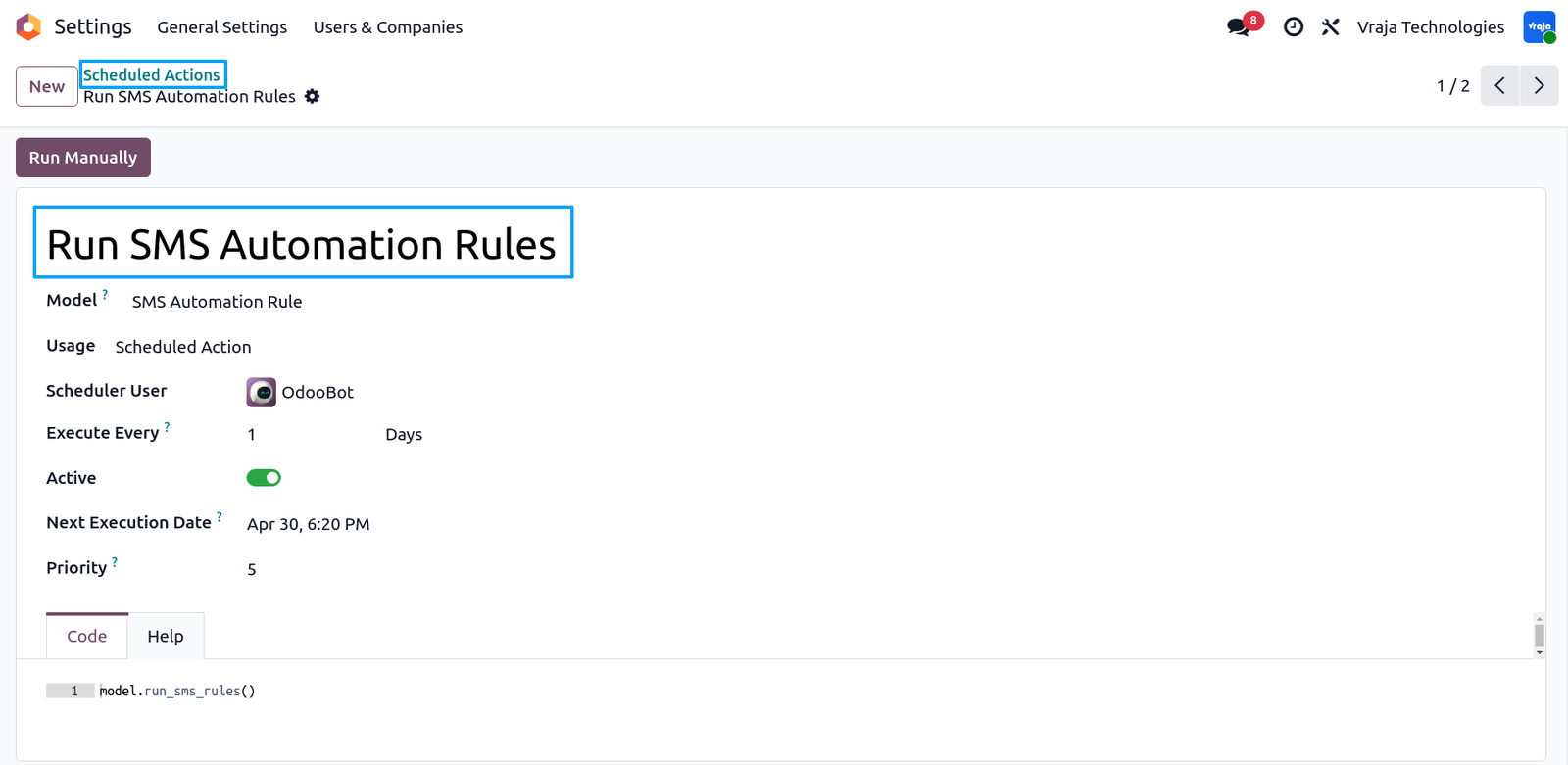
SMS Automation Engine includes a built-in scheduled cron job that runs automatically every day.
- No manual action required —the system processes all active rules,checks matching records and sends SMSwithout any human intervention.
- Cron job is accessible from:
- Settings → Technical → Scheduled Actions → Run SMS Automation Rules
- You can also:
- → Change the frequency (hourly, daily, weekly)
- → Run manually anytime for instant execution
- → View last execution time and status
- → Enable or disable the cron anytime/li>
- → For instant testing without waitingfor the daily cron — use the Run Now button directly on any rule.
 How many rules can I create?
- Unlimited. Create as many rules as needed for different models, date fields and conditions.
Can I disable a rule without deleting it?
- Yes. Click the Active smart button on any rule to disable it instantly. Re-enable anytime without losing configuration.
Can I test a rule without waiting for cron?
- Yes. Use the Run Now button on any rule to execute instantly and verify the result without sending real SMS.
What if cron was down and SMS was missed?
- Enable Catchup mode on the rule and set Look Back days to include missed records automatically on the next cron run.
Can I send the same SMS multiple times?
- No. Built-in duplicate prevention ensures the same SMS is never sent twice to the same record.
Can I control how many SMS are sent daily?
- Yes. Set a Global Daily SMS Limit in Settings → SMS Automation Engine. The system stops automatically when the limit is reached and notifies the admin via activity warning.
Where can I see sent and failed SMS?
- Go to SMS Automation → SMS Logs. Filter by Sent, Failed or Today. Every attempt is logged with full details.
Why did my SMS fail?
-
Check the SMS Log to see the exact failure reason such as:
- No phone number on partner
- No partner found on record
- SMS credit balance insufficient
Is SMS activity logged on the source record?
- Yes. Every sent SMS is automatically posted as a note in the record chatter for complete activity history.
I would like to request a custom feature for this application. What’s the process to get it implemented?
- We’re happy to help tailor the application to meet your business needs! You can reach us via sales@vrajatechnologies.com
Who is the point of contact for technical support, configuration support or bug-related queries?
- You can reach us via support@vrajatechnologies.com
Submit a Support Ticket
If you encounter any issues while using our app that are caused by the app itself, we offer complimentary support for 60 days from the date of purchase.
To create a support ticket, please register via the Vraja Technologies Support Email and provide the necessary details so we can assist you in resolving the issue.

Email Us
support@vrajatechnologies.com

 1.png)
Contact Us
vrajatechnologies.com/contactus

Support
vrajatechnologies.com/support-policy
Vraja Technologies Services
Odoo Implementation

Odoo App Integration Services

Odoo Customization

Odoo Consultation

Odoo Support & Maintenance

Odoo Developer Outsourcing
Suggested Application















Reviews
There are no reviews yet.