
Description
.png)
 Enterprise Community Odoo.sh
Website Product Quantity Rules (Min, Max & Multiplier)
The Website Product Quantity Rules (Min, Max & Multiplier) module provides a powerful solution to control how products are purchased on the Odoo eCommerce website. It allows businesses to define minimum purchase quantity, maximum purchase quantity, and quantity step (multiplier) for each product, ensuring customers can only select quantities that follow predefined business rules.
These restrictions are automatically enforced throughout the website shopping process, including the product page, cart page, and checkout flow. By ensuring that customers select valid quantities, the module helps businesses implement bulk purchasing policies, control order limits, and sell products in fixed quantity increments such as packs, cartons, or wholesale bundles. This improves order accuracy, prevents incorrect quantity entries, and ensures that all purchases comply with the company’s sales policies while providing a smooth shopping experience for customers.
 Watch on YouTube
We specialize in delivering advanced Odoo solutions across multiple domains. Our expertise includes:

EDI & SWIFT/ACH Payment Integrations
End-to-end EDI automation, including X12, EDIFACT, XML standards, & financial integrations such as SWIFT, ACH, & Fedwire.


eCommerce Integrations
Seamless integration with leading eCommerce platforms to sync products, orders, inventory, and customer data in real time.

Shipping Integrations
Robust shipping connectors for global couriers, offering automated label generation, tracking, and rate computation.

Most Useful Apps for your ERP
A wide range of highly-rated Odoo modules designed to enhance automation, improve productivity, & simplify business operations.
 Features
 Process
 FAQs
FAQs
 Minimum Quantity Restriction
Configure the minimum purchasable quantity for each product to ensure customers order at least the required number of units.
Maximum Quantity Limit
Set a maximum purchase limit for products to control how many units a customer can order in a single transaction.
Quantity Step (Multiplier) Control
Define quantity increments so that customers can only purchase products in specific steps such as 5, 10, 15, or any configured multiplier.
Website Product Page Enforcement
Quantity rules are automatically applied on the product detail page to guide customers in selecting valid quantities before adding products to the cart.
Cart & Checkout Validation
The module validates quantity rules on the cart and checkout pages to prevent invalid orders and ensure compliance with configured quantity policies.
Complete eCommerce Integration
Fully integrated with Odoo Website and eCommerce, ensuring quantity restrictions remain consistent across the entire purchase workflow.
Supports Bulk & Pack-Based Sales
Ideal for wholesale businesses, bulk product sales, and products sold in packs, cartons, or predefined quantity bundles.
Improved Order Accuracy
Prevents customers from entering invalid quantities, reducing order errors and ensuring compliance with business sales rules.
Go to Website → eCommerce → Products and open the desired product. Navigate to the Sales tab and locate the Website Quantity Rules section.
Configure the Minimum Quantity, Maximum Quantity, and Quantity Step, then save the product to apply the rules on the website.
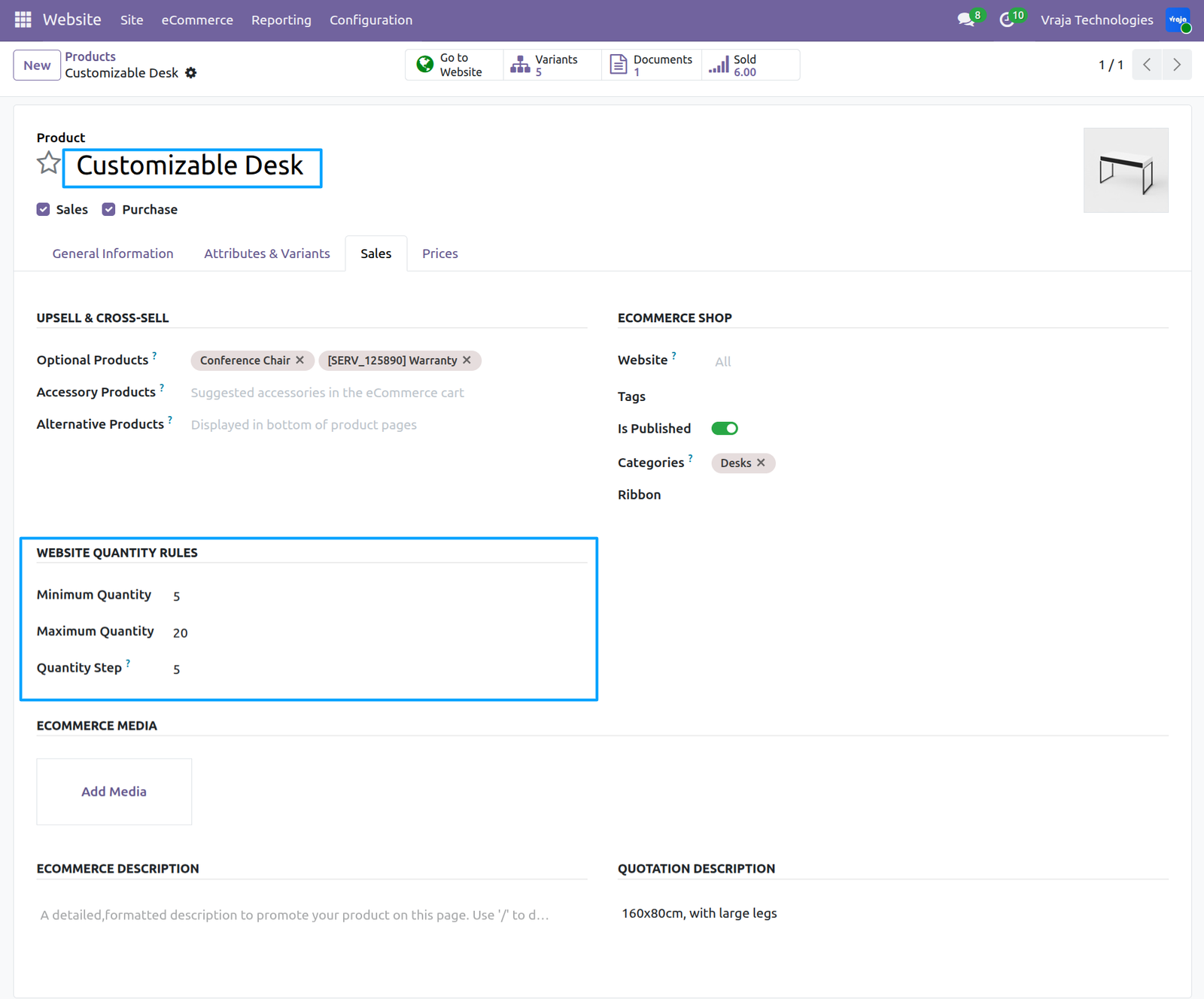
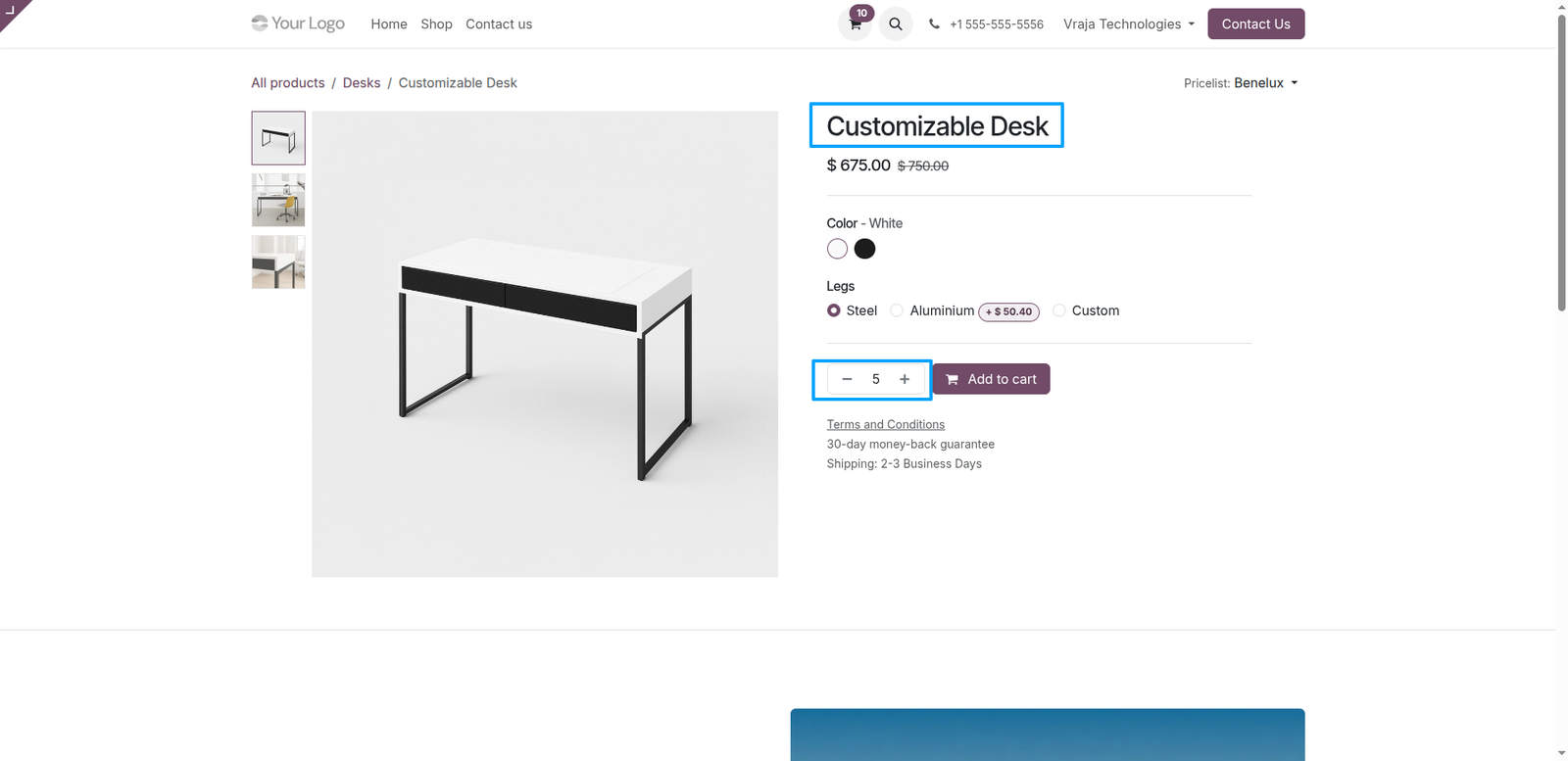
Go to the Odoo E-commerce website and open the product page. The configured minimum quantity will be automatically displayed.
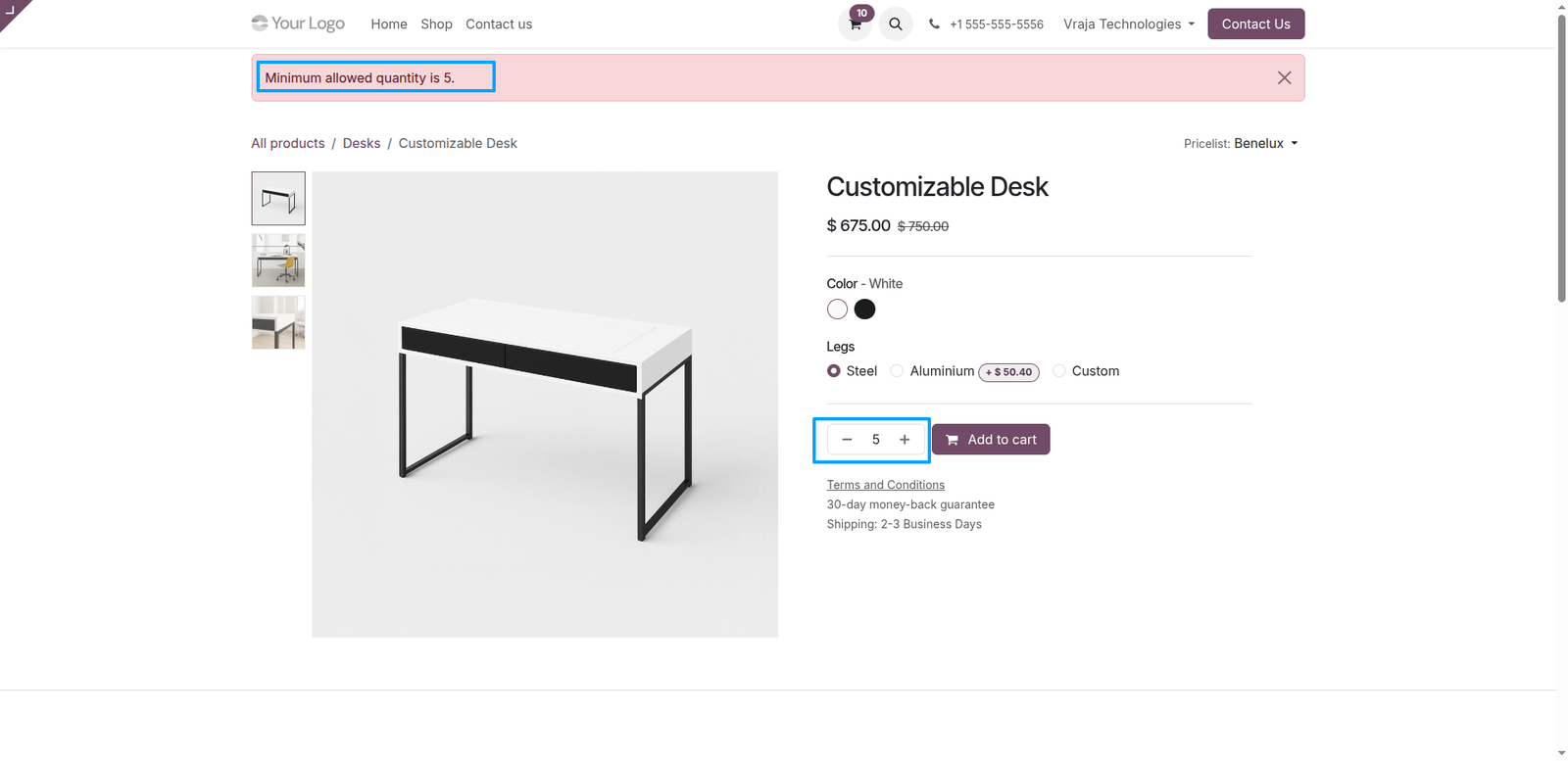
Customers cannot order a quantity lower than the minimum quantity set for the product. If you do not want to apply a minimum quantity restriction, you can keep the value as 0, which is the default configuration.
When the customer clicks the plus (+) icon to increase the quantity, it will increment based on the configured quantity step.
For example, if the Minimum Quantity is 5, Maximum Quantity is 20, and Quantity Step is 5, then the allowed quantities will be 5, 10, 15, and 20. The quantity selector will increase and decrease only in increments of 5 and will not allow values outside this range.
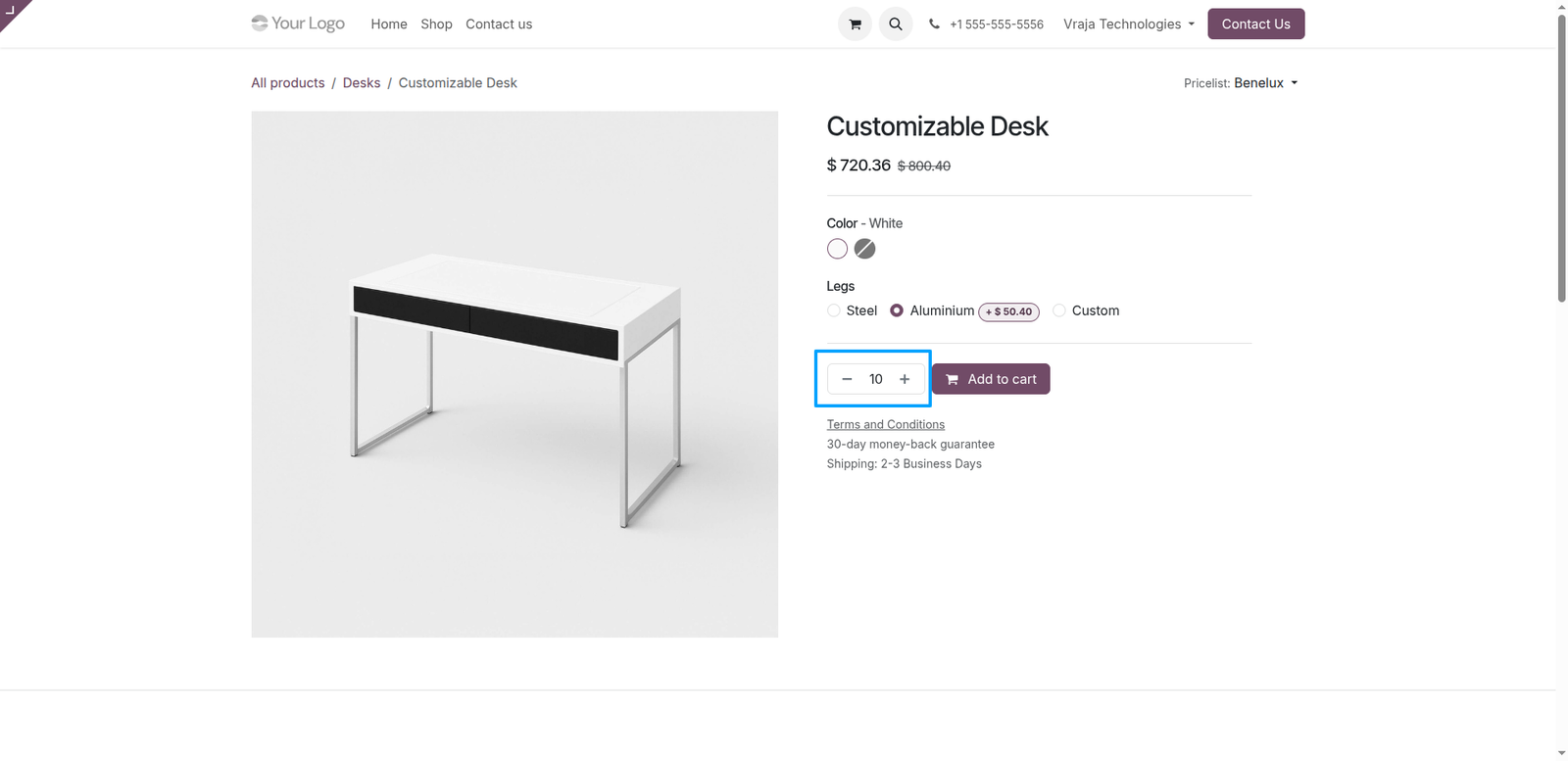
Minimum Quantity, Maximum Quantity, and Quantity Step are configured, and the customer manually enters a quantity that does not follow the defined step (for example, entering 7 when the step is 5), the system will display a warning message. The system will not accept the invalid quantity and will automatically adjust it to the nearest valid value based on the configured step, enforcing the quantity rules on the Odoo E-commerce website.
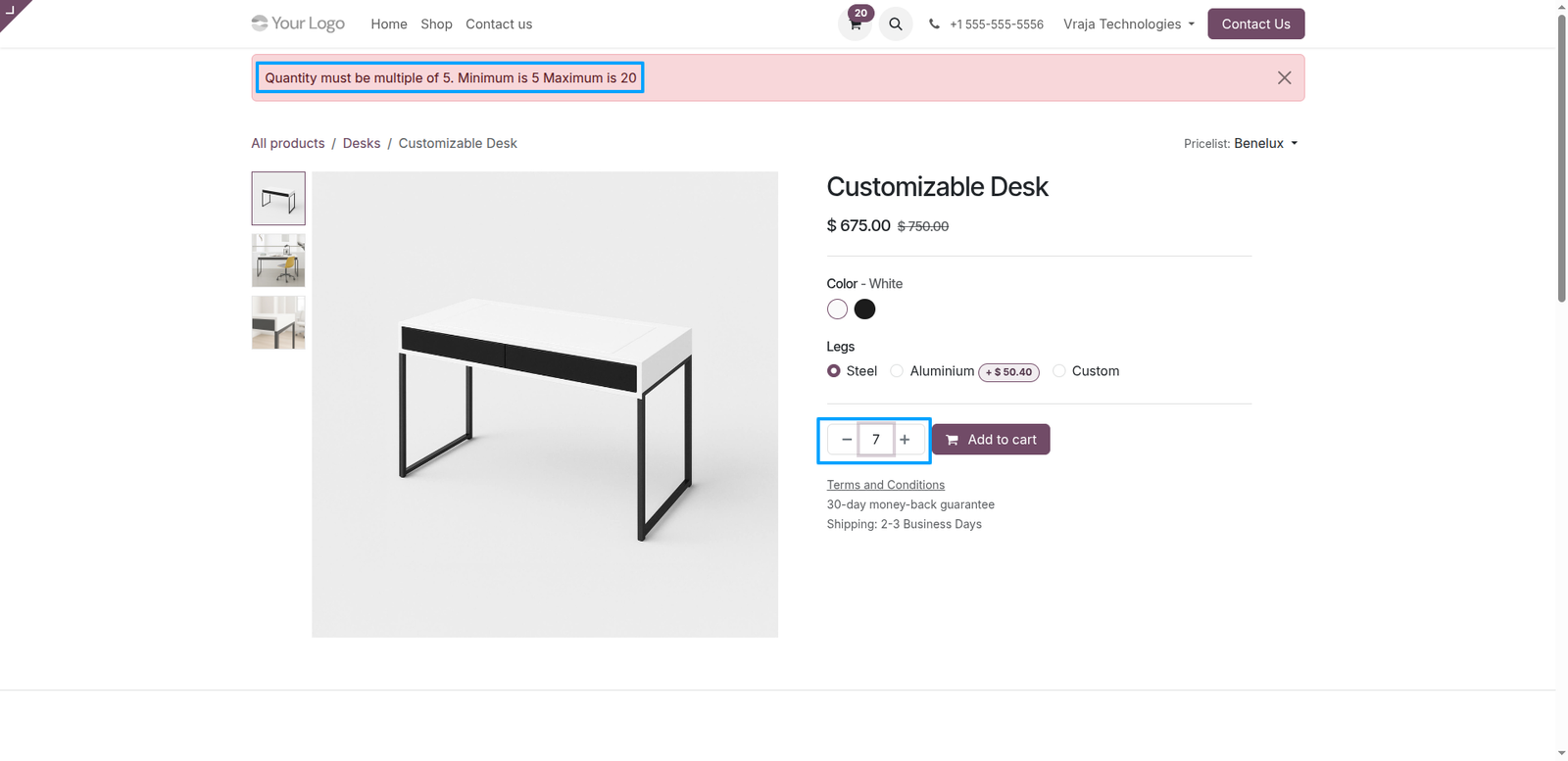
When the customer reaches the maximum quantity and clicks the plus (+) icon, the system will display a warning message indicating that the maximum allowed quantity has been reached. The system will not allow the quantity to increase beyond the configured maximum limit.
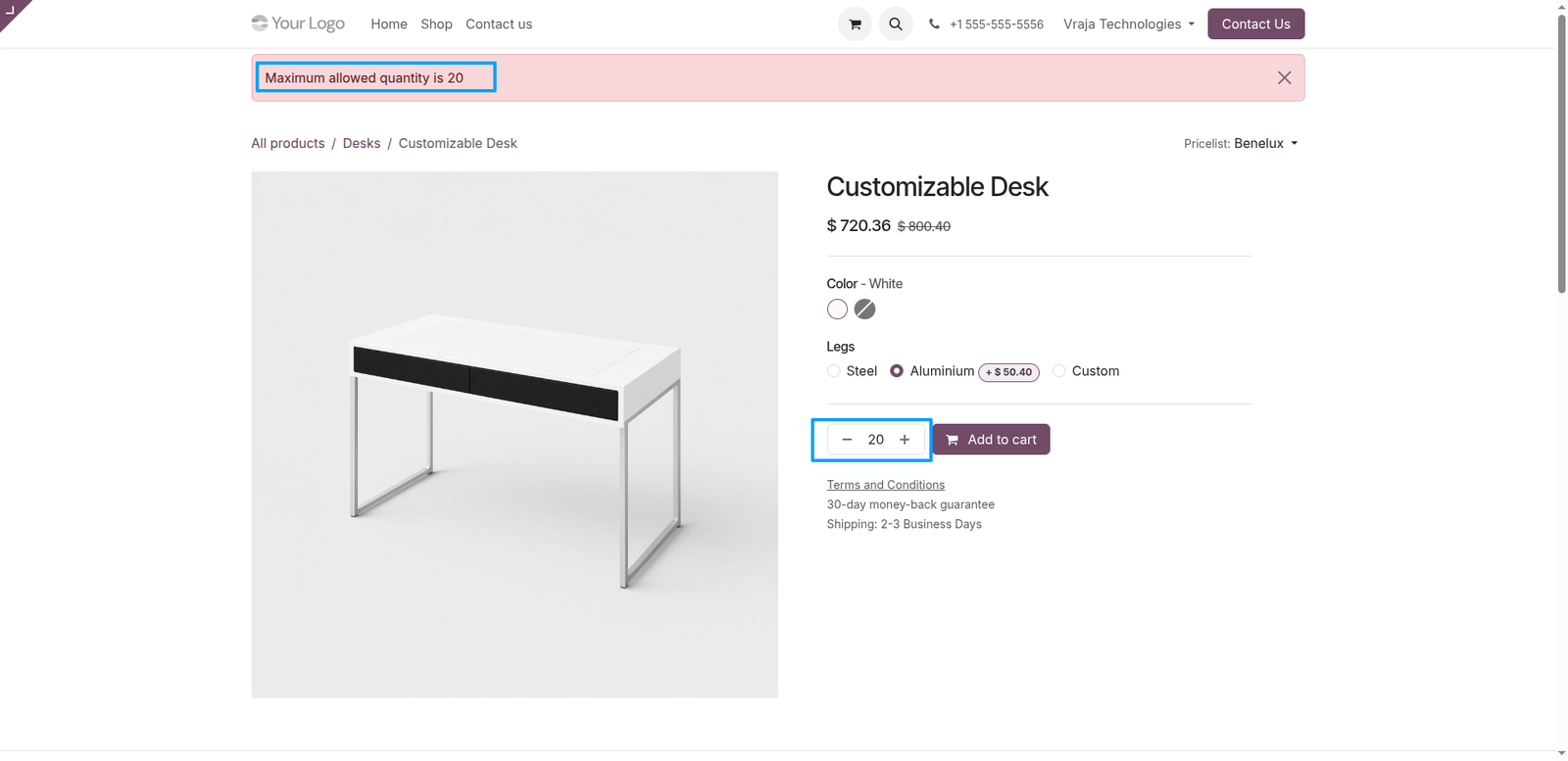
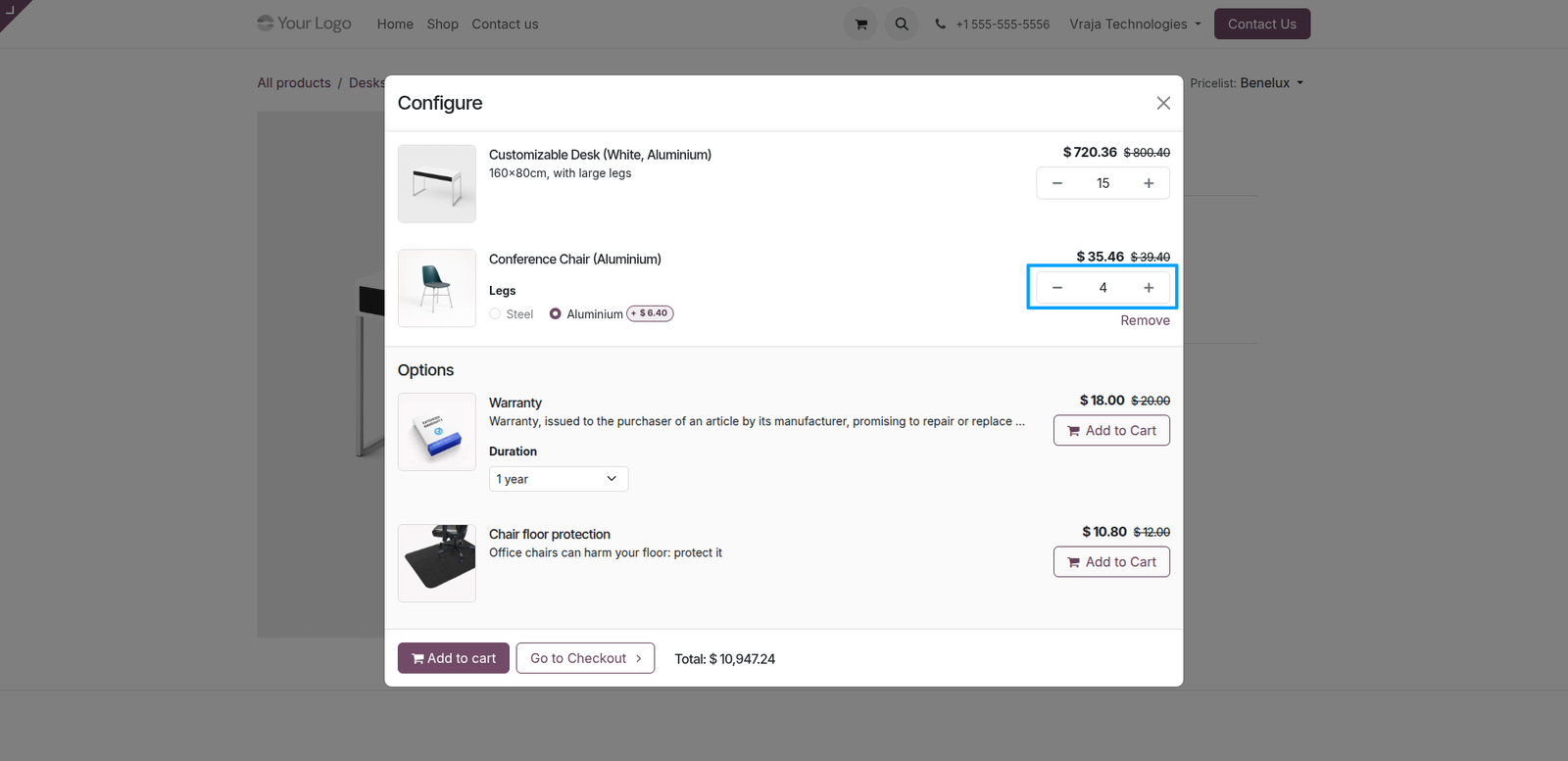
When the customer clicks the Add to Cart button and then clicks the plus (+) icon to increase the quantity beyond the configured maximum quantity, the system displays a warning message in the dialog box.
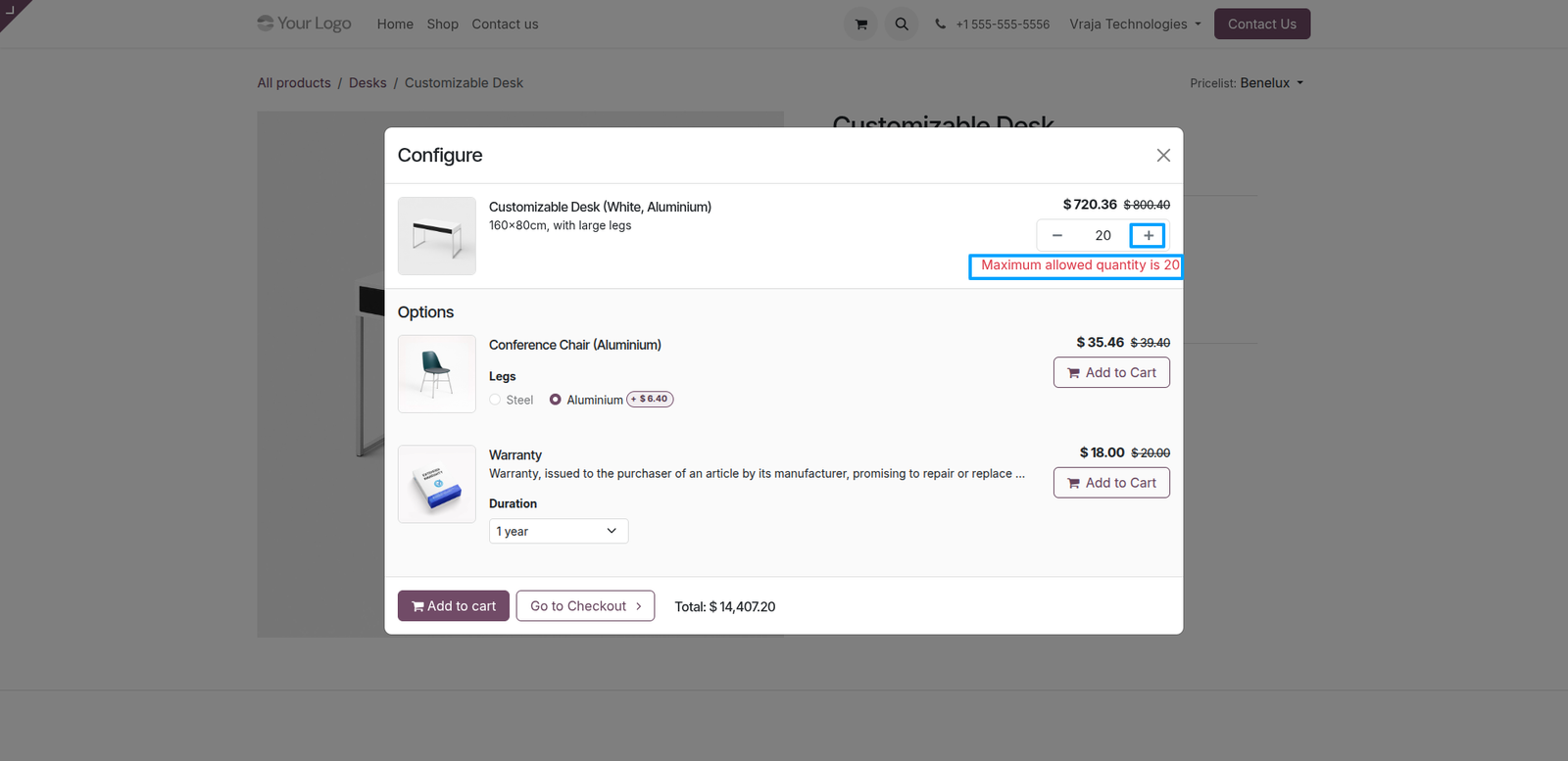
When the user clicks Add to Cart, a dialog box opens showing the product and its optional products. If any optional product has Website Quantity Rules configured, its minimum quantity will be automatically applied and displayed by default in the dialog.
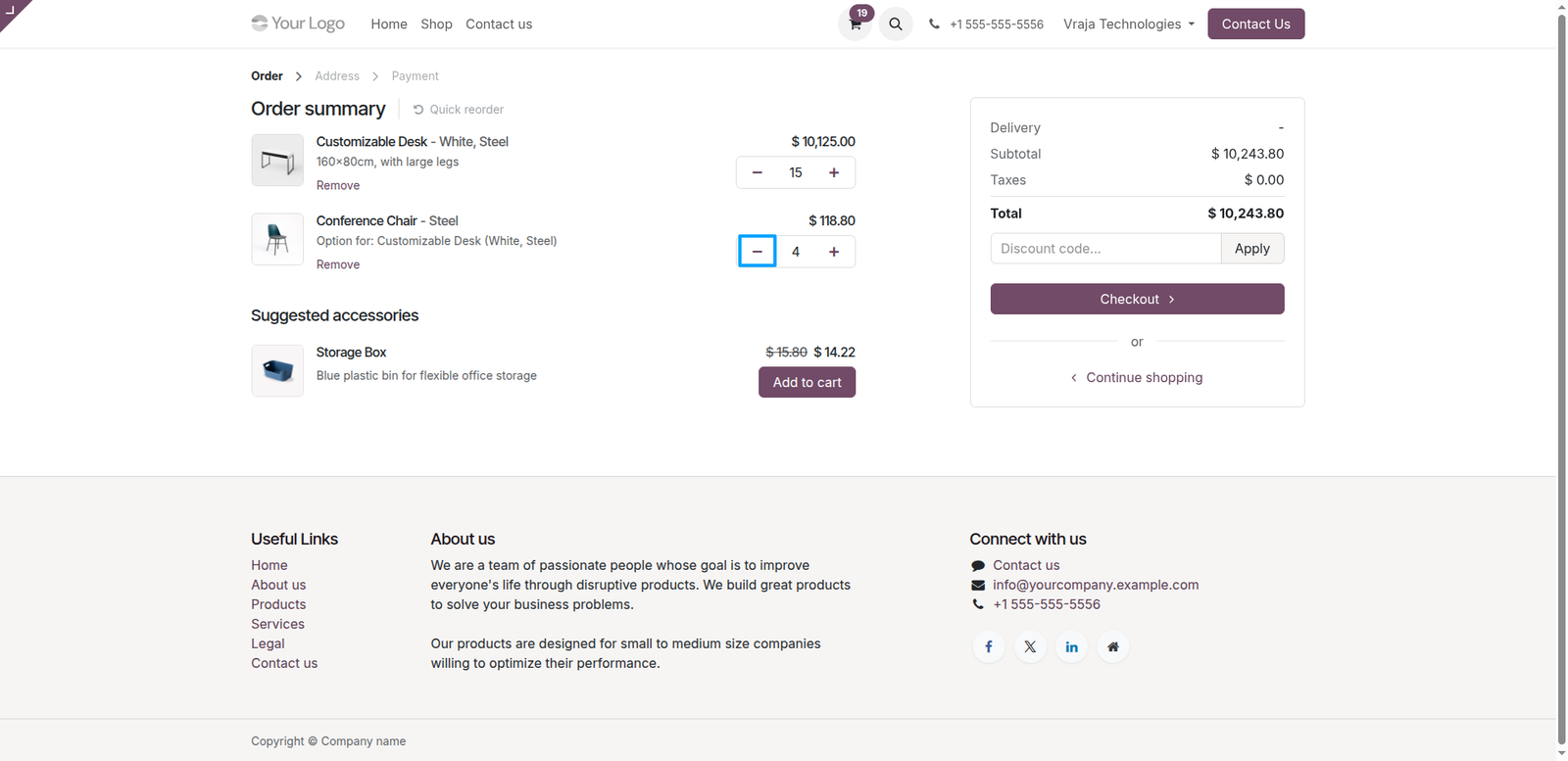
When the customer clicks the Proceed to Checkout button, the cart page displays the products with the selected quantities.
If the customer clicks the minus (−) icon and decreases the quantity below the configured minimum quantity, the product will be automatically removed from the cart. This ensures that only valid quantities are allowed according to the Website Quantity Rules in Odoo E-commerce.
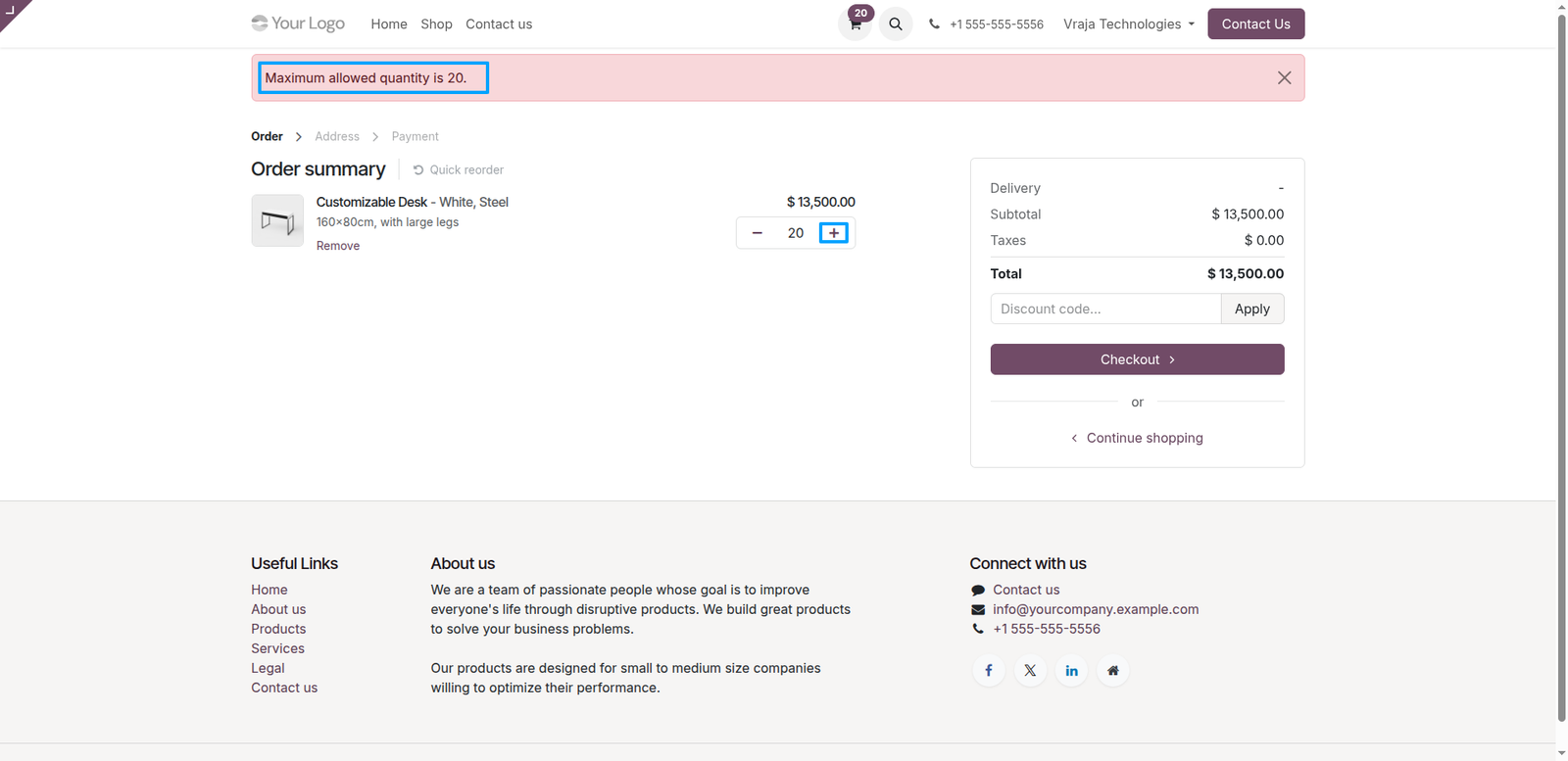
On the website cart page, when the customer clicks the plus (+) icon and the quantity reaches the configured maximum limit, the system will display a warning message such as “Maximum allowed quantity is 20.” The quantity cannot be increased beyond this limit in the Odoo E-commerce cart.
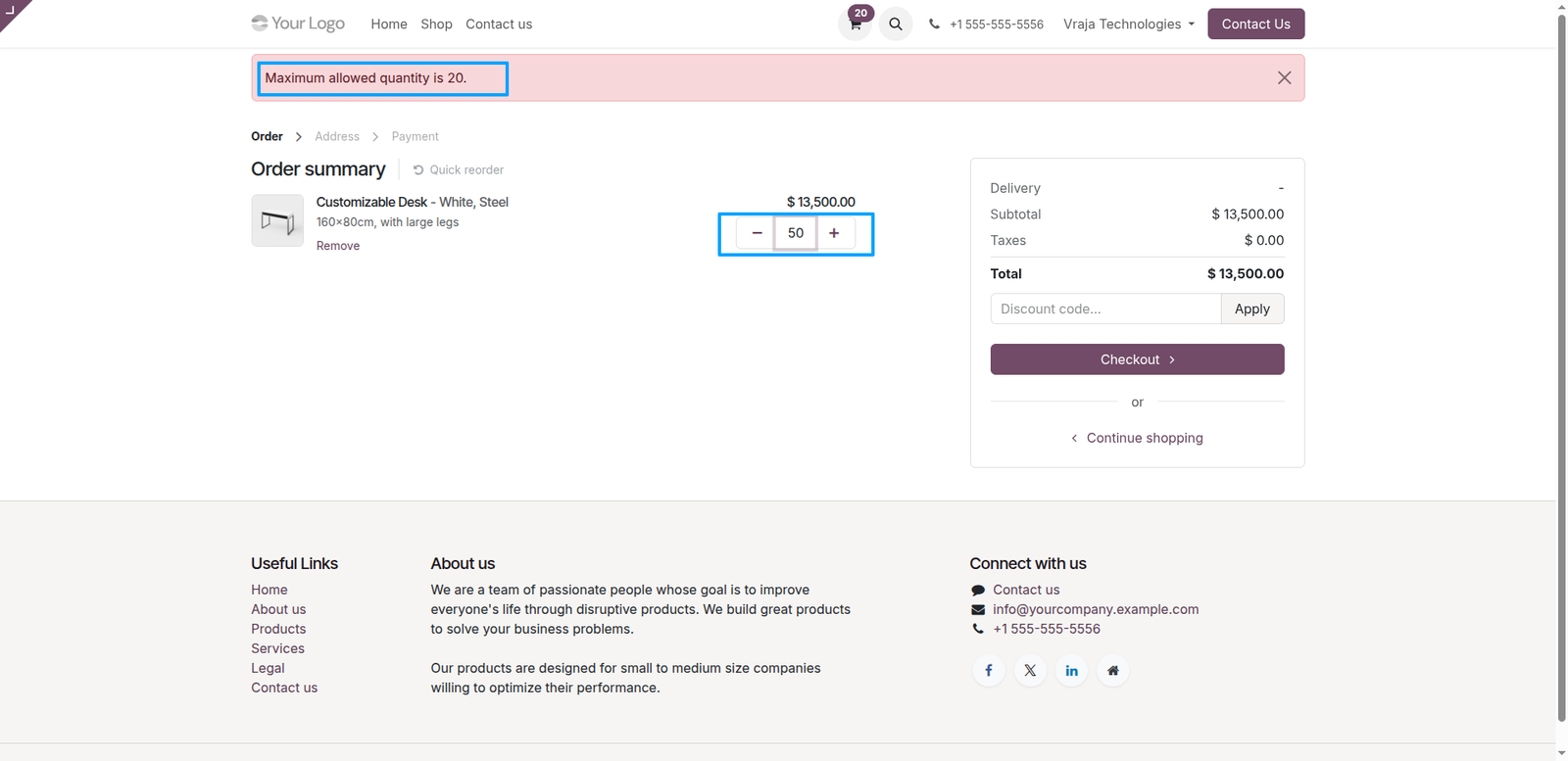
If the user manually enters a quantity such as 50 on the cart page, the system will automatically reset the quantity to the configured maximum quantity (20) defined in the Sales tab of the product. A warning message will also be displayed to inform the customer about the maximum allowed quantity in the Odoo E-commerce cart.
 Can customers order less than the minimum quantity?
- No. Customers cannot order less than the configured minimum quantity. If they try to decrease below the minimum, the system will restrict it or automatically remove the product from the cart. If you do not want this restriction, set the minimum quantity to 0.
What happens if the customer exceeds the maximum quantity?
- If the customer increases the quantity beyond the configured maximum quantity, the system will display a warning message and prevent further increase. If the customer enters a higher quantity manually (for example, 50), it will automatically reset to the maximum allowed quantity.
How does the quantity step (multiplier) work?
- The quantity step defines the increment value. For example, if the minimum quantity is 5, maximum is 20, and step is 5, then customers can only select 5, 10, 15, and 20.
Are these quantity rules applied on the cart and checkout page?
- Yes. The quantity rules are applied across the entire website, including the product page, Add to Cart dialog, cart page, and checkout, ensuring consistent validation throughout the purchase process in Odoo E-commerce.
Do Website Quantity Rules apply to optional products?
- Yes. If optional products have quantity rules configured, their minimum quantity will be automatically applied and displayed by default in the Add to Cart dialog, ensuring customers follow the defined rules.
I would like to request a custom feature for this application. What’s the process to get it implemented?
- We’re happy to help tailor the application to meet your business needs! You can reach us via sales@vrajatechnologies.com
Who is the point of contact for technical support, configuration support or bug-related queries?
- You can reach us via support@vrajatechnologies.com
Submit a Support Ticket
If you encounter any issues while using our app that are caused by the app itself, we offer complimentary support for 90 days from the date of purchase.
To create a support ticket, please register via the Vraja Technologies Support Email and provide the necessary details so we can assist you in resolving the issue.

Email Us
support@vrajatechnologies.com

 1.png)
Contact Us
vrajatechnologies.com/contactus

Support
vrajatechnologies.com/support-policy
Vraja Technologies Services

Odoo Implementation

Odoo App Integration Services

Odoo Customization

Odoo Consultation

Odoo Support & Maintenance

Odoo Developer Outsourcing
Suggested Application















Reviews
There are no reviews yet.